編輯:關於Android編程
Tips:此源碼分析基於Android 4.2
先來看看一個Activity上的UI控件結構:
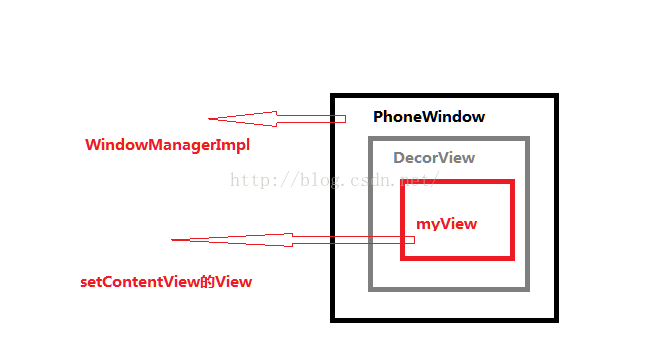
圖1-1 Activity中的UI組件結構
好了現在開始分析。。。。。。
一、Activity的創建
了解android的zygote分裂你會知道,每個APP都是zygote的子進程,而他的入口函數是ActivityThread類中的main函數。其中有一個handleLaucherActivity函數,這裡就是
創建Activity的地方。
private void handleLaunchActivity(ActivityClientRecord r, Intent customIntent) {
        // If we are getting ready to gc after going to the background, well
        // we are back active so skip it.
        unscheduleGcIdler();

        if (r.profileFd != null) {
            mProfiler.setProfiler(r.profileFile, r.profileFd);
            mProfiler.startProfiling();
            mProfiler.autoStopProfiler = r.autoStopProfiler;
        }
        // Make sure we are running with the most recent config.
        handleConfigurationChanged(null, null);

        if (localLOGV) Slog.v(
            TAG, "Handling launch of " + r);
        //重點一
        Activity a = performLaunchActivity(r, customIntent);

        if (a != null) {
            r.createdConfig = new Configuration(mConfiguration);
            Bundle oldState = r.state;
            // 重點二
            handleResumeActivity(r.token, false, r.isForward,
                    !r.activity.mFinished && !r.startsNotResumed);

           }

         後面代碼省略 ......

    }
這裡已經標出了兩個重點的函數
先來看看第一個performLauncherActivity
這個函數返回一個activity,可見activity確實在這裡創建了,先上代碼
private Activity performLaunchActivity(ActivityClientRecord r, Intent customIntent) {

       ......

       Activity activity = null;
        try {
            java.lang.ClassLoader cl = r.packageInfo.getClassLoader();
            //正真創建activity的地方
            activity = mInstrumentation.newActivity(
                    cl, component.getClassName(), r.intent);
            StrictMode.incrementExpectedActivityCount(activity.getClass());
            r.intent.setExtrasClassLoader(cl);
            if (r.state != null) {
                r.state.setClassLoader(cl);
            }
        } catch (Exception e) {
            if (!mInstrumentation.onException(activity, e)) {
                throw new RuntimeException(
                    "Unable to instantiate activity " + component
                    + ": " + e.toString(), e);
            }
        }

      ......

                if (activity != null) {
                Context appContext = createBaseContextForActivity(r, activity);
                CharSequence title = r.activityInfo.loadLabel(appContext.getPackageManager());
                Configuration config = new Configuration(mCompatConfiguration);
                if (DEBUG_CONFIGURATION) Slog.v(TAG, "Launching activity "
                        + r.activityInfo.name + " with config " + config);
                //又是一個重點,暫且先不分析,,,
                activity.attach(appContext, this, getInstrumentation(), r.token,
                        r.ident, app, r.intent, r.activityInfo, title, r.parent,
                        r.embeddedID, r.lastNonConfigurationInstances, config);

                if (customIntent != null) {
                    activity.mIntent = customIntent;
                }
                r.lastNonConfigurationInstances = null;
                activity.mStartedActivity = false;
                int theme = r.activityInfo.getThemeResource();
                if (theme != 0) {
                    activity.setTheme(theme);
                }

                activity.mCalled = false;
                //這裡回調了Activity的OnCreate
                mInstrumentation.callActivityOnCreate(activity, r.state);
                if (!activity.mCalled) {
                    throw new SuperNotCalledException(
                        "Activity " + r.intent.getComponent().toShortString() +
                        " did not call through to super.onCreate()");
                }
                r.activity = activity;
                r.stopped = true;
                if (!r.activity.mFinished) {
                    activity.performStart();
                    r.stopped = false;
                }
                if (!r.activity.mFinished) {
                    if (r.state != null) {
                        mInstrumentation.callActivityOnRestoreInstanceState(activity, r.state);
                    }
                }
                if (!r.activity.mFinished) {
                    activity.mCalled = false;
                    mInstrumentation.callActivityOnPostCreate(activity, r.state);
                    if (!activity.mCalled) {
                        throw new SuperNotCalledException(
                            "Activity " + r.intent.getComponent().toShortString() +
                            " did not call through to super.onPostCreate()");
                    }
                }
            }

      ......


      return activity;
}
這裡貼上了關鍵的代碼,由此可見performLauncherActivity函數主要做了兩件重要的事情,創建了Activity以及回調了OnCreate。
這裡看出他是利用了Java的反射機制根據類名創建了一個Activity
接下來再來看下第二個函數handleResumeActivity,什麼都不說先看代碼:
          final void handleResumeActivity(IBinder token, boolean clearHide, boolean isForward,
            boolean reallyResume) {
       ......

       if (r.window == null && !a.mFinished && willBeVisible) {
                r.window = r.activity.getWindow();
                View decor = r.window.getDecorView();
                decor.setVisibility(View.INVISIBLE);
                ViewManager wm = a.getWindowManager();
                WindowManager.LayoutParams l = r.window.getAttributes();
                a.mDecor = decor;
                l.type = WindowManager.LayoutParams.TYPE_BASE_APPLICATION;
                l.softInputMode |= forwardBit;
                if (a.mVisibleFromClient) {
                    a.mWindowAdded = true;
                    //關鍵函數
                    wm.addView(decor, l);
                }

            // If the window has already been added, but during resume
            // we started another activity, then don't yet make the
            // window visible.
            }
         .......
         }
到了這裡可以看到多了兩個比較重要的對象View, ViewManager, 隨後decor對象add到了ViewManager,那麼這兩個對象到底是什麼呢?
getDectorView進去一看原來是Window類的一個抽象方法,那麼到底是什麼實現了他?
這就要看剛剛哪個Activity的attach函數了
final void attach(Context context, ActivityThread aThread,
            Instrumentation instr, IBinder token, int ident,
            Application application, Intent intent, ActivityInfo info,
            CharSequence title, Activity parent, String id,
            NonConfigurationInstances lastNonConfigurationInstances,
            Configuration config) {
        attachBaseContext(context);

        mFragments.attachActivity(this, mContainer, null);

        //創建了一個mWindow,這是一個實現了Window抽象方法的對象
        mWindow = PolicyManager.makeNewWindow(this);
        mWindow.setCallback(this);
        mWindow.getLayoutInflater().setPrivateFactory(this);

        ......

        //創建了WindowManager
        mWindow.setWindowManager(
                (WindowManager)context.getSystemService(Context.WINDOW_SERVICE),
                mToken, mComponent.flattenToString(),
                (info.flags & ActivityInfo.FLAG_HARDWARE_ACCELERATED) != 0);
        if (mParent != null) {
            mWindow.setContainer(mParent.getWindow());
        }
        mWindowManager = mWindow.getWindowManager();
        mCurrentConfig = config;
    }
在handleResumeActivity中的r.window = r.activity.getWindow();我們可以看出這裡創建的mWindow給了r.window
public Window getWindow() {
        return mWindow;
    }
由此可見mWindow的getDecorView方法返回的便是我們要認識的哪個View,現在就來看看這個mWindow到底是何方聖神。
創建mWindow時有出現了個PolicyManager,現在先看看這個是什麼東西
public final class PolicyManager {
    private static final String POLICY_IMPL_CLASS_NAME =
        "com.android.internal.policy.impl.Policy";

    private static final IPolicy sPolicy;

    static {
        // Pull in the actual implementation of the policy at run-time
        try {
            Class policyClass = Class.forName(POLICY_IMPL_CLASS_NAME);
            sPolicy = (IPolicy)policyClass.newInstance();
        } catch (ClassNotFoundException ex) {
            throw new RuntimeException(
                    POLICY_IMPL_CLASS_NAME + " could not be loaded", ex);
        } catch (InstantiationException ex) {
            throw new RuntimeException(
                    POLICY_IMPL_CLASS_NAME + " could not be instantiated", ex);
        } catch (IllegalAccessException ex) {
            throw new RuntimeException(
                    POLICY_IMPL_CLASS_NAME + " could not be instantiated", ex);
        }
    }

    // Cannot instantiate this class
    private PolicyManager() {}

    // The static methods to spawn new policy-specific objects
    public static Window makeNewWindow(Context context) {
        return sPolicy.makeNewWindow(context);
    }

    public static LayoutInflater makeNewLayoutInflater(Context context) {
        return sPolicy.makeNewLayoutInflater(context);
    }

    public static WindowManagerPolicy makeNewWindowManager() {
        return sPolicy.makeNewWindowManager();
    }

    public static FallbackEventHandler makeNewFallbackEventHandler(Context context) {
        return sPolicy.makeNewFallbackEventHandler(context);
    }
}
從這裡可以看出調用的PolicyManager.makeNewWindow(this)正真實現是在Policy中
 public Window makeNewWindow(Context context) {
        return new PhoneWindow(context);
    }
至此我們才發現所謂的mWindow其實是一個PhoneWindow對象
現在我們在了看看正真實現getDecorView的PhoneWindow中獲得的View到底是什麼?
 @Override
    public final View getDecorView() {
        if (mDecor == null) {
            installDecor();
        }
        return mDecor;
    }
private void installDecor() {
        if (mDecor == null) {
            mDecor = generateDecor();
            mDecor.setDescendantFocusability(ViewGroup.FOCUS_AFTER_DESCENDANTS);
            mDecor.setIsRootNamespace(true);
            if (!mInvalidatePanelMenuPosted && mInvalidatePanelMenuFeatures != 0) {
                mDecor.postOnAnimation(mInvalidatePanelMenuRunnable);
            }
        }
        if (mContentParent == null) {
            mContentParent = generateLayout(mDecor);

            // Set up decor part of UI to ignore fitsSystemWindows if appropriate.
            mDecor.makeOptionalFitsSystemWindows();

            mTitleView = (TextView)findViewById(com.android.internal.R.id.title);

         ......
      }

          ......

}
到了這一步我們才發現原來哪個View是一個DecorView,
private final class DecorView extends FrameLayout implements RootViewSurfaceTaker
好了現在解決了我們第一個問題,View到底是什麼?現在我們再來分析下ViewManager究竟是什麼?
ViewManager wm = a.getWindowManager();
public WindowManager getWindowManager() {
        return mWindowManager;
    }
但是WindowManager只是一個公共的接口,我們還是得進入到attach中的mWindow.setWindowManager()中看看到底發生了什麼?
public interface WindowManager extends ViewManager
public void setWindowManager(WindowManager wm, IBinder appToken, String appName,
            boolean hardwareAccelerated) {
        mAppToken = appToken;
        mAppName = appName;
        mHardwareAccelerated = hardwareAccelerated
                || SystemProperties.getBoolean(PROPERTY_HARDWARE_UI, false);
        if (wm == null) {
            wm = (WindowManager)mContext.getSystemService(Context.WINDOW_SERVICE);
        }
        mWindowManager = ((WindowManagerImpl)wm).createLocalWindowManager(this);
    }
public WindowManagerImpl createLocalWindowManager(Window parentWindow) {
        return new WindowManagerImpl(mDisplay, parentWindow);
    }
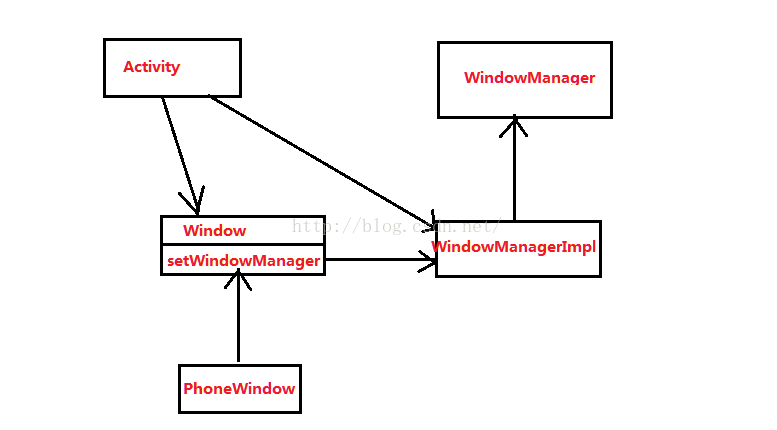
好了處理了這門多復雜的關系,我們先來總結下:
1、我們是分析到了handleResumeActivity這個函數,想弄清楚View跟ViewManager分別是什麼?
2、之後我們返回去查看activity的attache函數,發現其中創建的mWindow跟mWindowManager其實是PhoneWindow與WindowManagerImpl.
3、我們再回到View與ViewManager的創建過程,發下其實View是在PhoneWindow中創建的DecorView而ViewManager正是mWindowManager(即WindowManagerImpl),
在attach中調用Window的setWindowManager時將創建的WindowManagerImpl保存了起來。
經過這般分析再來看這張圖:
好了,接下來我們繼續來分析handleResumeActivity中另一個很關鍵的函數wm.addView(decor, l);
addView的正真實現實在frameworks\base\core\java\android\view\WindowManagerGlobal.java
public void addView(View view, ViewGroup.LayoutParams params,
            Display display, Window parentWindow) {
        if (view == null) {
            throw new IllegalArgumentException("view must not be null");
        }
        if (display == null) {
            throw new IllegalArgumentException("display must not be null");
        }
        if (!(params instanceof WindowManager.LayoutParams)) {
            throw new IllegalArgumentException("Params must be WindowManager.LayoutParams");
        }

        final WindowManager.LayoutParams wparams = (WindowManager.LayoutParams)params;
        if (parentWindow != null) {
            parentWindow.adjustLayoutParamsForSubWindow(wparams);
        }

        ViewRootImpl root;
        View panelParentView = null;

        synchronized (mLock) {
            // Start watching for system property changes.
            if (mSystemPropertyUpdater == null) {
                mSystemPropertyUpdater = new Runnable() {
                    @Override public void run() {
                        synchronized (mLock) {
                            for (ViewRootImpl viewRoot : mRoots) {
                                viewRoot.loadSystemProperties();
                            }
                        }
                    }
                };
                SystemProperties.addChangeCallback(mSystemPropertyUpdater);
            }

            int index = findViewLocked(view, false);
            if (index >= 0) {
                throw new IllegalStateException("View " + view
                        + " has already been added to the window manager.");
            }

            // If this is a panel window, then find the window it is being
            // attached to for future reference.
            if (wparams.type >= WindowManager.LayoutParams.FIRST_SUB_WINDOW &&
                    wparams.type <= WindowManager.LayoutParams.LAST_SUB_WINDOW) {
                final int count = mViews != null ? mViews.length : 0;
                for (int i=0; i= 0) {
                    removeViewLocked(index, true);
                }
            }
            throw e;
        }
    }
這裡有出現了一個新的對象ViewRootImpl以及調用了它的一個重要方法setView,現在我們就來分析下
public final class ViewRootImpl implements ViewParent,
        View.AttachInfo.Callbacks, HardwareRenderer.HardwareDrawCallbacks
有一個mSurface,他是Surface類型,而前面提到的UI都是在這上面繪畫出來的,可以想象成一個畫布
還有一個W類型的內部類,這個類將參與Binder通信
static class W extends IWindow.Stub
我們接著看下ViewRootImpl的構造函數:
public ViewRootImpl(Context context, Display display) {
        super();

        if (MEASURE_LATENCY) {
            if (lt == null) {
                lt = new LatencyTimer(100, 1000);
            }
        }

        // Initialize the statics when this class is first instantiated. This is
        // done here instead of in the static block because Zygote does not
        // allow the spawning of threads.
        mWindowSession = WindowManagerGlobal.getWindowSession(context.getMainLooper());
        mDisplay = display;

        CompatibilityInfoHolder cih = display.getCompatibilityInfo();
        mCompatibilityInfo = cih != null ? cih : new CompatibilityInfoHolder();

        mThread = Thread.currentThread();
        mLocation = new WindowLeaked(null);
        mLocation.fillInStackTrace();
        mWidth = -1;
        mHeight = -1;
        mDirty = new Rect();
        mTempRect = new Rect();
        mVisRect = new Rect();
        mWinFrame = new Rect();
        mWindow = new W(this);

        ......

}
public static IWindowSession getWindowSession(Looper mainLooper) {
        synchronized (WindowManagerGlobal.class) {
            if (sWindowSession == null) {
                try {
                    InputMethodManager imm = InputMethodManager.getInstance(mainLooper);
                    IWindowManager windowManager = getWindowManagerService();
                    sWindowSession = windowManager.openSession(
                            imm.getClient(), imm.getInputContext());
                    float animatorScale = windowManager.getAnimationScale(2);
                    ValueAnimator.setDurationScale(animatorScale);
                } catch (RemoteException e) {
                    Log.e(TAG, "Failed to open window session", e);
                }
            }
            return sWindowSession;
        }
    }
現在我們來看下setView中的調用的一個重要方法
                public void setView(View view, WindowManager.LayoutParams attrs, View panelParentView) {

                ......

                // Schedule the first layout -before- adding to the window
                // manager, to make sure we do the relayout before receiving
                // any other events from the system.
                //重點關注
                requestLayout();
                if ((mWindowAttributes.inputFeatures
                        & WindowManager.LayoutParams.INPUT_FEATURE_NO_INPUT_CHANNEL) == 0) {
                    mInputChannel = new InputChannel();
                }
                try {
                    mOrigWindowType = mWindowAttributes.type;
                    mAttachInfo.mRecomputeGlobalAttributes = true;
                    collectViewAttributes();
                    // 這裡調用了IWindowSession的addToDisplay並且把W類型的mWindow傳過去
                    res = mWindowSession.addToDisplay(mWindow, mSeq, mWindowAttributes,
                            getHostVisibility(), mDisplay.getDisplayId(),
                            mAttachInfo.mContentInsets, mInputChannel);
                } catch (RemoteException e) {
                    mAdded = false;
                    mView = null;
                    mAttachInfo.mRootView = null;
                    mInputChannel = null;
                    mFallbackEventHandler.setView(null);
                    unscheduleTraversals();
                    setAccessibilityFocus(null, null);
                    throw new RuntimeException("Adding window failed", e);
                } finally {
                    if (restore) {
                        attrs.restore();
                    }
                }

               ......

          }
現在我們來看看requestLayout函數,這裡才是Activity的UI繪制,進去看看發現其實是一個異步任務中執行了那些繪制任務
final class TraversalRunnable implements Runnable {
        @Override
        public void run() {
            doTraversal();
        }
    }
void doTraversal() {
        if (mTraversalScheduled) {
            mTraversalScheduled = false;
            mHandler.getLooper().removeSyncBarrier(mTraversalBarrier);

            if (mProfile) {
                Debug.startMethodTracing("ViewAncestor");
            }

            Trace.traceBegin(Trace.TRACE_TAG_VIEW, "performTraversals");
            try {
                performTraversals();
            } finally {
                Trace.traceEnd(Trace.TRACE_TAG_VIEW);
            }

            if (mProfile) {
                Debug.stopMethodTracing();
                mProfile = false;
            }
        }
    }
         //這個函數還是比較麻煩的,這裡就給出關鍵點
         private void performTraversals() {

          ......

          relayoutResult = relayoutWindow(params, viewVisibility, insetsPending);

          ......

           //一些繪制相關工作
          mView.draw(layerCanvas);

           ......
            }
private int relayoutWindow(WindowManager.LayoutParams params, int viewVisibility,
            boolean insetsPending) throws RemoteException {

        float appScale = mAttachInfo.mApplicationScale;
        boolean restore = false;
        if (params != null && mTranslator != null) {
            restore = true;
            params.backup();
            mTranslator.translateWindowLayout(params);
        }
        if (params != null) {
            if (DBG) Log.d(TAG, "WindowLayout in layoutWindow:" + params);
        }
        mPendingConfiguration.seq = 0;
        //Log.d(TAG, ">>>>>> CALLING relayout");
        if (params != null && mOrigWindowType != params.type) {
            // For compatibility with old apps, don't crash here.
            if (mTargetSdkVersion < android.os.Build.VERSION_CODES.ICE_CREAM_SANDWICH) {
                Slog.w(TAG, "Window type can not be changed after "
                        + "the window is added; ignoring change of " + mView);
                params.type = mOrigWindowType;
            }
        }
        int relayoutResult = mWindowSession.relayout(
                mWindow, mSeq, params,
                (int) (mView.getMeasuredWidth() * appScale + 0.5f),
                (int) (mView.getMeasuredHeight() * appScale + 0.5f),
                viewVisibility, insetsPending ? WindowManagerGlobal.RELAYOUT_INSETS_PENDING : 0,
                mWinFrame, mPendingContentInsets, mPendingVisibleInsets,
                mPendingConfiguration, mSurface);
        //Log.d(TAG, "<<<<<< BACK FROM relayout");
        if (restore) {
            params.restore();
        }

        if (mTranslator != null) {
            mTranslator.translateRectInScreenToAppWinFrame(mWinFrame);
            mTranslator.translateRectInScreenToAppWindow(mPendingContentInsets);
            mTranslator.translateRectInScreenToAppWindow(mPendingVisibleInsets);
        }
        return relayoutResult;
    }
補充:
既然是Activity的顯示,那麼必然是少不了顯示我們自己設置的UI,一般我們設置的UI都是在OnCreate中的setContentView中設置,現在我們就來看看這個函數到底做了那些事。
Activity中的SetContentView();
public void setContentView(View view) {
        getWindow().setContentView(view);
        initActionBar();
    }
還記得上面所說的Activity顯示中有一個Window吧,那個getWindow就是PhoneWindow,那麼我們就來看看PhoneWindow中的SetContentView:
@Override
    public void setContentView(View view) {
        setContentView(view, new ViewGroup.LayoutParams(MATCH_PARENT, MATCH_PARENT));
    }

    @Override
    public void setContentView(View view, ViewGroup.LayoutParams params) {
        if (mContentParent == null) {
            installDecor();
        } else {
            mContentParent.removeAllViews();
        }
        mContentParent.addView(view, params);
        final Callback cb = getCallback();
        if (cb != null && !isDestroyed()) {
            cb.onContentChanged();
        }
    }
接下來再來看看installDector:
private void installDecor() {
        if (mDecor == null) {
            mDecor = generateDecor();
            mDecor.setDescendantFocusability(ViewGroup.FOCUS_AFTER_DESCENDANTS);
            mDecor.setIsRootNamespace(true);
            if (!mInvalidatePanelMenuPosted && mInvalidatePanelMenuFeatures != 0) {
                mDecor.postOnAnimation(mInvalidatePanelMenuRunnable);
            }
        }
        if (mContentParent == null) {
            mContentParent = generateLayout(mDecor);

            // Set up decor part of UI to ignore fitsSystemWindows if appropriate.
            mDecor.makeOptionalFitsSystemWindows();

            mTitleView = (TextView)findViewById(com.android.internal.R.id.title);
            if (mTitleView != null) {
                mTitleView.setLayoutDirection(mDecor.getLayoutDirection());
                if ((getLocalFeatures() & (1 << FEATURE_NO_TITLE)) != 0) {
                    View titleContainer = findViewById(com.android.internal.R.id.title_container);
                    if (titleContainer != null) {
                        titleContainer.setVisibility(View.GONE);
                    } else {
                        mTitleView.setVisibility(View.GONE);
                    }
                    if (mContentParent instanceof FrameLayout) {
                        ((FrameLayout)mContentParent).setForeground(null);
                    }
                } else {
                    mTitleView.setText(mTitle);
                }
            } else {
                mActionBar = (ActionBarView) findViewById(com.android.internal.R.id.action_bar);
                if (mActionBar != null) {
                    mActionBar.setWindowCallback(getCallback());
                    if (mActionBar.getTitle() == null) {
                        mActionBar.setWindowTitle(mTitle);
                    }
                    final int localFeatures = getLocalFeatures();
                    if ((localFeatures & (1 << FEATURE_PROGRESS)) != 0) {
                        mActionBar.initProgress();
                    }
                    if ((localFeatures & (1 << FEATURE_INDETERMINATE_PROGRESS)) != 0) {
                        mActionBar.initIndeterminateProgress();
                    }

                    boolean splitActionBar = false;
                    final boolean splitWhenNarrow =
                            (mUiOptions & ActivityInfo.UIOPTION_SPLIT_ACTION_BAR_WHEN_NARROW) != 0;
                    if (splitWhenNarrow) {
                        splitActionBar = getContext().getResources().getBoolean(
                                com.android.internal.R.bool.split_action_bar_is_narrow);
                    } else {
                        splitActionBar = getWindowStyle().getBoolean(
                                com.android.internal.R.styleable.Window_windowSplitActionBar, false);
                    }
                    final ActionBarContainer splitView = (ActionBarContainer) findViewById(
                            com.android.internal.R.id.split_action_bar);
                    if (splitView != null) {
                        mActionBar.setSplitView(splitView);
                        mActionBar.setSplitActionBar(splitActionBar);
                        mActionBar.setSplitWhenNarrow(splitWhenNarrow);

                        final ActionBarContextView cab = (ActionBarContextView) findViewById(
                                com.android.internal.R.id.action_context_bar);
                        cab.setSplitView(splitView);
                        cab.setSplitActionBar(splitActionBar);
                        cab.setSplitWhenNarrow(splitWhenNarrow);
                    } else if (splitActionBar) {
                        Log.e(TAG, "Requested split action bar with " +
                                "incompatible window decor! Ignoring request.");
                    }

                    // Post the panel invalidate for later; avoid application onCreateOptionsMenu
                    // being called in the middle of onCreate or similar.
                    mDecor.post(new Runnable() {
                        public void run() {
                            // Invalidate if the panel menu hasn't been created before this.
                            PanelFeatureState st = getPanelState(FEATURE_OPTIONS_PANEL, false);
                            if (!isDestroyed() && (st == null || st.menu == null)) {
                                invalidatePanelMenu(FEATURE_ACTION_BAR);
                            }
                        }
                    });
                }
            }
        }
    }
再來看看mContentParent:
protected ViewGroup generateLayout(DecorView decor) {

       ......

       mDecor.startChanging();
        //layoutResource是一個資源ID
        View in = mLayoutInflater.inflate(layoutResource, null);
        decor.addView(in, new ViewGroup.LayoutParams(MATCH_PARENT, MATCH_PARENT));
        //ID_ANDROID_CONTENT是com.android.internal.R.id.content
        ViewGroup contentParent = (ViewGroup)findViewById(ID_ANDROID_CONTENT);
        if (contentParent == null) {
            throw new RuntimeException("Window couldn't find content container view");
        }

        if ((features & (1 << FEATURE_INDETERMINATE_PROGRESS)) != 0) {
            ProgressBar progress = getCircularProgressBar(false);
            if (progress != null) {
                progress.setIndeterminate(true);
            }
        }

       ......

        return contentPartent;

}
這裡的contentPartent是由findViewById獲得,實際是mDectorView的一部分,為什麼這麼說看看下面的代碼就知道了:
 public View findViewById(int id) {
        return getDecorView().findViewById(id);
    }
 android之播放器
本部分代碼在《Android應用開發揭秘》中提到,但是在eclipse環境下調試時出現異常,幾番糾結,代碼終於可以播放器音樂、並成功移植到手機上...... p
 Android初級教程初談自定義view自定義屬性
有些時候,自己要在布局文件中重復書寫大量的代碼來定義一個布局。這是最基本的使用,當然要掌握;但是有些場景都去對應的布局裡面寫對應的屬性,就顯得很無力。會發現,系統自帶的控
 Android中事件的分發機制
Android事件構成在Android中,事件主要包括點按、長按、拖拽、滑動等,點按又包括單擊和雙擊,另外還包括單指操作和多指操作。所有這些都構成了Andro
 Android 模仿flabby bird游戲開發
一、示意圖:1)開始畫面:2)游戲中畫面:3)結束畫面:二、分析:1、游戲中的每個元素都可封裝成對象,1)開始按鈕與結束按鈕可封裝成GameButton對象:屬性有:有坐