編輯:關於Android編程
但是:
Binder不支持RPC,只有本地客戶端和服務端基於消息通信,不適用於流不符合POSIX標准客戶端使用服務
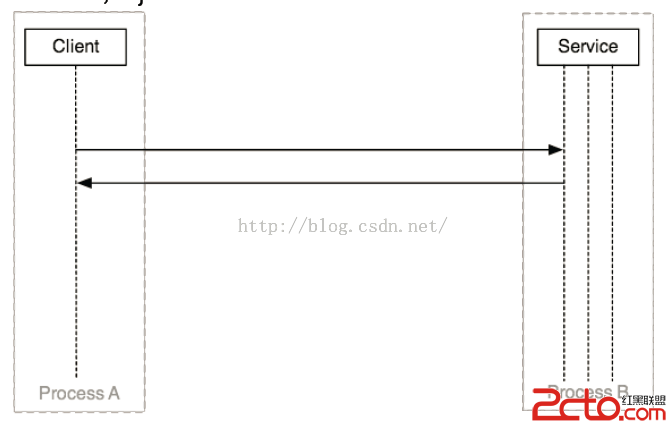
進程之間無法進行直接通信,所以通過Binder驅動
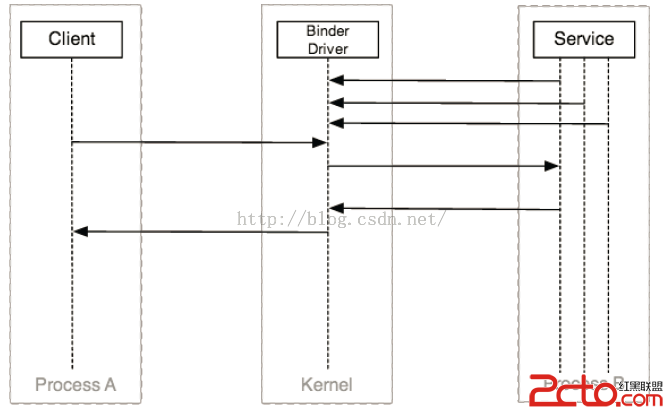
客戶端和服務端不需要了解binder協議,所以使用代理和存根
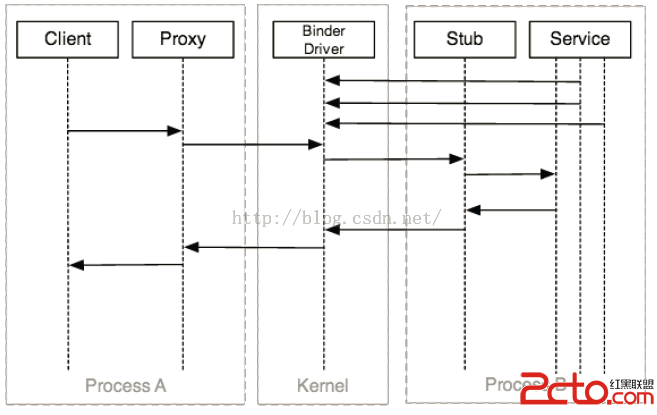
客戶端不想要知道正在使用IPC,也不關心binder和代理,所以,需要管理對象進行抽象
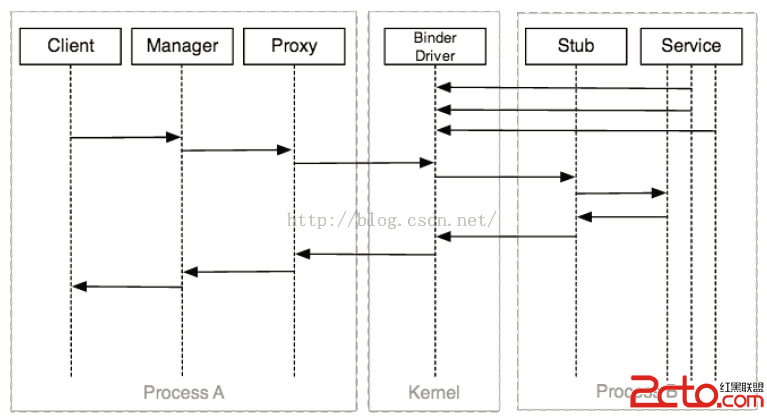
但是客戶端怎樣獲取它想要通信的服務的handle,只需要問問sevicemanager(Context Manager),服務是否已經注冊
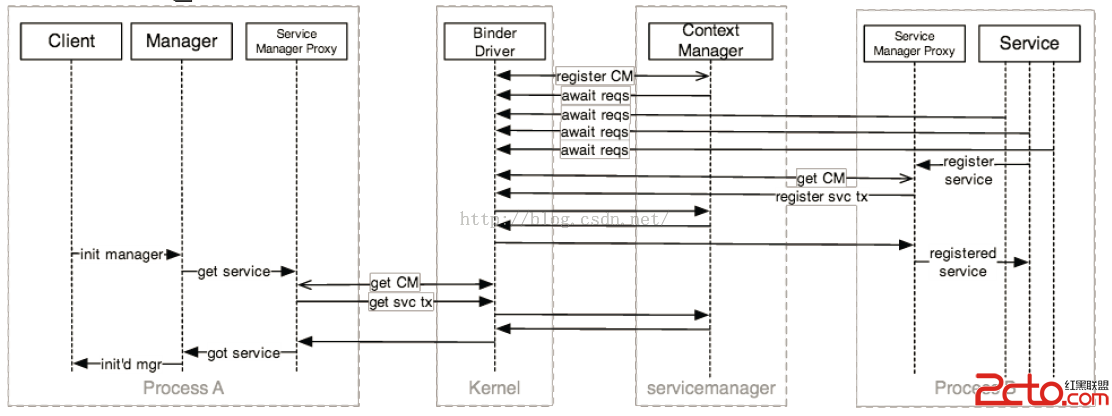
最後,我們看下總體的架構
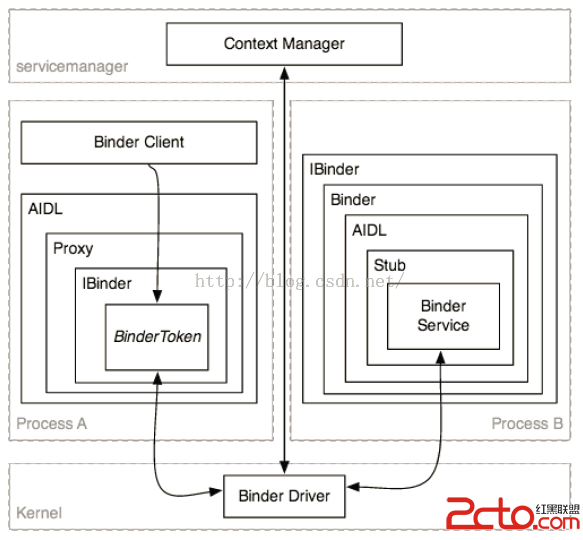
使用aidl實現跨進程的加減法
新建android工程,創建包com.realize.calc.aidl,新建文件ICalcAIDL.aidl,內容如下
package com.realize.calc.aidl;
interface ICalcAIDL
{
	int add(int x , int y);
	int min(int x , int y );
}
package com.realize.lizijun.binder_server;

import com.realize.calc.aidl.ICalcAIDL;

import android.app.Service;
import android.content.Intent;
import android.os.IBinder;
import android.os.RemoteException;
import android.util.Log;

public class CalcService extends Service
{
	private static final String TAG = "server";

	public void onCreate()
	{
		Log.e(TAG, "onCreate");
	}

	public IBinder onBind(Intent t)
	{
		Log.e(TAG, "onBind");
		return mBinder;
	}

	public void onDestroy()
	{
		Log.e(TAG, "onDestroy");
		super.onDestroy();
	}

	public boolean onUnbind(Intent intent)
	{
		Log.e(TAG, "onUnbind");
		return super.onUnbind(intent);
	}

	public void onRebind(Intent intent)
	{
		Log.e(TAG, "onRebind");
		super.onRebind(intent);
	}

	private final ICalcAIDL.Stub mBinder = new ICalcAIDL.Stub()
	{

		@Override
		public int add(int x, int y) throws RemoteException
		{
			return x + y;
		}

		@Override
		public int min(int x, int y) throws RemoteException
		{
			return x - y;
		}

	};

}
        <service android:name="com.realize.lizijun.binder_server.CalcService">
            <intent-filter>
                <action android:name="com.realize.calc.aidl">

                <category android:name="android.intent.category.DEFAULT">
            </category></action></intent-filter>
        </service>
新建android工程,創建包com.realize.calc.aidl,新建文件ICalcAIDL.aidl(與服務端是一樣的),內容如下
package com.realize.calc.aidl;
interface ICalcAIDL
{
	int add(int x , int y);
	int min(int x , int y );
}
package com.realize.lizijun.binder_client;

import android.app.Activity;
import android.content.ComponentName;
import android.content.Context;
import android.content.Intent;
import android.content.ServiceConnection;
import android.os.Bundle;
import android.os.IBinder;
import android.util.Log;
import android.view.View;
import android.widget.Toast;

import com.realize.calc.aidl.ICalcAIDL;

public class MainActivity extends Activity
{
	private static final String TAG = "client";
	private ICalcAIDL mCalcAidl;

	private ServiceConnection mServiceConn = new ServiceConnection()
	{
		@Override
		public void onServiceDisconnected(ComponentName name)
		{
			Log.e(TAG, "onServiceDisconnected");
			mCalcAidl = null;
		}

		@Override
		public void onServiceConnected(ComponentName name, IBinder service)
		{
			Log.e(TAG, "onServiceConnected");
			mCalcAidl = ICalcAIDL.Stub.asInterface(service);
		}
	};

	@Override
	protected void onCreate(Bundle savedInstanceState)
	{
		super.onCreate(savedInstanceState);
		setContentView(R.layout.activity_main);

	}

	/**
	 * 點擊BindService按鈕時調用
	 * @param view
	 */
	public void bindService(View view)
	{
		Intent intent = new Intent();
		intent.setAction("com.realize.calc.aidl");
		bindService(intent, mServiceConn, Context.BIND_AUTO_CREATE);
	}
	/**
	 * 點擊unBindService按鈕時調用
	 * @param view
	 */
	public void unbindService(View view)
	{
		unbindService(mServiceConn);
	}
	/**
	 * 點擊12+12按鈕時調用
	 * @param view
	 */
	public void addInvoked(View view) throws Exception
	{

		if (mCalcAidl != null)
		{
			int addRes = mCalcAidl.add(12, 12);
			Toast.makeText(this, addRes + "", Toast.LENGTH_SHORT).show();
		} else
		{
			Toast.makeText(this, "服務器被異常殺死,請重新綁定服務端", Toast.LENGTH_SHORT)
					.show();

		}

	}
	/**
	 * 點擊50-12按鈕時調用
	 * @param view
	 */
	public void minInvoked(View view) throws Exception
	{

		if (mCalcAidl != null)
		{
			int addRes = mCalcAidl.min(50, 12);
			Toast.makeText(this, addRes + "", Toast.LENGTH_SHORT).show();
		} else
		{
			Toast.makeText(this, "服務器未綁定或被異常殺死,請重新綁定服務端", Toast.LENGTH_SHORT)
					.show();

		}

	}

}
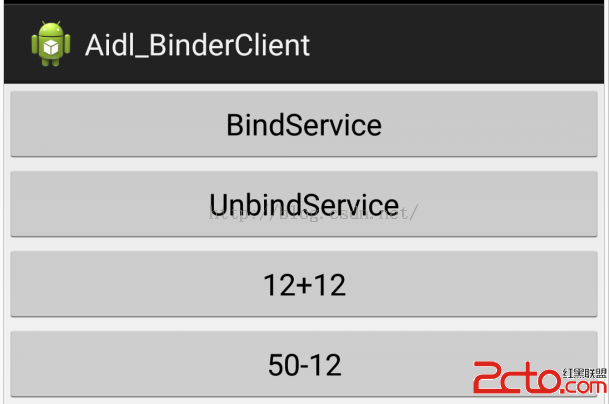
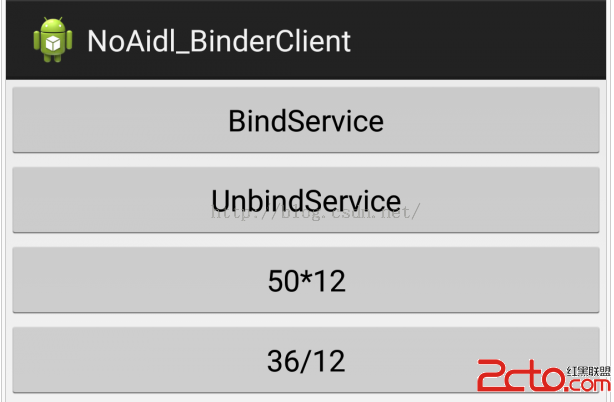
點擊BindService之後,服務端執行了onCreate和onBind的方法, 客戶端執行onServiceConnected方法然後點擊12+12,50-12可以成功的調用服務端的代碼並返回正確的結果再點擊unBindService, Service調用了onUnbind和onDestory然後點擊12+12,50-12,仍然能夠看到正確的結果,說明客戶端與服務端的連接仍然存在我們通過後台,把服務強制停止掉,可以看到調用了onServiceDisconnected方法,此時,再點擊12+12,50-12,就獲取不到結果了
上面創建ICalcAIDL.aidl之後,在gen目錄下回生成文件ICalcAIDL.java, 該文件實現了客戶端和服務端的代理(proxy)和存根(stub)

服務端代碼中調用ICalcAIDL.Stub
	private final ICalcAIDL.Stub mBinder = new ICalcAIDL.Stub()
	{

		@Override
		public int add(int x, int y) throws RemoteException
		{
			return x + y;
		}

		@Override
		public int min(int x, int y) throws RemoteException
		{
			return x - y;
		}

	};
public static abstract class Stub extends android.os.Binder implements com.realize.calc.aidl.ICalcAIDL
@Override public boolean onTransact(int code, android.os.Parcel data, android.os.Parcel reply, int flags) throws android.os.RemoteException
{
	switch (code)
	{
		case INTERFACE_TRANSACTION:
		{
			reply.writeString(DESCRIPTOR);
			return true;
		}
		case TRANSACTION_add:
		{
			data.enforceInterface(DESCRIPTOR);
			int _arg0;
			_arg0 = data.readInt();
			int _arg1;
			_arg1 = data.readInt();
			int _result = this.add(_arg0, _arg1);
			reply.writeNoException();
			reply.writeInt(_result);
			return true;
		}
		case TRANSACTION_min:
		{
			data.enforceInterface(DESCRIPTOR);
			int _arg0;
			_arg0 = data.readInt();
			int _arg1;
			_arg1 = data.readInt();
			int _result = this.min(_arg0, _arg1);
			reply.writeNoException();
			reply.writeInt(_result);
			return true;
		}
	}
	return super.onTransact(code, data, reply, flags);
}
服務端會根據客戶端發送來的消息執行onTransact方法,該方法有四個參數
code 是一個整形的唯一標識,用於區分執行哪個方法
data 客戶端傳遞過來的參數
reply 服務器返回的值
flags 標明是否有返回值,0為有(雙向),1為沒有(單向)
客戶端代碼中,調用了ICalcAIDL.Stub.asInterface
	private ServiceConnection mServiceConn = new ServiceConnection()
	{
		@Override
		public void onServiceDisconnected(ComponentName name)
		{
			Log.e(TAG, "onServiceDisconnected");
			mCalcAidl = null;
		}

		@Override
		public void onServiceConnected(ComponentName name, IBinder service)
		{
			Log.e(TAG, "onServiceConnected");
			mCalcAidl = ICalcAIDL.Stub.asInterface(service);
		}
	};
public static com.realize.calc.aidl.ICalcAIDL asInterface(android.os.IBinder obj)
{
	if ((obj==null)) {
		return null;
	}
	android.os.IInterface iin = obj.queryLocalInterface(DESCRIPTOR);
	if (((iin!=null)&&(iin instanceof com.realize.calc.aidl.ICalcAIDL))) {
		return ((com.realize.calc.aidl.ICalcAIDL)iin);
	}
	return new com.realize.calc.aidl.ICalcAIDL.Stub.Proxy(obj);
}
@Override public int add(int x, int y) throws android.os.RemoteException
{
	android.os.Parcel _data = android.os.Parcel.obtain();
	android.os.Parcel _reply = android.os.Parcel.obtain();
	int _result;
	try {
		_data.writeInterfaceToken(DESCRIPTOR);
		_data.writeInt(x);
		_data.writeInt(y);
		mRemote.transact(Stub.TRANSACTION_add, _data, _reply, 0);
		_reply.readException();
		_result = _reply.readInt();
	}
	finally {
		_reply.recycle();
		_data.recycle();
	}
		return _result;
}
聲明了兩個android.os.Parcel對象,_data用於傳遞數據,_replay用於接收返回的數據
最後調用transact方法,與服務端進行通信
怎樣不通過AIDL文件,實現跨進程通信呢,從上面的分析中,我們可以知道,不通過AIDL文件,實現跨進程通信,那麼實際上,就是要實現自動生成的AIDL文件中的接口功能, 下面我們實現跨進程的乘除調用
創建工程,實現CalcService.java,代碼如下
package com.realize.lizijun.noaidl_binder_server;

import android.app.Service;
import android.content.Intent;
import android.os.Binder;
import android.os.IBinder;
import android.os.Parcel;
import android.os.RemoteException;
import android.util.Log;

public class CalcService extends Service
{
	private static final String DESCRIPTOR = "CalcService";
	private static final String TAG = "server";

	public void onCreate()
	{
		Log.e(TAG, "onCreate");
	}

	@Override
	public int onStartCommand(Intent intent, int flags, int startId)
	{
		Log.e(TAG, "onStartCommand");
		return super.onStartCommand(intent, flags, startId);
	}

	public IBinder onBind(Intent t)
	{
		Log.e(TAG, "onBind");
		return mBinder;
	}

	public void onDestroy()
	{
		Log.e(TAG, "onDestroy");
		super.onDestroy();
	}

	public boolean onUnbind(Intent intent)
	{
		Log.e(TAG, "onUnbind");
		return super.onUnbind(intent);
	}

	public void onRebind(Intent intent)
	{
		Log.e(TAG, "onRebind");
		super.onRebind(intent);
	}

	private MyBinder mBinder = new MyBinder();

	private class MyBinder extends Binder
	{
		@Override
		protected boolean onTransact(int code, Parcel data, Parcel reply,
				int flags) throws RemoteException
		{
			switch (code)
			{
			case 0x110:
			{
				Log.e(TAG, "0x110");
				data.enforceInterface(DESCRIPTOR);
				int _arg0;
				_arg0 = data.readInt();
				int _arg1;
				_arg1 = data.readInt();
				int _result = _arg0 * _arg1;
				reply.writeNoException();
				reply.writeInt(_result);
				return true;
			}
			case 0x111:
			{
				Log.e(TAG, "0x111");
				data.enforceInterface(DESCRIPTOR);
				int _arg0;
				_arg0 = data.readInt();
				int _arg1;
				_arg1 = data.readInt();
				int _result = _arg0 / _arg1;
				reply.writeNoException();
				reply.writeInt(_result);
				return true;
			}
			}
			return super.onTransact(code, data, reply, flags);
		}

	};

}
自定義了一個Binder子類,然後復寫了其onTransact方法
        <service android:name="com.realize.lizijun.noaidl_binder_server.CalcService">
            <intent-filter>
                <action android:name="com.realize.noaidl.calc">
                <category android:name="android.intent.category.DEFAULT">
            </category></action></intent-filter>
        </service>
創建工程,其主activity內容如下所示:
package com.realize.lizijun.noaidl_binder_client;

import android.app.Activity;
import android.content.ComponentName;
import android.content.Context;
import android.content.Intent;
import android.content.ServiceConnection;
import android.os.Bundle;
import android.os.IBinder;
import android.os.RemoteException;
import android.util.Log;
import android.view.View;
import android.widget.Toast;

public class MainActivity extends Activity
{
	private static final String TAG = "client";
	private IBinder mPlusBinder = null;
	private ServiceConnection mServiceConnPlus = new ServiceConnection()
	{
		// 只有當servie異常退出時,系統才會調用onServiceDisconnected()
		@Override
		public void onServiceDisconnected(ComponentName name)
		{
			Log.e(TAG, "mServiceConnPlus onServiceDisconnected");
			mPlusBinder = null;
		}

		@Override
		public void onServiceConnected(ComponentName name, IBinder service)
		{

			Log.e(TAG, " mServiceConnPlus onServiceConnected");
			mPlusBinder = service;
		}
	};

	@Override
	protected void onCreate(Bundle savedInstanceState)
	{
		super.onCreate(savedInstanceState);
		setContentView(R.layout.activity_main);

	}

	public void bindService(View view)
	{
		Intent intentPlus = new Intent();
		intentPlus.setAction("com.realize.noaidl.calc");
		boolean result = bindService(intentPlus, mServiceConnPlus,
				Context.BIND_AUTO_CREATE);
		Log.e(TAG, result + "");
	}

	public void unbindService(View view)
	{
		if (mServiceConnPlus != null)
		{
			Log.e(TAG, "unbindService");
			unbindService(mServiceConnPlus);
			//mServiceConnPlus = null;
		}
	}

	public void mulInvoked(View view)
	{

		if (mPlusBinder == null)
		{
			Toast.makeText(this, "未連接服務端或服務端被異常殺死", Toast.LENGTH_SHORT).show();
		} else
		{
			android.os.Parcel _data = android.os.Parcel.obtain();
			android.os.Parcel _reply = android.os.Parcel.obtain();
			int _result = 0;
			try
			{
				_data.writeInterfaceToken("CalcService");
				_data.writeInt(50);
				_data.writeInt(12);
				mPlusBinder.transact(0x110, _data, _reply, 0);
				_reply.readException();
				_result = _reply.readInt();
				Toast.makeText(this, _result + "", Toast.LENGTH_SHORT).show();

			} catch (RemoteException e)
			{
				e.printStackTrace();
			} finally
			{
				_reply.recycle();
				_data.recycle();
			}
		}

	}

	public void divInvoked(View view)
	{

		if (mPlusBinder == null)
		{
			Toast.makeText(this, "未連接服務端或服務端被異常殺死", Toast.LENGTH_SHORT).show();
		} else
		{
			android.os.Parcel _data = android.os.Parcel.obtain();
			android.os.Parcel _reply = android.os.Parcel.obtain();
			int _result = 0;
			try
			{
				_data.writeInterfaceToken("CalcService");
				_data.writeInt(36);
				_data.writeInt(12);
				mPlusBinder.transact(0x111, _data, _reply, 0);
				_reply.readException();
				_result = _reply.readInt();
				Toast.makeText(this, _result + "", Toast.LENGTH_SHORT).show();

			} catch (RemoteException e)
			{
				e.printStackTrace();
			} finally
			{
				_reply.recycle();
				_data.recycle();
			}
		}

	}
}
 Android中使用ListView實現漂亮的表格效果
在這裡我們要使用Android ListView來實現顯示股票行情,效果圖如下,紅色表示股票價格上漲,綠色表示股票價格下跌。第一步、定義color.xml如下:復制代碼
 Android CalendarView,DatePicker,TimePicker,以及NumberPicker的使用
Android CalendarView,DatePicker,TimePicker,以及NumberPicker的使用簡單復習下基礎UI組件,做個簡單的總結
 Android Studio的中文亂碼問題解決方法
Android Studio安裝後發現所有的中文,不管是界面上的還是輸出的log中的中文都變成小框框 可以肯定是字體的問題 解決:菜單File->set
 Android實現對圖片的縮放、剪切、旋轉、存儲
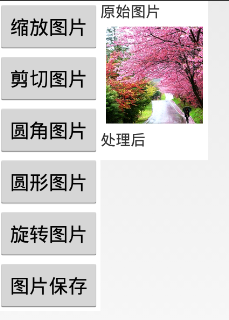
一、問題描述 在開發中,當我們需要的有一張大圖片同時還需要一些小圖片時,我們只需要通過代碼對此圖片進行不同比例的縮放即可,這樣大大節約資源,減小了安裝包的尺寸 。除縮