編輯:關於Android編程
1,需要權限
2,下載 RootTools.jar包。
3,兩個關鍵方法。主要是獲取shell,並執行命令行。
方法如下:
  private static boolean waitForCommand(Command cmd) {
        while (!cmd.isFinished()) {
            synchronized (cmd) {
                try {
                    if (!cmd.isFinished()) {
                        cmd.wait(2000);
                    }
                } catch (InterruptedException e) {
                    e.printStackTrace();
                }
            }

            if (!cmd.isExecuting() && !cmd.isFinished()) {
                //         Logger.errorST(Error: Command is not executing and is not finished!);
                return false;
            }
        }

        //Logger.debug(Command Finished!);
        return true;
    }
    public static ArrayList runAndWait1(String cmd, final boolean root) {
        final ArrayList output = new ArrayList();
        Command cc = new Command(1, cmd) {
            @Override
            public void commandOutput(int i, String s) {
                output.add(s);
//        System.out.println(output +root+s);
            }

            @Override
            public void commandTerminated(int i, String s) {

                System.out.println(error + root + s);

            }

            @Override
            public void commandCompleted(int i, int i2) {

            }
        };
        try {
            RootTools.getShell(root).add(cc);
        } catch (Exception e) {
            //       Logger.errorST(Exception when trying to run shell command, e);
            e.printStackTrace();
            return null;
        }

        if (!waitForCommand(cc)) {
            return null;
        }

        return output;
    }
4,接下來就是簡單的調用了。
final  File f=new File(/data/misc/wifi/wpa_supplicant.conf);

 new Thread(){
     @Override
     public void run() {
         super.run();
         ArrayList list=new ArrayList();
       //  String cpath = getCommandLineString(f.getPath());
         String s=cat  + f.getPath();
         list = runAndWait1(s, true);
         for (int i = 0; i < list.size(); i++) {
             Log.e(content,list.get(i));
         }


     }
 }.start();
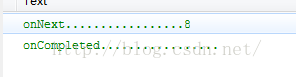
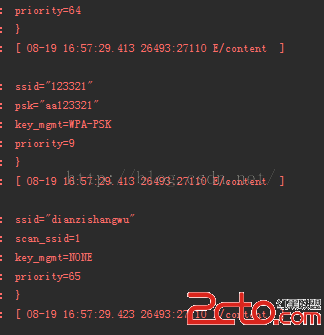
輸出結果如下:
 Android項目實現短信的發送、接收和對短信進行攔截
說實話,關於Android中對短信的一些相關操作是一個比較入門的東西。那我現在還要來寫這一篇博客的原因只是因為現在開發中有相關內容,而又想將這些東西分享給更多的人來學習,
 RecyclerView完全解析之結合AA(Android Annotations)注入框架實例(三十)
(一).前言:話說RecyclerView已經面市很久,也在很多應用中得到廣泛的使用,在整個開發者圈子裡面也擁有很不錯的口碑,那說明RecyclerView擁有比List
 Android: 顯示系統模塊加載以及調用流程
打開/dev/graphics/fb0節點的過程:打開/dev/graphics/fb0這個設備的調用過程如下:1.在HWComposer中,加載moduleHWComp
 Android Developer:內存分析器
Heap Viewer,Memory Monitor和Allocation Tracker是用來可視化你的app使用內存的補充工具。使用Memory Monitor To