編輯:關於Android編程
package com.xjp.broadcast;

import android.app.IntentService;
import android.content.Intent;
import android.util.Log;

/**
 * Description:
 * User: xjp
 * Date: 2015/5/4
 * Time: 15:47
 */

public class MyIntentService extends IntentService {

    private static final String TAG = "MyIntentService";

    /**
     * Creates an IntentService.  Invoked by your subclass's constructor.
     *
     * @param name Used to name the worker thread, important only for debugging.
     */
    public MyIntentService() {
        super("TEST");
    }

    @Override
    public void onCreate() {
        Log.e(TAG, "====onCreate==");
        super.onCreate();
    }

    @Override
    public void onDestroy() {
        Log.e(TAG, "====onDestroy==");
        super.onDestroy();
    }

    @Override
    public int onStartCommand(Intent intent, int flags, int startId) {
        Log.e(TAG, "====onStartCommand==");
        Log.e(TAG, "====Current Thread Id==" + Thread.currentThread().getId());
        return super.onStartCommand(intent, flags, startId);
    }

    @Override
    protected void onHandleIntent(Intent intent) {
        Log.e(TAG, "====onHandleIntent==");
        Log.e(TAG, "====Current Thread Id==" + Thread.currentThread().getId());

        /**
         * 此處模擬耗時任務執行
         */
        try {
            Thread.sleep(2000);
        } catch (InterruptedException e) {
            e.printStackTrace();
        }

        int key = intent.getIntExtra("key", 0);

        Log.e(TAG, "====the key is ==" + key);
    }
}
package com.xjp.broadcast;

import android.app.Activity;
import android.content.Intent;
import android.os.Bundle;
import android.view.View;
import android.widget.Button;


public class MainActivity extends Activity {


    private Button startService;


    @Override
    protected void onCreate(Bundle savedInstanceState) {
        super.onCreate(savedInstanceState);
        setContentView(R.layout.activity_main);


        startService = (Button) findViewById(R.id.startService);
        startService.setOnClickListener(new View.OnClickListener() {
            @Override
            public void onClick(View v) {
                Intent service2 = new Intent(MainActivity.this, MyIntentService.class);
                service2.putExtra("key", 3);
                startService(service2);
            }
        });

    }


    @Override
    protected void onResume() {
        super.onResume();

        Intent service = new Intent(this, MyIntentService.class);
        service.putExtra("key", 1);
        startService(service);

        Intent service1 = new Intent(this, MyIntentService.class);
        service1.putExtra("key", 2);
        startService(service1);
    }

    @Override
    protected void onDestroy() {
        super.onDestroy();
    }


}
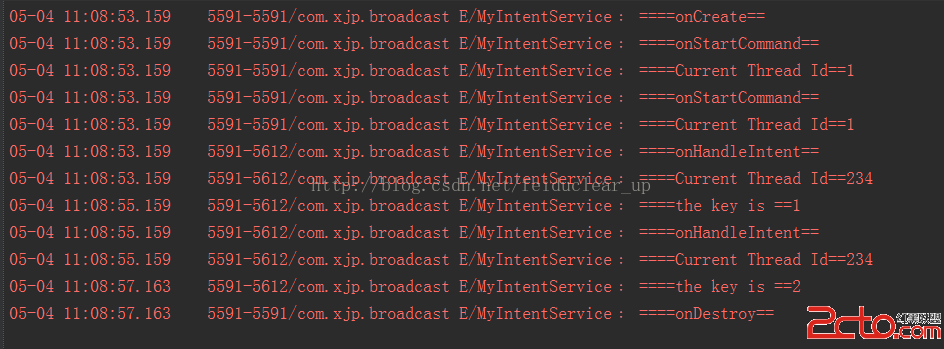
/*
 * Copyright (C) 2008 The Android Open Source Project
 *
 * Licensed under the Apache License, Version 2.0 (the "License");
 * you may not use this file except in compliance with the License.
 * You may obtain a copy of the License at
 *
 *      http://www.apache.org/licenses/LICENSE-2.0
 *
 * Unless required by applicable law or agreed to in writing, software
 * distributed under the License is distributed on an "AS IS" BASIS,
 * WITHOUT WARRANTIES OR CONDITIONS OF ANY KIND, either express or implied.
 * See the License for the specific language governing permissions and
 * limitations under the License.
 */

package android.app;

import android.content.Intent;
import android.os.Handler;
import android.os.HandlerThread;
import android.os.IBinder;
import android.os.Looper;
import android.os.Message;

/**
 * IntentService is a base class for {@link Service}s that handle asynchronous
 * requests (expressed as {@link Intent}s) on demand.  Clients send requests
 * through {@link android.content.Context#startService(Intent)} calls; the
 * service is started as needed, handles each Intent in turn using a worker
 * thread, and stops itself when it runs out of work.
 *
 *
This "work queue processor" pattern is commonly used to offload tasks * from an application's main thread. The IntentService class exists to * simplify this pattern and take care of the mechanics. To use it, extend * IntentService and implement {@link #onHandleIntent(Intent)}. IntentService * will receive the Intents, launch a worker thread, and stop the service as * appropriate. * *
All requests are handled on a single worker thread -- they may take as * long as necessary (and will not block the application's main loop), but * only one request will be processed at a time. * *
*For a detailed discussion about how to create services, read the * Services developer guide.
* * * @see android.os.AsyncTask */ public abstract class IntentService extends Service { private volatile Looper mServiceLooper; private volatile ServiceHandler mServiceHandler; private String mName; private boolean mRedelivery; private final class ServiceHandler extends Handler { public ServiceHandler(Looper looper) { super(looper); } @Override public void handleMessage(Message msg) { onHandleIntent((Intent)msg.obj); stopSelf(msg.arg1); } } /** * Creates an IntentService. Invoked by your subclass's constructor. * * @param name Used to name the worker thread, important only for debugging. */ public IntentService(String name) { super(); mName = name; } /** * Sets intent redelivery preferences. Usually called from the constructor * with your preferred semantics. * *If enabled is true, * {@link #onStartCommand(Intent, int, int)} will return * {@link Service#START_REDELIVER_INTENT}, so if this process dies before * {@link #onHandleIntent(Intent)} returns, the process will be restarted * and the intent redelivered. If multiple Intents have been sent, only * the most recent one is guaranteed to be redelivered. * *
If enabled is false (the default), * {@link #onStartCommand(Intent, int, int)} will return * {@link Service#START_NOT_STICKY}, and if the process dies, the Intent * dies along with it. */ public void setIntentRedelivery(boolean enabled) { mRedelivery = enabled; } @Override public void onCreate() { // TODO: It would be nice to have an option to hold a partial wakelock // during processing, and to have a static startService(Context, Intent) // method that would launch the service & hand off a wakelock. super.onCreate(); HandlerThread thread = new HandlerThread("IntentService[" + mName + "]"); thread.start(); mServiceLooper = thread.getLooper(); mServiceHandler = new ServiceHandler(mServiceLooper); } @Override public void onStart(Intent intent, int startId) { Message msg = mServiceHandler.obtainMessage(); msg.arg1 = startId; msg.obj = intent; mServiceHandler.sendMessage(msg); } /** * You should not override this method for your IntentService. Instead, * override {@link #onHandleIntent}, which the system calls when the IntentService * receives a start request. * @see android.app.Service#onStartCommand */ @Override public int onStartCommand(Intent intent, int flags, int startId) { onStart(intent, startId); return mRedelivery ? START_REDELIVER_INTENT : START_NOT_STICKY; } @Override public void onDestroy() { mServiceLooper.quit(); } /** * Unless you provide binding for your service, you don't need to implement this * method, because the default implementation returns null. * @see android.app.Service#onBind */ @Override public IBinder onBind(Intent intent) { return null; } /** * This method is invoked on the worker thread with a request to process. * Only one Intent is processed at a time, but the processing happens on a * worker thread that runs independently from other application logic. * So, if this code takes a long time, it will hold up other requests to * the same IntentService, but it will not hold up anything else. * When all requests have been handled, the IntentService stops itself, * so you should not call {@link #stopSelf}. * * @param intent The value passed to {@link * android.content.Context#startService(Intent)}. */ protected abstract void onHandleIntent(Intent intent); }
 Android簡易實戰教程--第二十六話《網絡圖片查看器在本地緩存》
上一篇已經把王略中的圖片獲取到了。生活中有這麼些場景:微信聯網打開別人照片後,當手機斷網的時候再去點擊人家的額圖片還能完整看到。這時候,已經不是去網路中獲取圖片了,其實微
 框架模式 MVC 在Android中的使用
算來學習Android開發已有2年的歷史了,在這2年的學習當中,基本掌握了Android的基礎知識。越到後面的學習越感覺困難,一來是自認為android沒啥可學的了(自認
 android之Dialog自定義引發的血案
我仍然從實際工作中出發!最近需要在照相機裡面添加聲控拍照功能(語音拍照),在設置當中需要實現如下圖的效果: 其設置的語音拍照菜單功能描述如下: (1)當點擊語音拍照菜單
 Drawable適配
一直都是在自家的盒子上開發App,很少接觸到Android適配的問題。但是不得不說Android嚴重的碎片化,對於應用開發者來說,學會Android適配的是必要的。意識到