編輯:關於Android編程
Android的待機狀態管理由PowerManagerService.java管理
主要的狀態更新方法在下面貼出代碼, 注釋寫的很清楚, 第一次看系統源碼感覺還比較爽
主要是更新喚醒, 屏幕休眠以及其他的一些狀態, 然後系統根據更新的狀態進行一些操作, 比如系統睡眠, 進入屏保, 或者電源模式變更等等.
 /**
     * Updates the global power state based on dirty bits recorded in mDirty.
     *
     * This is the main function that performs power state transitions.
     * We centralize them here so that we can recompute the power state completely
     * each time something important changes, and ensure that we do it the same
     * way each time.  The point is to gather all of the transition logic here.
     */
    private void updatePowerStateLocked() {
        if (!mSystemReady || mDirty == 0) {
            return;
        }
        if (!Thread.holdsLock(mLock)) {
            Slog.wtf(TAG, "Power manager lock was not held when calling updatePowerStateLocked");
        }

        // Phase 0: Basic state updates.
        updateIsPoweredLocked(mDirty);
        updateStayOnLocked(mDirty);

        // Phase 1: Update wakefulness.
        // Loop because the wake lock and user activity computations are influenced
        // by changes in wakefulness.
        final long now = SystemClock.uptimeMillis();
        int dirtyPhase2 = 0;
        for (;;) {
            int dirtyPhase1 = mDirty;
            dirtyPhase2 |= dirtyPhase1;
            mDirty = 0;

            updateWakeLockSummaryLocked(dirtyPhase1);
            updateUserActivitySummaryLocked(now, dirtyPhase1);
            if (!updateWakefulnessLocked(dirtyPhase1)) {
                break;
            }
        }

        // Phase 2: Update dreams and display power state.
        updateDreamLocked(dirtyPhase2);
        updateDisplayPowerStateLocked(dirtyPhase2);

        // Phase 3: Send notifications, if needed.
        if (mDisplayReady) {
            sendPendingNotificationsLocked();
        }

        // Phase 4: Update suspend blocker.
        // Because we might release the last suspend blocker here, we need to make sure
        // we finished everything else first!
        updateSuspendBlockerLocked();
    }
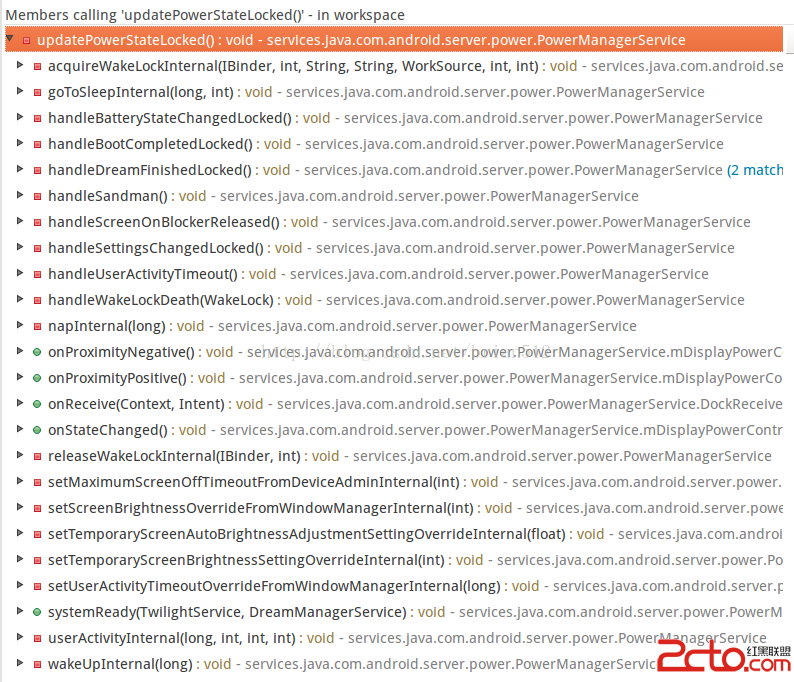
可以發現, 基本都是接受到一些系統廣播之後進行調用(以handle開頭的方法), 以及系統設置後調用(set開頭的方法), 來更新電源狀態, 還有一些接口回調, 主要是給用戶的一些操作
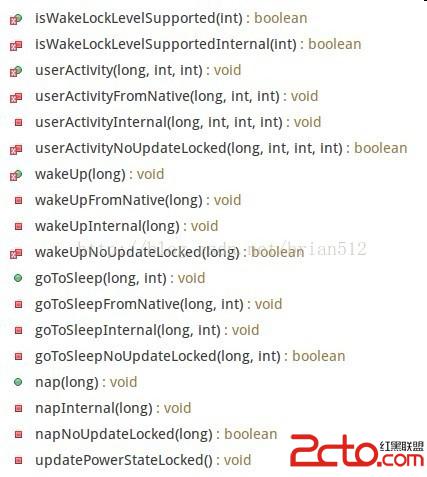
先是public的回調方法, 回調方法把任務傳遞到內部的private方法(Internal結尾), 還有接收的native方法(Native結尾), 最後都是通過Locked結尾的方法調用updatePowerStateLocked()更新狀態.
 Android 實現頂層窗口、懸浮窗口
1、如圖片1所示,在一個Android應用中,除了標題欄和底層的ActionBar的區域,是我們可以操縱的UI區域,那是不是說我們就不能改變除了這兩個區域的UI呢?答案是
 Android 快速開發系列 打造萬能的ListView GridView 適配器
1、概述 相信做Android開發的寫得最多的就是ListView,GridView的適配器吧,記得以前開發一同事開發項目,一個項目下來基本就一直在寫Lis
 如何將Crash率從2.2%降至0.2%
天天P圖作為圖像處理類APP,內部集成了很多功能,包括濾鏡、人臉檢測、美白、磨皮、美妝、拼圖、相機等,而且這些功能多是用底層算法依靠GPU實現,如何保證這些功能在眾廠商生
 紅米pro多少錢 紅米pro怎麼樣
紅米手機官方微博正式公布了7月27日新品發布會主角之一——紅米Pro。除此之外,還有一款神秘新品露面,不出意外的話,應該就是小米筆記