編輯:關於Android編程
1、DensityUtils
/**
 * 常用單位轉換的輔助類
 */
public class DensityUtils
{
	private DensityUtils() {
		/* cannot be instantiated */
		throw new UnsupportedOperationException("cannot be instantiated");
	}

	/**
	 * dp轉px
	 *
	 * @param context
	 * @param dpVal
	 * @return
	 */
	public static int dp2px(Context context, float dpVal) {
		return Math.round(TypedValue.applyDimension(TypedValue.COMPLEX_UNIT_DIP, dpVal, context.getResources().getDisplayMetrics()));
	}

	/**
	 * sp轉px
	 *
	 * @param context
	 * @param spVal
	 * @return
	 */
	public static int sp2px(Context context, float spVal) {
		return  Math.round(TypedValue.applyDimension(TypedValue.COMPLEX_UNIT_SP, spVal, context.getResources().getDisplayMetrics()));
	}

	/**
	 * px轉dp
	 *
	 * @param context
	 * @param pxVal
	 * @return
	 */
	public static float px2dp(Context context, float pxVal) {
		final float scale = context.getResources().getDisplayMetrics().density;
		return (pxVal / scale);
	}

	/**
	 * px轉sp
	 *
	 * @param context
	 * @param pxVal
	 * @return
	 */
	public static float px2sp(Context context, float pxVal) {
		return (pxVal / context.getResources().getDisplayMetrics().scaledDensity);
	}

}
2、LogUtil
/**
 * 日志工具類。統一管理日志信息的顯示/隱藏
 *
 * @author Tobin
 */
public class LogUtil {
    /** 日志輸出時的TAG */
    private static String mTag = "LogUtil";

    /**
     * 是否已經顯示佛祖
     */
    private static boolean isShowBuddha = false;

    /**
     * 是否允許輸出log
     *  mDebuggable < 1:  不允許
     *  mDebuggable >= 1: 根據等級允許
     * */
    private static int mDebuggable = 10;

    /** 日志輸出級別V */
    public static final int LEVEL_VERBOSE = 1;

    /** 日志輸出級別D */
    public static final int LEVEL_DEBUG = 2;

    /** 日志輸出級別I */
    public static final int LEVEL_INFO = 3;

    /** 日志輸出級別W */
    public static final int LEVEL_WARN = 4;

    /** 日志輸出級別E */
    public static final int LEVEL_ERROR = 5;

    private LogUtil() throws InstantiationException {
        throw new InstantiationException("This class is not created for instantiation");
    }

    /**
     * 佛祖顯靈
     */
    public static void showBuddha() {
        if (isShowBuddha) {
            return;
        }
        isShowBuddha = true;
        Log.i(mTag, "                            _ooOoo_");
        Log.i(mTag, "                           o8888888o");
        Log.i(mTag, "                          88\" . \"88");
        Log.i(mTag, "                           (| -_- |)");
        Log.i(mTag, "                            O\\ = /O");
        Log.i(mTag, "                        ____/`---'\\____");
        Log.i(mTag, "                      .   ' \\| |// `.");
        Log.i(mTag, "                       / \\\\||| : |||// \\");
        Log.i(mTag, "                     / _||||| -:- |||||- \\");
        Log.i(mTag, "                       | | \\\\\\ - /// | |");
        Log.i(mTag, "                     | \\_| ''\\---/'' | |");
        Log.i(mTag, "                      \\ .-\\__ `-` ___/-. /");
        Log.i(mTag, "                   ___`. .' /--.--\\ `. . __");
        Log.i(mTag, "                .\"\" '< `.___\\_<|>_/___.' >'\"\".");
        Log.i(mTag, "               | | : `- \\`.;`\\ _ /`;.`/ - ` : | |");
        Log.i(mTag, "                 \\ \\ `-. \\_ __\\ /__ _/ .-` / /");
        Log.i(mTag, "         ======`-.____`-.___\\_____/___.-`____.-'======");
        Log.i(mTag, "                            `=---='");
        Log.i(mTag, "         .............................................");
        Log.i(mTag, "         				信佛祖,無bug");
        Log.i(mTag, "         				del bug ...");
    }

    /**
     * 以級別為v 的形式輸出LOG
     * */
    public static void v(String msg) {
        if (mDebuggable >= LEVEL_VERBOSE) {
            Log.v(mTag, msg);
        }
    }

    /** 以級別為 d 的形式輸出LOG */
    public static void d(String msg) {
        if (mDebuggable >= LEVEL_DEBUG) {
            Log.d(mTag, msg);
        }
    }

    /** 以級別為 d 的形式輸出LOG */
    public static void d(String tag,String msg) {
        if (mDebuggable >= LEVEL_DEBUG) {
            Log.d(tag, msg);
        }
    }

    /** 以級別為 i 的形式輸出LOG */
    public static void i(String msg) {
        if (mDebuggable >= LEVEL_INFO) {
            Log.i(mTag, msg);
        }
    }

    /** 以級別為 i 的形式輸出LOG */
    public static void i(String tag,String msg) {
        if (mDebuggable >= LEVEL_INFO) {
            Log.i(tag, msg);
        }
    }

    /**
     * 以級別為 w 的形式輸出LOG
     * */
    public static void w(String msg) {
        if (mDebuggable >= LEVEL_WARN) {
            Log.w(mTag, msg);
        }
    }

    /**
     * 以級別為 w 的形式輸出LOG
     * */
    public static void w(String tag,String msg) {
        if (mDebuggable >= LEVEL_WARN) {
            Log.w(tag, msg);
        }
    }

    /**
     * 以級別為 w 的形式輸出Throwable
     * */
    public static void w(Throwable tr) {
        if (mDebuggable >= LEVEL_WARN) {
            Log.w(mTag, "", tr);
        }
    }

    /**
     * 以級別為 w 的形式輸出LOG信息和Throwable
     * */
    public static void w(String msg, Throwable tr) {
        if (mDebuggable >= LEVEL_WARN && null != msg) {
            Log.w(mTag, msg, tr);
        }
    }

    /**
     * 以級別為 e 的形式輸出LOG
     *
     * */
    public static void e(String msg) {
        if (mDebuggable >= LEVEL_ERROR) {
            Log.e(mTag, msg);
        }
    }

    /**
     * 以級別為 e 的形式輸出LOG
     *
     * */
    public static void e(String tag,String msg) {
        if (mDebuggable >= LEVEL_ERROR) {
            Log.e(tag, msg);
        }
    }

    /**
     * 以級別為 e 的形式輸出Throwable
     * */
    public static void e(Throwable tr) {
        if (mDebuggable >= LEVEL_ERROR) {
            Log.e(mTag, "", tr);
        }
    }

    /** 以級別為 e 的形式輸出LOG信息和Throwable */
    public static void e(String msg, Throwable tr) {
        if (mDebuggable >= LEVEL_ERROR && null != msg) {
            Log.e(mTag, msg, tr);
        }
    }

}
/**
 * 獲得屏幕相關的輔助類
 *
 */
public class ScreenUtils {
	private ScreenUtils() {
		/* cannot be instantiated */
		throw new UnsupportedOperationException("cannot be instantiated");
	}

	/**
	 * 獲得屏幕高度
	 *
	 * @param context
	 * @return
	 */
	public static int getScreenWidth(Context context) {
		WindowManager wm = (WindowManager) context.getSystemService(Context.WINDOW_SERVICE);
		DisplayMetrics outMetrics = new DisplayMetrics();
		wm.getDefaultDisplay().getMetrics(outMetrics);
		return outMetrics.widthPixels;
	}

	/**
	 * 獲得屏幕寬度
	 *
	 * @param context
	 * @return
	 */
	public static int getScreenHeight(Context context) {
		WindowManager wm = (WindowManager) context.getSystemService(Context.WINDOW_SERVICE);
		DisplayMetrics outMetrics = new DisplayMetrics();
		wm.getDefaultDisplay().getMetrics(outMetrics);
		return outMetrics.heightPixels;
	}

	/**
	 * 獲得狀態欄的高度
	 *
	 * @param context
	 * @return
	 */
	public static int getStatusHeight(Context context) {
		int statusHeight = -1;
		try {
			Class clazz = Class.forName("com.android.internal.R$dimen");
			Object object = clazz.newInstance();
			int height = Integer.parseInt(clazz.getField("status_bar_height").get(object).toString());
			statusHeight = context.getResources().getDimensionPixelSize(height);
		} catch (Exception e) {
			e.printStackTrace();
		}
		return statusHeight;
	}

	/**
	 * 獲取當前屏幕截圖,包含狀態欄
	 *
	 * @param activity
	 * @return
	 */
	public static Bitmap snapShotWithStatusBar(Activity activity) {
		View view = activity.getWindow().getDecorView();
		view.setDrawingCacheEnabled(true);
		view.buildDrawingCache();
		Bitmap bmp = view.getDrawingCache();
		int width = getScreenWidth(activity);
		int height = getScreenHeight(activity);
		Bitmap bp = null;
		bp = Bitmap.createBitmap(bmp, 0, 0, width, height);
		view.destroyDrawingCache();
		return bp;
	}

	/**
	 * 獲取當前屏幕截圖,不包含狀態欄
	 *
	 * @param activity
	 * @return
	 */
	public static Bitmap snapShotWithoutStatusBar(Activity activity) {
		View view = activity.getWindow().getDecorView();
		view.setDrawingCacheEnabled(true);
		view.buildDrawingCache();
		Bitmap bmp = view.getDrawingCache();
		Rect frame = new Rect();
		activity.getWindow().getDecorView().getWindowVisibleDisplayFrame(frame);
		int statusBarHeight = frame.top;

		int width = getScreenWidth(activity);
		int height = getScreenHeight(activity);
		Bitmap bp = null;
		bp = Bitmap.createBitmap(bmp, 0, statusBarHeight, width, height - statusBarHeight);
		view.destroyDrawingCache();
		return bp;
	}

}
4、JsonUtil 基於fastjson-1.x.xx.android.jar,下載地址:https://github.com/alibaba/fastjson/releases
/**
 * FastJson序列化工具包
 *
 * @author Sun
 * @since 2012-1-19
 * @author Tobin
 * @modify 2015-5-27
 */
public class JsonUtil {

    private static final String CHARSET = "UTF-8";

    /**
     * 將網絡請求下來的數據用fastjson處理空的情況,並將時間戳轉化為標准時間格式
     * @param result
     * @return
     */
    public static String dealResponseResult(String result) {
        result = JSONObject.toJSONString(result,
                SerializerFeature.WriteClassName,
                SerializerFeature.WriteMapNullValue,
                SerializerFeature.WriteNullBooleanAsFalse,
                SerializerFeature.WriteNullListAsEmpty,
                SerializerFeature.WriteNullNumberAsZero,
                SerializerFeature.WriteNullStringAsEmpty,
                SerializerFeature.WriteDateUseDateFormat,
                SerializerFeature.WriteEnumUsingToString,
                SerializerFeature.WriteSlashAsSpecial,
                SerializerFeature.WriteTabAsSpecial);
        return result;
    }

    /**
     * 將json轉換成為java對象T
     *
     * @param json
     * @param classOfT
     * @return
     */
    public static  T Json2T(String json, Class classOfT) {
        if (null == json || "".equals(json.trim()))
            return null;
        try {
            return JSON.parseObject(json, classOfT);
        } catch (Throwable e) {
            e.printStackTrace();
            Log.e("JsonUtil.Json2T", "msg:" + json + "\nclazz:" + classOfT.getName());
            return null;
        }
    }

    /**
     * 將json轉換成為java對象列表List
     *
     * @param json
     * @param classOfT
     * @return
     */
    public static  List Json2List(String json, Class classOfT) {
        if (null == json || "".equals(json.trim())) {
            return null;
        }
        try {
            return JSON.parseArray(json, classOfT);
        } catch (Exception e) {
            Log.e("JsonUtil.Json2T", "msg:" + json + "\r\nclazz:" + classOfT.getName());
            return null;
        }
    }

    /**
     * 把JSON數據轉換成較為復雜的java對象列表List>
     *
     * @param jsonData
     *            JSON數據
     * @return
     * @throws Exception
     */
    public static List> json2MapList(String jsonData) throws Exception {
        return JSON.parseObject(jsonData, new TypeReference>>() {});
    }

    /**
     * 將非集合類java對象轉換成為json object
     *
     * @param o
     * @return
     */
    public static JSONObject Object2JsonObject(Object o) {
        try {
            return (JSONObject) JSON.toJSON(o);
        } catch (Exception e) {
            e.printStackTrace();
            return null;
        }
    }

    /**
     * 將集合類java對象裝換成為json array
     *
     * @param collection
     * @return
     */
    public static JSONArray Collection2JsonArray(Collection collection) {
        try {
            return (JSONArray) JSON.toJSON(collection);
        } catch (Exception e) {
            e.printStackTrace();
            return null;
        }
    }

    /**
     * json String 轉 JSONObject
     *
     * @param json
     * @return
     */
    public static JSONObject json2JsonObject(String json) {
        try {
            return JSON.parseObject(json);
        } catch (Throwable e) {
            e.printStackTrace();
            return null;
        }
    }

    /**
     * 將json轉換成為jsonArray對象
     *
     * @param str
     * @return
     */
    public static JSONArray Json2JsonArray(String str) {
        if (null == str || "".equals(str.trim())) {
            return null;
        }
        try {
            return JSON.parseArray(str);
        } catch (Exception e) {
            e.printStackTrace();
            return null;
        }
    }

    /**
     * 將對象Object轉換成json格式數據
     *
     * @param o
     * @return
     */
    public static String Object2Json(Object o) {
        try {
            return JSON.toJSONString(o);
        } catch (Exception e) {
            e.printStackTrace();
            return null;
        }
    }

    /**
     * 將對象Object轉換成更加方便觀察的json格式數據,但會增加存儲空間
     *
     * @param o
     * @return
     */
    public static String Object2JsonPrettyFormat(Object o) {
        try {
            return JSON.toJSONString(o, true);
        } catch (Exception e) {
            e.printStackTrace();
            return null;
        }
    }

    /**
     * byte[] 轉 JSONObject
     *
     * @param bytes
     * @return
     */
    public static JSONObject bytes2JsonObject(byte[] bytes) {
        try {
            return JSON.parseObject(new String(bytes, CHARSET));
        } catch (Exception e) {
            e.printStackTrace();
            return null;
        }
    }

    /**
     * byte[] 轉 java對象
     *
     * @param bytes
     * @return
     */
    public static  T bytes2T(byte[] bytes, Class classOfT) {
        try {
            return JSON.parseObject(new String(bytes, CHARSET), classOfT);
        } catch (Exception e) {
            e.printStackTrace();
            return null;
        }
    }

    /**
     * 將對象轉換成json格式數據,使用全序列化方案
     *
     * @param o
     * @return
     */
    public static String Object2JsonSerial(Object o) {
        try {
            return JSON.toJSONString(o, SerializerFeature.WriteClassName);
        } catch (Exception e) {
            e.printStackTrace();
            return null;
        }
    }

    /**
     * 將列表轉換成為json,使用全序列化方案
     *
     * @param l
     * @return
     */
    public static String list2JsonSerial(List l) {
        if (null == l) {
            return null;
        }
        try {
            return JSON.toJSONString(l, SerializerFeature.WriteClassName);
        } catch (Exception e) {
            e.printStackTrace();
            return null;
        }
    }

    /**
     * 將全序列化json轉換成為java對象
     *
     * @param json
     * @return
     */
    public static Object JsonSerial2Object(String json) {
        try {
            return JSON.parse(json);
        } catch (Exception e) {
            e.printStackTrace();
            return null;
        }
    }

    /**
     * 將全序列化json轉換成為list對象
     *
     * @param json
     * @return
     */
    public static List JsonSerial2List(String json) {
        try {
            return JSON.parseArray(json);
        } catch (Exception e) {
            e.printStackTrace();
            return null;
        }
    }

    /**
     * 將全序列化json轉換為jsonArray對象
     *
     * @param json
     * @return
     */
    public static JSONArray JsonSerial2JsonArray(String json) {
        try {
            return JSON.parseArray(json);
        } catch (Exception e) {
            e.printStackTrace();
            return null;
        }
    }
}
5、HttpUtils
/**
 *  @author Tobin
 *
 * 簡單的Http請求的工具類
 *
 */
public class HttpUtils
{

	private static final int TIMEOUT_IN_MILLIONS = 5000;

	public interface CallBack {
		void onRequestComplete(String result);
	}

	/**
	 * 異步的Get請求
	 *
	 * @param urlStr
	 * @param callBack
	 */
	public static void doGetAsyn(final String urlStr, final CallBack callBack) {
		new Thread() {
			public void run() {
				try {
					String result = doGet(urlStr);
					if (callBack != null) {
						callBack.onRequestComplete(result);
					}
				} catch (Exception e) {
					e.printStackTrace();
				}
			}
		}.start();
	}

	/**
	 * 異步的Post請求
	 * @param urlStr
	 * @param params
	 * @param callBack
	 * @throws Exception
	 */
	public static void doPostAsyn(final String urlStr, final String params, final CallBack callBack) throws Exception {
		new Thread() {
			public void run() {
				try {
					String result = doPost(urlStr, params);
					if (callBack != null) {
						callBack.onRequestComplete(result);
					}
				} catch (Exception e) {
					e.printStackTrace();
				}
			}
		}.start();
	}

	/**
	 * Get請求,獲得返回數據
	 *
	 * @param urlStr
	 * @return
	 * @throws Exception
	 */
	public static String doGet(String urlStr)
	{
		URL url = null;
		HttpURLConnection conn = null;
		InputStream is = null;
		ByteArrayOutputStream baos = null;
		try {
			url = new URL(urlStr);
			conn = (HttpURLConnection) url.openConnection();
			conn.setReadTimeout(TIMEOUT_IN_MILLIONS);
			conn.setConnectTimeout(TIMEOUT_IN_MILLIONS);
			conn.setRequestMethod("GET");
			conn.setRequestProperty("accept", "*/*");
			conn.setRequestProperty("connection", "Keep-Alive");
			if (conn.getResponseCode() == 200) {
				is = conn.getInputStream();
				baos = new ByteArrayOutputStream();
				int len = -1;
				byte[] buf = new byte[128];
				while ((len = is.read(buf)) != -1) {
					baos.write(buf, 0, len);
				}
				baos.flush();
				return baos.toString();
			} else {
				throw new RuntimeException(" responseCode is not 200 ... ");
			}

		} catch (Exception e) {
			e.printStackTrace();
		} finally {
			try {
				if (is != null)
					is.close();
			} catch (IOException e) {
				e.printStackTrace();
			}
			try {
				if (baos != null)
					baos.close();
			} catch (IOException e) {
				e.printStackTrace();
			}
			conn.disconnect();
		}
		return null ;
	}

	/**
	 * 向指定 URL 發送POST方法的請求
	 *
	 * @param url
	 *            發送請求的 URL
	 * @param param
	 *            請求參數,請求參數應該是 name1=value1&name2=value2 的形式。
	 * @return 所代表遠程資源的響應結果
	 * @throws Exception
	 */
	public static String doPost(String url, String param)
	{
		PrintWriter out = null;
		BufferedReader in = null;
		String result = "";
		try {
			URL realUrl = new URL(url);
			// 打開和URL之間的連接
			HttpURLConnection conn = (HttpURLConnection) realUrl.openConnection();
			// 設置通用的請求屬性
			conn.setRequestProperty("accept", "*/*");
			conn.setRequestProperty("connection", "Keep-Alive");
			conn.setRequestMethod("POST");
			conn.setRequestProperty("Content-Type", "application/x-www-form-urlencoded");
			conn.setRequestProperty("charset", "utf-8");
			conn.setUseCaches(false);
			// 發送POST請求必須設置如下兩行
			conn.setDoOutput(true);
			conn.setDoInput(true);
			conn.setReadTimeout(TIMEOUT_IN_MILLIONS);
			conn.setConnectTimeout(TIMEOUT_IN_MILLIONS);

			if (param != null && !param.trim().equals("")) {
				// 獲取URLConnection對象對應的輸出流
				out = new PrintWriter(conn.getOutputStream());
				// 發送請求參數
				out.print(param);
				// flush輸出流的緩沖
				out.flush();
			}
			// 定義BufferedReader輸入流來讀取URL的響應
			in = new BufferedReader(new InputStreamReader(conn.getInputStream()));
			String line;
			while ((line = in.readLine()) != null) {
				result += line;
			}
		} catch (Exception e) {
			e.printStackTrace();
		} finally {		// 使用finally塊來關閉輸出流、輸入流
			try {
				if (out != null) {
					out.close();
				}
				if (in != null) {
					in.close();
				}
			} catch (IOException ex) {
				ex.printStackTrace();
			}
		}
		return result;
	}
}
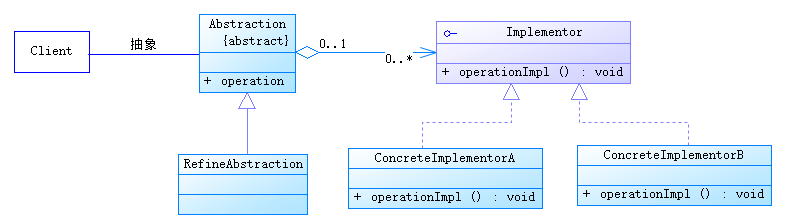 java/android 設計模式學習筆記(8)---橋接模式
這篇博客我們來介紹一下橋接模式(Bridge Pattern),它也是結構型設計模式之一。橋接,顧名思義,就是用來連接兩個部分,使得兩個部分可以互相通訊或者使用,橋接模式
 Android百度地圖例子
由於項目裡用到了百度地圖,路線規劃的標題(比如“M235/362”)在百度地圖API裡面沒有給出來,網上各種搜索都找不到別人發出來的方案,然後就只
 android AttributeSet API
android AttributeSet API public interface AttributeSet android.util.Attri
 android如果給imageview做圓角,如果在原有的bitmap上加上一些修飾的drawable
先上效果圖: Layout文件: 首先介紹兩種把資源裡的drawable轉成bitmap的方式 第一種: Bitma