編輯:關於Android編程
    <receiver android:enabled="true" android:exported="false" android:name=".JpushReceiver">
        <intent-filter>
            <action android:name="cn.jpush.android.intent.REGISTRATION">
            <action android:name="cn.jpush.android.intent.MESSAGE_RECEIVED">
            <action android:name="cn.jpush.android.intent.NOTIFICATION_RECEIVED">
            <action android:name="cn.jpush.android.intent.NOTIFICATION_OPENED">
            <action android:name="cn.jpush.android.intent.ACTION_RICHPUSH_CALLBACK">
            <action android:name="cn.jpush.android.intent.CONNECTION">
            <category android:name="com.example.exmpushjpush">
        </category></action></action></action></action></action></action></intent-filter>
    </receiver>
import cn.jpush.api.JPushClient;
import cn.jpush.api.common.ClientConfig;
import cn.jpush.api.common.resp.APIConnectionException;
import cn.jpush.api.common.resp.APIRequestException;
import cn.jpush.api.push.PushResult;
import cn.jpush.api.push.model.Message;
import cn.jpush.api.push.model.Platform;
import cn.jpush.api.push.model.PushPayload;
import cn.jpush.api.push.model.audience.Audience;
import cn.jpush.api.push.model.notification.Notification;
import java.util.Map;
import java.util.Set;

public class MessagePush {
	public static long IOS = 0L;
	public static long Android = 1L;

	private String mTitle;
	private String mMessage;
	private long mPlatformType;

	private JPushClient mJpushClient;
	private Platform mPlatform;
	private Audience mAudience;
	private Notification mNotify;
	private Message mMsg;
	public long mMsgId;
	public String mStatus;
	public String mErrCode;
	public String mErrMsg;

	public MessagePush(String appKey, String masterSecret, String message) {
		ClientConfig conf = ClientConfig.getInstance();
		conf.setMaxRetryTimes(3);
		mJpushClient = new JPushClient(masterSecret, appKey, null, conf);

		mMessage = message;
		mTitle = "";
		mPlatform = Platform.all();
		mMsg = Message.content(message);
		mAudience = Audience.all();
		setMsg(-1L, 0, 0, "");
	}

	public MessagePush(String appKey, String masterSecret, String message, String title) {
		this(appKey, masterSecret, message);
		mTitle = title;
	}

	public MessagePush(String appKey, String masterSecret, String message,
			String title, Long platformType, Map extras) {
		this(appKey, masterSecret, message, title);
		mPlatformType = platformType.longValue();
		System.out.println("MessagePush platformType=" + platformType);
		if (platformType.longValue() == IOS) {
			mPlatform = Platform.ios();
			mNotify = Notification.ios(mMessage, extras);
		} else if (platformType.longValue() == Android) {
			mPlatform = Platform.android();
			mNotify = Notification.android(mMessage, mTitle, extras);
		} else {
			mPlatform = Platform.winphone();
			mNotify = Notification.winphone(mMessage, extras);
		}
	}

	public void setAlias(Set alias) {
		mAudience = Audience.alias(alias);
	}

	public void setTag(String[] tag) {
		mAudience = Audience.tag(tag);
	}

	public void sendPush() {
		PushPayload payload = build();
		try {
			PushResult result = mJpushClient.sendPush(payload);
			mMsgId = result.msg_id;
			System.out.println("Got result - " + result);
		} catch (APIConnectionException e) {
			System.out.println("Connection error. Should retry later. "
					+ e.getMessage());
			setMsg(-1L, -1, -1, e.getMessage());
		} catch (APIRequestException e) {
			System.out.println("HTTP Status: " + e.getStatus());
			System.out.println("Error Code: " + e.getErrorCode());
			System.out.println("Error Message: " + e.getErrorMessage());
			System.out.println("Msg ID: " + e.getMsgId());
			setMsg(e.getMsgId(), e.getStatus(), e.getErrorCode(),
					e.getErrorMessage());
		}
	}

	private void setMsg(long msgId, int status, int errCode, String errMsg) {
		mMsgId = msgId;
		mStatus = String.valueOf(status);
		mErrCode = String.valueOf(errCode);
		mErrMsg = errMsg;
	}

	private PushPayload build() {
		System.out.println("build platformType=" + mPlatformType);
		PushPayload push;
		if (mPlatformType == IOS) {
			push = PushPayload.newBuilder().setPlatform(mPlatform)
					.setAudience(mAudience).setNotification(mNotify)
					.build();
		} else if (mPlatformType == Android) {
			push = PushPayload.newBuilder().setPlatform(mPlatform)
					.setAudience(mAudience).setMessage(mMsg).build();
					//.setAudience(mAudience).setNotification(mNotify).build();
		} else {
			push = PushPayload.newBuilder().setPlatform(mPlatform)
					.setAudience(mAudience).setMessage(mMsg).build();
		}
		return push;
	}
}
import java.util.ArrayList;
import java.util.List;

import com.gexin.rp.sdk.base.IPushResult;
import com.gexin.rp.sdk.base.impl.AppMessage;
import com.gexin.rp.sdk.base.uitls.AppConditions;
import com.gexin.rp.sdk.http.IGtPush;
import com.gexin.rp.sdk.template.NotificationTemplate;

public class PushtoAppNotify {
    //采用"Java SDK 快速入門", "第二步 獲取訪問憑證 "中獲得的應用配置,用戶可以自行替換
	private static String appId = "FJ9uNM6WkS8laiS3C05W9";
    private static String appKey = "cpV7gRK6IlAo26aDZGMtI1";
    private static String masterSecret = "QSvOwGnx0E9jEMpiXtqJ39";
	static String host = "http://sdk.open.api.igexin.com/apiex.htm";

    public static void main(String[] args) throws Exception {

        IGtPush push = new IGtPush(host, appKey, masterSecret);

        NotificationTemplate template = NotificationTemplateDemo();
        AppMessage message = new AppMessage();
        message.setData(template);

        message.setOffline(true);
        //離線有效時間,單位為毫秒,可選
        message.setOfflineExpireTime(24 * 1000 * 3600);
        //推送給App的目標用戶需要滿足的條件
        AppConditions cdt = new AppConditions();
        List appIdList = new ArrayList();
        appIdList.add(appId);
        message.setAppIdList(appIdList);
        //手機類型
        List phoneTypeList = new ArrayList();
        //省份
        List provinceList = new ArrayList();
        //自定義tag
        List tagList = new ArrayList();

        cdt.addCondition(AppConditions.PHONE_TYPE, phoneTypeList);
        cdt.addCondition(AppConditions.REGION, provinceList);
        cdt.addCondition(AppConditions.TAG,tagList);
        message.setConditions(cdt);

        IPushResult ret = push.pushMessageToApp(message,"任務別名_toApp");
        System.out.println(ret.getResponse().toString());
    }

    public static NotificationTemplate NotificationTemplateDemo() throws Exception {
        NotificationTemplate template = new NotificationTemplate();
        template.setAppId(appId);
        template.setAppkey(appKey);
        template.setTitle("PushtoAppNotify標題");
        template.setText("PushtoAppNotify內容");
        template.setLogo("icon.png");
        template.setLogoUrl("");
        template.setIsRing(true);
        template.setIsVibrate(true);
        template.setIsClearable(true);
	    // 透傳消息設置,1為強制啟動應用,客戶端接收到消息後就會立即啟動應用;2為等待應用啟動
	    template.setTransmissionType(1);
	    template.setTransmissionContent("PushtoAppNotify請輸入您要透傳的內容");

        return template;
    }

    public static class NotificationTemplateDemo {

    	public static NotificationTemplate notificationTemplateDemo(String appId, String appkey) {
    	    NotificationTemplate template = new NotificationTemplate();
    	    // 設置APPID與APPKEY
    	    template.setAppId(appId);
    	    template.setAppkey(appkey);
    	    // 設置通知欄標題與內容
    	    template.setTitle("請輸入通知欄標題");
    	    template.setText("請輸入通知欄內容");
    	    // 配置通知欄圖標
    	    template.setLogo("icon.png");
    	    // 配置通知欄網絡圖標
    	    template.setLogoUrl("");
    	    // 設置通知是否響鈴,震動,或者可清除
    	    template.setIsRing(true);
    	    template.setIsVibrate(true);
    	    template.setIsClearable(true);
    	    // 透傳消息設置,1為強制啟動應用,客戶端接收到消息後就會立即啟動應用;2為等待應用啟動
    	    template.setTransmissionType(1);
    	    template.setTransmissionContent("請輸入您要透傳的內容");
    	    // 設置定時展示時間
    	    // template.setDuration("2015-01-16 11:40:00", "2015-01-16 12:24:00");
    	    return template;
    	}

    }

}
 Android手掌抑制功能的實現
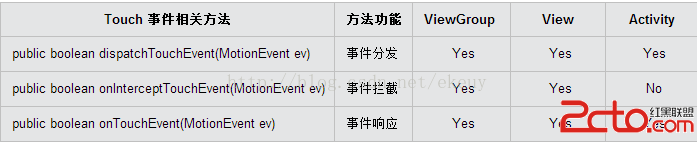
最近需要實現一個功能,在Activity中有一個手寫區域,為了更好的用戶體驗,需要滿足即使整個手掌放在屏幕上時(android平板,屏幕比較大)也只響應手寫區域內的操作,
 Android 開發之AndFix
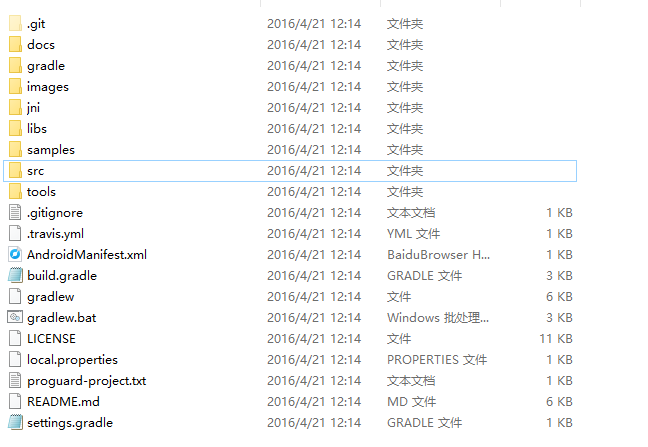
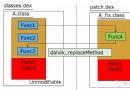
阿裡巴巴開源項目,地址:https://github.com/alibaba/AndFixtools裡面有我們需要的工具,docs是一些文檔介紹。AndFix解決在線修復
 微信熱補丁Tinker的實踐演進之路
Dev Club 是一個交流移動開發技術,結交朋友,擴展人脈的社群,成員都是經過審核的移動開發工程師。每周都會舉行嘉賓分享,話題討論等活動。本期,我們邀請了騰訊WXG A
 android項目 之 來電管家(2) ----- ListView+CheckBox的使用
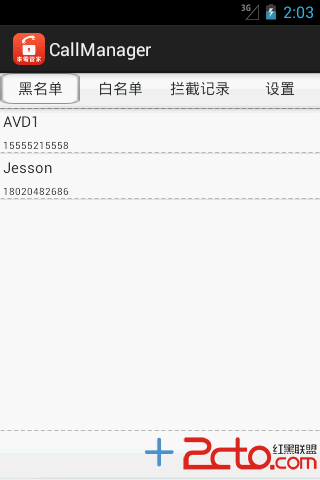
上一節,已經完成了來電管家的界面設計,那麼下面就要實現具體的功能了,如何將添加的黑白名單顯示呢?這裡用到了ListView,那麼,如果需要刪除黑白名單呢,是一個個長按彈出