編輯:關於Android編程
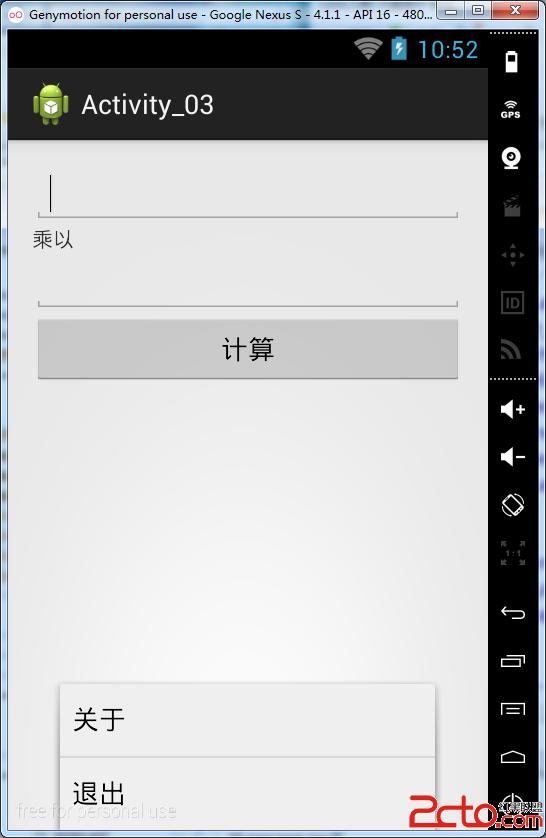
界面文件activity_main.xml
1 2 3 4 5 6 7 8 9 10 11 12 13 14 15 16 17 18 19 20 21 22 23 24 25 26 27 28 29 30 31 32 33 34<RelativeLayout xmlns:android="http://schemas.android.com/apk/res/android"
xmlns:tools="http://schemas.android.com/tools"
android:layout_width="match_parent"
android:layout_height="match_parent"
android:paddingBottom="@dimen/activity_vertical_margin"
android:paddingLeft="@dimen/activity_horizontal_margin"
android:paddingRight="@dimen/activity_horizontal_margin"
android:paddingTop="@dimen/activity_vertical_margin"
tools:context="com.example.activity_03.MainActivity" >
<EditText
android:id="@+id/factor_one"
android:layout_width="fill_parent"
android:layout_height="wrap_content" />
<TextView
android:id="@+id/symbol"
android:layout_width="fill_parent"
android:layout_height="wrap_content"
android:layout_below="@+id/factor_one" />
<EditText
android:id="@+id/factor_two"
android:layout_width="fill_parent"
android:layout_height="wrap_content"
android:layout_below="@+id/symbol" />
<Button
android:id="@+id/multiply"
android:layout_width="fill_parent"
android:layout_height="wrap_content"
android:layout_below="@+id/factor_two" />
RelativeLayout>
界面文件result.xml
1
2
3
4
5
6
7
8
9
10
11
12
xml version="1.0" encoding="utf-8"?>
<LinearLayout xmlns:android="http://schemas.android.com/apk/res/android"
android:layout_width="match_parent"
android:layout_height="match_parent"
android:orientation="vertical" >
<TextView
android:id="@+id/result"
android:layout_width="fill_parent"
android:layout_height="wrap_content"
/>
LinearLayout>
MainActivity.java
1
2
3
4
5
6
7
8
9
10
11
12
13
14
15
16
17
18
19
20
21
22
23
24
25
26
27
28
29
30
31
32
33
34
35
36
37
38
39
40
41
42
43
44
45
46
47
48
49
50
51
52
53
54
55
56
57
public class MainActivity extends ActionBarActivity {
private EditText factor_one;
private EditText factor_two;
private TextView symbol;
private Button multiply;
@Override
protected void onCreate(Bundle savedInstanceState) {
super.onCreate(savedInstanceState);
setContentView(R.layout.activity_main);
factor_one = (EditText) findViewById(R.id.factor_one);
factor_two = (EditText) findViewById(R.id.factor_two);
symbol = (TextView) findViewById(R.id.symbol);
multiply = (Button) findViewById(R.id.multiply);
symbol.setText(R.string.symbol);
multiply.setText("計算");
multiply.setOnClickListener(new OnClickListener() {
@Override
public void onClick(View v) {
// TODO Auto-generated method stub
String factor_one_str = factor_one.getText().toString();
String factor_two_str = factor_two.getText().toString();
Intent intent = new Intent();
intent.putExtra("factor_one_str", factor_one_str);
intent.putExtra("factor_two_str", factor_two_str);
intent.setClass(MainActivity.this, ResultActivity.class);
MainActivity.this.startActivity(intent);
}
});
}
@Override
public boolean onCreateOptionsMenu(Menu menu) {//設置菜單
//MenuItem android.view.Menu.add(int groupId, int itemId, int order, int titleRes)
menu.add(0, 1, 1, R.string.about);
menu.add(0, 2, 2, R.string.exit);
return super.onCreateOptionsMenu(menu);
}
@Override
public boolean onOptionsItemSelected(MenuItem item) {//選中菜單選項之後進行的操作
if (item.getItemId() == 1) {//關於
}else if (item.getItemId() == 2) {//退出
finish();
}
return super.onOptionsItemSelected(item);
}
}
ResultActivity.java
1
2
3
4
5
6
7
8
9
10
11
12
13
14
15
16
17
18
public class ResultActivity extends Activity{
private TextView result;
@Override
protected void onCreate(Bundle savedInstanceState) {
super.onCreate(savedInstanceState);
setContentView(R.layout.result);
String factor_one_str = getIntent().getStringExtra("factor_one_str");
String factor_two_str = getIntent().getStringExtra("factor_two_str");
int factor_one = Integer.parseInt(factor_one_str);
int factor_two = Integer.parseInt(factor_two_str);
result = (TextView) findViewById(R.id.result);
result.setText(factor_one * factor_two + "");
}
}
strings.xml
1
2
3
4
5
6
7
8
9
10
xml version="1.0" encoding="utf-8"?>
<resources>
<string name="app_name">Activity_03string>
<string name="hello_world">Hello world!string>
<string name="action_settings">Settingsstring>
<string name="symbol">乘以string>
<string name="exit">退出string>
<string name="about">關於string>
resources>
AndroidManifest.xml 中注冊Activity
1
<activity android:name=".ResultActivity" android:label="ResultActivity"/>

歡迎大家訪問我的個人網站 萌萌的IT人
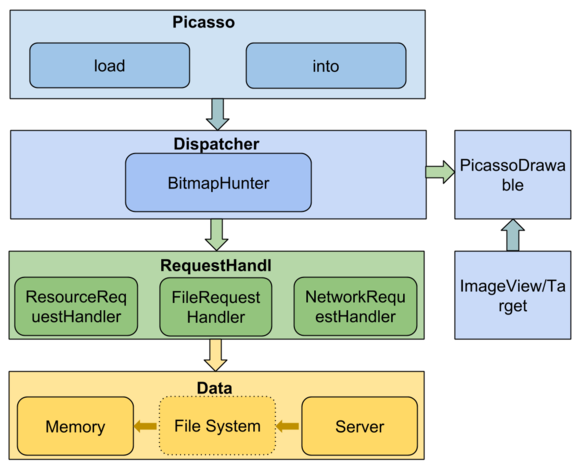 Picasso源碼分析
對於android的圖片加載庫,之前用過UIL、volley、Picasso、Glide、Fresco,都是很好的圖片加載庫,之前對於Picasso這個庫研究的比較多一點
 Android-支付寶快捷支付
支付寶的快捷支付Android版業務流程比較麻煩,出現的意外情況比較多.在此,簡單說下開發流程以及出現錯誤的解決方案; 1.注冊支付業務.這裡不在贅述.建立數據安全傳輸所
 Android4.4獲取圖片路徑
關於Android4.4的圖片路徑獲取,如果回來的Uri的格式有兩種 content://com.android.providers.med
 android自定義ProgressView長條漸變色的進度條
最近在公司,項目不是很忙了,偶爾看見一個兄台在CSDN求助,幫忙要一個自定義的漸變色進度條,我當時看了一下進度條,感覺挺漂亮的,就嘗試的去自定義view實現了一個,廢話不