編輯:關於Android編程
本文用Java創建UI並聯合JNI層操作surface來直接顯示yuv數據(yv12),開發環境為Android 4.4,全志A23平台。
package com.example.myyuvviewer;

import java.io.File;
import java.io.FileInputStream;
import android.app.Activity;
import android.os.Bundle;
import android.os.Environment;
import android.util.Log;
import android.view.Surface;
import android.view.SurfaceHolder;
import android.view.SurfaceHolder.Callback;
import android.view.SurfaceView;

public class MainActivity extends Activity {

	final private String TAG = "MyYUVViewer";
	final private String FILE_NAME = "yuv_320_240.yuv";
	private int width = 320;
	private int height = 240;
	private int size = width * height * 3/2;

	@Override
	protected void onCreate(Bundle savedInstanceState) {
		super.onCreate(savedInstanceState);
		setContentView(R.layout.activity_main);
		nativeTest();
		SurfaceView surfaceview = (SurfaceView) findViewById(R.id.surfaceView);
		SurfaceHolder holder = surfaceview.getHolder();
		holder.addCallback(new Callback(){

			@Override
			public void surfaceCreated(SurfaceHolder holder) {
				// TODO Auto-generated method stub
				Log.d(TAG,"surfaceCreated");
				byte[]yuvArray = new byte[size];
				readYUVFile(yuvArray, FILE_NAME);
				nativeSetVideoSurface(holder.getSurface());
				nativeShowYUV(yuvArray,width,height);
			}

			@Override
			public void surfaceChanged(SurfaceHolder holder, int format,
					int width, int height) {
				// TODO Auto-generated method stub

			}

			@Override
			public void surfaceDestroyed(SurfaceHolder holder) {
				// TODO Auto-generated method stub

			}});
	}

	private boolean readYUVFile(byte[] yuvArray,String filename){
		try {
            // 如果手機插入了SD卡,而且應用程序具有訪問SD的權限
            if (Environment.getExternalStorageState().equals(
                    Environment.MEDIA_MOUNTED)) {
                // 獲取SD卡對應的存儲目錄
                File sdCardDir = Environment.getExternalStorageDirectory();
                // 獲取指定文件對應的輸入流
                FileInputStream fis = new FileInputStream(
                        sdCardDir.getCanonicalPath() +"/" + filename);
                fis.read(yuvArray, 0, size);
                fis.close();
                return true;
            } else {
                return false;
            }
        }catch (Exception e) {
            e.printStackTrace();
            return false;
        }
	}
	private native void nativeTest();
	private native boolean nativeSetVideoSurface(Surface surface);
	private native void nativeShowYUV(byte[] yuvArray,int width,int height);
	static {
        System.loadLibrary("showYUV");
    }
}
activity_main.xml#include#include #include #include #include #include #include #include #include #include using namespace android; static sp surface; static int ALIGN(int x, int y) { // y must be a power of 2. return (x + y - 1) & ~(y - 1); } static void render( const void *data, size_t size, const sp &nativeWindow,int width,int height) { ALOGE("[%s]%d",__FILE__,__LINE__); sp mNativeWindow = nativeWindow; int err; int mCropWidth = width; int mCropHeight = height; int halFormat = HAL_PIXEL_FORMAT_YV12;//顏色空間 int bufWidth = (mCropWidth + 1) & ~1;//按2對齊 int bufHeight = (mCropHeight + 1) & ~1; CHECK_EQ(0, native_window_set_usage( mNativeWindow.get(), GRALLOC_USAGE_SW_READ_NEVER | GRALLOC_USAGE_SW_WRITE_OFTEN | GRALLOC_USAGE_HW_TEXTURE | GRALLOC_USAGE_EXTERNAL_DISP)); CHECK_EQ(0, native_window_set_scaling_mode( mNativeWindow.get(), NATIVE_WINDOW_SCALING_MODE_SCALE_CROP)); // Width must be multiple of 32??? //很重要,配置寬高和和指定顏色空間yuv420 //如果這裡不配置好,下面deque_buffer只能去申請一個默認寬高的圖形緩沖區 CHECK_EQ(0, native_window_set_buffers_geometry( mNativeWindow.get(), bufWidth, bufHeight, halFormat)); ANativeWindowBuffer *buf;//描述buffer //申請一塊空閒的圖形緩沖區 if ((err = native_window_dequeue_buffer_and_wait(mNativeWindow.get(), &buf)) != 0) { ALOGW("Surface::dequeueBuffer returned error %d", err); return; } GraphicBufferMapper &mapper = GraphicBufferMapper::get(); Rect bounds(mCropWidth, mCropHeight); void *dst; CHECK_EQ(0, mapper.lock(//用來鎖定一個圖形緩沖區並將緩沖區映射到用戶進程 buf->handle, GRALLOC_USAGE_SW_WRITE_OFTEN, bounds, &dst));//dst就指向圖形緩沖區首地址 if (true){ size_t dst_y_size = buf->stride * buf->height; size_t dst_c_stride = ALIGN(buf->stride / 2, 16);//1行v/u的大小 size_t dst_c_size = dst_c_stride * buf->height / 2;//u/v的大小 memcpy(dst, data, dst_y_size + dst_c_size*2);//將yuv數據copy到圖形緩沖區 } CHECK_EQ(0, mapper.unlock(buf->handle)); if ((err = mNativeWindow->queueBuffer(mNativeWindow.get(), buf, -1)) != 0) { ALOGW("Surface::queueBuffer returned error %d", err); } buf = NULL; } static void nativeTest(){ ALOGE("[%s]%d",__FILE__,__LINE__); } static jboolean nativeSetVideoSurface(JNIEnv *env, jobject thiz, jobject jsurface){ ALOGE("[%s]%d",__FILE__,__LINE__); surface = android_view_Surface_getSurface(env, jsurface); if(android::Surface::isValid(surface)){ ALOGE("surface is valid "); }else { ALOGE("surface is invalid "); return false; } ALOGE("[%s][%d]\n",__FILE__,__LINE__); return true; } static void nativeShowYUV(JNIEnv *env, jobject thiz,jbyteArray yuvData,jint width,jint height){ ALOGE("width = %d,height = %d",width,height); jint len = env->GetArrayLength(yuvData); ALOGE("len = %d",len); jbyte *byteBuf = env->GetByteArrayElements(yuvData, 0); render(byteBuf,len,surface,width,height); } static JNINativeMethod gMethods[] = { {"nativeTest", "()V", (void *)nativeTest}, {"nativeSetVideoSurface", "(Landroid/view/Surface;)Z", (void *)nativeSetVideoSurface}, {"nativeShowYUV", "([BII)V", (void *)nativeShowYUV}, }; static const char* const kClassPathName = "com/example/myyuvviewer/MainActivity"; // This function only registers the native methods static int register_com_example_myyuvviewer(JNIEnv *env) { ALOGE("[%s]%d",__FILE__,__LINE__); return AndroidRuntime::registerNativeMethods(env, kClassPathName, gMethods, NELEM(gMethods)); } jint JNI_OnLoad(JavaVM* vm, void* reserved) { ALOGE("[%s]%d",__FILE__,__LINE__); JNIEnv* env = NULL; jint result = -1; if (vm->GetEnv((void**) &env, JNI_VERSION_1_4) != JNI_OK) { ALOGE("ERROR: GetEnv failed\n"); goto bail; } assert(env != NULL); ALOGE("[%s]%d",__FILE__,__LINE__); if (register_com_example_myyuvviewer(env) < 0) { ALOGE("ERROR: MediaPlayer native registration failed\n"); goto bail; } /* success -- return valid version number */ result = JNI_VERSION_1_4; bail: return result; }
LOCAL_PATH:= $(call my-dir)
include $(CLEAR_VARS)

LOCAL_SRC_FILES:= \
	showYUV.cpp

LOCAL_SHARED_LIBRARIES := \
	libcutils \
	libutils \
	libbinder \
    libui \
    libgui \
	libandroid_runtime \
	libstagefright_foundation

LOCAL_MODULE:= libshowYUV

LOCAL_MODULE_TAGS := tests

include $(BUILD_SHARED_LIBRARY)這樣Eclipse會自動把so庫打包進apk。
轉載請注明出處:http://blog.csdn.net/tung214/article/details/37762487
yuvdata下載地址:點擊打開鏈接
 Android ListView的item點擊無響應的解決方法
如果listitem裡面包括button或者checkbox等控件,默認情況下listitem會失去焦點,導致無法響應item的事件,最常用的解決辦法 是在listite
 Android中替換WebView加載網頁失敗時的頁面
我們用webView去請求一個網頁鏈接的時候,如果請求網頁失敗或無網絡的情況下,它會返回給我們這樣一個頁面,如下圖所示: 上面這個頁面就是系統自帶的頁面,你覺得
 android--context分析
前言 Context在android中的作用不言而喻,當我們訪問當前應用的資源,啟動一個新的activity的時候都需要提供Context,而這個Context到底是什麼
 android為ListView每個Item上面的按鈕添加事件
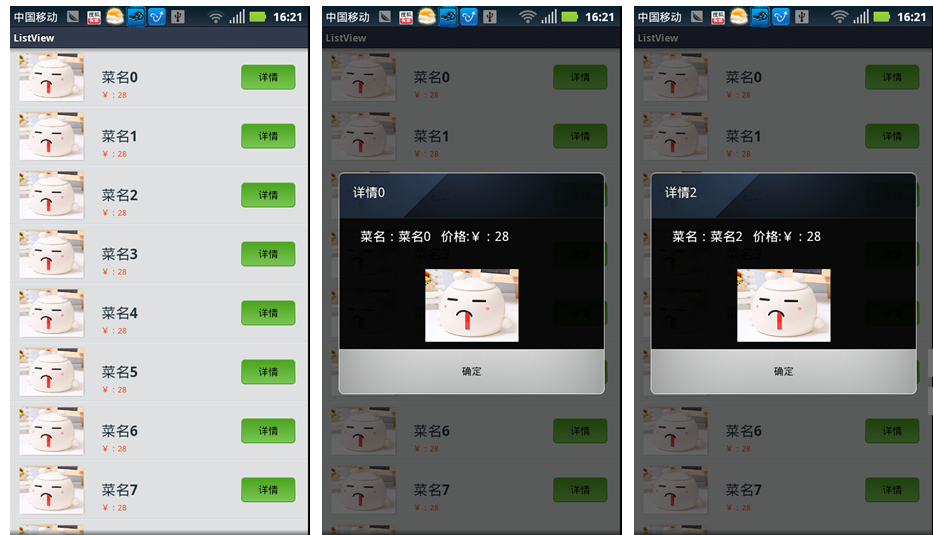
本文介紹了ListView給每個Item上面的按鈕添加事件,具體如下:1.先看下效果圖:在這裡僅供測試,我把數據都寫死了,根據需要可以自己進行修改,此外實現ListVie