編輯:關於Android編程
在android上發送郵件方式:
第一種:借助GMail APP客戶端,缺點是必須使用GMail帳號,有點是比較方便
不需要寫很多代碼,但是不是很靈活。
第二種:基於JMail實現,可以很靈活的自己設置各種屬性,不需要GMail帳號
在第二種方式的實現之前,看一下JMail對EMail結構的劃分:
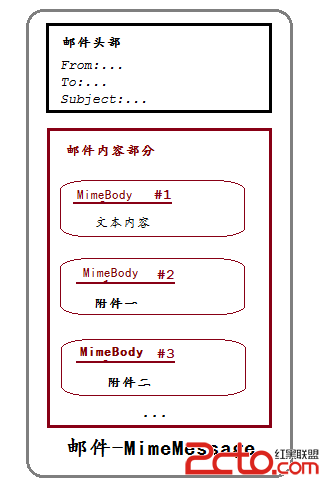
基於SMTP協議發送EMail,所以客戶端必須要知道SMTP的主機
騰訊郵件的SMTP主機為:stmp.qq.com端口為465基於SSL協議
最後我做了一個簡單的封裝,把發送文本加圖像附件的功能做出了
一個單獨的Class,只要調用一下即可完成:
package com.gloomyfish.jmail.demo;

import java.util.Date;
import java.util.Properties;

import javax.activation.DataHandler;
import javax.activation.DataSource;
import javax.activation.FileDataSource;
import javax.mail.Address;
import javax.mail.Message;
import javax.mail.Multipart;
import javax.mail.Session;
import javax.mail.Transport;
import javax.mail.internet.InternetAddress;
import javax.mail.internet.MimeBodyPart;
import javax.mail.internet.MimeMessage;
import javax.mail.internet.MimeMultipart;

public class EMailSender {

	private String host;
	private String port;
	private String userName;
	private String password;
	private String[] images;

	public String[] getImagePath() {
		return images;
	}

	public void setImagePath(String[] imagePath) {
		this.images = imagePath;
	}

	public EMailSender(String host, String port, String userName, String password)
	{
		this.host = host;
		this.port = port;
		this.userName = userName;
		this.password = password;
	}

	public void sendEmail(String subject, String recepits, String sender, String content)
	{
		Properties props = new Properties();
		props.put(mail.smtp.host, host);  //設置smtp的服務器地址
		// props.put(mail.smtp.starttls.enable, true);
		// props.put(mail.smtp.port, port); // 設置端口
		// props.put(mail.smtp.auth, true); //設置smtp服務器要身份驗證。

		props.put(mail.smtp.socketFactory.port, port);
		props.put(mail.smtp.socketFactory.class, javax.net.ssl.SSLSocketFactory);
		props.put(mail.smtp.auth, true);
		props.put(mail.smtp.port, port);

		// 返回授權Base64編碼
		PopupAuthenticator auth = new PopupAuthenticator(userName, password);
		// 獲取會話對象
		Session session = Session.getInstance(props, auth);
		// 設置為DEBUG模式
		session.setDebug(true);

		// 郵件內容對象組裝
		MimeMessage message = new MimeMessage(session);
		try
		{
			Address addressFrom = new InternetAddress(sender, Jia Zhi Gang);
			Address addressTo = new InternetAddress(recepits, My QQ E-Mail);
			message.setSubject(subject);
			message.setSentDate(new Date());
			message.setFrom(addressFrom);
			message.addRecipient(Message.RecipientType.TO,addressTo);

			// 郵件文本/HTML內容
			Multipart multipart = new MimeMultipart();
			MimeBodyPart messageBodyPart = new MimeBodyPart();
	        messageBodyPart.setContent(content, text/html);
	        multipart.addBodyPart(messageBodyPart);

	        // 添加郵件附件
	        if (images != null && images.length > 0) {
	            for (String filePath : images) {
	                MimeBodyPart attachPart = new MimeBodyPart();
	                DataSource source = new FileDataSource(filePath);
	                attachPart.setDataHandler(new DataHandler(source));
	                attachPart.setFileName(filePath);
	                multipart.addBodyPart(attachPart);
	            }
	        }

	        // 保存郵件內容
	        message.setContent(multipart);

			// 獲取SMTP協議客戶端對象,連接到指定SMPT服務器
			Transport transport = session.getTransport(smtp);
			transport.connect(host, Integer.parseInt(port), userName, password);
			System.out.println(connet it success!!!!);

			// 發送郵件到SMTP服務器
			Thread.currentThread().setContextClassLoader( getClass().getClassLoader() );
			Transport.send(message);
			System.out.println(send it success!!!!);

			// 關閉連接
			transport.close();
		}
		catch(Exception e)
		{
			e.printStackTrace();
		}
	}

	public String getHost() {
		return host;
	}

	public void setHost(String host) {
		this.host = host;
	}

	public String getPort() {
		return port;
	}

	public void setPort(String port) {
		this.port = port;
	}

	public String getUserName() {
		return userName;
	}

	public void setUserName(String userName) {
		this.userName = userName;
	}

	public String getPassword() {
		return password;
	}

	public void setPassword(String password) {
		this.password = password;
	}

}
用戶授權類:
package com.gloomyfish.jmail.demo;


import javax.mail.Authenticator;
import javax.mail.PasswordAuthentication;


class PopupAuthenticator extends Authenticator {
	private String userName;
	private String password;
	public PopupAuthenticator(String userName, String password)
	{
		this.userName = userName;
		this.password = password;
	}
    public PasswordAuthentication getPasswordAuthentication() {
        return new PasswordAuthentication(userName, password);
    }
}
特別注意:
1.在android上發送郵件必須自己導入三個相關的JAVA文件
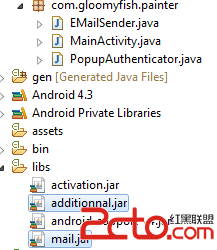
上述JAR文件的下載地址已經在文章開始處給出!
 Android-貝塞爾曲線
——前言——什麼是貝塞爾曲線——貝塞爾曲線的分類——貝塞爾曲線代碼實現&m
 導入工程到Android Studio時出現Errorr HTTP/1.1 400 Bad Request
導入工程到Android Studio時,gradle出現如下錯誤。Error:Failed to complete Gradle execution.Cause:Una
 Android系統架構
一、Android歷史2003 年 Andy Rubin 創辦 Android 公司2005 年 Google 收購 Android 公司2007 年成立開放手持設備聯盟
 最近較流行的效果 Android自定義View實現傾斜列表/圖片
先看看效果圖:實現思路:擦除圖片相應的角,然後層疊圖片,產生傾斜效果代碼實現:1、定義屬性在values文件夾下的attrs文件添加以下代碼<resources&g