編輯:關於Android編程
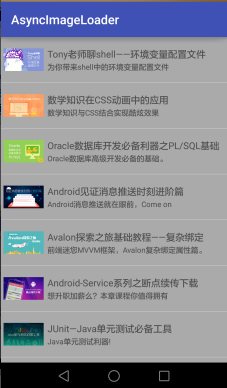
在ListView中加載圖片是非常常見的場景,圖片的加載要滿足下面的幾個要求:
(1)不管圖片是位於網絡還是本地,加載都不應該是同步的,而是應該異步去加載,比如用AsyncTask。
(2)為了避免重復下載圖片和頁面展示的速度,一般要做緩存,比如最常見的LruCache。
(3)為了提高Listview的性能,我們一般會用holder來重用Listview的item。
代碼大概就是這樣的:
public class MainActivity extends Activity {

	private ImageLoader imageLoader;

	@Override
	protected void onCreate(Bundle savedInstanceState) {
		super.onCreate(savedInstanceState);
		setContentView(R.layout.activity_main);

		imageLoader = new ImageLoader(new ImageDownloader(){
			@Override
			public Bitmap download(String path, int width, int height) {
				return HttpUtil.download(path);
			}
		});

		final ListView listview = (ListView)this.findViewById(R.id.listview);
		Button btn = (Button)this.findViewById(R.id.btn);
		btn.setOnClickListener(new View.OnClickListener() {
			@Override
			public void onClick(View v) {
				List dataList = getDataList();
				listview.setAdapter(new ListViewAdapter(MainActivity.this, dataList));
			}
		});
	}

	@Override
	protected void onDestroy() {
		super.onDestroy();
		imageLoader.destory();
	}

	private class ListViewAdapter extends BaseAdapter{
		private Context context;
		private List dataList;
		public ListViewAdapter(Context context, List dataList){
			this.context = context;
			this.dataList = dataList;
		}
		@Override
		public int getCount() {
			return dataList.size();
		}
		@Override
		public Object getItem(int position) {
			return dataList.get(position);
		}
		@Override
		public long getItemId(int position) {
			return position;
		}
		@Override
		public View getView(int position, View convertView, ViewGroup parent) {
			Holder holder = null;
			if(convertView == null){
				holder = new Holder();
				convertView = new ItemView(context);
				holder.itemView = (ItemView)convertView;
				convertView.setTag(holder);
			}else{
				holder = (Holder)convertView.getTag();
			}
			ItemView itemView = holder.itemView;
			ImageView itemImageView = itemView.getImageView();
			ItemBean item = dataList.get(position);
			// 先設置一個默認的圖片
			// 假如不設置,當頁面滑到了某個正在加載的item上,恰好這個item是復用的前面的已經顯示的item
			// 那麼這個item首先會顯示前一個item的圖片,等自己的下載完成以後,再替換掉這個圖片,
			// 假如下載時間很長,會讓用戶感覺圖片錯亂了!
			itemImageView.setImageResource(R.drawable.ic_launcher);
			//隨後下載實際的圖片
			imageLoader.loadImage(item.getImagePath(), 50, 50, itemImageView);
			return itemView;
		}
		class Holder{
			ItemView itemView;
		}
	}
現在問題就出現了,考慮下面的場景:
下載一幅圖片的時間很長,比如說10s,每一頁顯示3個item。
用戶第一次打開頁面,第一頁應該展示item0,item1,item2。在item0還沒下載完的時候,用戶滑到了第3頁,第3頁應該展示的是item6,item7,item8。那麼這一頁的item肯定是重用的第一頁的那些item。此時,用戶等待頁面加載。假如,item6重用的是item0,item7重用的是item1,item8重用的是item2,當item0下載完成以後,item6上展示的是item0上的圖片,這就混亂了!只有當item6自己的圖片下載完以後,item6展示的才是正確的圖片!如果在加載的過程中,用戶不停的滑動,那麼用戶看到的頁面就是完全錯亂的!
本文的圖片加載器就可以避免這個問題,是一個同事寫的,感覺很不錯,就直接拿過來了,看下代碼:
public class ImageLoader {

	private static final String TAG = "ImageLoader";

	private ImageCache cache;

	private HashSet cacheKeys = new HashSet();

	private ImageDownloader downloader;

	// 保存filepath和ImageView的關系,因為ImageView會復用,所以只有這個關系才是正確的關系
	// 一個imageView只能對應一個filepath,一個filepath對應一個物理文件
	private WeakHashMap imageView2FileMap = new WeakHashMap();
	// 一個filepath可能對應多個imageView,因為有可能會有多個imageView顯示同一張圖片
	private HashMap> file2ImageViewMap = new HashMap>();
	// 正在讀的或者已經在列隊裡的filepath,讀完刪除
	private HashSet fileInLoadSet = new HashSet();

	public ImageLoader(ImageDownloader downloader) {
		if(downloader == null){
			throw new RuntimeException("ImageDownloader can not be null");
		}
		this.cache = ImageCache.getInstance();
		this.downloader = downloader;
	}

	/**
	 * 給imageView設置圖片
	 *
	 * @param filePath
	 *            圖片路徑
	 * @param width
	 *            寬
	 * @param height
	 *            高
	 * @param imageView
	 * @return 緩存中有,直接設置,並返回true,沒有異步讀取,讀完再設置,返回false
	 */
	public boolean loadImage(String filePath, int width, int height, ImageView imageView) {
		String filePathKey = getKeyForFilePath(filePath, width, height);
		Bitmap bmp = cache.get(filePathKey);
		if (bmp == null) {
			ImageViewReference imageViewRef = new ImageViewReference(imageView);
			// 更新imageView和filepath的最新的關系
			imageView2FileMap.put(imageView, filePathKey);
			HashSet imageViewSet = file2ImageViewMap.get(filePathKey);
			if (imageViewSet == null) {
				imageViewSet = new HashSet();
				file2ImageViewMap.put(filePathKey, imageViewSet);
			}
			imageViewSet.add(imageViewRef);
			// 不會重復下載
			if (fileInLoadSet.contains(filePathKey)) {
				return false;
			} else {
				fileInLoadSet.add(filePathKey);
			}
			Holder holder = new Holder();
			holder.width = width;
			holder.height = height;
			holder.filePath = filePath;
			holder.filePathKey = filePathKey;
			holder.imageViewRef = imageViewRef;
			new ImageLoadTask().execute(holder);
			return false;
		} else {
			imageView.setImageBitmap(bmp);
			return true;
		}

	}

	private class ImageLoadTask extends AsyncTask {

		@Override
		protected Holder doInBackground(Holder... params) {
			Holder holder = params[0];
			int width = holder.width;
			int height = holder.height;
			String filePath = holder.filePath;
			String filePathKey = holder.filePathKey;
			// 找到key對應的所有imageView,如果imageView的數量是0說明不用下載了
			int count = getCountOfImageViewForKey(filePathKey);
			if (count <= 0) {
				return null;
			}
			try {
				Random rnd = new Random();
				Thread.sleep((int) (1000 * rnd.nextDouble()));
			} catch (Exception e) {
				e.printStackTrace();
			}
			// 開始讀取,放入cache
			if(downloader != null){
				//Bitmap bmp = ImageUtil.compressBitmap(filePath, width, height);
				Bitmap bmp = downloader.download(filePath, width, height);
				if(bmp != null){
					cache.put(filePathKey, bmp);
					cacheKeys.add(filePath);
					holder.imageData = bmp;
				}
			}
			return holder;
		}

		@Override
		protected void onPostExecute(Holder holder) {
			super.onPostExecute(holder);
			// 讀完圖片,把key移除
			String filePathKey = holder.filePathKey;
			fileInLoadSet.remove(filePathKey);

			Bitmap data = holder.imageData;
			if(data == null){
				return;
			}

			ArrayList imageViewArrayList = getImageViewListForKey(filePathKey);
			if (imageViewArrayList.size() == 0) {
				return;
			}
			// 遍歷imageview列表,通過imageView2FileMap查找該imageView對應的最新的latestFilePathKey是不是剛剛下載好的這個filePathKey
			// 只有一直才需要顯示,如果不一致,說明該imageView已經被復用,對應到了新的key
			for (ImageView imageView : imageViewArrayList) {
				String latestFilePathKey = imageView2FileMap.get(imageView);
				if (latestFilePathKey != null && latestFilePathKey.equals(filePathKey)) {
					if (imageView != null) {
						imageView.setImageBitmap(data);
						Log.e(TAG, "設置圖片 ");
						/*
						 * boolean isSet;
						 * try{
						 * 		isSet=(Boolean)
						 * 		imageView.getTag();
						 * }catch(Exception e) {
						 * 		isSet=true;
						 * }
						 * if(isSet) {
						 * 		imageView.setImageBitmap(result);
						 * 		Log.e(TAG,"設置圖片 ");
						 * }
						 */
					}
					// 即使不remove,也會自動回收
					imageView2FileMap.remove(imageView);
				} else {

				}
			}
			file2ImageViewMap.remove(filePathKey);
		}
	}

	class Holder {
		int width,height;
		String filePath, filePathKey;
		Bitmap imageData;
		ImageViewReference imageViewRef;
	}

	private String getKeyForFilePath(String imagePath, int width, int height) {
		return imagePath + "_" + width + "_" + height;
	}

	/**
	 * 銷毀ImageLoader
	 *
	 * */
	public void clear(){
		imageView2FileMap.clear();
		file2ImageViewMap.clear();
		fileInLoadSet.clear();
		for(String cacheKey : cacheKeys){
			cache.remove(cacheKey);
		}
		cacheKeys.clear();
		imageView2FileMap = null;
		file2ImageViewMap = null;
		fileInLoadSet = null;
		cacheKeys = null;
		downloader = null;
		cache = null;
	}

	/**
	 * 銷毀ImageLoader, 應用退出的時候調用
	 *
	 * */
	public void destory() {
		clear();
		ImageCache.destroy();
	}


	public interface ImageDownloader{
		public Bitmap download(String path,int width, int height);
	}

	/**
	 * 通過file2ImageViewMap獲取filePath對應的所有imageView列表 同時刪除被回收的imageView,
	 *
	 * @param filePathKey
	 * @return
	 */
	private ArrayList getImageViewListForKey(String filePathKey) {
		ArrayList imageViewArrayList = new ArrayList();
		HashSet imageViewReferences = file2ImageViewMap.get(filePathKey);
		if(imageViewReferences == null){
			return null;
		}
		Iterator it = imageViewReferences.iterator();
		while (it.hasNext()) {
			ImageViewReference reference = it.next();
			if (reference.get() != null) {
				imageViewArrayList.add(reference.get());
			} else {
				it.remove();
			}
		}
		return imageViewArrayList;
	}

	/**
	 * 獲取指定的filePath對應的有效imageView的數量
	 *
	 * @param filePathKey
	 * @return
	 */
	private int getCountOfImageViewForKey(String filePathKey) {
		ArrayList imageViewArrayList = getImageViewListForKey(filePathKey);
		if(imageViewArrayList == null){
			return 0;
		}else{
			return imageViewArrayList.size();
		}
	}

	private static class ImageCache extends LruCache {
		private static final int cacheSize = 10 * 1024 * 1024;
		private static ImageCache instance = new ImageCache(cacheSize);
		public static ImageCache getInstance(){
			return instance;
		}
		private ImageCache(int maxSize) {
			super(maxSize);
		}
		@Override
		protected int sizeOf(String key, Bitmap value) {
			return value.getByteCount();
		}
		public static void destroy(){
			if(instance == null){
				return;
			}
			instance.evictAll();
			instance = null;
		}
	}

	private static class ImageViewReference extends WeakReference {
		public ImageViewReference(ImageView r) {
			super(r);
		}
		@Override
		public boolean equals(Object o) {
			ImageViewReference other=(ImageViewReference)o;
			return this.get()==other.get();
		}
		@Override
		public int hashCode() {
			ImageView imageView = this.get();
			if(imageView != null){
				return imageView.hashCode();
			}
			return 0;
		}
	}

}
源碼在這裡:http://download.csdn.net/download/goldenfish1919/7320823 Android Art Hook 技術方案
0x1 開始Anddroid上的ART從5.0之後變成默認的選擇,可見ART的重要性,目前關於Dalvik Hook方面研究的文章很多,但我在網上
 Android持久化技術之SharedPreferences存儲實例詳解
本文實例講述了Android持久化技術之SharedPreferences存儲。分享給大家供大家參考,具體如下:1、SharedPreferences存儲在前面一篇文章《
 viewpager實現圖片輪番(本地圖片)
(項目中需要實現圖片輪番效果,就查資料著重學習,本地圖片實現)原理就是利用定時任務器定時切換ViewPager的頁面,根據圖片個數動態生成下端的圓點。效果圖: 1、獲取本
 android中的AIDL進程間通信示例
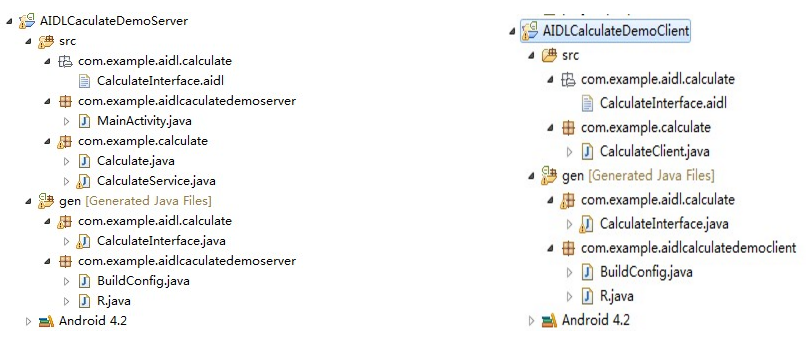
關於IPC應該不用多介紹了,Android系統中的進程之間不能共享內存,那麼如果兩個不同的應用程序之間需要通訊怎麼辦呢?比如公司的一個項目要更新,產品的需求是依附於當前項