編輯:關於Android編程
這幾天在實現一個APK版本更新的功能,發現涉及的東西比較繁雜。本著一勞永逸的想法將相關的內容寫成了相對比較獨立的類供以後參考同時也與大家共享,歡迎大家批評指正
主要實現了一下幾個類:
(1)文件下載:設計自定義類,只需傳入一個Handler、下載地址URLStr及保存路徑及可實現下載的功能。handler主要用於線程間通信,跟新通知中的進度條。
對於handler發送消息更新UI線程實現進度展示的時候一定注意不要太過頻繁,過設置計數器隔一定時間才發送消息,不然容易引起系統奔潰
(2) 通知(Notification):提供系統默認自帶形式以及自定義通知欄布局兩種形式。
(3) 服務:後台服務,startService啟動模式
package com.example.test;

import java.io.BufferedInputStream;
import java.io.File;
import java.io.FileNotFoundException;
import java.io.FileOutputStream;
import java.io.IOException;
import java.io.InputStream;
import java.net.HttpURLConnection;
import java.net.MalformedURLException;

import android.annotation.SuppressLint;
import android.os.Environment;
import android.os.Handler;
import android.os.Message;
import android.os.StrictMode;
import android.util.Log;

@SuppressLint("NewApi")
public class DownFileThread implements Runnable {
	public final static int DOWNLOAD_COMPLETE = -2;
	public final static int DOWNLOAD_FAIL = -1;
	public final static String TAG = "DownFileThread";
	Handler mHandler; //傳入的Handler,用於像Activity或service通知下載進度
	String urlStr;  //下載URL
	File apkFile;   //文件保存路徑
	boolean isFinished; //下載是否完成
	boolean interupted=false;  //是否強制停止下載線程
    public DownFileThread(Handler handler,String urlStr,String filePath)
    {
    	Log.i(TAG, urlStr);
    	this.mHandler=handler;
    	this.urlStr=urlStr;
    	apkFile=new File(filePath);
    	isFinished=false;
    }
    public File getApkFile()
    {
    	if(isFinished)
    		return apkFile;
    	else
    		return null;
    }
	public boolean isFinished() {
		return isFinished;
	}

	/**
	 * 強行終止文件下載
	 */
    public void  interuptThread()
    {
    	interupted=true;
    }

	@Override
	public void run() {
		// TODO Auto-generated method stub
		if (Environment.getExternalStorageState().equals(
				Environment.MEDIA_MOUNTED)) {
			java.net.URL url = null;
			HttpURLConnection conn = null;
			InputStream iStream = null;
//			if (DEVELOPER_MODE)
			{
		         StrictMode.setThreadPolicy(new StrictMode.ThreadPolicy.Builder()
		                 .detectDiskReads()
		                 .detectDiskWrites()
		                 .detectNetwork()   // or .detectAll() for all detectable problems
		                 .penaltyLog()
		                 .build());
		         StrictMode.setVmPolicy(new StrictMode.VmPolicy.Builder()
		                 .detectLeakedSqlLiteObjects()
		                 .detectLeakedClosableObjects()
		                 .penaltyLog()
		                 .penaltyDeath()
		                 .build());
		     }
			try {
				url = new java.net.URL(urlStr);
				conn = (HttpURLConnection) url.openConnection();
				conn.setConnectTimeout(5000);
				conn.setReadTimeout(20000);
				iStream = conn.getInputStream();
			} catch (MalformedURLException e) {
				Log.i(TAG, "MalformedURLException");
				e.printStackTrace();
			} catch (Exception e) {
				Log.i(TAG, "獲得輸入流失敗");
				e.printStackTrace();
			}
			FileOutputStream fos = null;
			try {
				fos = new FileOutputStream(apkFile);
			} catch (FileNotFoundException e) {
				 Log.i(TAG, "獲得輸出流失敗:new FileOutputStream(apkFile);");
				e.printStackTrace();
			}
			BufferedInputStream bis = new BufferedInputStream(iStream);
			byte[] buffer = new byte[1024];
			int len;
			// 獲取文件總長度
			int length = conn.getContentLength();
			double rate=(double)100/length;  //最大進度轉化為100
			int total = 0;
			int times=0;//設置更新頻率,頻繁操作UI線程會導致系統奔潰
			try {
				 Log.i("threadStatus", "開始下載");
				while (false==interupted  && ((len = bis.read(buffer)) != -1)) {
					fos.write(buffer, 0, len);
					// 獲取已經讀取長度

					total += len;
					int p=(int)(total*rate);
					Log.i("num", rate+","+total+","+p);
					if(times>=512 || p==100)
					{/*
					這是防止頻繁地更新通知,而導致系統變慢甚至崩潰。
                                                             非常重要。。。。。*/
						Log.i("time", "time");
					    times=0;
						Message msg = Message.obtain();
						msg.what =p ;
						mHandler.sendMessage(msg);
					}
					times++;
				}
				fos.close();
				bis.close();
				iStream.close();
				if(total==length)
				{
				    isFinished=true;
				    mHandler.sendEmptyMessage(DOWNLOAD_COMPLETE);
				    Log.i(TAG, "下載完成結束");
				}
				 Log.i(TAG, "強制中途結束");
				//mhandler.sendEmptyMessage(4);
			} catch (IOException e) {
				Log.i(TAG, "異常中途結束");
				mHandler.sendEmptyMessage(DOWNLOAD_FAIL);
				e.printStackTrace();
			}
		}
		else
		{
			Log.i(TAG, "外部存儲卡不存在,下載失敗!");
			mHandler.sendEmptyMessage(DOWNLOAD_FAIL);
		}
	}
}
package com.example.test;

import android.app.Notification;
import android.app.NotificationManager;
import android.app.PendingIntent;
import android.content.Context;
import android.widget.RemoteViews;
/**
 * Notification類,既可用系統默認的通知布局,也可以用自定義的布局
 *
 * @author lz
 *
 */
public class MyNotification {
	public final static int DOWNLOAD_COMPLETE = -2;
	public final static int DOWNLOAD_FAIL = -1;
	Context mContext;   //Activity或Service上下文
    Notification notification;  //notification
    NotificationManager nm;
    String titleStr;   //通知標題
    String contentStr; //通知內容
    PendingIntent contentIntent; //點擊通知後的動作
    int notificationID;   //通知的唯一標示ID
    int iconID;         //通知欄圖標
    long when = System.currentTimeMillis();
    RemoteViews remoteView=null;  //自定義的通知欄視圖
    /**
     *
     * @param context Activity或Service上下文
     * @param contentIntent  點擊通知後的動作
     * @param id    通知的唯一標示ID
     */
	public MyNotification(Context context,PendingIntent contentIntent,int id) {
		// TODO Auto-generated constructor stub
		mContext=context;
		notificationID=id;
		this.contentIntent=contentIntent;
		this.nm=(NotificationManager)mContext.getSystemService(Context.NOTIFICATION_SERVICE);
	}

	/**
	 * 顯示自定義通知
	 * @param icoId 自定義視圖中的圖片ID
	 * @param titleStr 通知欄標題
	 * @param layoutId 自定義布局文件ID
	 */
    public void showCustomizeNotification(int icoId,String titleStr,int layoutId) {
    	this.titleStr=titleStr;
    	notification=new Notification(R.drawable.ic_launcher, titleStr, when);
    	notification.flags = Notification.FLAG_ONLY_ALERT_ONCE;
    	notification.flags |= Notification.FLAG_AUTO_CANCEL;
    	notification.contentIntent=this.contentIntent;

        // 1、創建一個自定義的消息布局 view.xml
        // 2、在程序代碼中使用RemoteViews的方法來定義image和text。然後把RemoteViews對象傳到contentView字段
    	if(remoteView==null)
    	{
            remoteView = new RemoteViews(mContext.getPackageName(),layoutId);
	        remoteView.setImageViewResource(R.id.ivNotification,icoId);
	        remoteView.setTextViewText(R.id.tvTitle, titleStr);
	        remoteView.setTextViewText(R.id.tvTip, "開始下載");
	        remoteView.setProgressBar(R.id.pbNotification, 100, 0, false);
            notification.contentView = remoteView;
    	}
         nm.notify(notificationID, notification);
    }
    /**
     * 更改自定義布局文件中的進度條的值
     * @param p 進度值(0~100)
     */
    public void changeProgressStatus(int p)
    {
    	if(notification.contentView!=null)
    	{
    		if(p==DOWNLOAD_FAIL)
    			notification.contentView.setTextViewText(R.id.tvTip , "下載失敗! ");
    		else if(p==100)
    			notification.contentView.setTextViewText(R.id.tvTip , "下載完成,請點擊安裝");
    		else
    			notification.contentView.setTextViewText(R.id.tvTip , "進度("+p+"%) : ");
    		notification.contentView.setProgressBar(R.id.pbNotification, 100, p, false);
    	}
    	nm.notify(notificationID, notification);
    }
    public void changeContentIntent(PendingIntent intent)
    {
    	this.contentIntent=intent;
    	notification.contentIntent=intent;
    }
  /**
   * 顯示系統默認格式通知
   * @param iconId 通知欄圖標ID
   * @param titleText 通知欄標題
   * @param contentStr 通知欄內容
   */
    public void showDefaultNotification(int iconId,String titleText,String contentStr) {
    	this.titleStr=titleText;
    	this.contentStr=contentStr;
		this.iconID=iconId;

		notification=new Notification();
		notification.tickerText=titleStr;
		notification.icon=iconID;
		notification.flags = Notification.FLAG_INSISTENT;
		notification.flags |= Notification.FLAG_AUTO_CANCEL;
		notification.contentIntent=this.contentIntent;

	    // 添加聲音效果
		// notification.defaults |= Notification.DEFAULT_SOUND;

        // 添加震動,後來得知需要添加震動權限 : Virbate Permission
        // mNotification.defaults |= Notification.DEFAULT_VIBRATE ;

        //添加狀態標志
        //FLAG_AUTO_CANCEL        該通知能被狀態欄的清除按鈕給清除掉
        //FLAG_NO_CLEAR           該通知能被狀態欄的清除按鈕給清除掉
        //FLAG_ONGOING_EVENT      通知放置在正在運行
        //FLAG_INSISTENT          通知的音樂效果一直播放
		notification.flags = Notification.FLAG_ONLY_ALERT_ONCE;
		changeNotificationText(contentStr);
    }
    /**
     * 改變默認通知欄的通知內容
     * @param content
     */
    public void changeNotificationText(String content)
    {
    	notification.setLatestEventInfo(mContext, titleStr, content,contentIntent);

        // 設置setLatestEventInfo方法,如果不設置會App報錯異常
        //  NotificationManager mNotificationManager = (NotificationManager) getSystemService(Context.NOTIFICATION_SERVICE);
        //注冊此通知
        // 如果該NOTIFICATION_ID的通知已存在,會顯示最新通知的相關信息 ,比如tickerText 等
        nm.notify(notificationID, notification);
    }

    /**
     * 移除通知
     */
    public void removeNotification()
    {
        // 取消的只是當前Context的Notification
        nm.cancel(notificationID);
    }

}
package com.example.test;

import java.io.File;

import android.app.Notification;
import android.app.NotificationManager;
import android.app.PendingIntent;
import android.app.Service;
import android.content.Context;
import android.content.Intent;
import android.net.Uri;
import android.os.Environment;
import android.os.Handler;
import android.os.IBinder;
import android.os.Message;
import android.provider.Settings.Global;
import android.util.Log;

public class DownloadServices extends Service {
	private final static int DOWNLOAD_COMPLETE = -2;
    private final static int DOWNLOAD_FAIL = -1;

    //自定義通知欄類
    MyNotification myNotification;

    String filePathString; //下載文件絕對路徑(包括文件名)

    //通知欄跳轉Intent
    private Intent updateIntent = null;
    private PendingIntent updatePendingIntent = null;

    DownFileThread downFileThread;  //自定義文件下載線程

    private Handler updateHandler = new  Handler(){
        @Override
        public void handleMessage(Message msg) {
            switch(msg.what){
                case DOWNLOAD_COMPLETE:
                    //點擊安裝PendingIntent
                     Uri uri = Uri.fromFile(downFileThread.getApkFile());
                     Intent installIntent = new Intent(Intent.ACTION_VIEW);
                     installIntent.setDataAndType(uri, "application/vnd.android.package-archive");
                     updatePendingIntent = PendingIntent.getActivity(DownloadServices.this, 0, installIntent, 0);
                     myNotification.changeContentIntent(updatePendingIntent);
                     myNotification.notification.defaults=Notification.DEFAULT_SOUND;//鈴聲提醒
                     myNotification.changeNotificationText("下載完成,請點擊安裝!");

                    //停止服務
                  //  myNotification.removeNotification();
                    stopSelf();
                    break;
                case DOWNLOAD_FAIL:
                    //下載失敗
                	//                	myNotification.changeProgressStatus(DOWNLOAD_FAIL);
                	myNotification.changeNotificationText("文件下載失敗!");
                    stopSelf();
                    break;
                default:  //下載中
                	Log.i("service", "default"+msg.what);
        //        	myNotification.changeNotificationText(msg.what+"%");
        	myNotification.changeProgressStatus(msg.what);
            }
        }
    };

	public DownloadServices() {
		// TODO Auto-generated constructor stub
	//	mcontext=context;
		Log.i("service","DownloadServices1");

	}

	@Override
	public void onCreate() {
		// TODO Auto-generated method stub
		Log.i("service","onCreate");
		super.onCreate();
	}

	@Override
	public void onDestroy() {
		// TODO Auto-generated method stub
		Log.i("service","onDestroy");
		if(downFileThread!=null)
		downFileThread.interuptThread();
		stopSelf();
		super.onDestroy();
	}

	@Override
	public int onStartCommand(Intent intent, int flags, int startId) {
		// TODO Auto-generated method stub
		Log.i("service","onStartCommand");

		updateIntent = new Intent(this, MainActivity.class);
		PendingIntent	updatePendingIntent = PendingIntent.getActivity(this,0,updateIntent,0);
		myNotification=new MyNotification(this, updatePendingIntent, 1);

		//	myNotification.showDefaultNotification(R.drawable.ic_launcher, "測試", "開始下載");
				myNotification.showCustomizeNotification(R.drawable.ic_launcher, "測試下載", R.layout.notification);

        filePathString=Environment.getExternalStorageDirectory().getAbsolutePath() + "/family.apk";

        //開啟一個新的線程下載,如果使用Service同步下載,會導致ANR問題,Service本身也會阻塞
        downFileThread=new  DownFileThread(updateHandler,"http://10.103.241.247:8013/update/download",filePathString);
        new Thread(downFileThread).start();

        return super.onStartCommand(intent, flags, startId);
	}


	@Override
	@Deprecated
	public void onStart(Intent intent, int startId) {
		// TODO Auto-generated method stub
		Log.i("service","onStart");
		super.onStart(intent, startId);
	}

	@Override
	public IBinder onBind(Intent arg0) {
		// TODO Auto-generated method stub
		Log.i("service","onBind");
		return null;
	}

}
 Android使用開源框架Fresco處理圖片
關於Fresco的優點大家自行谷歌吧,它太強大太優秀了,我這一片小博文容納不下啊羨慕,今天主要給大家簡單介紹下Fresco的使用以及一些屬性的介紹。 Fresc
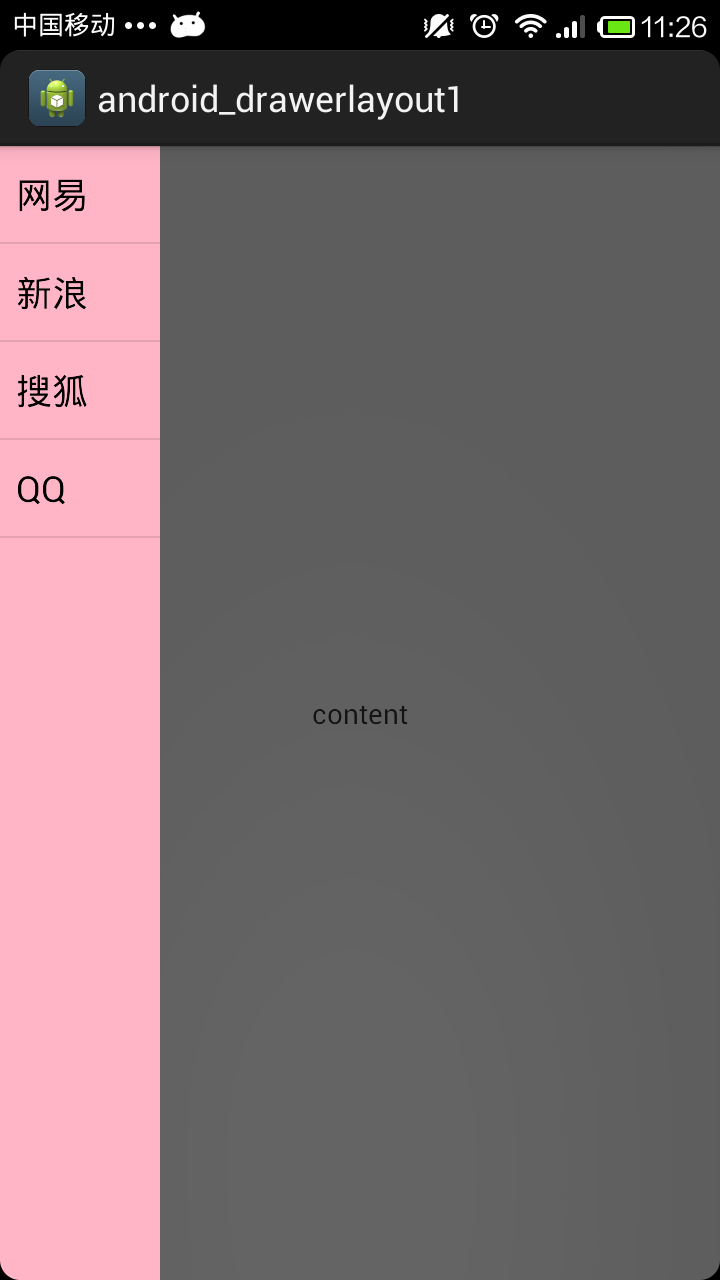 使用DrawerLayout組件實現側滑抽屜的功能
DrawerLayout組件同樣是V4包中的組件,也是直接繼承於ViewGroup類,所以這個類也是一個容器類。使用DrawerLayout可以輕松的實現抽屜效果,使用D
 ListView實現頂部和底部內容指示器的方法
頂部指示器?這是什麼?好吧,我承認這是我自己想出來的詞,因為我不知道它有什麼學名,究竟是什麼呢?看下這個圖就知道了。這是我們的美工MM畫的,偶的神吶,這雖然很漂亮
 Android開發工程中集成mob短信驗證碼功能的方法
一.前言現在的app基本上都需要用到短信功能,注冊時或者有消息通知時需要給用戶發送一條短信,但是對於個人開發者來說,去買第三方的短信服務實在是有點奢侈,很好的是mob為我