編輯:關於Android編程
package com.example.test;

import java.util.Timer;
import java.util.TimerTask;

import android.annotation.SuppressLint;
import android.content.Context;
import android.graphics.Bitmap;
import android.graphics.BitmapFactory;
import android.graphics.Canvas;
import android.graphics.Color;
import android.graphics.Matrix;
import android.graphics.Paint;
import android.graphics.PixelFormat;
import android.graphics.PorterDuff.Mode;
import android.os.Handler;
import android.os.Message;
import android.util.Log;
import android.view.SurfaceHolder;
import android.view.SurfaceView;
import android.view.SurfaceHolder.Callback;

@SuppressLint("HandlerLeak")
class Surface extends SurfaceView implements Callback{

    Bitmap bmp;
    private Paint mPaint;
    private SurfaceHolder mHolder;
    public Surface(Context context) {
        super(context);
        mHolder = getHolder();
        mHolder.addCallback(this);
        mPaint = new Paint();
        mPaint.setColor(Color.GREEN);
        mPaint.setAntiAlias(true);//抗鋸齒
        setFocusable(true);
        setFocusableInTouchMode(true);
//        setZOrderOnTop(true);
//        mHolder.setFormat(PixelFormat.TRANSPARENT);//設置背景透明
        bmp = BitmapFactory.decodeResource(getResources(), R.drawable.camera_r_local);
        bmp = Bitmap.createScaledBitmap(bmp, 15, 15, false);
    }

    public Handler handler = new Handler(){
        @Override
        public void handleMessage(Message msg) {
            switch (msg.what) {
            case 0:
                canvas_ok();
                break;
            }
            super.handleMessage(msg);
        }

    };

    public void canvas_ok(){
         Canvas canvas = null;
        try {
            canvas = mHolder.lockCanvas();
            canvas.drawColor(Color.TRANSPARENT, Mode.CLEAR);//清除屏幕
//          canvas.save();
            Matrix matrix = new Matrix();
            matrix.postTranslate(130, 0);
            matrix.postRotate(degree, 130 ,130);
            canvas.drawBitmap(bmp, matrix, mPaint);
//          canvas.restore();
        } catch (Exception e) {
        }finally {
            if(canvas != null) {
                mHolder.unlockCanvasAndPost(canvas);
            }
        }
    }

    int degree = 0;
    Timer timer = new Timer();
    boolean flag = true;
    @Override
    public void surfaceCreated(SurfaceHolder holder) {
        canvas_ok();
        timer.schedule(new TimerTask() {
            @Override
            public void run() {
                if (flag) {
                    degree++;
                    if (degree == 360) {
                        flag = false;
                    }
                }else {
                    degree--;
                    if(degree == -360 || degree == 0){
                        flag = true;
                    }
                }
                Log.e("flag", degree+"  : "+flag);
                handler.sendEmptyMessage(0);
            }
        }, 50, 50);
    }


    @Override
    public void surfaceChanged(SurfaceHolder holder, int format, int width,
            int height) {

    }


    @Override
    public void surfaceDestroyed(SurfaceHolder holder) {
        if (timer != null) {
            timer.cancel();
            timer = null;
        }
    }
}

package com.example.test;

import java.util.Timer;
import java.util.TimerTask;

import android.annotation.SuppressLint;
import android.content.Context;
import android.graphics.Bitmap;
import android.graphics.BitmapFactory;
import android.graphics.Canvas;
import android.graphics.Color;
import android.graphics.Matrix;
import android.graphics.Paint;
import android.graphics.PixelFormat;
import android.graphics.PorterDuff.Mode;
import android.os.Handler;
import android.os.Message;
import android.util.Log;
import android.view.SurfaceHolder;
import android.view.SurfaceView;
import android.view.SurfaceHolder.Callback;

@SuppressLint("HandlerLeak")
class Surface extends SurfaceView implements Callback{

Bitmap bmp;
private Paint mPaint;
private SurfaceHolder mHolder;
public Surface(Context context) {
super(context);
mHolder = getHolder();
mHolder.addCallback(this);
        mPaint = new Paint();
        mPaint.setColor(Color.GREEN);
        mPaint.setAntiAlias(true);//抗鋸齒
        setFocusable(true);
        setFocusableInTouchMode(true);
//        setZOrderOnTop(true);
//        mHolder.setFormat(PixelFormat.TRANSPARENT);//設置背景透明
bmp = BitmapFactory.decodeResource(getResources(), R.drawable.camera_r_local);
  bmp = Bitmap.createScaledBitmap(bmp, 15, 15, false);
}

public Handler handler = new Handler(){
@Override
public void handleMessage(Message msg) {
switch (msg.what) {
case 0:
canvas_ok();
break;
}
super.handleMessage(msg);
}

};

public void canvas_ok(){
Canvas canvas = null;
try {
canvas = mHolder.lockCanvas();
canvas.drawColor(Color.TRANSPARENT, Mode.CLEAR);//清除屏幕
//         canvas.save();
       Matrix matrix = new Matrix();
       matrix.postTranslate(130, 0);
       matrix.postRotate(degree, 130 ,130);
       canvas.drawBitmap(bmp, matrix, mPaint);
//         canvas.restore();
} catch (Exception e) {
}finally {
            if(canvas != null) {
                mHolder.unlockCanvasAndPost(canvas);
            }
        }
}

int degree = 0;
Timer timer = new Timer();
boolean flag = true;
@Override
public void surfaceCreated(SurfaceHolder holder) {
canvas_ok();
timer.schedule(new TimerTask() {
@Override
public void run() {
if (flag) {
degree++;
if (degree == 360) {
flag = false;
}
}else {
degree--;
if(degree == -360 || degree == 0){
flag = true;
}
}
Log.e("flag", degree+"  : "+flag);
handler.sendEmptyMessage(0);
}
}, 50, 50);
}


@Override
public void surfaceChanged(SurfaceHolder holder, int format, int width,
int height) {

}


@Override
public void surfaceDestroyed(SurfaceHolder holder) {
if (timer != null) {
timer.cancel();
timer = null;
}
}
}
Main7.java是主類
package com.example.test;

import android.app.Activity;
import android.os.Bundle;
import android.widget.RelativeLayout;

public class Main7 extends Activity{
    Surface surface;
    RelativeLayout.LayoutParams laParams;
    @Override
    protected void onCreate(Bundle savedInstanceState) {
        super.onCreate(savedInstanceState);
        surface = new Surface(this);
        laParams = new RelativeLayout.LayoutParams(260,  260);
        setContentView(surface, laParams);
    }

}

package com.example.test;

import android.app.Activity;
import android.os.Bundle;
import android.widget.RelativeLayout;

public class Main7 extends Activity{
Surface surface;
RelativeLayout.LayoutParams laParams;
@Override
protected void onCreate(Bundle savedInstanceState) {
super.onCreate(savedInstanceState);
surface = new Surface(this);
laParams = new RelativeLayout.LayoutParams(260,  260);
setContentView(surface, laParams);
}

}
效果圖如下:

 學習Android Studio開發工具之Activity2(&Fragment)
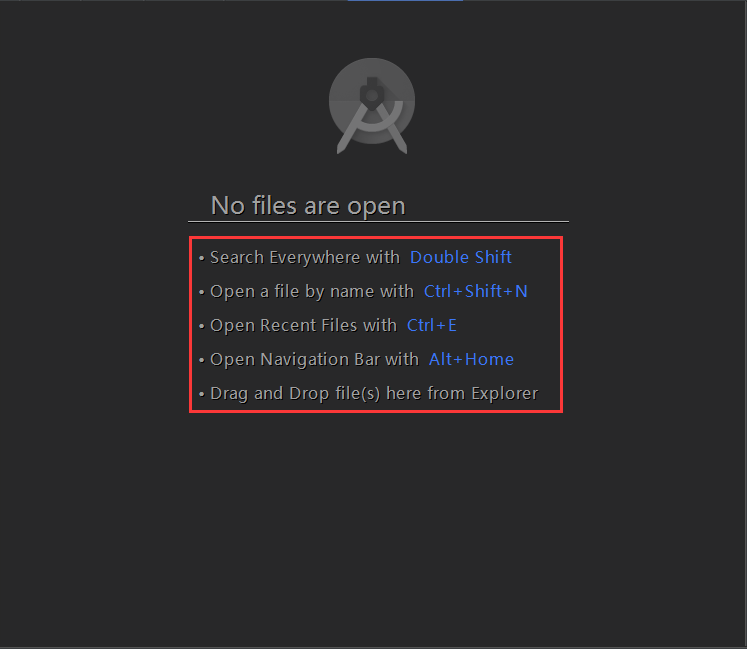
開篇先介紹幾個放在眼前卻經常忽視的快捷鍵如圖:展現出android Studio超強的搜索能力,提高大工程的開發維護效率。雙擊Shift按鍵效果Ctrl+Shift+N
 閱讀《Android 從入門到精通》(29)——LinearLayout 等四類方法
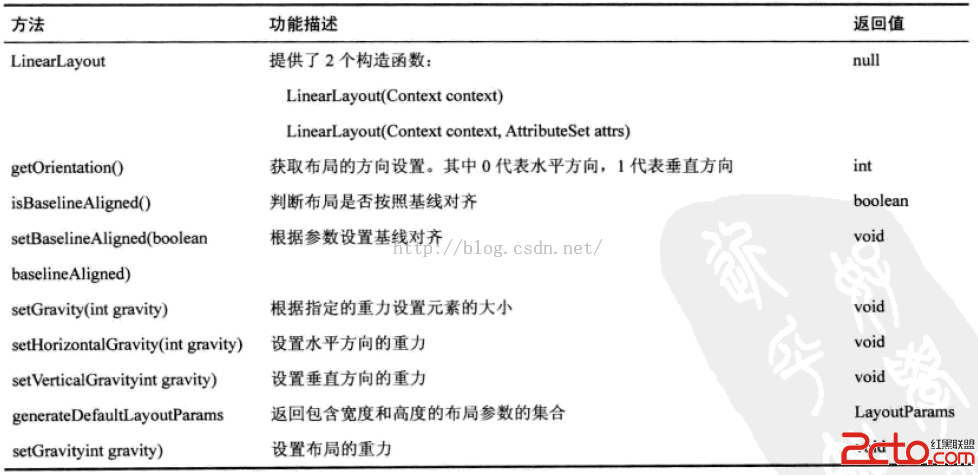
LinearLayout 類方法RelativeLayout 類方法TableLayout 類方法AbsoluteLayout 類方法
 Android實現仿微信tab高亮icon粘著手的滑動效果
微信的主頁分為3個tab,被選中的tab的tabwidget下面會有一個高亮的長條icon,而當切換tab頁面的時候,這個icon不是等到tab切換完成後再出現在當前被選
 Android雜談(22):AndroidStudio快捷鍵
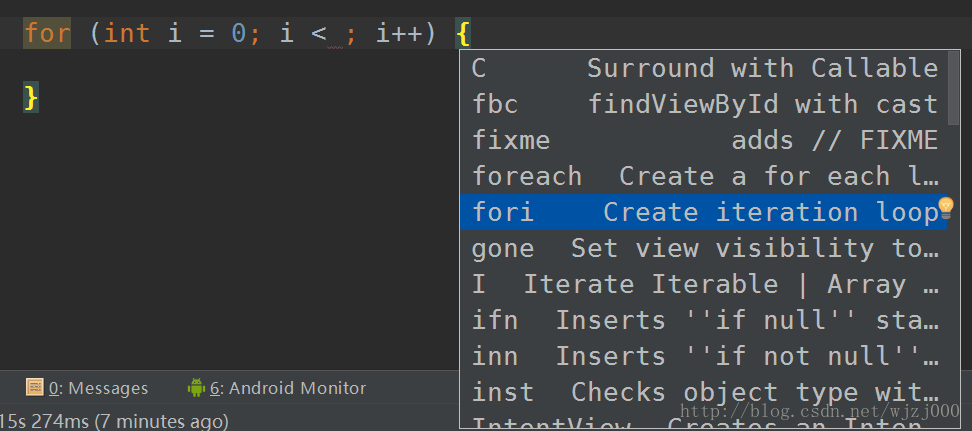
本菜開源的一個自己寫的Demo,希望能給Androider們有所幫助,水平有限,見諒見諒.. https://github.com/zhiaixinyang/MyFir