編輯:關於Android編程
int console_init_r(void)
{
    char *stdinname, *stdoutname, *stderrname;
    struct stdio_dev *inputdev = NULL, *outputdev = NULL, *errdev = NULL;

#ifdef CONFIG_CONSOLE_MUX
    int iomux_err = 0;
#endif
    /* set default handlers at first */
    gd->jt->getc  = serial_getc;
    gd->jt->tstc  = serial_tstc;
    gd->jt->putc  = serial_putc;
    gd->jt->puts  = serial_puts;
    gd->jt->printf = serial_printf;
/*--------------------------以上為代碼段1--------------------------------------------*/

    /* stdin stdout and stderr are in environment */
    /* scan for it */
    stdinname  = getenv("stdin");
    stdoutname = getenv("stdout");
    stderrname = getenv("stderr");  //setenv stdout serial,vga標准輸出被重載,如果u-boot中環境變量stdou被設定,那麼stdout就被重定位
    if (OVERWRITE_CONSOLE == 0) {  /* if not overwritten by config switch */  這裡OVERWRITE_CONSOLE值為1
        inputdev  = search_device(DEV_FLAGS_INPUT,  stdinname);
        outputdev = search_device(DEV_FLAGS_OUTPUT, stdoutname);
        errdev    = search_device(DEV_FLAGS_OUTPUT, stderrname);
#ifdef CONFIG_CONSOLE_MUX  //如setenv stdout serial,vga
        iomux_err = iomux_doenv(stdin, stdinname);
        iomux_err += iomux_doenv(stdout, stdoutname);
        iomux_err += iomux_doenv(stderr, stderrname);
        if (!iomux_err)
            /* Successful, so skip all the code below. */
            goto done;
#endif
    }
/*--------------------------以上為代碼段2--------------------------------------------*/

    /* if the devices are overwritten or not found, use default device */
    if (inputdev == NULL) {
        inputdev  = search_device(DEV_FLAGS_INPUT,  "serial");
    }
    if (outputdev == NULL) {
        outputdev = search_device(DEV_FLAGS_OUTPUT, "serial");
    }
    if (errdev == NULL) {
        errdev    = search_device(DEV_FLAGS_OUTPUT, "serial");
    }

/*--------------------------以上為代碼段3--------------------------------------------*/

    /* Initializes output console first */
    if (outputdev != NULL) {
        /* need to set a console if not done above. */
        console_doenv(stdout, outputdev);
    }
    if (errdev != NULL) {
        /* need to set a console if not done above. */
        console_doenv(stderr, errdev);
    }
    if (inputdev != NULL) {
        /* need to set a console if not done above. */
        console_doenv(stdin, inputdev);
    }

/*--------------------------以上為代碼段4--------------------------------------------*/

#ifdef CONFIG_CONSOLE_MUX
done:
#endif
#ifndef CONFIG_SYS_CONSOLE_INFO_QUIET  /*defined*/
    stdio_print_current_devices();
#endif /* CONFIG_SYS_CONSOLE_INFO_QUIET */
#ifdef CONFIG_SYS_CONSOLE_ENV_OVERWRITE  /*no defined*/
    /* set the environment variables (will overwrite previous env settings) */
    for (i = 0; i < 3; i++) {
        setenv(stdio_names[i], stdio_devices[i]->name);
    }
#endif /* CONFIG_SYS_CONSOLE_ENV_OVERWRITE */  /*defined*/
    gd->flags |= GD_FLG_DEVINIT;   /* device initialization completed */

    print_pre_console_buffer(PRE_CONSOLE_FLUSHPOINT2_EVERYTHING_BUT_SERIAL);
/*--------------------------以上為代碼段5--------------------------------------------*/

    return 0;
}
上述程序按其實現的功能可分為5部分,為了便於分析,我們下面僅以stdout設備為例,逐步進行討論:gd->jt->getc = serial_getc; gd->jt->tstc = serial_tstc; ....上述的代碼段設置jt操作的默認函數為串口相關函數。關於gd->jt所包含函數的使用,我們將在後續的章節中討論。
    stdinname =getenv("stdin");
    stdoutname = getenv("stdout");
    stderrname = getenv("stderr");  /*setenv stdout serial,vga標准輸出被重載,如果u-boot中環境變量stdou被設定,那麼stdout就被重定位*/
    if (OVERWRITE_CONSOLE == 0) {  /* if not overwritten by config switch */  /* OVERWRITE_CONSOLE或為宏定義,或為函數返回值,這裡為返回值1*/
        inputdev  = search_device(DEV_FLAGS_INPUT,  stdinname);
        outputdev = search_device(DEV_FLAGS_OUTPUT, stdoutname);
        errdev    = search_device(DEV_FLAGS_OUTPUT, stderrname);
#ifdef CONFIG_CONSOLE_MUX  //如setenv stdout serial,vga
        iomux_err = iomux_doenv(stdin, stdinname);
        iomux_err += iomux_doenv(stdout, stdoutname);
        iomux_err += iomux_doenv(stderr, stderrname);
        if (!iomux_err)
            /* Successful, so skip all the code below. */
            goto done;
#endif
如我們曾在u-boot中執行命令:
    stdoutname = getenv("stdout");   /*setenv stdout serial,vga標准輸出被重載,如果u-boot中環境變量stdou被設定,那麼stdout就被重定位*/
    ...
    if (OVERWRITE_CONSOLE == 0) {  /* if not overwritten by config switch */  /* OVERWRITE_CONSOLE或為宏定義,或為函數返回值,這裡為返回值1*/
#ifdef CONFIG_CONSOLE_MUX  //如setenv stdout serial,vga
        iomux_err = iomux_doenv(stdin, stdinname);
             ...
        if (!iomux_err)
            /* Successful, so skip all the code below. */
            goto done;
#endif
        inputdev  = search_device(DEV_FLAGS_INPUT,  stdinname);
        ...
這樣,當定義了CONFIG_CONSOLE_MUX時,如果iomux_doenv的執行沒有錯誤,那麼跳過search_device。如果有錯誤,則進一步執行search_device段代碼。
#ifdef CONFIG_CONSOLE_MUX

/* This tries to preserve the old list if an error occurs. */
int iomux_doenv(const int console, const char *arg)
{
    char *console_args, *temp, **start;
    int i, j, k, io_flag, cs_idx, repeat;
    struct stdio_dev *dev;
    struct stdio_dev **cons_set;
    console_args = strdup(arg);
      ...
    i = 0;
    temp = console_args;
    for (;;) {
        temp = strchr(temp, ',');
        if (temp != NULL) {
            i++;
            temp++;
            continue;
        }
        /* There's always one entry more than the number of commas. */
        i++;
        break;
    }
    start = (char **)malloc(i * sizeof(char *));
    ...
    /* setenv stdout serial,vga 幾個用逗號分隔的參數*/
    i = 0;
    start[0] = console_args;
    for (;;) {
        temp = strchr(start[i++], ',');
        if (temp == NULL)
            break;
        *temp = '\0';
        start[i] = temp + 1;
    }
   /*start是一個指向字符串的指針數組。這裡start[0]指向serial, start[1]指向vga*/

/*--------------------------以上為代碼段2.1 --------------------------------------------*/
    cons_set = (struct stdio_dev **)calloc(i, sizeof(struct stdio_dev *));
    /*...cons_set檢查,出錯返回1*/
    switch (console) {
    case stdout:
        io_flag = DEV_FLAGS_OUTPUT;
        break;
    default:
            /*...釋放資源start,console_args,cons_set*/
        return 1;
    }
    cs_idx = 0;
    for (j = 0; j < i; j++) {
        dev = search_device(io_flag, start[j]);
        if (dev == NULL)
            continue;
         repeat = 0;
         for (k = 0; k < cs_idx; k++) {
            if (dev == cons_set[k]) {
                repeat++;
                break;
            }
         }
         if (repeat)
            continue;
        if (console_assign(console, start[j]) < 0)
            continue;
        cons_set[cs_idx++] = dev;
    }

/*--------------------------以上為代碼段2.2 --------------------------------------------*/
    free(console_args);
    free(start);
    /* failed to set any console */
    if (cs_idx == 0) {
        free(cons_set);
        return 1;
    } else {
        console_devices[console] =
            (struct stdio_dev **)realloc(console_devices[console],
            cs_idx * sizeof(struct stdio_dev *));
        if (console_devices[console] == NULL) {
            free(cons_set);
            return 1;
        }

        memcpy(console_devices[console], cons_set, cs_idx *
            sizeof(struct stdio_dev *));
        cd_count[console] = cs_idx;
    }
    free(cons_set);
/*--------------------------以上為代碼段2.3 --------------------------------------------*/
    return 0;
}

#endif /* CONFIG_CONSOLE_MUX */
上述程序中的stdin,stdout,stderr在include/common.h中定義:#define stdin 0 #define stdout 1 #define stderr 2 #define MAX_FILES 3討論上述代碼之前,首先要強調的是,只有定義了CONFIG_CONSOLE_MUX,才會有函數iomux_doenv的定義和實現。
int console_assign(int file, const char *devname)
{
    int flag;
    struct stdio_dev *dev;
    /* Check for valid file */
    switch (file) {
    case stdin:
        flag = DEV_FLAGS_INPUT;
        break;
    case stdout:
    case stderr:
        flag = DEV_FLAGS_OUTPUT;
        break;
    default:
        return -1;
    }
    /* Check for valid device name */
    dev = search_device(flag, devname);
    if (dev)
        return console_setfile(file, dev);
    return -1;
}
為了此處的討論盡可能清晰簡單,search_device函數我們放在後面分析。
static int console_setfile(int file, struct stdio_dev * dev)
{
    int error = 0;
    if (dev == NULL)
        return -1;
    switch (file) {
    case stdin:
    case stdout:
    case stderr:
        /* Start new device */
        if (dev->start) {
            error = dev->start(dev);
            /* If it's not started dont use it */
            if (error < 0)
                break;
        }
        /* Assign the new device (leaving the existing one started) */
        stdio_devices[file] = dev;
        /*
         * Update monitor functions
         * (to use the console stuff by other applications)
         */
        switch (file) {
        case stdin:
            gd->jt->getc = getc;
            ...
            break;
        case stdout:
                    ...
            gd->jt->printf = printf;
            break;
        }
        break;
    default:       /* Invalid file ID */
        error = -1;
    }
    return error;
}
首先嘗試啟動入口參數中的stdio設備。需要注意的是,在前面"stdio_add_devices"一節stdio設備的注冊中,只是填充了相關的結構體,如果其後沒有被使用(如serial就曾被使用了),就還未真正實際啟動被注冊的設備。而這裡,為console分配stdio設備時,就要啟動它(實際是初始化該硬件設備),因為接下就要使用該硬件完成stdio實際的硬件輸入輸出操作。上述dev->start代碼中,一旦啟動失敗(有可能已啟動,或硬件自身的原因),函數console_setfile就立即返回,返回值為0。console_setfile的上層函數也返回0,這樣就回到代碼段2.2,但接下來還是會填充cons_set,但不會在函數console_setfile中接著填充下面的stdio_devices。程序最後將更新gd->jt函數列表。
代碼段2.3
該段代碼主要實現:
將上面代碼段查找到的設備存儲到全局變量console_devices[console]中,其設備個數存儲到全局變量cd_count[console]中。
這裡的console即stdin,stdout,stderr常量之一。當這三者之一擁有多個stdio設備時,console_devices[console]會保存這多個設備,且用cd_count[console]來記錄設備個數。如環境變量stdout的值為serial,vga,那麼console_devices[1]指向的struct stdio_dev結構體指針數組中會包含兩個指針,分別指向serial和vga設備對應的結構體地址。
cd_count[1]為console_devices[1]指向的數組的長度,這裡值為2。
我們可以在最終的輸出函數console_puts實現中看到console_devices和cd_count的使用:
static void console_puts(int file, const char *s)
{
    int i;
    struct stdio_dev *dev;
    for (i = 0; i < cd_count[file]; i++) {
        dev = console_devices[file][i];
        if (dev->puts != NULL)
            dev->puts(dev, s);
    }
}
函數iomux_doenv總結:static struct stdio_dev *tstcdev; struct stdio_dev **console_devices[MAX_FILES]; int cd_count[MAX_FILES];其中的MAX_FILES在 include/common.h中定義為3,即stdin,stdout,stderr。
if (outputdev == NULL) {
   outputdev = search_device(DEV_FLAGS_OUTPUT, "serial");
}
search_device函數執行設備查找,其輸入參數DEV_FLAGS_OUTPUT為stdin,stdout,stderr對應的三者之一。
struct stdio_dev *search_device(int flags, const char *name)
{
    struct stdio_dev *dev;
    dev = stdio_get_by_name(name);
    if (dev && (dev->flags & flags))
          return dev;
    return ((void *)0);
}
函數stdio_get_by_name在common/stdio.c中實現:
struct stdio_dev* stdio_get_by_name(const char *name)
{
    struct list_head *pos;
    struct stdio_dev *dev;
    if(!name)
        return NULL;
    list_for_each(pos, &(devs.list)) {
        dev = list_entry(pos, struct stdio_dev, list);
        if(strcmp(dev->name, name) == 0)
            return dev;
    }
    return NULL;
}
在前面"stdio_add_devices"函數討論的一節中,所有注冊的stdio設備使用全局變量devs.list鏈表串接起來,stdio_get_by_name函數就是在此鏈表中查找名字為涵參name的stdio設備。我們繼續跟蹤list_entry,可以看到其定義為:
#define list_entry(ptr, type, member) \
    container_of(ptr, type, member)
container_of和linux驅動中用法一致,也是通過結構體成員來查找結構體自身的首址。我們在前面的"stdio_add_devices" 一節中也曾經提及過,devs.list的鏈表成員只是struct stdio_dev結構體的成員變量list,而非struct stdio_dev結構體變量本身。所以要使用container_of查找描述stdio設備的struct stdio_dev變量自身。stdio_get_by_name執行完返回到search_device後,如果找到設備,還會核對查找到的設備屬性標志是否和輸入參數的標志一致,設備屬性標志在該設備注冊時設置。
static inline void console_doenv(int file, struct stdio_dev *dev)
{
    console_setfile(file, dev);
}
函數console_setfile將上述查找到的設備最終存儲在全局變量stdio_devices中。這我們在上面代碼段2.2已經討論過。最終將默認的serial設備賦值到stdio_devices中去。gd->flags |= GD_FLG_DEVINIT; /* device initialization completed */ print_pre_console_buffer(PRE_CONSOLE_FLUSHPOINT2_EVERYTHING_BUT_SERIAL);由於CONFIG_PRE_CONSOLE_BUFFER沒有定義,print_pre_console_buffer為空函數。
void puts(const char *s)
{
   ...
   if(!gd->have_console)
        return pre_console_puts(s);
    if (gd->flags & GD_FLG_DEVINIT) {
        /* Send to the standard output */
        fputs(stdout, s);
    } else {
        /* Send directly to the handler */
        pre_console_puts(s);
        serial_puts(s);
    }
}
上述代碼中,如果gd->flags & GD_FLG_DEVINIT為真時,將使用fputs執行信息輸出,fputs定義為:
void fputs(int file,constchar*s)
{
    if (file < MAX_FILES)
        console_puts(file, s);
}
函數console_puts我們在代碼段2.2中粗略提及過,其具體實現如下:
static void console_puts(int file, const char *s)
{
    int i;
    struct stdio_dev *dev;
    for (i = 0; i < cd_count[file]; i++) {
        dev = console_devices[file][i];
        if (dev->puts != NULL)
            dev->puts(dev, s);
    }
}
可見,gd->flags & GD_FLG_DEVINIT為真時,最終將使用console_devices中注冊過的控制台函數執行相關操作。也即是,執行了代表gd->flags |= GD_FLG_DEVINIT後,gd->flags & GD_FLG_DEVINIT為真 ,代表console控制台中的相關操作函數可用了。否則使用默認的串口輸出函數serial_puts。
考慮到這樣一種情況,我們在上述代碼段5的語句
gd->flags |= GD_FLG_DEVINIT;
之前的printf輸出信息,將會使用默認的串口輸出函數serial_puts,該函數在board_f階段被注冊且其後續可用。而該代碼段之後的程序,所使用的printf,都將使用該節討論的console控制台輸出函數。
gd->flags |= GD_FLG_DEVINIT語句制造了一個這樣的分水嶺。
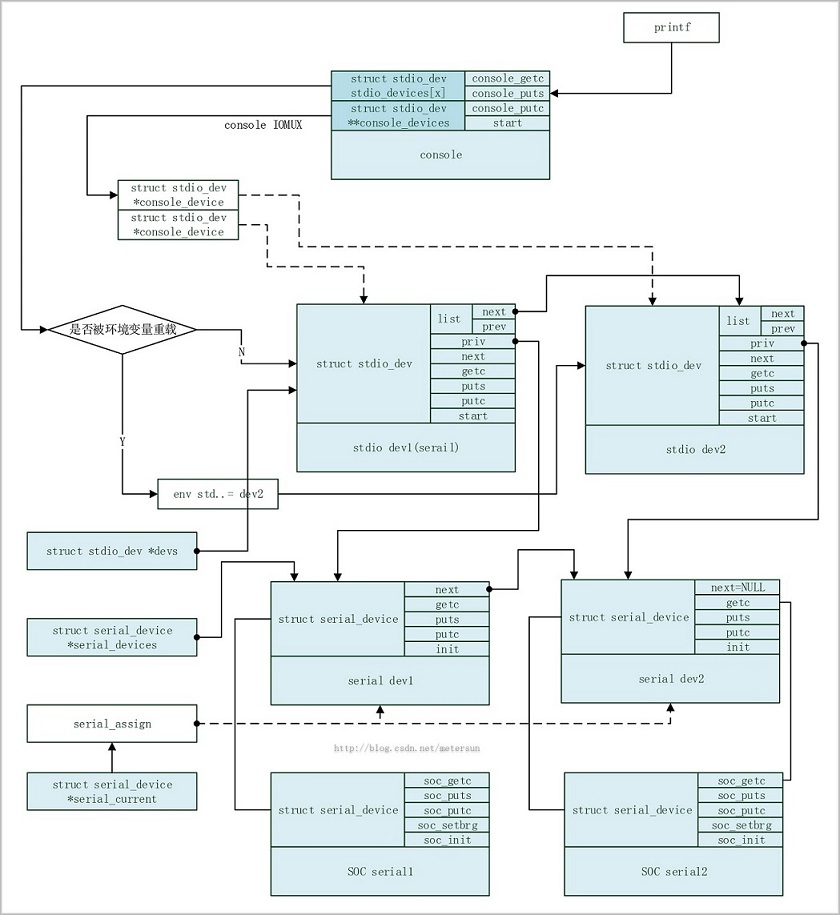
那麼在stdio和serial結構圖的基礎上,加上console,三者之間的結構總圖如下:
 Android實戰--英文詞典(API+GSON+Volley)
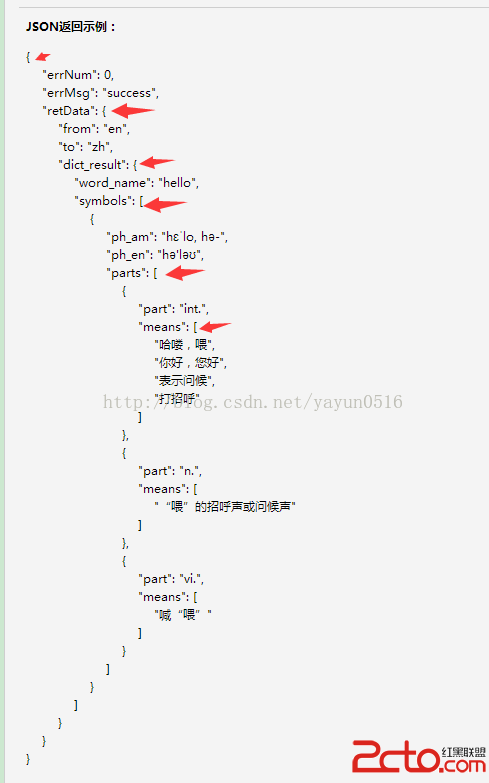
轉載請注明出處,喜歡我的可以關注我!上一節我們介紹了GSON和Volley,用GSON對返回的數據進行了初步解析,這一節我們更進一步,討論一下如何實現英文詞典。首先把JS
 Android的定位策略
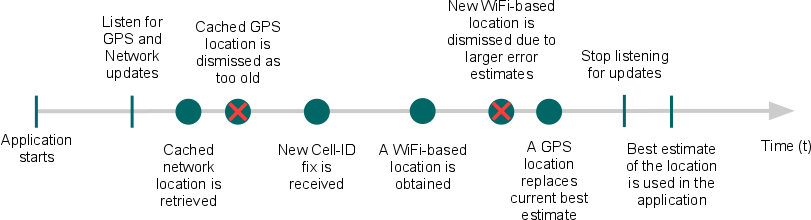
前言 Note: 本文中的策略適用於Android平台上android.location包中的定位API。不同於Google Location Services API,
 Android中使用二級緩存、異步加載批量加載圖片完整案例
一、問題描述Android應用中經常涉及從網絡中加載大量圖片,為提升加載速度和效率,減少網絡流量都會采用二級緩存和異步加載機制,所謂二級緩存就是通過先從內存中獲取、再從文
 僅5步搞定Android開發環境部署 Android開發環境搭建教程
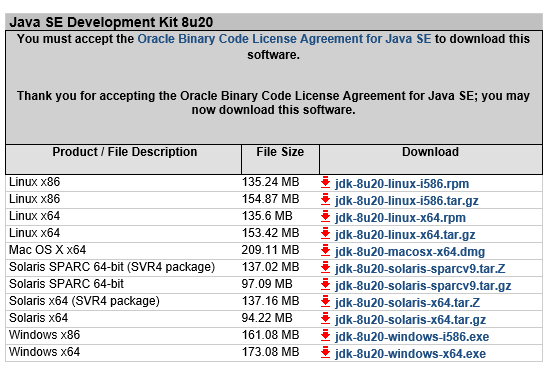
在windows安裝Android的開發環境不簡單也說不上算復雜,本文寫給第一次想在自己Windows上建立Android開發環境投入Android浪潮的朋友們,為了確保