編輯:關於Android編程
Servlet監聽器簡介
Servlet監聽器的作用是監聽Web容器的有效事件,由容器管理。利用Listener接口監聽在容器中的某個執行程序,並更具應用程序的需求做出適當的響應。
監聽Servlet上下文
Servlet上下文監聽可以監聽ServletContext對象的創建、刪除和添加屬性,以及刪除和修改操作,該監聽器需要用到下面兩個接口。
class myServletContextListener implements ServletContextListener{

    //通知正在收聽的對象應用程序已經被加載及初始化
    @Override
    public void contextInitialized(ServletContextEvent servletContextEvent) {

    }

    //通知正在收聽的對象應用程序已經被載出,即關閉
    @Override
    public void contextDestroyed(ServletContextEvent servletContextEvent) {

    }
}
ServletAttributeListener接口:監聽ServletContext屬性的修改、刪除和增加
class myServletAttributeListener implements ServletContextAttributeListener{
    //若有對象加入Application范圍,通知正在收聽的對象
    @Override
    public void attributeAdded(ServletContextAttributeEvent servletContextAttributeEvent) {

    }
    //若有對象從Application范圍移除,通知正在收聽的對象
    @Override
    public void attributeRemoved(ServletContextAttributeEvent servletContextAttributeEvent) {

    }
    //若有對象在Application范圍內的一個對象被另一個對象替換,通知正在收聽的對象
    @Override
    public void attributeReplaced(ServletContextAttributeEvent servletContextAttributeEvent) {

    }
}

class myServletAttributeListener2 implements ServletRequestAttributeListener{

    @Override
    public void attributeAdded(ServletRequestAttributeEvent servletRequestAttributeEvent) {

    }

    @Override
    public void attributeRemoved(ServletRequestAttributeEvent servletRequestAttributeEvent) {

    }

    @Override
    public void attributeReplaced(ServletRequestAttributeEvent servletRequestAttributeEvent) {

    }
}
監聽HTTP會話
HttpSessionListener接口:監聽HTTP會話的創建及銷毀
class myHttpSessionListener implements HttpSessionListener{

    //通知正在收聽的對象,session已經被加載及初始化
    @Override
    public void sessionCreated(HttpSessionEvent httpSessionEvent) {

    }
    //通知正在收聽的對象,session被載出
    @Override
    public void sessionDestroyed(HttpSessionEvent httpSessionEvent) {

    }
}
HttpSessionActivationListener接口:監聽HTTP會話active和passivate情況
class myHttpSessionActivationListener implements HttpSessionActivationListener{
    //通知正在收聽的對象,其session狀態變為有效狀態
    @Override
    public void sessionWillPassivate(HttpSessionEvent httpSessionEvent) {

    }
    //通知正在收聽的對象,其session狀態變為無效狀態
    @Override
    public void sessionDidActivate(HttpSessionEvent httpSessionEvent) {

    }
}
HttpSessionBindingListener接口:監聽HTTP會話中對象的綁定信息,它是唯一不需要再web.xml中設置Listener的。
class myHttpBindingListener implements HttpSessionBindingListener{
    //當有對象加入session的范圍時,會被自動調用
    @Override
    public void valueBound(HttpSessionBindingEvent httpSessionBindingEvent) {

    }
    //當有對象從session的范圍移除時,會被自動取消調用
    @Override
    public void valueUnbound(HttpSessionBindingEvent httpSessionBindingEvent) {

    }
}
HttpSessionAttributeListener接口:監聽HTTP會話中屬性的設置請求。
class myHttpSessionAttributeListener implements HttpSessionAttributeListener {

    //若有對象加入Session范圍,通知正在收聽的對象
    @Override
    public void attributeAdded(HttpSessionBindingEvent httpSessionBindingEvent) {

    }

    //若有對象從Session范圍移除,通知正在收聽的對象
    @Override
    public void attributeRemoved(HttpSessionBindingEvent httpSessionBindingEvent) {

    }

    //若有對象在Session范圍內的一個對象被另一個對象替換,通知正在收聽的對象
    @Override
    public void attributeReplaced(HttpSessionBindingEvent httpSessionBindingEvent) {

    }
}
監聽Servlet請求
ServletRequestListener接口:
class myServletRequestListener implements ServletRequestListener{

    //通知正在收聽的對象,ServletRequest已經被加載及初始化
    @Override
    public void requestDestroyed(ServletRequestEvent servletRequestEvent) {

    }
    //通知正在收聽的對象,ServletRequest已經被載出,即關閉
    @Override
    public void requestInitialized(ServletRequestEvent servletRequestEvent) {

    }
}
ServletRequestAttributeListener接口:
class myServletRequestAttributeListener implements ServletRequestAttributeListener{
    //若有對象加入Request范圍,通知正在收聽的對象
    @Override
    public void attributeAdded(ServletRequestAttributeEvent servletRequestAttributeEvent) {

    }
    //若有對象從Request范圍移除,通知正在收聽的對象
    @Override
    public void attributeRemoved(ServletRequestAttributeEvent servletRequestAttributeEvent) {

    }
    //若有對象在Request范圍內的一個對象被另一個對象替換,通知正在收聽的對象
    @Override
    public void attributeReplaced(ServletRequestAttributeEvent servletRequestAttributeEvent) {

    }
}
下面使用一個小例子:使用監聽器查看在線用戶
UserInfoList類:
package com.java.model;

import java.util.ArrayList;

/**
 * Created with IntelliJ IDEA.
 * Created by YEN on 2016/7/10 and 22:05.
 */
public class UserInfoList {
    private static UserInfoList userInfoList=new UserInfoList();
    private ArrayList arrayList=null;
    public UserInfoList(){
        this.arrayList=new ArrayList();
    }
    public static UserInfoList getInstance(){
        return userInfoList;
    }
    //增加用戶
    public boolean addUserInfo(String username){
        if(username!=null){
            this.arrayList.add(username);
            return true;
        }else return false;
    }
    //獲取用戶列表
    public ArrayList getUserList(){
        return arrayList;
    }
    //移除用戶
    public void removeUserInfo(String username){
        if(username!=null){
            arrayList.remove(username);
        }
    }
}
UserInfoTrace類:
package com.java.model;

import javax.servlet.http.HttpSessionBindingEvent;
import javax.servlet.http.HttpSessionBindingListener;

/**
 * Created with IntelliJ IDEA.
 * Created by YEN on 2016/7/10 and 22:12.
 */

public class UserInfoTrace implements HttpSessionBindingListener{
    private String username;
    private UserInfoList container=UserInfoList.getInstance();
    public UserInfoTrace(){
        this.username="";
    }
    public String getUsername() {
        return username;
    }
    public void setUsername(String username) {
        this.username = username;
    }
    @Override
    public void valueBound(HttpSessionBindingEvent httpSessionBindingEvent) {
        System.out.println("上線................"+this.username);
    }

    @Override
    public void valueUnbound(HttpSessionBindingEvent httpSessionBindingEvent) {
        System.out.println("下線................"+this.username);
        if(username!=""){
            container.removeUserInfo(username);
        }
    }
}
login.jsp頁面
<%--
  Created by IntelliJ IDEA.
  User: YEN
  Date: 2016/7/9
  Time: 16:29
  To change this template use File | Settings | File Templates.
--%>
<%@ page contentType="text/html;charset=UTF-8" language="java" %>
<html>
<head>
    <title>Title</title>
    <script>
        function checkForm() {
            if(document.getElementById("username").value==null || document.getElementById("username").value==""){
                  alert("用戶名不能為空!");
                  return false;
              }
            if(document.getElementById("password").value==null || document.getElementById("password").value==""){
                alert("密碼不能為空!");
                return false;
            }
            return true;
        }
    </script>
</head>
<body>
<form name="form1" action="<%=request.getContextPath()%>/showUserInfo.jsp" method="get" onsubmit="return checkForm()">
    username:<input type="text" name="username" id="username">   <br>
    password:<input type="password" name="password" id="password">   <br>
    <input type="submit" value="提交">
</form>
</body>
</html>
showUserInfo.jsp頁面
<%--
  Created by IntelliJ IDEA.
  User: YEN
  Date: 2016/7/10
  Time: 22:16
  To change this template use File | Settings | File Templates.
--%>
<%@ page contentType="text/html;charset=UTF-8" language="java" %>
<%@page import="com.java.model.UserInfoList" language="java" %>
<%@page import="com.java.model.UserInfoTrace" language="java" %>
<%@ page import="java.util.ArrayList" %>
<html>
<head>
    <title>UserInfoPage</title>
</head>
<body>
<%
    UserInfoList userInfoList=UserInfoList.getInstance();  //獲得UserInfoList類的對象
    UserInfoTrace userInfoTrace=new UserInfoTrace();       //創建UserInfoTrace類的對象
    request.setCharacterEncoding("UTF-8");
    String username=request.getParameter("username");
    userInfoTrace.setUsername(username);
    session.setAttribute("list",userInfoTrace);
    userInfoList.addUserInfo(username);
    session.setMaxInactiveInterval(30);                   //session過期時間為30s
%>
<textarea rows="8" cols="20">
    <%
        ArrayList arrayList=userInfoList.getUserList();
        if(arrayList!=null && arrayList.size()>0 ){
            for (int i = 0; i < arrayList.size(); i++) {
                out.print(arrayList.get(i));
            }
        }
    %>
</textarea>
</body>
</html>
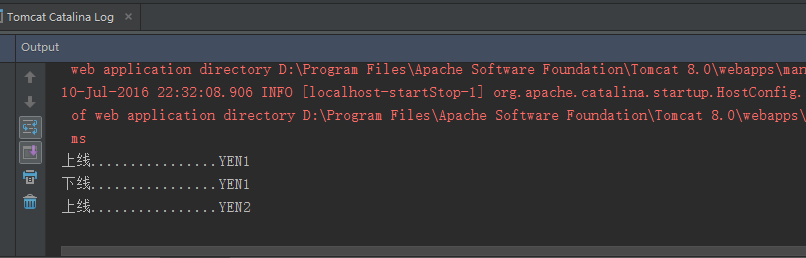
運行結果:
一:在login.jsp頁面輸入信息

二:點擊登陸按鈕


三:在登陸一個用戶
 手把手圖文並茂教你發布Android開源庫
經常逛github,總看到別人的readme中寫著compile ‘com.xxx:1.0.xxx’,這個已經越來越普及,個人,團人,公司都在用,
 學習Android Studio開發工具之Activity1
Android Studio與EclipseADT存在著諸多不同之處,這裡列舉一些Android Studio相對Eclipse 比較棒的特性。顏色、圖片在布局和代碼中可
 Android事件分發機制完全解析,帶你從源碼的角度徹底理解(一)
其實我一直准備寫一篇關於Android事件分發機制的文章,從我的第一篇博客開始,就零零散散在好多地方使用到了Android事件分發的知識。也有好多朋友問過我各種問題,比如
 Android簡易實戰教程--第二十六話《網絡圖片查看器在本地緩存》
上一篇已經把王略中的圖片獲取到了。生活中有這麼些場景:微信聯網打開別人照片後,當手機斷網的時候再去點擊人家的額圖片還能完整看到。這時候,已經不是去網路中獲取圖片了,其實微