

編輯:Android 開發教學
Android 的 Service 與 Windows 中的服務概念相近:都沒有使用者介面,都在背景執行。Activity 可以啟動一個 Service,而 Service 一旦啟動便能持續在背景存活,即使啟動它的 Activity 被關閉或切換走了也不受影響。
Started:透過 startService() 啟動。啟動後不受啟動者控制,適合在背景執行費時工作,如下載檔案,通常不會把結果回傳給啟動它的 Activity。
Bound:透過 bindService() 啟動。它提供了一種 Client/Service 的互動模型,允許呼叫方與服務雙向溝通:發送請求、取得結果,並支援行程間溝通。Bound Service 的生命週期與綁定它的 Activity 連動,多個 Activity 可同時綁定同一個服務,當所有綁定都解除時,服務自動結束。
這兩種形式只是為了說明方便,實際上同一個 Service 可以同時具備兩種身分,只要把兩組介面該實作的函式都寫好即可。
onStartCommand():Activity 呼叫 startService 時觸發。由於此類服務不受啟動者控制,應用有責任主動停止它,服務也可以呼叫 stopSelf 自行結束。
onBind():Activity 呼叫 bindService 時觸發,需回傳一個 IBinder 物件給呼叫方,對方再透過它提供的介面來使用服務。
onCreate():服務第一次被建立時呼叫,性質與 Activity 的 onCreate 類似。
onDestroy():服務退出時呼叫。
實作完 Service 子類別後,和 Activity 一樣必須在 AndroidManifest.xml 中宣告:
<manifest ... >
...
<application ... >
<service android:name=".ExampleService" />
...
</application>
</manifest>
同樣可以為 Service 設定 Intent Filter;若不希望被外部存取,把 android:exported 設為 false 即可。
Service 通常隱身在背景,但 Android 也允許它站到前台。前台服務必須在螢幕頂端狀態列提供一個 Notification,明確告知使用者「有東西正在跑」,例如音樂播放器在標題欄顯示當前曲目就是典型例子。
本例的 Foreground Service Controller 示範了一個跑在前台的服務,做法是呼叫 startForeground() 切到前台、stopForeground() 退出前台(注意:這只會讓它離開前台,服務本身不會停止)。這兩個方法是 API 2.0 才加入的,之前的版本只有 setForeground。
為了同時相容舊版,本例用反射的方式動態探測當前系統是否具備 startForeground 與 stopForeground,有就呼叫,沒有就退回 setForeground。相關的方法簽章與參照宣告如下:
private static final Class[] mStartForegroundSignature = new Class[] {
  int.class, Notification.class};
private static final Class[] mStopForegroundSignature = new Class[] {
  boolean.class};
private Method mStartForeground;
private Method mStopForeground;
private Object[] mStartForegroundArgs = new Object[2];
private Object[] mStopForegroundArgs = new Object[1];
你只要知道 startForegroundCompat 與 stopForegroundCompat 的作用等同於 startForeground 與 stopForeground 即可,其餘反射細節與 Service 本身的邏輯無關。值得一提的是,在後續的 Android 版本中,啟動前台服務已成為強制要求,並需要搭配通知渠道(Notification Channel)使用。
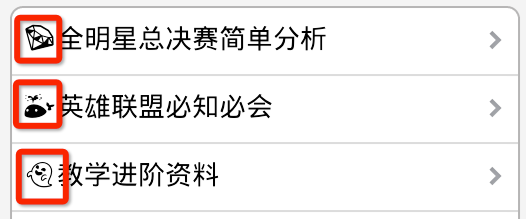 Android 上顯示 Emoji 表情字符的簡便做法
一、取得字型檔 下載 AndroidEmoji.ttf,可從 GitHub 的 Android Platform 相關專案取得,或直接下載 AndroidEmoji.tt
 仿桌面 Launcher 效果:分屏、拖拽與位置記憶的實現思路
做 Android 的同學,大概都對 Launcher 那些絢爛的切屏與拖拽效果動過心。什麼,連 Launcher 是什麼都不知道?拿起手機,解鎖後在首屏左右滑動體驗一下
 Android 自定義 View:仿 QQ 等級天數進度
這個自定義 View 主要用來呈現等級或成長天數進度。畫面中可以看到背景矩形、兩層圓環與多段文字,整體效果類似常見的等級進度控件。繪製步驟先用 RectF 定義圓環範圍,
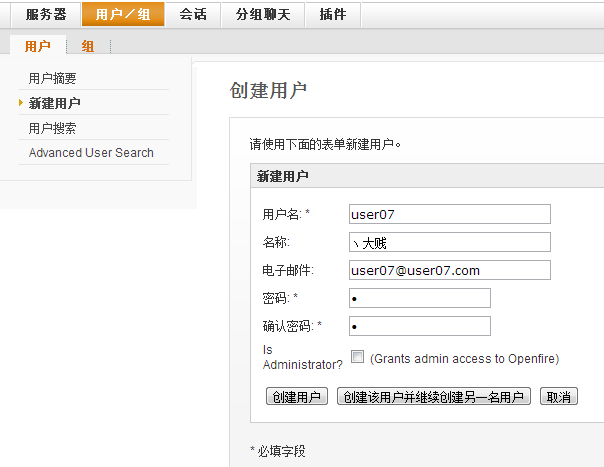 基於 Openfire 開發 Android 即時通訊(3):建立好友列表
透過 roster 就能取得好友列表,但前提是伺服器端已經建立好 roster 資料。如果伺服器上完全沒有設定,那麼不會取得全部使用者,roster.getEntries