

編輯:Android 程式設計入門
在 Android 中,可以通過發送廣播的方式為應用創建桌面快捷方式。首先需要判斷快捷方式是否已存在,避免重複創建:
// 判讀是否已經存在快捷方式 public boolean isExistShortCut() { boolean isInstallShortcut = false; final ContentResolver cr = Main3Activity.this.getContentResolver(); // 2.2系統之後是"com.android.launcher2.settings",之前的為"com.android.launcher.settings" final String AUTHORITY = "com.android.launcher2.settings"; final Uri CONTENT_URI = Uri.parse("content://" + AUTHORITY + "/favorites?notify=true"); Cursor c = cr.query(CONTENT_URI, new String[] { "title", "iconResource" }, "title=?", new String[] { getString(R.string.app_name) }, null); if (c != null && c.getCount() > 0) { isInstallShortcut = true; System.out.println("已經存在快捷方式"); } return isInstallShortcut; }
接著需要在 AndroidManifest.xml 中加入相應權限:
<uses-permission android:name="com.android.launcher.permission.INSTALL_SHORTCUT" /> <uses-permission android:name="com.android.launcher.permission.UNINSTALL_SHORTCUT"/> <!-- 快捷方式信息需要從setting中讀取 --> <uses-permission android:name="com.android.launcher.permission.READ_SETTINGS"/>
最後在 onCreate() 中加入創建邏輯:
if(!isExistShortCut()){ Intent addIntent=new Intent("com.android.launcher.action.INSTALL_SHORTCUT"); Parcelable icon=Intent.ShortcutIconResource.fromContext(this, R.drawable.ic_launcher); //獲取快捷鍵的圖標 Intent myIntent=new Intent(this, MainActivity.class); addIntent.putExtra(Intent.EXTRA_SHORTCUT_NAME, getString(R.string.app_name));//快捷方式的標題 addIntent.putExtra(Intent.EXTRA_SHORTCUT_ICON_RESOURCE, icon);//快捷方式的圖標 addIntent.putExtra(Intent.EXTRA_SHORTCUT_INTENT, myIntent);//快捷方式的動作 addIntent.putExtra("duplicate",false); sendBroadcast(addIntent);//發送廣播 }
通過以上步驟,即可在用戶桌面動態創建應用的快捷方式圖標。
 Android 開發:界面設計基礎知識
一個優秀的 App 不僅要界面美觀,更需要良好的性能與穩定性。作為開發者,既要理解界面設計原則,也要能寫出高質量的佈局代碼。本章著重講解常用控件、界面佈局以及一些常用的界
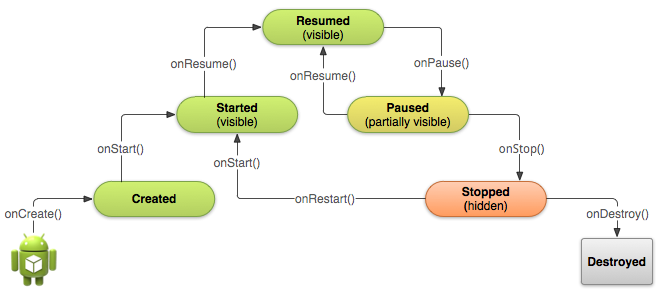 Android Activity 生命週期詳解與實踐要點
本文參考官方文檔,目的不在於羅列 Activity 如何啟動、創建、暫停與銷毀,而是從實際開發出發,分析在 Activity 各個生命週期中我們應該處理哪些工作。 Ac
 Android ListView 實作(二):用 SimpleAdapter 打造圖文列表
SimpleAdapter 是 ListView 四種內建 Adapter 中最實用的一個:它能一次搞定「圖片 + 多行文字」的列表項目,不必自己繼承 BaseAdapt
 Android 系統內部整體架構圖解
理解 Android 系統的內部架構,是深入學習 Android 開發的重要基礎。下圖展示了 Android 系統的分層結構與各層之間的關係: