

編輯:Android 程式設計入門
幀動畫是 Android 中常見的動畫形式之一,它通過連續播放一系列圖片來呈現動畫效果。本文將介紹兩種實現幀動畫的方式:在 XML 文件中定義,以及通過 Java 代碼動態設置。
首先需要在 drawable 資源文件夾下創建一個 animation_list 文件,定義各幀的圖片與顯示時長:
<?xml version="1.0" encoding="utf-8"?> <animation-list xmlns:android="https://schemas.android.com/apk/res/android"> <item android:drawable="@drawable/p1" android:duration="500" /> <item android:drawable="@drawable/p2" android:duration="500" /> <item android:drawable="@drawable/p3" android:duration="500" /> <item android:drawable="@drawable/p4" android:duration="500" /> <item android:drawable="@drawable/p5" android:duration="500" /> </animation-list>
然後在 Java 代碼中將動畫加載到控件上並啟動:
ImageView imageView=(ImageView)findViewById(R.id.id_iv); imageView.setImageResource(R.drawable.anim_list); AnimationDrawable animationDrawable = (AnimationDrawable) image.getDrawable(); animationDrawable.setOneShot(false);//是否只執行一次 animationDrawable.start();//開啟動畫 //animationDrawable.stop();//停止動畫
除了 XML 定義,也可以完全通過代碼動態添加每一幀:
ImageView imageView= (ImageView)findViewById(R.id.id_iv); animationDrawable= new AnimationDrawable(); animationDrawable.addFrame(getResources().getDrawable(R.drawable.p1), 500); animationDrawable.addFrame(getResources().getDrawable(R.drawable.p2), 500); imageView.setImageDrawable(animationDrawable); animationDrawable.setOneShot(false);//是否只執行一次 animationDrawable.start();//開啟動畫 //animationDrawable.stop();//停止動畫
其中,addFrame 的兩個參數分別對應要顯示的圖片資源和該幀的顯示時長(毫秒)。setOneShot(false) 表示動畫循環播放,若設為 true 則只播放一次。
 Android 學習筆記:ActionBar 完整使用指南
一、基本概念 最權威的說明當然還是 Google 官方文件: https://developer.android.com/training/basics/actionba
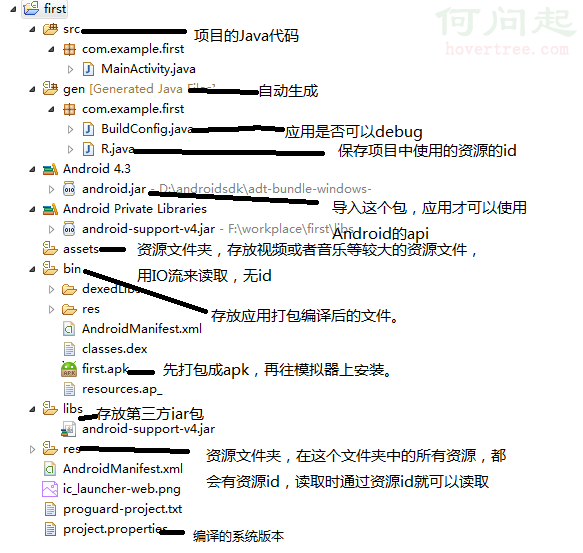 Android 開發入門:專案目錄結構與清單檔配置
Android 專案的目錄結構如下: 資源資料夾: 清單配置檔 Android 的四大元件在使用前,都必須先在清單檔(AndroidManifest.xml)中完成配
 Android 四大組件之 BroadcastReceiver 廣播接收器詳解
BroadcastReceiver 是 Android 四大組件之一,本文從基本概念、使用方法、生命週期到廣播種類,系統性地梳理這一機制。 一、基本概念 1、Broadc
 Android 應用閃退(Crash)分析與捕獲機制
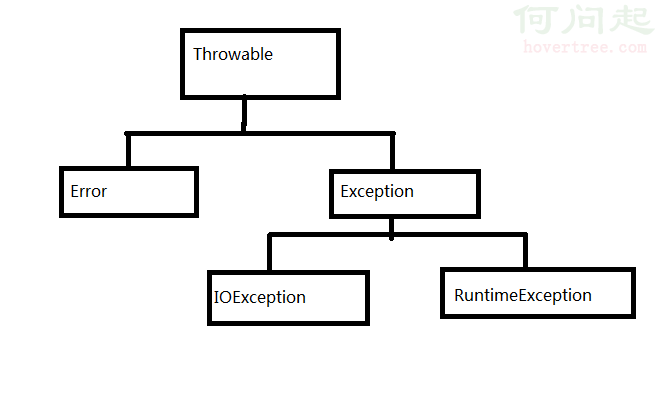
問題描述 閃退(Crash)是指客戶端程式在執行時遭遇無法處理的例外或錯誤而被迫結束的現象。要系統性地處理它,需要回答兩個問題:Crash 發生的原因如何分類、各對應什麼