

編輯:Android 開發實例
Android 與單片機通訊時,常需要處理 GBK 中文、十六進位字串、byte 陣列與不同進位。以下整理常用轉換。
例如 BAFAC2DCB2B7 轉為「胡蘿卜」,兩個位元組合成一個漢字:
public static String stringToGbk(String string) throws Exception {
    byte[] bytes = new byte[string.length() / 2];
    for (int j = 0; j < bytes.length; j++) {
        byte high = Byte.parseByte(string.substring(j * 2, j * 2 + 1), 16);
        byte low = Byte.parseByte(string.substring(j * 2 + 1, j * 2 + 2), 16);
        bytes[j] = (byte) (high << 4 | low);
    }
    return new String(bytes, "GBK");
}public static byte[] gbkToString(String str) throws Exception {
return new String(str.getBytes("GBK"), "gb2312").getBytes("gb2312");
}例如 7e 80 11 20 可轉為 7e801120,適合 log 輸出:
public static String bytesToHexString(byte[] src) {
    StringBuilder stringBuilder = new StringBuilder();
    if (src == null || src.length <= 0) {
        return null;
    }
    for (int i = 0; i < src.length; i++) {
        int v = src[i] & 0xFF;
        String hv = Integer.toHexString(v);
        if (hv.length() < 2) {
            stringBuilder.append(0);
        }
        stringBuilder.append(hv);
    }
    return stringBuilder.toString();
}public static StringBuilder byte2HexStr(byte[] data) {
if (data != null && data.length > 0) {
StringBuilder stringBuilder = new StringBuilder(data.length);
for (byte byteChar : data) {
stringBuilder.append(String.format("%02X ", byteChar));
}
return stringBuilder;
}
return null;
}public static String bytesToAllHex(byte[] bytes, int radix) {
return new BigInteger(1, bytes).toString(radix);
}public static byte[] HexString2Bytes(String src) {
byte[] ret = new byte[src.length() / 2];
byte[] tmp = src.getBytes();
for (int i = 0; i < tmp.length / 2; i++) {
ret[i] = uniteBytes(tmp[i * 2], tmp[i * 2 + 1]);
}
return ret;
}
public static byte uniteBytes(byte src0, byte src1) {
byte _b0 = Byte.decode("0x" + new String(new byte[] { src0 })).byteValue();
_b0 = (byte) (_b0 << 4);
byte _b1 = Byte.decode("0x" + new String(new byte[] { src1 })).byteValue();
return (byte) (_b0 ^ _b1);
}這些方法涵蓋單片機常見的 ASCII、GBK、十六進位與進位轉換。實際使用時,建議加上例外處理與空值檢查,並依裝置端與單片機的編碼約定調整。
 Android MediaPlayer 完整指南:播放控制、進度條與快轉倒轉
要在 App 裡播放音訊或影片,Android 提供了不少途徑,而 MediaPlayer 是最直覺的一個。它讓你以幾行程式碼就能控制內建媒體播放服務,完成播放、暫停、跳
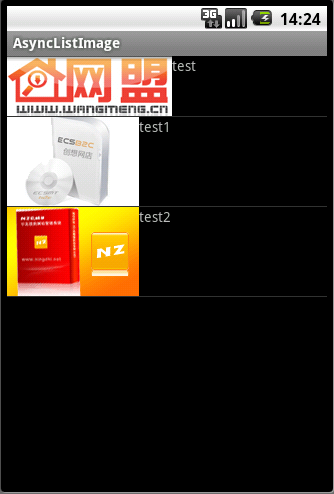 Android ListView 非同步載入圖片實作:快取、視圖複用與標籤比對
只要列表裡的圖片來自網路,就該用非同步載入。理由很直接:讓使用者盯著空白框等圖片載完,是種刑罰。下面把整個實作拆成四個部分,並說明其中幾個非做不可的細節。一、非同步載入的
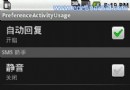 PreferenceActivity 設定頁面開發詳解
PreferenceActivity 是 Android 中專門用於建立設定頁面的 Activity。它能把 CheckBox、清單、輸入框與鈴聲選擇等常見設定控制項,以
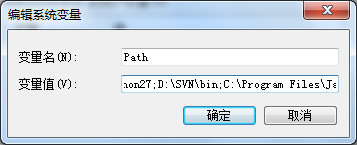 Java 開發環境建置(一):JDK 安裝與環境變數設定
要寫 Android,第一步是把 Java 的開發環境準備好。這一篇記錄 JDK 的安裝與 Windows 上兩個關鍵環境變數的設定流程,並附上驗證方式。 步驟一:下載