

編輯:Android 開發實例
前幾天看到有人用 iOS 寫了個圖靈機器人的客戶端,順手翻了官網的接入文件(https://www.tuling123.com/openapi/),發現簡單得有點意外——就是一個 GET 請求,拼上參數拿回一段 JSON。於是花了點時間搗鼓出個 Android 版本。技術含量談不上,但確實好玩,正好前一晚在複盤秦時明月,就給這只小寵物起名「小貅貅」了。
這個小項目的界面走的是類微信的聊天風格,能力則完全來自圖靈機器人的開放接口:閑聊、講故事、講笑話、查天氣、查公交都能應付。效果大概長這樣:
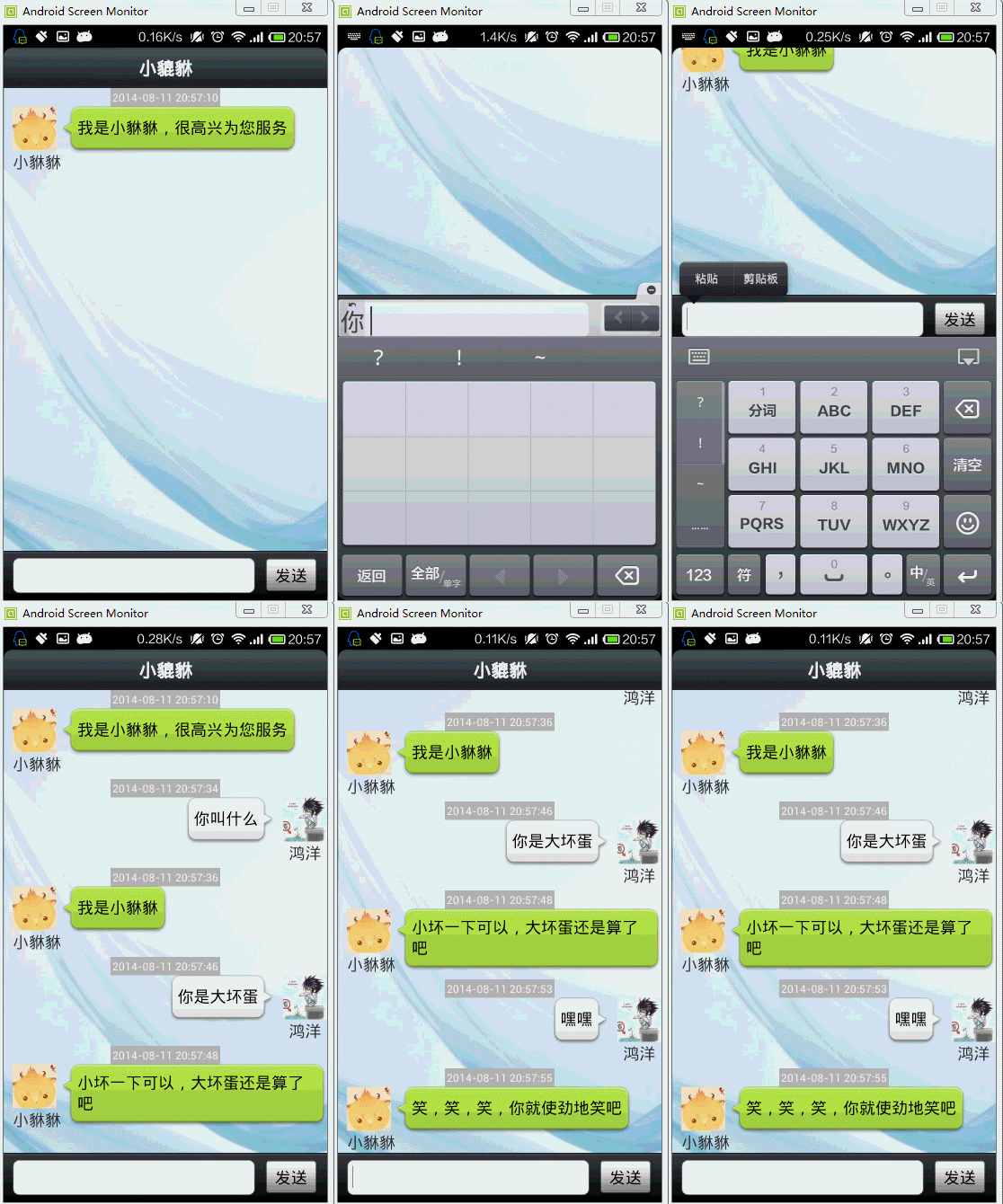
核心邏輯並不複雜:本地維護一個消息列表,發送時先把自己的話插進列表並刷新,然後開一個子線程去請求接口,拿到回覆後通過 Handler 切回主線程更新界面。
package com.example.android_robot_;

import java.util.ArrayList;
import java.util.Date;
import java.util.List;

import android.app.Activity;
import android.content.Context;
import android.os.Bundle;
import android.os.Handler;
import android.os.Message;
import android.text.TextUtils;
import android.view.View;
import android.view.Window;
import android.view.inputmethod.InputMethodManager;
import android.widget.EditText;
import android.widget.ListView;
import android.widget.Toast;

import com.example.android_robot_.bean.ChatMessage;
import com.example.android_robot_.bean.ChatMessage.Type;
import com.zhy.utils.HttpUtils;

public class MainActivity extends Activity {

    /** 展示消息的 ListView */
    private ListView mChatView;
    /** 輸入框 */
    private EditText mMsg;
    /** 聊天消息數據源 */
    private List<ChatMessage> mDatas = new ArrayList<ChatMessage>();
    /** 適配器 */
    private ChatMessageAdapter mAdapter;

    private Handler mHandler = new Handler() {
        public void handleMessage(Message msg) {
            ChatMessage from = (ChatMessage) msg.obj;
            mDatas.add(from);
            mAdapter.notifyDataSetChanged();
            mChatView.setSelection(mDatas.size() - 1);
        }
    };

    @Override
    protected void onCreate(Bundle savedInstanceState) {
        super.onCreate(savedInstanceState);
        requestWindowFeature(Window.FEATURE_NO_TITLE);
        setContentView(R.layout.main_chatting);
        initView();
        mAdapter = new ChatMessageAdapter(this, mDatas);
        mChatView.setAdapter(mAdapter);
    }

    private void initView() {
        mChatView = (ListView) findViewById(R.id.id_chat_listView);
        mMsg = (EditText) findViewById(R.id.id_chat_msg);
        mDatas.add(new ChatMessage(Type.INPUT, "我是小貅貅,很高興為您服務"));
    }

    public void sendMessage(View view) {
        final String msg = mMsg.getText().toString();
        if (TextUtils.isEmpty(msg)) {
            Toast.makeText(this, "您還沒有填寫信息呢...", Toast.LENGTH_SHORT).show();
            return;
        }
        ChatMessage to = new ChatMessage(Type.OUTPUT, msg);
        to.setDate(new Date());
        mDatas.add(to);
        mAdapter.notifyDataSetChanged();
        mChatView.setSelection(mDatas.size() - 1);
        mMsg.setText("");

        // 順手把軟鍵盤收起來
        InputMethodManager imm =
                (InputMethodManager) getSystemService(Context.INPUT_METHOD_SERVICE);
        if (imm.isActive()) {
            imm.toggleSoftInput(InputMethodManager.SHOW_IMPLICIT,
                                InputMethodManager.HIDE_NOT_ALWAYS);
        }

        new Thread() {
            public void run() {
                ChatMessage from = null;
                try {
                    from = HttpUtils.sendMsg(msg);
                } catch (Exception e) {
                    from = new ChatMessage(Type.INPUT, "服務器掛了呢...");
                }
                Message message = Message.obtain();
                message.obj = from;
                mHandler.sendMessage(message);
            }
        }.start();
    }
}
幾個值得留意的細節:網絡請求千萬不要寫在主線程裡,這裡用裸 Thread 只是為了示例清晰,正式項目建議換成線程池或異步任務;Handler 更新列表後記得調 setSelection 滾到最後一條,否則新消息會被頂出屏幕;接口異常時給一句人味的兜底文案,比彈一個 Toast 舒服得多。需要注意的是,圖靈機器人的接口屬於第三方服務, availability 和免費額度都可能變化,上線前記得確認當前的接入政策。
代碼就這麼多,拿去改成自己的寵物也無妨,跑的時候有問題歡迎隨時交流。
 Android 解析 JSON:從 Array、Object 到 Key/Value
JSON 的全稱是 JavaScript Object Notation,中文常譯作「JavaScript 物件符號法」。雖說名字裡有 JavaScript,格式本身卻是
 開啟 ListView 側邊快速滾動滑塊:一行屬性搞定 fastScroll
不少開發者不知道 ListView 右側那個快速滾動滑塊(fast scroll thumb)該怎麼啟用,其實只要一行設定。 用 XML 布局的話,在 ListView
 動手做安卓文件管理器(一):先理清資源層
文件管理器這類工具的職責很明確:幫用戶把存在本地和網絡上的文件管好,創建、打開、查看、編輯、移動、刪除是最基本的六件事,做得深一點還會加上網絡掛載、應用管理、解壓縮和全文
 Android 進階:藍牙傳感應用實例
前文介紹過 Android 利用麥克風采集並顯示模擬信號的方法,這種方式適用於沒有 IO 控制、單純讀取信號的場景。但如果傳感器本身還需要控制電路(例如採集血氧信號時要紅