

編輯:Android 開發實例
專案測試時遇到一個狀況:按 Home 回到桌面,用某個清理工具清記憶體,App 的 Service 就被結束了,再進來時報錯。看了 log 也說不上是哪裡沒控制好,更不明白對方究竟殺掉了什麼(這點我到現在也沒完全弄清楚)。換成小米系統自帶的記憶體優化則不會出問題。
後來想到用 Service 保命,查了資料發現官方本來就有這套機制——Foreground Service(前台服務)。讓 Service 以前台任務的方式運行,就能大幅降低被回收的機率。做法是透過通知欄告知使用者「服務正在運行」,這也是 Android 的設計意圖:前台服務必須對使用者可見。
Notification notification = new Notification(R.drawable.icon, "服務開啟", System.currentTimeMillis()); notification.flags|= Notification.FLAG_NO_CLEAR; notification.flags=Notification.FLAG_ONGOING_EVENT; Intent notificationIntent = new Intent(this, MainActivity.class); PendingIntent pendingIntent = PendingIntent.getActivity(this, 0, notificationIntent, 0); notification.setLatestEventInfo(this, "service", "防止服務被任務管理器所殺", pendingIntent); startForeground(ONGOING_NOTIFICATION, notification);
這樣 Service 的存活率確實提高,但通知欄無法清除——一清除服務就被殺。
後來一次做自訂通知時,通知欄沒有顯示任何東西,卻發現 Service 也沒被殺。於是進一步研究,最後發現只要兩行就能達到「保住服務但不出現通知」的效果:
Notification notification = new Notification(); startForeground(1, notification);
完整程式碼如下:
public class TestService extends Service { private static final Class[] mStartForegroundSignature = new Class[] { int.class, Notification.class }; private static final Class[] mStopForegroundSignature = new Class[] { boolean.class }; private NotificationManager mNM; private Method mStartForeground; private Method mStopForeground; private Object[] mStartForegroundArgs = new Object[2]; private Object[] mStopForegroundArgs = new Object[1]; @Override public IBinder onBind(Intent intent) { return null; } @Override public void onCreate() { super.onCreate(); mNM = (NotificationManager) getSystemService(Context.NOTIFICATION_SERVICE); try { mStartForeground = TestService.class.getMethod("startForeground", mStartForegroundSignature); mStopForeground = TestService.class.getMethod("stopForeground", mStopForegroundSignature); } catch (NoSuchMethodException e) { mStartForeground = mStopForeground = null; } // 我們並不需要為 notification.flags 設置 FLAG_ONGOING_EVENT,因為 // 前台服務的 notification.flags 總是默認包含了那個標志位 Notification notification =new Notification(); // 注意使用 startForeground ,id 為 0 將不會顯示 notification startForegroundCompat(1, notification); } @Override public void onDestroy() { super.onDestroy(); stopForegroundCompat(1); } // 以兼容性方式開始前台服務 private void startForegroundCompat(int id, Notification n) { if (mStartForeground != null) { mStartForegroundArgs[0] = id; mStartForegroundArgs[1] = n; try { mStartForeground.invoke(this, mStartForegroundArgs); } catch (IllegalArgumentException e) { e.printStackTrace(); } catch (IllegalAccessException e) { e.printStackTrace(); } catch (InvocationTargetException e) { e.printStackTrace(); } return; } mNM.notify(id, n); } // 以兼容性方式停止前台服務 private void stopForegroundCompat(int id) { if (mStopForeground != null) { mStopForegroundArgs[0] = Boolean.TRUE; try { mStopForeground.invoke(this, mStopForegroundArgs); } catch (IllegalArgumentException e) { e.printStackTrace(); } catch (IllegalAccessException e) { e.printStackTrace(); } catch (InvocationTargetException e) { e.printStackTrace(); } return; } // 在 setForeground 之前調用 cancel,因為我們有可能在取消前台服務之後 // 的那一瞬間被kill掉。這個時候 notification 便永遠不會從通知一欄移除 mNM.cancel(id); } }
實測結果是某些常見的清理工具與手機管家都無法結束這個 Service。不過手動結束之後再打開,音頻仍在播放(這是個跟音頻有關的客戶端),感覺有點彆扭。
這個技巧在當時的 Android 版本上有效,但今天已經行不通,也不該再用。原因有三:
1. 空的 Notification 會被系統拒絕。Android 8.0(API 26)開始,前台服務必須綁定一條有效的通知渠道,且通知必須實際可見。傳入空 Notification 會直接拋 RemoteServiceException 或 MissingForegroundServiceTypeException,「隱形」的路被堵死了。
2. 反射呼叫 mStartForeground 毫無必要。那段 Method 反射是為了相容 API 5 以前的舊系統。現在 startForeground(id, notification) 是公開 API,直接呼叫即可,reflection 只會增加維護負擔與 crash 風險。
3. 必須宣告 foregroundServiceType。Android 9 起,前台服務要在 Manifest 明確標示用途(mediaPlayback、location、dataSync 等),並依類型執行期請求對應權限。Android 14 更會強制檢查。
先問:真的需要長時間背景執行嗎?絕大多數情況其實不需要。改用 WorkManager(可延後的工作)、FirebaseMessaging(推播喚醒)、或 JobScheduler 才是正解,系統會在合適時機幫你執行,不必跟省電機制對抗。
若確實需要(音樂播放、導航、錄音、通話),就用標準做法:
<service android:name=".PlaybackService" android:foregroundServiceType="mediaPlayback" android:exported="false" />
NotificationChannel channel = new NotificationChannel("playback", "播放控制", NotificationManager.IMPORTANCE_LOW); getNotificationManager().createNotificationChannel(channel); Notification n = new NotificationCompat.Builder(this, "playback") .setSmallIcon(R.drawable.ic_play) .setContentTitle("正在播放") .setOngoing(true) .build(); startForeground(1001, n);
並且記得:Android 12 起 startForeground() 不能從背景啟動(有若干例外情境),使用者也可能透過通知直接停掉你的服務——所以服務必須能被優雅地結束,工作狀態也該在 onTaskRemoved() 裡妥善收尾。
原始 bug 是「被清理後再進來就報錯」。即使 Service 沒被殺,正確的修法也該是:讓 Service 與 UI 的狀態可以從任何中斷點恢復——把播放位置、下載進度等持久化,重進時讀回並校正,而不是假設 Service 永遠活著。省電機制只會越來越嚴格,把程式寫成「隨時可能被殺」的樣子,才是長久之計。
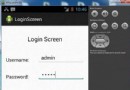 Android 登入功能範例:輸入欄位設計與三次失敗後停用按鈕
需要帳號的 App,幾乎都少不了一個登入頁。它看似只是兩個輸入框加一顆按鈕,實際上卻涵蓋了幾個不容忽略的細節:密碼不能被旁人看見、錯誤時要給明確回饋,以及不該讓人無限次嘗
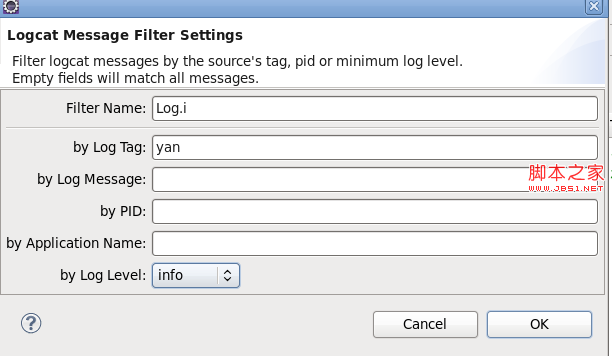 Logcat 調試的詳細步驟與常見問題
Logcat 是最基礎也最常用的調試手段,但每次隔一段時間再用,總會在某一步卡住——日誌刷屏找不到目標,或者打了半天一個字都不顯示。把步驟和排查要點固化下來,能省不少時間
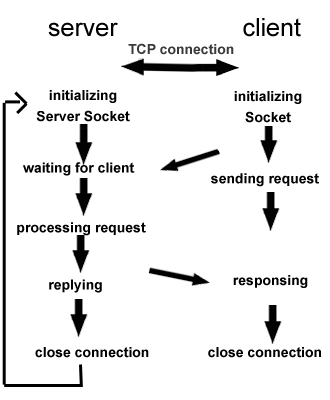 Android 中的 TCP 與 UDP 傳輸實作
TCP 與 UDP 是 Android 網路開發中常見的傳輸協定。TCP 面向連接、可靠且按序傳輸;UDP 無連接、低延遲,適合理會即時性較高的場景。TCP 通訊概念TC
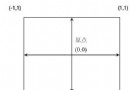 使用 OpenGL ES 混合模式縮放視頻緩衝區以適配螢幕
在開發軟體渲染型遊戲時,如何將固定尺寸的視頻緩衝區縮放到不同解析度螢幕,是常見挑戰。相較於純軟體縮放或完全依賴 GPU,混合模式在效能與相容性之間取得較好平衡。三種縮放策