

編輯:Android 開發實例
本篇承接中篇,重點在於把自定義的 ScrollLayout 組件真正接入 Activity 與布局,讓左右滑動切屏跑起來。
ScrollViewDemoActivity.java 非常簡單,只需設置內容布局即可:
package com.teleca.robin;

import android.app.Activity;
import android.os.Bundle;

public class ScrollViewDemoActivity extends Activity {

    /** Called when the activity is first created. */
    @Override
    public void onCreate(Bundle savedInstanceState) {
        super.onCreate(savedInstanceState);
        setContentView(R.layout.main_scroll);
    }
}
main_scroll.xml 的關鍵在於:根節點使用的是我們自定義的 com.teleca.robin.ScrollLayout,內部放入三個充滿屏幕的子 LinearLayout,分別作為三頁,每頁設置不同的背景圖並顯示「第一頁」「第二頁」「第三頁」的文字。
<?xml version="1.0" encoding="utf-8"?>
<com.teleca.robin.ScrollLayout
    xmlns:android="https://schemas.android.com/apk/res/android"
    android:id="@+id/ScrollLayoutTest"
    android:layout_width="fill_parent"
    android:layout_height="fill_parent">

    <LinearLayout
        android:layout_width="fill_parent"
        android:layout_height="fill_parent"
        android:orientation="vertical"
        android:background="@drawable/girl">
        <TextView
            android:id="@+id/textView1"
            android:layout_width="fill_parent"
            android:layout_height="wrap_content"
            android:text="第一頁"
            android:textAppearance="?android:attr/textAppearanceLarge">
        </TextView>
    </LinearLayout>

    <LinearLayout
        android:layout_width="fill_parent"
        android:layout_height="fill_parent"
        android:orientation="vertical"
        android:background="@drawable/girl2">
        <TextView
            android:id="@+id/textView1"
            android:layout_width="fill_parent"
            android:layout_height="wrap_content"
            android:text="第二頁"
            android:textAppearance="?android:attr/textAppearanceLarge">
        </TextView>
    </LinearLayout>

    <LinearLayout
        android:layout_width="fill_parent"
        android:layout_height="fill_parent"
        android:orientation="vertical"
        android:background="@drawable/girl3">
        <TextView
            android:id="@+id/textView1"
            android:layout_width="fill_parent"
            android:layout_height="wrap_content"
            android:text="第三頁"
            android:textAppearance="?android:attr/textAppearanceLarge">
        </TextView>
    </LinearLayout>

</com.teleca.robin.ScrollLayout>
把 Activity 註冊到 AndroidManifest.xml 後即可運行,你會看到一個能隨手指滑動而平滑切換的仿 Launcher 桌面效果。
 Android Button 控制項與監聽器設計教學
Button 是最常見的 Android 控制項之一。使用者透過點擊按鈕觸發事件,而開發者則透過監聽器決定點擊後要執行的行為。一個沒有監聽器的 Button 幾乎沒有互動
 現代 Android 架構實戰:從響應式資料流到建置系統的整理術
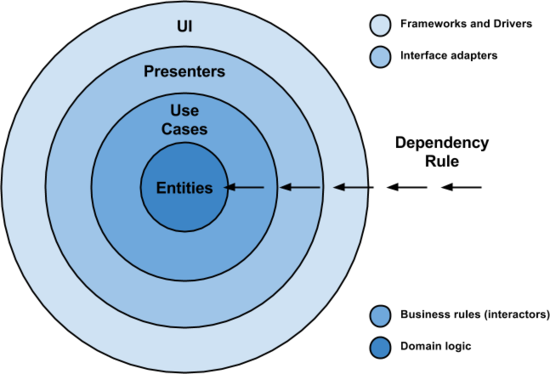
沉寂了一段時間,收集到不少讀者回饋之後,我覺得這個話題該好好談一談了。接下來我想分享的是:在我眼中,打造一個現代化 Android 應用該有的樣子,以及支撐它背後的架構思
 Android 刪除 Preference 的深層原理與常見失敗原因
Android 的設定介面實作起來相當輕鬆,簡單到一個 XML 檔就能搞定。宣告容易,但想從 PreferenceScreen 或 PreferenceCategory
 仿優酷 App 圖片輪播:ViewPager 自動切換完整實作
這個範例用 ViewPager 實作了圖片輪播,同時支援自動播放與手動滑動。其實不只優酷,許多商城與入口網站的首頁 banner 都是同一套邏輯。實作思路1. 加入 su