

編輯:Android 開發實例
TextSwitcher 專門用來替「會變動的文字」加上進出動畫,例如輪播標題、即時計數、狀態提示。
public class TextSwitcher extends ViewSwitcher繼承鏈:Object → View → ViewGroup → FrameLayout → ViewAnimator → ViewSwitcher → TextSwitcher
它是 ViewSwitcher 的特化版本,只接受 TextView 類型的子檢視。每當你呼叫 setText(),它就會用動畫把舊文字淡出、新文字淡入,切換過程因此變得柔和。若直接呼叫 setCurrentText(),則是硬切、不播放動畫。
public TextSwitcher(Context context):建立空的 TextSwitcher。public TextSwitcher(Context context, AttributeSet attrs):以指定的 Context 與屬性集合建立。public void addView(View child, int index, ViewGroup.LayoutParams params):加入子檢視;若 child 不是 TextView 會丟出 IllegalArgumentException。public void setCurrentText(CharSequence text):立即換成新文字,不播放動畫。public void setText(CharSequence text):設定下一個檢視的文字並切換,會播放進出動畫。以下摘自官方 APIDemos 的 TextSwitcher 範例,點一次按鈕就讓數字淡入淡出地遞增:
public class TextSwitcher1 extends Activity
        implements ViewSwitcher.ViewFactory, View.OnClickListener {

    private TextSwitcher mSwitcher;
    private int mCounter = 0;

    @Override
    protected void onCreate(Bundle savedInstanceState) {
        super.onCreate(savedInstanceState);
        setContentView(R.layout.text_switcher_1);

        mSwitcher = (TextSwitcher) findViewById(R.id.switcher);
        mSwitcher.setFactory(this);

        Animation in = AnimationUtils.loadAnimation(this, android.R.anim.fade_in);
        Animation out = AnimationUtils.loadAnimation(this, android.R.anim.fade_out);
        mSwitcher.setInAnimation(in);
        mSwitcher.setOutAnimation(out);

        Button nextButton = (Button) findViewById(R.id.next);
        nextButton.setOnClickListener(this);

        updateCounter();
    }

    public void onClick(View v) {
        mCounter++;
        updateCounter();
    }

    private void updateCounter() {
        mSwitcher.setText(String.valueOf(mCounter));
    }

    public View makeView() {
        TextView t = new TextView(this);
        t.setGravity(Gravity.TOP | Gravity.CENTER_HORIZONTAL);
        t.setTextSize(36);
        return t;
    }
}
對應的版面配置:
<LinearLayout xmlns:android="https://schemas.android.com/apk/res/android"
    android:layout_width="match_parent"
    android:layout_height="match_parent"
    android:orientation="vertical">

    <Button android:id="@+id/next"
        android:layout_width="wrap_content"
        android:layout_height="wrap_content"
        android:text="Next" />

    <TextSwitcher android:id="@+id/switcher"
        android:layout_width="match_parent"
        android:layout_height="wrap_content" />
</LinearLayout>TextSwitcher 一定要先設定 ViewFactory(實作 makeView() 傳回一個 TextView),否則無法運作;接著用 setInAnimation() 與 setOutAnimation() 指定進出動畫,最後一律透過 setText() 更新內容,動畫才會生效。
資料來源:Android 官方 API 文件與 APIDemos 整理。
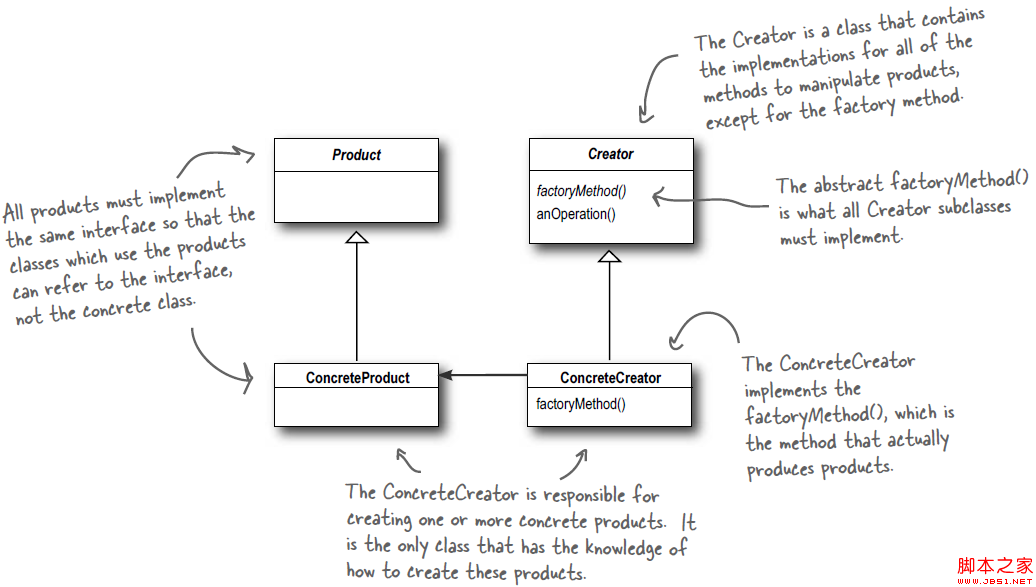 Android 源碼中的工廠方法模式:定義、優勢與 ListActivity 案例
定義 Define an interface for creating an object, but let subclasses decide which class
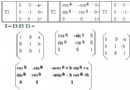 Android Matrix 圖像變換完全解析:平移、旋轉、鏡像、錯切與復合變換
線性代數裡學過矩陣,但真正把矩陣用來做圖像變換,往往是在實際項目中才想通。這篇把 android.graphics.Matrix 的理論與用法系統梳理一遍。 一、3×3
 Android 抽屜效果實作:用 SlidingDrawer 打造隱藏式側邊面板
最近在開發一個應用時,我希望把設定頁面和主頁面放在一起,讓使用者能即時預覽設定對 UI 的影響。SlidingDrawer 這個控制項正好能實現這種「抽屜」效果——拉開時
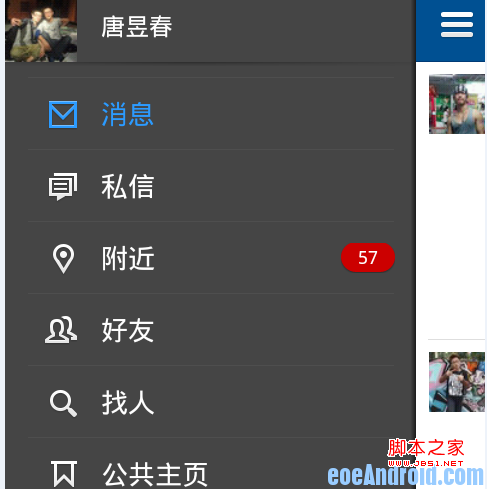 ListView 選中項持續高亮的正確做法
很多客戶端的左側導航欄都有這樣的效果:點擊某一行後,該行會持續保持高亮(比如文字變色),而不是只在按下的一瞬間有反饋;再點別的行,高亮就整行搬過去。下面記錄實現過程與一個