

編輯:初階開發
Activity 物件與 Service 物件通常執行在不同的 process 裡,各有不同的 UID。因為彼此獨立,Activity 多半得依賴 Intent 去請 Android 啟動它需要的 Service。
站在 Service 開發者的角度,前來連線的 Activity 屬於「外界」的軟體,而且大多是別人寫的。問題來了:Service 怎麼確定這個外來物件沒有惡意?這就是安全性要處理的事。Service 類別中可以做權限檢查:
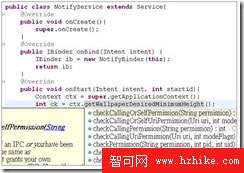
確認對方善意之後,Service 才把 IBinder 介面的參照交給 Activity。Activity 從此可以透過 IBinder 介面使用 Binder 的服務:
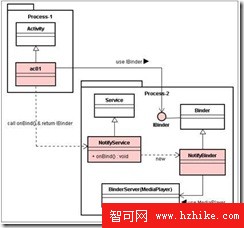
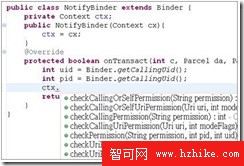
雙向都要設防。當 Activity 呼叫 IBinder 的 transact() 等函式時,會反向觸發 NotifyBinder 子類別的 onTransact()。在這個回呼點上同樣可以進行安全檢驗,例如:
int uid = Binder.getCallingUID();
取得對方的 UID 來核對身分,也可以進一步呼叫 checkCallingPermission() 之類的方法做權限檢查:
通過檢驗、確認來客無誤之後,才啟動 BinderServer(例如影音播放器)提供真正的服務。以上是從 Service 開發者視角看 IBinder 安全機制的概念脈絡,具體程式碼這裡從略。
一個 Package 可以含多個 Activity,它們可能在同一個 process 中執行,也可能被指派到不同 process。由於 Linux 的安全限制,加上不同 process 的位址空間彼此獨立,同一 process 內的 Activity-a 與 Activity-b 溝通起來方便又快;一旦分屬不同 process,就成了 IPC 跨進程溝通,成本高得多。
先看似同進程的直連寫法。ac01 提供一個靜態參照 appRef 與 setData() 方法,Activity_1 在 onCreate 的最後直接寫入:
// ac01.java
public static ac01 appRef = null;
public void setData(String x) { feedback_data = x; }

// Activity_1.java
ac01.appRef.setData("feedback from Activity_1.");
// ac01 在 onResume() 中:setTitle(feedback_data);
這行指令只有在 ac01 與 Activity_1 位於同一個位址空間(同一 process)時才有效。如果把 AndroidManifest.xml 改成讓 Activity_1 跑在獨立 process:
<activity android:name=".Activity_1" android:process=":remote" />
那麼 ac01.appRef.setData(...) 就會失效——兩個 process 各自持有自己的記憶體,靜態變數根本不是同一份。
跨進程時,可以改用 SharedPreferences 做為資料交換的落地位。先匯入 Editor 介面:
import android.content.SharedPreferences.Editor;
Activity_1 負責寫入:
Editor passwdfile = getSharedPreferences("ITEM", 0).edit();
passwdfile.putString("ITEM", "feedback from Activity_1.");
passwdfile.commit();
ac01 負責讀取。寫在 onResume() 裡:
SharedPreferences passwdfile = getSharedPreferences("ITEM", 0);
String im = passwdfile.getString("ITEM", null);
setTitle(im);
也可以改寫在 onActivityResult() 裡,並改用 startActivityForResult() 啟動下一個 Activity:
protected void onActivityResult(int requestCode, int resultCode, Intent data) {
    SharedPreferences passwdfile = getSharedPreferences("ITEM", 0);
    setTitle(passwdfile.getString("ITEM", null));
}
// ...
Intent intent = new Intent(Intent.ACTION_EDIT, null);
this.startActivityForResult(intent, 0);
兩種寫法都能讓 Activity_1 把資料回傳給 ac01。差別在時機:onResume() 每次回到前景都會讀一次;onActivityResult() 只在被呼叫的那次返回時觸發,語意更精準,也更貼近「我確實在等一個回傳值」的意圖。
值得留意的是,SharedPreferences 是「每個 Package 私有」的儲存機制。因此上面這套做法的前提是:ac01 與 Activity_1 屬於同一個 Package(不論同 process 或分屬不同 process 都可以)。若兩者分屬不同 Package,SharedPreferences 就派不上用場了,得另尋 IPC 方案。
 Android 開發講義(七):Activity 與 Service 通訊、SurfaceView 計時繪圖
Activity 與 Service 之間的溝通 先執行 ac01: 這個 ac01 立刻啟動 myService,myService 每隔一段時間定時送出數字,畫面上
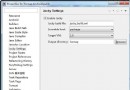 Jocky 程式碼保護工具的設定與使用流程
Jocky 是一款用來對 Android 專案做「混碼」(程式碼混淆與保護)的工具,它以 Eclipse 外掛的形式安裝,實際執行的則是一支 Ant 建置腳本。以下是完整
 Android 開發講義(二):DDMS 模擬簡訊、Layout 的服務觀與繼承/委託抉擇
八、如何從 DDMS 發送簡訊給應用程式 切換到 DDMS 路徑一:在 Eclipse 的 Android 程式編輯畫面,點擊右上角的 DDMS 按鈕,再從清單中選取即可
 Android 連線時顯示下載進度條
在 Android 應用中,若需要從網路取得資料,常會使用進度條提示使用者目前仍在處理中。這能避免畫面看起來像卡住,也能提升操作回饋。基本思路可以先顯示 Progress