

編輯:關於 Android 程式設計
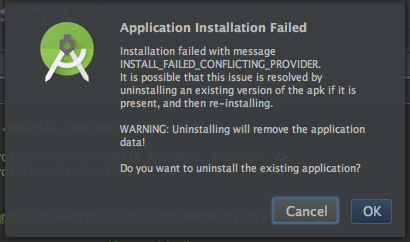
安裝時突然看到 INSTALL_FAILED_CONFLICTING_PROVIDER,而且錯誤訊息裡完全沒提是哪個元件出了問題——這種「毫無頭緒」的感覺最惱人。其實成因非常單一,解法也很乾淨。
Android 中,ContentProvider 的 authorities 是全系統唯一的識別碼,同一時間只能有一個 App 使用同一組 authority。系統在安裝新 App 時,會比對它的所有 provider authority 與裝置上已安裝應用的 authority;一旦重複,安裝立即中止並拋出這個錯誤。
最常見的觸發情境是:你參考了某個開源專案或教學,把它的 provider 宣告整段複製過來,卻忘了把 authorities 換成自己的。這時,只要你的 App 和那個「參考來源」裝在同一台裝置上,衝突就發生了。
不要寫死字串,改為以 applicationId 為前綴:
 <provider
     android:name="android.support.v4.content.FileProvider"
     android:authorities="${applicationId}.fileprovider"
     android:grantUriPermissions="true"
     android:exported="false">
     <meta-data
         android:name="android.support.FILE_PROVIDER_PATHS"
         android:resource="@xml/file_paths" />
</provider>
${applicationId} 是 Gradle 在編譯階段會替換的佔位符(manifest placeholder)。因為每個 App 的 applicationId 都不同,代入後的 authorities 自然不會撞車。這 also 是 AndroidX FileProvider 官方建議的寫法。
順帶一提,如果你的專案有多個 build variant(例如正式版與測試版各自帶 .debug 後綴的 applicationIdSuffix),這個寫法會自動產生兩組不同的 authorities,讓 debug 版與正式版可以並存安裝——這正是它比寫死字串更實用的地方。
既然宣告時用了 applicationId,程式碼中取用時也要用同一套規則,最保險的做法是從 Context 動態取得,而不是自己拼字串:
 public final static String getFileProviderName(Context context) {
     return context.getPackageName() + ".fileprovider";
 }
之後建立共享受理 URI 時就能保持一致:
 Uri uri = FileProvider.getUriForFile(context,
         getFileProviderName(context), file);
殘留的舊安裝。 若你曾經裝過寫死 authorities 的舊版本,改好程式碼後仍需先解除安裝舊版,否則衝突依然存在。用 adb uninstall <package> 或到設定中移除乾淨。
第三方 SDK 也佔用 authority。 錯誤訊息中的 authority 名稱往往能直接看出來源(例如含 react-native-image-crop-picker、auth0 之類)。這類衝突要用 manifest merger 的 tools:node 或 tools:replace 處理,或改用 tools:selector 依 build variant 決定。
同一個 App 內宣告了兩次。 檢查各 module 與 library 的 Manifest 是否有重複宣告,用 ./gradlew processDebugManifest 或 Build 面板的 Merged Manifest 檢視合併後的結果,比逐個檔案翻找快得多。
總結一句:authorities 請一律用 ${applicationId} 開頭,這個問題就不會再找上你。
 Android 實現指針滑動動態效果的方法
要做出一個像儀表指針般平滑移動的動態效果,可以透過 FrameLayout 疊放指針與刻度,再開啟一條執行緒,利用迴圈與休眠來控制指針的 padding 屬性,藉此產生移
 Android Fragment 入門:碎片化設計的概念與特性
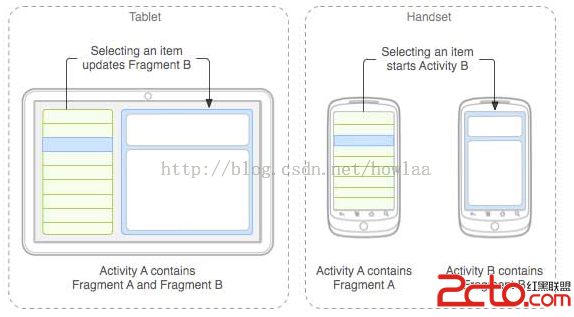
當你想對 Activity 進行模組化設計時,就可以使用碎片化的 Fragment。簡單來說,Fragment 就像是一個「子 Activity」,它把介面與行為拆分成可
 ListView 實作:BaseAdapter 與 AsyncTask 異步加載
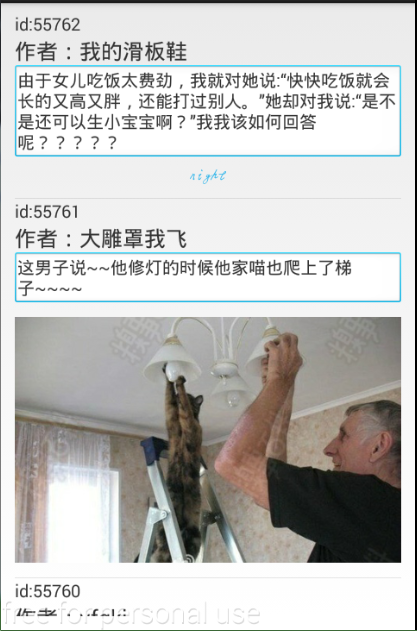
BaseAdapter 的作用BaseAdapter 是 ListView 與 Spinner 常用的資料適配器。它需要實作 getCount、getItem、getIt
 從源碼角度深度解析嵌套滑動機制 NestedScrolling
說到 Android 的機制,大家首先想到的多半是事件分發與事件攔截。但不知道你有沒有聽說過嵌套滑動機制?準確地說,可以把它理解為把事件分發與事件攔截綜合在了一起。 提到