

編輯:關於 Android 程式設計
以下流程以 Android Studio 為開發環境。整體而言,取得定位資訊並不難,可以拆成幾個步驟。
註冊百度帳號後,前往百度地圖開放平台建立應用並產生 API_KEY。詳細說明請參考官方文件。
於百度地圖開放平台的 Android 定位 SDK 頁面下載壓縮檔。
建立 Android Studio 專案後,把解壓後的 jar 放進 libs 目錄,並在 src/main 下建立 jniLibs 資料夾,將解壓後的架構目錄複製進去。
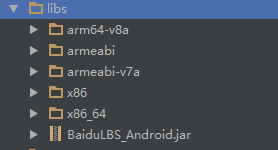
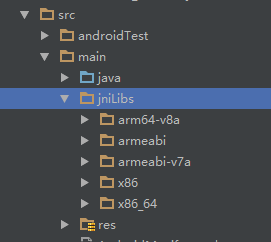
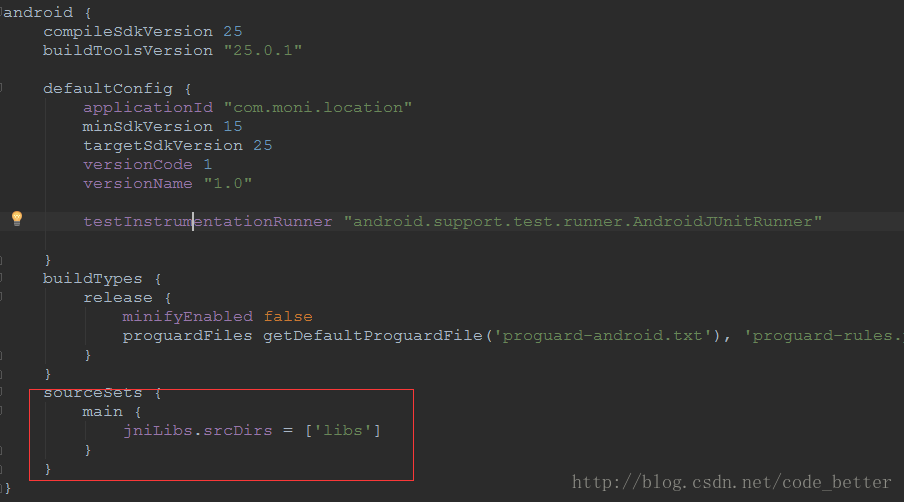
對 BaiduLBS_Android.jar 執行 Add As Library,並在 app 的 build.gradle 的 android 區塊補上:
 sourceSets {
 main {
 jniLibs.srcDirs = ['libs']
 }
 }
 <uses-permission android:name="android.permission.INTERNET"/>
 <uses-permission android:name="android.permission.ACCESS_WIFI_STATE" />
 <uses-permission android:name="android.permission.ACCESS_NETWORK_STATE" />
 <!-- 網路定位 -->
 <uses-permission android:name="android.permission.ACCESS_COARSE_LOCATION" />
 <!-- GPS 定位 -->
 <uses-permission android:name="android.permission.ACCESS_FINE_LOCATION" />
並在 application 標籤中補上 API_KEY 與定位服務:
 <meta-data
 android:name="com.baidu.lbsapi.API_KEY"
 android:value="你申請的 API key" />
 <service
 android:name="com.baidu.location.f"
 android:enabled="true"
 android:process=":remote" />
 public class MainActivity extends AppCompatActivity {
 public LocationClient mLocationClient = null;
 public BDLocationListener myListener = new MyLocationListener();

 @Override
 protected void onCreate(Bundle savedInstanceState) {
 super.onCreate(savedInstanceState);
 setContentView(R.layout.activity_main);
 startLocate();
 }

 /** 啟動定位 */
 private void startLocate() {
 mLocationClient = new LocationClient(getApplicationContext());
 mLocationClient.registerLocationListener(myListener);

 LocationClientOption option = new LocationClientOption();
 option.setLocationMode(LocationClientOption.LocationMode.Battery_Saving); // 定位模式:高精度/低功耗/僅裝置
 option.setCoorType("bd09ll"); // 回傳座標系,預設 gcj02
 option.setScanSpan(1000); // 定位間隔,需大於等於 1000ms
 option.setIsNeedAddress(true); // 是否需要地址資訊
 option.setOpenGps(true); // 是否使用 GPS
 option.setLocationNotify(true); // GPS 有效時是否每秒輸出一次結果
 option.setIsNeedLocationDescribe(true); // 是否需要位置語意化結果,例如「在北京天安門附近」
 option.setIsNeedLocationPoiList(true); // 是否需要 POI 結果
 option.setIgnoreKillProcess(false); // stop 時是否終止獨立進程
 option.SetIgnoreCacheException(false); // 是否收集 CRASH 資訊
 option.setEnableSimulateGps(false); // 是否過濾 GPS 模擬結果
 mLocationClient.setLocOption(option);

 mLocationClient.start();
 }

 private class MyLocationListener implements BDLocationListener {
 @Override
 public void onReceiveLocation(BDLocation location) {
 StringBuffer sb = new StringBuffer(256);
 sb.append("time : "); sb.append(location.getTime());
 sb.append("\nerror code : "); sb.append(location.getLocType());
 sb.append("\nlatitude : "); sb.append(location.getLatitude());
 sb.append("\nlontitude : "); sb.append(location.getLongitude());
 sb.append("\nradius : "); sb.append(location.getRadius());

 if (location.getLocType() == BDLocation.TypeGpsLocation) {
 // GPS 定位結果
 sb.append("\nspeed : "); sb.append(location.getSpeed()); // 公里/小時
 sb.append("\nsatellite : "); sb.append(location.getSatelliteNumber());
 sb.append("\nheight : "); sb.append(location.getAltitude()); // 公尺
 sb.append("\ndirection : "); sb.append(location.getDirection()); // 度
 sb.append("\naddr : "); sb.append(location.getAddrStr());
 sb.append("\ndescribe : "); sb.append("gps 定位成功");
 } else if (location.getLocType() == BDLocation.TypeNetWorkLocation) {
 // 網路定位結果
 sb.append("\naddr : "); sb.append(location.getAddrStr());
 sb.append("\noperationers : "); sb.append(location.getOperators());
 sb.append("\ndescribe : "); sb.append("網路定位成功");
 } else if (location.getLocType() == BDLocation.TypeOffLineLocation) {
 sb.append("\ndescribe : "); sb.append("離線定位成功,離線定位結果也是有效的");
 } else if (location.getLocType() == BDLocation.TypeServerError) {
 sb.append("\ndescribe : "); sb.append("服務端定位失敗,可提供 IMEI 與大體定位時間回報官方追查");
 } else if (location.getLocType() == BDLocation.TypeNetWorkException) {
 sb.append("\ndescribe : "); sb.append("網路不通導致定位失敗,請檢查網路連線");
 } else if (location.getLocType() == BDLocation.TypeCriteriaException) {
 sb.append("\ndescribe : "); sb.append("無法取得有效定位依據,飛行模式下常見,可嘗試重新開機");
 }

 sb.append("\nlocationdescribe : "); sb.append(location.getLocationDescribe());
 List<Poi> list = location.getPoiList();
 if (list != null) {
 sb.append("\npoilist size = : "); sb.append(list.size());
 for (Poi p : list) {
 sb.append("\npoi= : "); sb.append(p.getId() + " " + p.getName() + " " + p.getRank());
 }
 }
 Log.e("描述:", sb.toString());
 }
 }
 }
實務上有幾點值得提醒:LocationClientOption 的每個設定都有官方預設值,只需覆寫真正需要調整的項目;getLocType() 是排查問題的第一線索,例如網路異常、服務端錯誤、缺乏定位依據等都有各自的白名單型別,依型別給使用者不同提示,體驗會好很多。
 繪圖篇:全面掌握 Android 屬性動畫
本文將為大家介紹 Android 自 3.0 版本之後推出的一種全新動畫機制——屬性動畫。如果你對動畫還不太熟悉,建議先閱讀「繪圖篇——Android 動畫基礎」打底。好
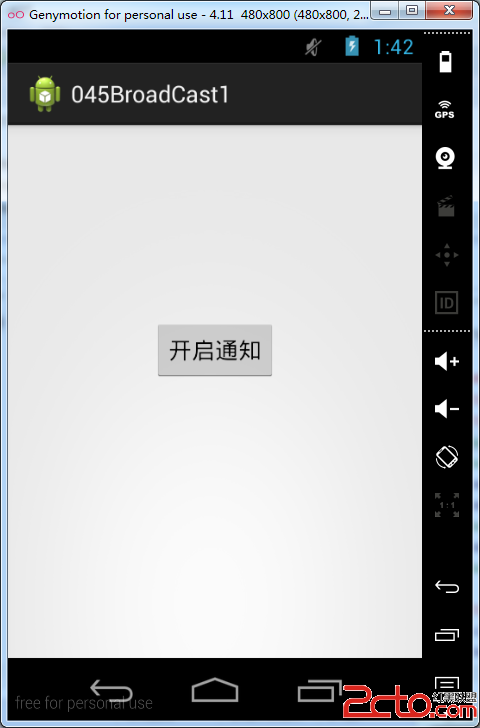 Android廣播元件入門:發送、註冊與常見應用
在Android的四大元件中,BroadcastReceiver是負責事件通知與跨元件溝通的元件。與Service不同,廣播更強調「發送事件」,接收端是否處理則由註冊方式
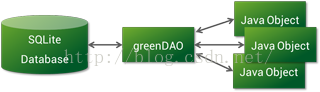 GreenDAO 入門(一):快速把 Java 對象映射到 SQLite
做 Android 開發很難避開 SQLite。如果不用任何框架,我們得自己拼 SQL 語句、自己解析 Cursor 查詢結果,既繁瑣又容易出錯。好消息是市面上已有不少成
 Android OpenGLES 2.0(六):用三角形拼出圓錐、圓柱與球體
前面的筆記裡,我們已經畫過三角形、正方形、圓形與立方體。這一集要挑戰圓錐、圓柱和球體。把這幾個基本幾何體拿下來之後,其餘常見的形體基本就攔不住我們了。 先把最重要的心法再