

編輯:關於 Android 程式設計
Android TextView 字體滾動效果
列表裡的標題太長、儀表盤上的設備名超出寬度,這時候與其粗暴截斷,不如讓文字自己滾起來。Android 的 TextView 原生支持跑馬燈(marquee),但默認情況下很難觸發——它要求控件獲得焦點,而在非焦點模式下幾乎不會滾動。解法是繼承 TextView,強行讓 isFocused() 永遠返回 true。
package com.godinsec.seland.ui.tools;

import android.content.Context;
import android.text.TextUtils.TruncateAt;
import android.util.AttributeSet;
import android.widget.TextView;

public class MarqueTextView extends TextView {

    public MarqueTextView(Context context, AttributeSet attrs, int defStyle) {
        super(context, attrs, defStyle);
        init(context);
    }

    public MarqueTextView(Context context, AttributeSet attrs) {
        super(context, attrs);
        init(context);
    }

    public MarqueTextView(Context context) {
        super(context);
        init(context);
    }

    private void init(Context context) {
        // 關鍵:把省略策略設為 marquee
        setEllipsize(TruncateAt.MARQUEE);
    }

    @Override
    public boolean isFocused() {
        // 讓系統一直認為本控件持有焦點,跑馬燈才會啟動
        return true;
    }
}
這裡重寫 isFocused() 是整個效果的支點。系統判斷是否啟動 marquee 動畫的依據之一,就是控件是否處於焦點狀態;由於普通 TextView 在列表項裡通常拿不到焦點,動畫自然不會跑。直接讓這個方法恆為真,是最省事的做法。
<com.godinsec.seland.ui.tools.MarqueTextView
    android:id="@+id/tv_attention_name"
    android:layout_width="wrap_content"
    android:layout_height="wrap_content"
    android:layout_gravity="center_vertical"
    android:layout_weight="1"
    android:ellipsize="marquee"
    android:focusable="true"
    android:focusableInTouchMode="true"
    android:marqueeRepeatLimit="marquee_forever"
    android:singleLine="true"
    android:text="XXXXXXXXXXXXXXXXXX"
    android:textColor="@color/textcolor_black_b2"
    android:textSize="@dimen/text_sp_s3" />
幾個屬性缺一不可:singleLine="true" 限定單行,ellipsize="marquee" 指定滾動策略,marqueeRepeatLimit="marquee_forever" 讓它無限循環(不設置默認只滾幾次就停),focusable 與 focusableInTouchMode 則是配合焦點判斷的補充。
第一,layout_width="wrap_content" 時文字會被撐開而不換行,marquee 也就無從觸發,所以父容器寬度必須受限(例如上面的 layout_weight="1" 配合 0dp 寬度),讓文字真的「放不下」。
第二,重寫 isFocused() 返回 true 有副作用:同一頁面多個此類控件並存時,焦點狀態會互相干擾,可能導致只有一個能滾。若遇到這種情況,可以改為判斷「文字寬度是否超出控件寬度」再決定返回值,精確控制哪些該滾。
 Android Transitions 框架完全解析:一次為多個 View 製作動畫
先前介紹 Animator 時曾提到,那些動畫都是針對單一物件設計的。就算可以對整個 Layout 加效果,本質上仍是「把 Layout 當成一個不可分割的整體」。那如果
 Android 客戶端效能參數監控方案比較與實踐
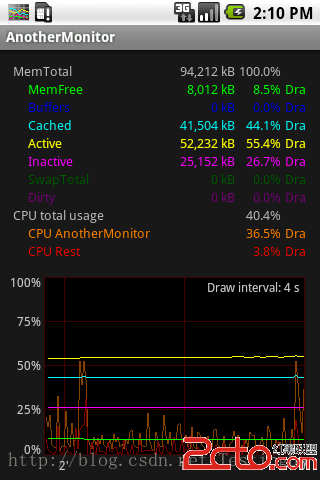
背景 在進行 Android 客戶端測試時,我們往往需要監控 CPU、記憶體、電量消耗、界面載入時間、網路流量等一系列指標。本文整理了三種可行方案,並對其優缺點做出比較。
 Android 應用程序窗口 View 的創建過程源碼解析
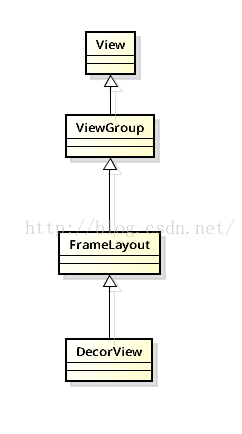
View 是 Android 界面開發中最重要的一類。我們看到的每一個界面,本質上都是由一個個 View 組成的。那麼,應用的界面究竟是何时、又是如何被創建出來的呢?本文
 Android NDK 開發入門:JNI 核心觀念一次搞懂
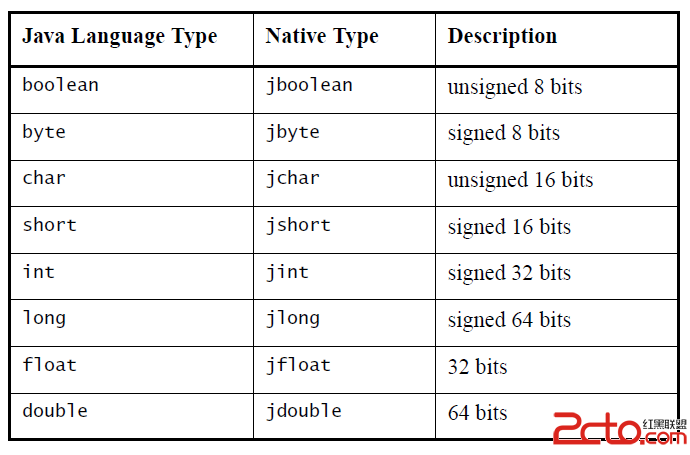
一、JNI 方法的命名規則 先在 Java 層宣告一個 native 方法。下面的 test 是本地方法,參數與回傳值都是字串。 package com.kltz88.