

編輯:關於 Android 程式設計
需求:頁面上有多個組件都能開啟倒計時,正常情況下倒計時結束後更新 UI,同時用戶可以隨時取消指定的倒計時。
這裡使用 CountDownTimer 來實現。它有兩個回調函數:onFinish 在倒計時結束時觸發,onTick 在倒計時過程中週期性觸發;用戶可以調用 CountDownTimer 對象的 cancel 方法隨時取消倒計時。
這樣做的好處很明顯:不必再手動管理繁瑣的線程來控制倒計時,更新 UI 也更為方便——因為 CountDownTimer 的回調本身就運行在主線程。
上代碼:
MainActivity
package test.demo.countdowntest; import android.os.Bundle; import android.os.CountDownTimer; import android.support.v7.app.AppCompatActivity; import android.view.View; import android.widget.Button; import android.widget.ProgressBar; import android.widget.Toast; public class MainActivity extends AppCompatActivity implements View.OnClickListener{ private Button bt1, bt2, bt3; private ProgressBar pb1, pb2, pb3; private MyCount mc1,mc2, mc3; private boolean mc1Click = false; private boolean mc2Click = false; private boolean mc3Click = false; @Override protected void onCreate(Bundle savedInstanceState) { super.onCreate(savedInstanceState); setContentView(R.layout.activity_main); bt1 = ((Button) findViewById(R.id.bt1)); bt2 = ((Button) findViewById(R.id.bt2)); bt3 = ((Button) findViewById(R.id.bt3)); bt1.setOnClickListener(this); bt2.setOnClickListener(this); bt3.setOnClickListener(this); pb1 = ((ProgressBar) findViewById(R.id.pb1)); pb2 = ((ProgressBar) findViewById(R.id.pb2)); pb3 = ((ProgressBar) findViewById(R.id.pb3)); mc1 = new MyCount(30000, 1000); mc1.setPb(bt1, pb1); mc2 = new MyCount(30000, 1000); mc2.setPb(bt2, pb2); mc3 = new MyCount(30000, 1000); mc3.setPb(bt3, pb3); } @Override public void onClick(View view) { switch (view.getId()) { case R.id.bt1: if (mc1Click) { mc1.cancel(); pb1.setVisibility(View.GONE); mc1Click = false; } else { pb1.setVisibility(View.VISIBLE); mc1.start(); mc1Click = true; } break; case R.id.bt2: if (mc2Click) { pb2.setVisibility(View.GONE); mc2.cancel(); mc2Click = false; } else { pb2.setVisibility(View.VISIBLE); mc2.start(); mc2Click = true; } break; case R.id.bt3: if (mc3Click) { pb3.setVisibility(View.GONE); mc3.cancel(); mc3Click = false; } else { pb3.setVisibility(View.VISIBLE); mc3.start(); mc3Click = true; } break; } } /*定義一個倒計時的內部類*/ class MyCount extends CountDownTimer { Button mBt; ProgressBar mPb; public MyCount(long millisInFuture, long countDownInterval) { super(millisInFuture, countDownInterval); } public void setPb(Button bt, ProgressBar pb) { mBt = bt; mPb = pb; } @Override public void onFinish() { mPb.setVisibility(View.GONE); } @Override public void onTick(long millisUntilFinished) { mBt.setText("請等待30秒(" + millisUntilFinished / 1000 + ")..."); Toast.makeText(MainActivity.this, millisUntilFinished / 1000 + "", Toast.LENGTH_LONG).show(); } } }activity_main.xml:
<?xml version="1.0" encoding="utf-8"?> <LinearLayout xmlns:android="https://schemas.android.com/apk/res/android" xmlns:tools="https://schemas.android.com/tools" android:id="@+id/activity_main" android:layout_width="match_parent" android:layout_height="match_parent" android:paddingBottom="@dimen/activity_vertical_margin" android:paddingLeft="@dimen/activity_horizontal_margin" android:paddingRight="@dimen/activity_horizontal_margin" android:paddingTop="@dimen/activity_vertical_margin" android:orientation="vertical" tools:context="cn.sh.changxing.countdowntest.MainActivity"> <LinearLayout android:layout_width="match_parent" android:layout_height="wrap_content" android:orientation="horizontal"> <Button android:id="@+id/bt1" android:layout_width="0dp" android:layout_height="wrap_content" android:layout_weight="1" android:text="測試啟動1"/> <ProgressBar android:id="@+id/pb1" android:layout_width="wrap_content" android:layout_height="wrap_content" android:layout_gravity="center" android:indeterminate="true"/> </LinearLayout> <LinearLayout android:layout_width="match_parent" android:layout_height="wrap_content" android:orientation="horizontal"> <Button android:id="@+id/bt2" android:layout_width="0dp" android:layout_height="wrap_content" android:layout_weight="1" android:text="測試啟動2"/> <ProgressBar android:id="@+id/pb2" android:layout_width="wrap_content" android:layout_height="wrap_content" android:layout_gravity="center" android:indeterminate="true"/> </LinearLayout> <LinearLayout android:layout_width="match_parent" android:layout_height="wrap_content" android:orientation="horizontal"> <Button android:id="@+id/bt3" android:layout_width="0dp" android:layout_height="wrap_content" android:layout_weight="1" android:text="測試啟動3"/> <ProgressBar android:id="@+id/pb3" android:layout_width="wrap_content" android:layout_height="wrap_content" android:layout_gravity="center" android:indeterminate="true"/> </LinearLayout> </LinearLayout>
可以看到,每個按鈕各自綁定一個 MyCount 實例,通過一個布爾標誌記錄當前是否正在倒計時,點擊時在"啟動"與"取消"之間切換,並同步控制進度條的顯示與隱藏,非常直觀。
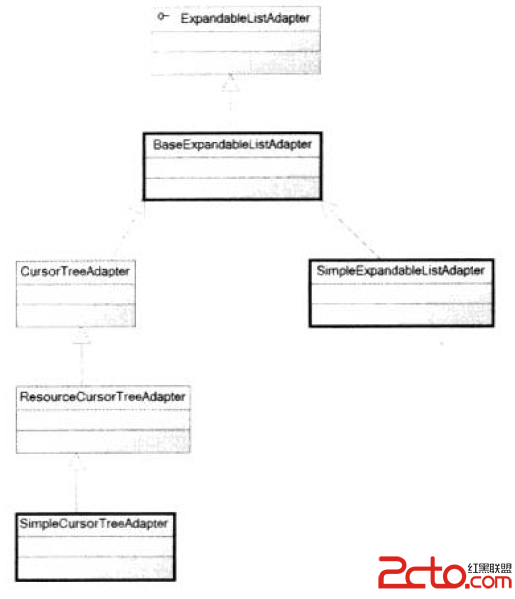 Android 的 ExpandableListView——Android 學習之旅(二十八)
ExpandableListView 簡介 ExpandableListView 是 ListView 的子類,用法與 ListView 類似。它能建立數個類別,每個類別
 Android GPS 定位實戰:從 NMEA 到衛星信噪比圖表
這個 GPS 測試程式最早寫於 2011 年,那時剛接觸 Android 開發,純粹是练手的實驗作品。最近因為工作需求又把它翻出來重寫,順手把定位服務相關的知識重新梳理了
 NavigationBottom:一款可定製的底部導航欄庫
如何引入項目 在 Module 下的 build.gradle 中加入以下依賴: compile com.github.youngkaaa:navigation-bot
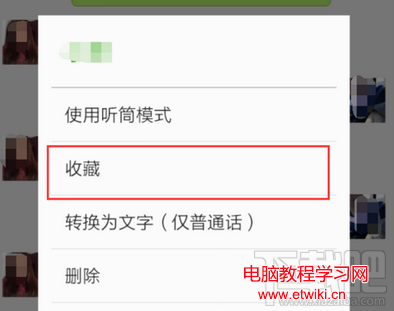 微信語音訊息怎麼轉發給別人?透過收藏繞過限制
微信幾乎人人都在用,但語音訊息一直有個限制:沒辦法像文字那樣直接轉發。其實繞道「收藏」就能做到,流程如下。 微信語音轉發步驟 一、在聊天裡長按想轉發的語音,選擇「收藏」