

編輯:關於 Android 程式設計
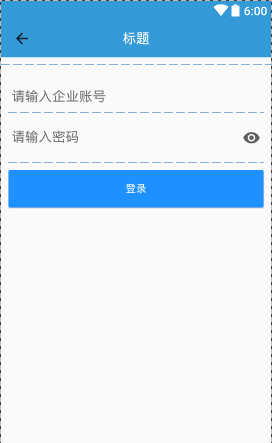
在登入、註冊或修改密碼頁面中,讓使用者能切換密碼明文與密文顯示,是常見且貼心的互動設計。自從 Design Support Library 推出後,可以透過 TextInputLayout 快速完成這個效果。
只要將 EditText 包在 TextInputLayout 中,並設定密碼輸入類型,再開啟密碼切換屬性即可:
<android.support.design.widget.TextInputLayout
    android:layout_width="match_parent"
    android:layout_height="wrap_content"
    app:passwordToggleEnabled="true">

    <EditText
        android:layout_width="match_parent"
        android:layout_height="wrap_content"
        android:inputType="textPassword" />
</android.support.design.widget.TextInputLayout>
當 EditText 的輸入類型為密碼時,TextInputLayout 會在右側顯示眼睛圖示。使用者點擊後,即可在明文與密文之間切換,提升輸入驗證的便利性。
若專案中的 Design 元件版本較舊,可能不支援此屬性。此時可先升級相依元件,或自行以圖片按鈕搭配輸入法的密碼轉換方法實作。
 用 ViewPager 實作 Android 圖片左右循環滑動與自動播放
這個 ViewPager 小 Demo 實現了圖片的左右循環滑動:滑到最後一頁再往右滑會回到第一頁,第一頁往左滑則跳到最後一頁,下方還帶有索引指示點。先上效果圖: 1.
 自定義 View 的三種實現方式:自繪、組合與繼承(深入 View 系列完結篇)
不知不覺間,「帶你一步步深入了解 View」系列已經寫到第四篇。回顧前面三篇,我們談過 LayoutInflater 的原理、視圖的繪製流程,以及視圖狀態與重繪機制,Vi
 監聽 ScrollView 滾動實現懸浮吸頂效果:重現美團、大眾點評的購買欄
行動裝置幾乎成了每個人的隨身配備,而決定一個 App 好不好的,除了功能本身,使用者體驗與介面細節往往才是關鍵。最近在美團與大眾點評上看到一個很貼心的設計:往下滑動時,「
 Android 疑難:HTC One S 上 SearchView 的軟鍵盤不吃 actionSearch
前言 怪問題年年有,今年特別多。這次遇到的是 SearchView 在 HTC One S 上的行為異常,不處理就完全沒辦法在這台機器上正常使用 SearchView——