

編輯:關於 Android 程式設計
Android 版知乎那種「一打開 App 就自動轉一下刷新球」的體驗,其實很好做。以下提供兩種寫法。
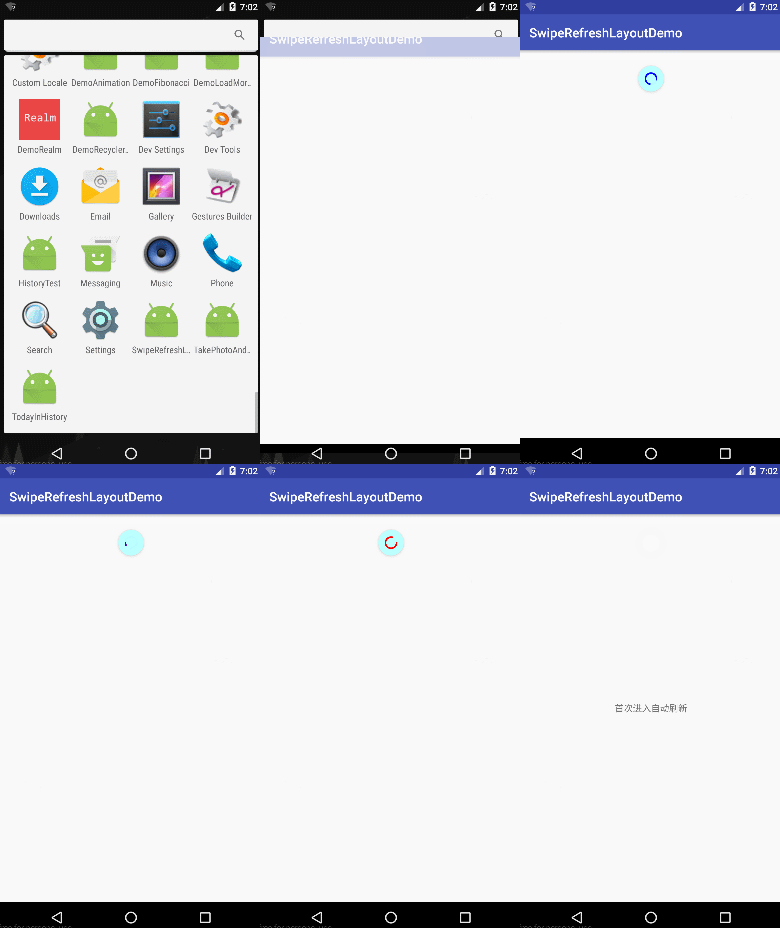
① 視窗取得焦點時設為刷新狀態:
@Override public void onWindowFocusChanged(boolean hasFocus) { super.onWindowFocusChanged(hasFocus); mSwipeRefreshLayout.setRefreshing(true); }
② 資料取回後關閉:
if (mSwipeRefreshLayout.isRefreshing()) { mSwipeRefreshLayout.setRefreshing(false); }
① 呼叫 measure() 通知系統去量測,再設為刷新:
//手動調用,通知系統去測量 mSwipeRefreshLayout.measure(0,0); mSwipeRefreshLayout.setRefreshing(true);
② 資料取回後關閉:
if (mSwipeRefreshLayout.isRefreshing()) { mSwipeRefreshLayout.setRefreshing(false); }
兩種方法的第一步其實是同一個目的:確保 SwipeRefreshLayout 完成繪製之後,才把刷新狀態設為 true。否則在多數情況下,刷新球根本不會顯示出來——因為控件此時還沒有完成量測與配置,setRefreshing(true) 設的狀態在首次 layout 時就被覆蓋了。
換個角度說,onWindowFocusChanged 與手動呼叫 measure() 都是為了「延後到繪製之後」而採取的手段。若使用較新的 AndroidX 版本,也可以直接在 onResume() 或資料初始化完成後搭配 post() 延遲一幀呼叫,效果相同。
package org.raphets.swiperefreshlayoutdemo; import android.graphics.Color; import android.support.v4.widget.SwipeRefreshLayout; import android.support.v7.app.AppCompatActivity; import android.os.Bundle; import android.util.Log; import android.widget.TextView; public class MainActivity extends AppCompatActivity { private SwipeRefreshLayout mSwipeRefreshLayout; private TextView mTextView; @Override protected void onCreate(Bundle savedInstanceState) { super.onCreate(savedInstanceState); setContentView(R.layout.activity_main); mSwipeRefreshLayout = (SwipeRefreshLayout) findViewById(R.id.srl); mTextView = (TextView) findViewById(R.id.tv); //設置刷新球顏色 mSwipeRefreshLayout.setColorSchemeColors(Color.BLUE, Color.RED, Color.YELLOW); mSwipeRefreshLayout.setProgressBackgroundColorSchemeColor(Color.parseColor("#BBFFFF")); //手動調用,通知系統去測量 // mSwipeRefreshLayout.measure(0,0); mSwipeRefreshLayout.setRefreshing(true); getData(); } /** * 模擬網絡請求 */ private void getData() { new Thread() { @Override public void run() { super.run(); //模擬網絡請求 try { Thread.sleep(3000); } catch (InterruptedException e) { e.printStackTrace(); } //在UI線程中更新UI runOnUiThread(new Runnable() { @Override public void run() { mTextView.setText("首次進入自動刷新"); if (mSwipeRefreshLayout.isRefreshing()) { mSwipeRefreshLayout.setRefreshing(false); } } }); } }.start(); } @Override public void onWindowFocusChanged(boolean hasFocus) { super.onWindowFocusChanged(hasFocus); mSwipeRefreshLayout.setRefreshing(true); } }
要注意的是,onWindowFocusChanged 不只在首次進入時觸發,從其他頁面返回或系統彈出對話框後 regained focus 時也會再觸發一次,若不希望每次都刷新,需要加上「僅首次執行」的旗標來控制。
 自定義 View 實作:仿通訊錄側邊索引欄,實現 A–Z 字母快速定位
手機通訊錄大概都有這樣的效果: 這個互動幾乎成了 Android 通訊錄的標準配備。今天我們就來看看它是怎麼做出來的。 一、整體規劃 1. 頁面功能拆解 整個畫面可
 應用內懸浮窗怎麼做?從 WindowManager 到服務與權限的完整拆解
先搞清楚懸浮窗是什麼 懸浮窗本質上就是一個系統級視窗,凌駕於應用之上。Android 把所有的視窗交給 WindowManagerService(WMS)統一管理,對 W
 Android 自定義 View:單行上下滾動公告
在許多 App 首頁,公告欄會以單行方式持續上下輪播。看似簡單,其實需要處理文字切換、動畫位移與定時更新。 實作思路 可以自訂一個 LinearLayout,內部放置兩
 用 Cocos2d-x 實作 Android Toast 風格的浮動提示
Android 原生的 Toast 有個討人喜歡的特質:淡入、停留、淡出,然後自己消失,完全不打斷操作。用 Cocos2d-x 做手機遊戲時,也想有同樣的效果,於是就自己