

編輯:關於 Android 程式設計
本文示範 Android 內建的 AnalogClock(指針式時鐘)元件如何使用,結論同樣很輕鬆:寫在版面裡就能動。
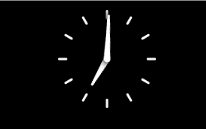
AnalogClock 會自行讀取系統時間並驅動時針、分針與秒針,因此不需要在 Activity 中 new 出物件,也不用掛任何計時器。把標籤放在想顯示的位置,並用 layout_gravity 決定對齊方式即可。
<?xml version="1.0" encoding="utf-8"?>
<LinearLayout xmlns:android="https://schemas.android.com/apk/res/android"
    android:orientation="vertical"
    android:layout_width="fill_parent"
    android:layout_height="fill_parent">

    <AnalogClock
        android:layout_width="wrap_content"
        android:layout_height="wrap_content"
        android:layout_gravity="center_horizontal"/>
</LinearLayout>
內建的 AnalogClock 只認 dial 與 hand_hour、hand_minute 這幾個內部資源,官方並未開放替換。若專案需要品牌化的錶盤,實務上會直接自訂 View,用 Canvas 畫出刻度與指針,再依時間換算旋轉角度,這樣自由度遠高於沿用預設元件。
 Android 自定義 View 打造彈性小球動畫(貝茲曲線篇)
先看成果 這次要實作的是一個會左右移動、並且不斷被「拉長壓扁」的彈性小球。看起來複雜,實際上核心只有一個觀念:用 Path.cubicTo() 畫出封閉的圓形,再依小球
 Android 常用 UI 組件入門:TextView 基本用法與類別結構
TextView 大概是 Android 裡被使用次數最多的 UI 組件。凡是需要把一段文字呈現在畫面上的地方,幾乎都會用到它。它本身不提供輸入能力,內容來源有兩種:在佈
 自定義 ScrollText:實作 Android 無縫循環滾動的跑馬燈文字
先看一下效果: 需求是讓一段長文字在 TextView 裡持續向左滾動,滾完之後無縫接回開頭,中間還要能穿插表情圖示。做法是自己寫一個繼承 TextView 的 S
 Android 技能:JSON 文本的創建與解析
摘要:JSON 數據在 Android 開發中無處不在。請求服務器數據時,返回無非是 HTML、XML、JSON 三種類型,因此掌握 JSON 對安卓程序員至關重要。 什