

編輯:關於 Android 程式設計
Socket 是 TCP/IP 協定上的一種通訊機制:在通訊的兩端各建立一個 Socket,從而在兩端之間形成一條網络虛擬鏈路。虛擬鏈路一旦建立,兩端的程式就能透過它雙向傳遞資料。
整体的訊息流向是這樣的:Client A 發訊息給 Client B,A 先把訊息送到伺服器 Server,Server 收到後再把 A 的訊息廣播給所有已連線的 Clients。
首先在伺服器建立一個 ServerSocket,這個物件用於監聽來自客戶端的連線請求。若沒有連線進來,它就一直停在等待狀態。
Socket accept():一旦收到客戶端的連線請求,這個方法會回傳一個與該客戶端對應的 Socket 物件,後續的通訊都靠它進行。
伺服器示例:
 // 創建一個 ServerSocket,用於監聽客戶端 Socket 的連接請求
 ServerSocket ss = new ServerSocket(30000);
 // 採用循環不斷接受來自客戶端的請求
 while (true) {
     // 每當接受到客戶端 Socket 的請求,服務器端也對應產生一個 Socket
     Socket s = ss.accept();
     // 下面就可以使用 Socket 進行通信了
     // ...
 }
客戶端則用 Socket 的建構子連到指定伺服器:
 // 創建連接到服務器 30000 端口的 Socket
 Socket s = new Socket("192.168.2.214", 30000);
 // 下面就可以使用 Socket 進行通信了
 // ...
這樣 Server 與 Client 之間就有了最基礎的雙向通訊能力。
我們要做的是多人聊天室,所以每當客戶端連上 ServerSocket 之後,程式要把該 Socket 加入 clients 集合保存,並為它啟動一條獨立線程,由這條線程負責處理該 Socket 的所有通訊任務。
 // 定義保存所有 Socket 的 ArrayList
 public static ArrayList<Socket> clients = new ArrayList<Socket>();
當伺服器線程讀到客戶端資料後,遍歷 clients 集合,把資料向集合中的每個 Socket 各發送一次——聊天室的功能就這樣成立了。
為什麼一定要開線程?因為 accept() 與 readUTF() 都是阻塞式的呼叫。若在單一线程裡循序處理每個客戶端,第一個客戶端不说话,其他所有人都得跟著卡住。每個連線配一條線程,本質上是用「併發」換取「互不阻塞」。
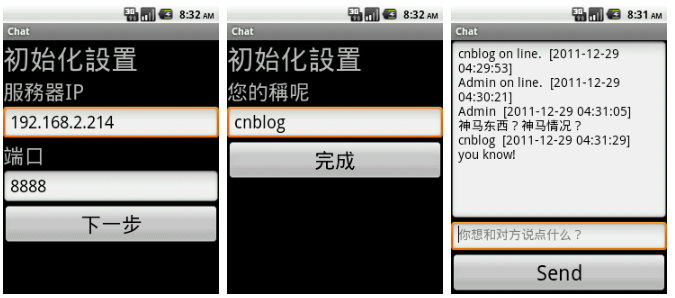
先建立一個 Java 專案,把 Server.java 跑起來,再啟動手機模擬器。
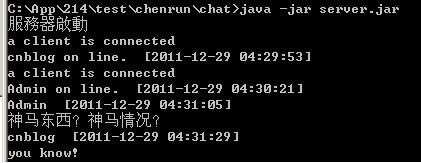
伺服器端打印的資訊:
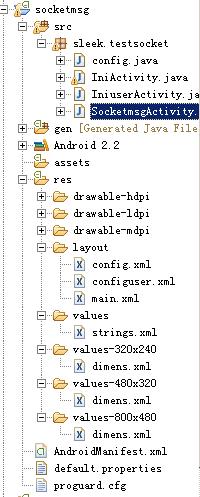
程式檔案結構:
這個頁面肩負最多職責:初始化資料庫、讀取使用者設定、建立連線、送出訊息,以及用 Handler 把子線程收到的訊息更新到介面。
 public class SocketmsgActivity extends Activity {

     private SQLiteDatabase db;
     Thread thread = null;
     Socket s = null;
     private InetSocketAddress isa = null;
     DataInputStream dis = null;
     DataOutputStream dos = null;
     private String reMsg = null;
     private Boolean isContect = false;
     private EditText chattxt;
     private EditText chatbox;
     private Button chatok;
     private String chatKey = "SLEEKNETGEOCK4stsjeS";
     private String name = null, ip = null, port = null;

     @Override
     public void onCreate(Bundle savedInstanceState) {
         super.onCreate(savedInstanceState);
         setContentView(R.layout.main);
         chattxt = (EditText) findViewById(R.id.chattxt);
         chatbox = (EditText) findViewById(R.id.chatbox);
         chatok = (Button) findViewById(R.id.chatOk);
         chatbox.setCursorVisible(false);
         chatbox.setFocusable(false);
         chatbox.setFocusableInTouchMode(false);
         chatbox.setGravity(2);

         // 初始化,創建數據庫來儲存用戶信息
         InitDatabase();
         db = SQLiteDatabase.openOrCreateDatabase(config.f, null);
         try {
             Cursor cursor = db.query("config", new String[] { "ip", "name", "port" },
                     null, null, null, null, null);
             while (cursor.moveToNext()) {
                 name = cursor.getString(cursor.getColumnIndex("name"));
                 ip = cursor.getString(cursor.getColumnIndex("ip"));
                 port = cursor.getString(cursor.getColumnIndex("port"));
             }
             cursor.close();
         } catch (Exception e) {
             System.out.println(e.toString());
         }
         db.close();

         // 設置連接
         if (ip == null || port == null) {
             Intent intent = new Intent(SocketmsgActivity.this, IniActivity.class);
             startActivity(intent);
             SocketmsgActivity.this.finish();
         } else if (name == null) {
             Intent intent = new Intent(SocketmsgActivity.this, IniuserActivity.class);
             startActivity(intent);
             SocketmsgActivity.this.finish();
         } else {
             connect();
             chatok.setOnClickListener(new View.OnClickListener() {
                 @Override
                 public void onClick(View v) {
                     String str = chattxt.getText().toString().trim();
                     System.out.println(s);
                     try {
                         dos.writeUTF(chatKey + "name:" + name + "end;" + str);
                         chattxt.setText("");
                     } catch (SocketTimeoutException e) {
                         System.out.println("連接超時,服務器未開啟或IP錯誤");
                         Toast.makeText(SocketmsgActivity.this, "連接超時,服務器未開啟或IP錯誤",
                                 Toast.LENGTH_SHORT).show();
                         Intent intent = new Intent(SocketmsgActivity.this, IniActivity.class);
                         startActivity(intent);
                         SocketmsgActivity.this.finish();
                         e.printStackTrace();
                     } catch (IOException e) {
                         System.out.println("連接超時,服務器未開啟或IP錯誤");
                         Toast.makeText(SocketmsgActivity.this, "連接超時,服務器未開啟或IP錯誤",
                                 Toast.LENGTH_SHORT).show();
                         Intent intent = new Intent(SocketmsgActivity.this, IniActivity.class);
                         startActivity(intent);
                         SocketmsgActivity.this.finish();
                         e.printStackTrace();
                     }
                 }
             });
         }
     }

     private Runnable doThread = new Runnable() {
         public void run() {
             System.out.println("running!");
             ReceiveMsg();
         }
     };

     public void connect() {
         try {
             s = new Socket();
             isa = new InetSocketAddress(ip, Integer.parseInt(port));
             s.connect(isa, 5000);
             if (s.isConnected()) {
                 dos = new DataOutputStream(s.getOutputStream());
                 dis = new DataInputStream(s.getInputStream());
                 dos.writeUTF(chatKey + "online:" + name);
                 /**
                  * 這裡是關鍵,我在此耗時 8h+
                  * 原因是子線程不能直接更新 UI
                  * 為此,我們需要通過 Handler 對象,通知主線程 UI Thread 來更新界面。
                  */
                 thread = new Thread(null, doThread, "Message");
                 thread.start();
                 System.out.println("connect");
                 isContect = true;
             }
         } catch (UnknownHostException e) {
             System.out.println("連接失敗");
             Toast.makeText(SocketmsgActivity.this, "連接失敗", Toast.LENGTH_SHORT).show();
             Intent intent = new Intent(SocketmsgActivity.this, IniActivity.class);
             startActivity(intent);
             SocketmsgActivity.this.finish();
             e.printStackTrace();
         } catch (SocketTimeoutException e) {
             System.out.println("連接超時,服務器未開啟或IP錯誤");
             Toast.makeText(SocketmsgActivity.this, "連接超時,服務器未開啟或IP錯誤",
                     Toast.LENGTH_SHORT).show();
             Intent intent = new Intent(SocketmsgActivity.this, IniActivity.class);
             startActivity(intent);
             SocketmsgActivity.this.finish();
             e.printStackTrace();
         } catch (IOException e) {
             System.out.println("連接失敗");
             e.printStackTrace();
         }
     }

     public void disConnect() {
         if (dos != null) {
             try {
                 dos.writeUTF(chatKey + "offline:" + name);
             } catch (IOException e1) {
                 e1.printStackTrace();
             }
             try {
                 s.close();
             } catch (IOException e) {
                 e.printStackTrace();
             }
         }
     }

     /** 線程監視 Server 信息 */
     private void ReceiveMsg() {
         if (isContect) {
             try {
                 while ((reMsg = dis.readUTF()) != null) {
                     System.out.println(reMsg);
                     if (reMsg != null) {
                         try {
                             Message msgMessage = new Message();
                             msgMessage.what = 0x1981;
                             handler.sendMessage(msgMessage);
                             Thread.sleep(100);
                         } catch (InterruptedException e) {
                             e.printStackTrace();
                         }
                     }
                 }
             } catch (SocketException e) {
                 System.out.println("exit!");
             } catch (IOException e) {
                 e.printStackTrace();
             }
         }
     }

     /** 通過 handler 更新 UI */
     Handler handler = new Handler() {
         public void handleMessage(Message msg) {
             switch (msg.what) {
                 case 0x1981:
                     chatbox.setText(chatbox.getText() + reMsg + '\n');
                     chatbox.setSelection(chatbox.length());
                     break;
             }
         }
     };

     @Override
     protected void onDestroy() {
         super.onDestroy();
         disConnect();
     }

     @Override
     public boolean onCreateOptionsMenu(Menu menu) {
         menu.add(0, 1, 1, "初始化設置");
         menu.add(0, 2, 2, "退出");
         return super.onCreateOptionsMenu(menu);
     }

     @Override
     public boolean onOptionsItemSelected(MenuItem item) {
         if (item.getItemId() == 1) {
             Intent intent = new Intent(SocketmsgActivity.this, IniActivity.class);
             startActivity(intent);
             SocketmsgActivity.this.finish();
         } else if (item.getItemId() == 2) {
             disConnect();
             SocketmsgActivity.this.finish();
             android.os.Process.killProcess(android.os.Process.myPid());
             System.exit(0);
         }
         return super.onOptionsItemSelected(item);
     }

     public void InitDatabase() {
         if (!config.path.exists()) {
             config.path.mkdirs();
             Log.i("LogDemo", "mkdir");
         }
         if (!config.f.exists()) {
             try {
                 config.f.createNewFile();
                 Log.i("LogDemo", "create a new database file");
             } catch (IOException e) {
                 Log.i("LogDemo", e.toString());
             }
         }
         try {
             if (tabIsExist("config") == false) {
                 db = SQLiteDatabase.openOrCreateDatabase(config.f, null);
                 db.execSQL("create table config(_id integer primary key autoincrement,"
                         + "ip varchar(128),port varchar(10),name varchar(32))");
                 Log.i("LogDemo", "create a database");
                 db.close();
             }
         } catch (Exception e) {
             Log.i("LogDemo", e.toString());
         }
     }

     /** check the database is already exist */
     public boolean tabIsExist(String tabName) {
         boolean result = false;
         if (tabName == null) {
             return false;
         }
         Cursor cursor = null;
         db = SQLiteDatabase.openOrCreateDatabase(config.f, null);
         try {
             String sql = "select count(*) as c from sqlite_master where type ='table' "
                     + "and name ='" + tabName.trim() + "' ";
             cursor = db.rawQuery(sql, null);
             if (cursor.moveToNext()) {
                 int count = cursor.getInt(0);
                 if (count > 0) {
                     result = true;
                 }
             }
         } catch (Exception e) {
             // handle exception
         }
         cursor.close();
         db.close();
         return result;
         }
 }
程式碼裡那句「在此耗時 8h+」的註解,講的是每個 Android 開發者都會遇到的關卡:子線程不能直接更新 UI。Android 的介面元件不是執行緒安全的,只有建立 View 的那條線程(主線程/UI 線程)才能操作它,否則會拋出 CalledFromWrongThreadException。解法就是透過 Handler 把更新動作 post 回主線程,這也是為什麼 ReceiveMsg() 收到訊息後不直接改 chatbox,而是包成 Message 交給 handler。
另外要說明的是,tabIsExist() 用字串拼接組 SQL 是有風險的寫法,實務上應改用參數化查詢。這裡是為了示範 sqlite_master 的用法才如此呈現。
 public class IniActivity extends Activity {
     private EditText ip, port;
     private Button nextButton;
     private String getip, getport;
     private InetSocketAddress isa = null;
     private SQLiteDatabase db;
     private String ipstring = null, portString = null;
     private int row = 0;

     @Override
     protected void onCreate(Bundle savedInstanceState) {
         super.onCreate(savedInstanceState);
         setContentView(R.layout.config);
         ip = (EditText) findViewById(R.id.ip);
         port = (EditText) findViewById(R.id.port);
         nextButton = (Button) findViewById(R.id.next);

         db = SQLiteDatabase.openOrCreateDatabase(config.f, null);
         try {
             Cursor cursor = db.query("config", new String[] { "ip", "port" }, null, null, null, null, null);
             while (cursor.moveToNext()) {
                 ipstring = cursor.getString(cursor.getColumnIndex("ip"));
                 portString = cursor.getString(cursor.getColumnIndex("port"));
                 row++;
             }
             ip.setText(ipstring);
             port.setText(portString);
             cursor.close();
         } catch (Exception e) {
             System.out.println(e.toString());
         }
         db.close();

         nextButton.setOnClickListener(new nextButtonListenner());
     }

     class nextButtonListenner implements OnClickListener {
         @Override
         public void onClick(View v) {
             getip = ip.getText().toString().trim();
             getport = port.getText().toString().trim();
             if (getip == "" || getip == null || getip.equals("")) {
                 Toast.makeText(IniActivity.this, "請輸入IP", Toast.LENGTH_SHORT).show();
                 ip.setFocusable(true);
             } else if (getport == "" || getport == null || getport.equals("")) {
                 Toast.makeText(IniActivity.this, "請輸入端口", Toast.LENGTH_SHORT).show();
                 port.setFocusable(true);
             } else {
                 try {
                     Socket s = new Socket();
                     isa = new InetSocketAddress(getip, Integer.parseInt(getport));
                     s.connect(isa, 5000);
                     try {
                         // 生成 ContentValues 對象
                         ContentValues values = new ContentValues();
                         // 鍵是列名,值是希望插入到這一列的值
                         values.put("ip", getip);
                         values.put("port", getport);
                         db = SQLiteDatabase.openOrCreateDatabase(config.f, null);
                         if (row == 0) {
                             db.insert("config", null, values);
                         } else {
                             db.update("config", values, null, null);
                         }
                         Toast.makeText(IniActivity.this, "連接成功", Toast.LENGTH_SHORT).show();
                         s.close();
                         Intent intent = new Intent(IniActivity.this, IniuserActivity.class);
                         startActivity(intent);
                         IniActivity.this.finish();
                         db.close();
                     } catch (Exception e) {
                         showDialog("設置失敗,數據庫不可用", IniActivity.this);
                     }
                 } catch (UnknownHostException e) {
                     e.printStackTrace();
                     showDialog("連接失敗,IP或者端口不可用", IniActivity.this);
                 } catch (SocketTimeoutException e) {
                     System.out.println("連接超時,服務器未開啟或IP錯誤");
                     showDialog("連接超時,服務器未開啟或IP錯誤", IniActivity.this);
                     e.printStackTrace();
                 } catch (IOException e) {
                     e.printStackTrace();
                     showDialog("連接失敗,IP或者端口不可用", IniActivity.this);
                 }
             }
         }
     }

     /** define a dialog for show the message */
     public void showDialog(String mess, Activity activity) {
         new AlertDialog.Builder(activity).setTitle("信息")
                 .setMessage(mess)
                 .setNegativeButton("確定", new DialogInterface.OnClickListener() {
                     public void onClick(DialogInterface dialog, int which) {
                     }
                 })
                 .show();
     }
 }
值得學的一點:按下「下一步」時先做一次 s.connect(isa, 5000) 的連通性測試,連得上才寫入資料庫。這比直接存了 IP 之後到聊天頁才發現連不上,使用者體驗好得多。不過這裡的網路連線仍寫在主線程上,嚴格來說應該放到子線程——Android 4.0 之後主線程網路操作會直接拋 NetworkOnMainThreadException。
 public class IniuserActivity extends Activity {
     private EditText name;
     private Button ok;
     private SQLiteDatabase db;
     private String nameString;

     @Override
     protected void onCreate(Bundle savedInstanceState) {
         super.onCreate(savedInstanceState);
         setContentView(R.layout.configuser);
         name = (EditText) findViewById(R.id.name);
         ok = (Button) findViewById(R.id.ok);
         ok.setOnClickListener(new okButtonListenner());

         db = SQLiteDatabase.openOrCreateDatabase(config.f, null);
         try {
             Cursor cursor = db.query("config", new String[] { "name" }, null, null, null, null, null);
             while (cursor.moveToNext()) {
                 nameString = cursor.getString(cursor.getColumnIndex("name"));
             }
             name.setText(nameString);
             cursor.close();
         } catch (Exception e) {
             System.out.println(e.toString());
         }
         db.close();
     }

     class okButtonListenner implements OnClickListener {
         @Override
         public void onClick(View v) {
             String getname = name.getText().toString().trim();
             if (getname == "") {
                 Toast.makeText(IniuserActivity.this, "請輸入您的稱呢", Toast.LENGTH_SHORT).show();
                 name.setFocusable(true);
             } else {
                 try {
                     ContentValues values = new ContentValues();
                     values.put("name", getname);
                     db = SQLiteDatabase.openOrCreateDatabase(config.f, null);
                     db.update("config", values, null, null);
                     Toast.makeText(IniuserActivity.this, "設置完成", Toast.LENGTH_SHORT).show();
                     Intent intent = new Intent(IniuserActivity.this, SocketmsgActivity.class);
                     startActivity(intent);
                     IniuserActivity.this.finish();
                     db.close();
                 } catch (Exception e) {
                     showDialog("設置失敗,數據庫不可用", IniuserActivity.this);
                 }
             }
         }
     }

     /** define a dialog for show the message */
     public void showDialog(String mess, Activity activity) {
         new AlertDialog.Builder(activity).setTitle("信息")
                 .setMessage(mess)
                 .setNegativeButton("確定", new DialogInterface.OnClickListener() {
                     public void onClick(DialogInterface dialog, int which) {
                     }
                 })
                 .show();
     }
 }
這裡用 getname == "" 來比對字串是錯的——Java 中 == 比較的是物件參考而非內容,應該用 equals() 或 TextUtils.isEmpty()。同樣的問題在上一個 Activity 也有,一併提醒。
把資料庫路徑集中管理,避免在各處硬編碼:
 public class config {
     public static String SDCARD = android.os.Environment.getExternalStorageDirectory().getAbsolutePath();
     public static File path = new File(SDCARD + "/RunChatDatabase/");      // 數據庫文件目錄
     public static File f = new File(SDCARD + "/RunChatDatabase/config.db"); // 數據庫文件
 }
把資料庫放在 SD 卡的好處是方便用檔案總管直接查看與移除;缺點是任何有儲存權限的 App 都能讀到,隱私性為零。正式產品應該放在 getFilesDir() 下的私有目錄。
聊天主介面 main.xml:
 <?xml version="1.0" encoding="utf-8"?>
 <LinearLayout xmlns:android="https://schemas.android.com/apk/res/android"
     android:orientation="vertical"
     android:layout_width="fill_parent"
     android:layout_height="fill_parent">

     <EditText
         android:id="@+id/chatbox"
         android:layout_width="fill_parent"
         android:layout_height="fill_parent"
         android:layout_weight="1">
     </EditText>

     <EditText
         android:id="@+id/chattxt"
         android:layout_width="fill_parent"
         android:layout_height="wrap_content"
         android:gravity="top"
         android:hint="你想和對方說點什麼?">
     </EditText>

     <Button
         android:id="@+id/chatOk"
         android:layout_width="fill_parent"
         android:layout_height="wrap_content"
         android:text="Send"
         android:textSize="@dimen/btn1">
     </Button>
 </LinearLayout>
IP 與埠號設定 config.xml:
 <?xml version="1.0" encoding="utf-8"?>
 <LinearLayout xmlns:android="https://schemas.android.com/apk/res/android"
     android:orientation="vertical"
     android:layout_width="match_parent"
     android:layout_height="match_parent">

     <TextView
         android:layout_width="fill_parent"
         android:layout_height="wrap_content"
         android:text="初始化設置"
         android:textSize="@dimen/h2"/>

     <TextView
         android:layout_width="fill_parent"
         android:layout_height="wrap_content"
         android:text="服務器IP"
         android:textSize="@dimen/h3"/>

     <EditText
         android:layout_width="fill_parent"
         android:layout_height="wrap_content"
         android:hint="192.168.2.214"
         android:id="@+id/ip"
         android:textSize="@dimen/et1"/>

     <TextView
         android:layout_width="fill_parent"
         android:layout_height="wrap_content"
         android:text="端口"
         android:textSize="@dimen/h3"/>

     <EditText
         android:layout_width="fill_parent"
         android:layout_height="wrap_content"
         android:hint="8888"
         android:id="@+id/port"
         android:textSize="@dimen/et1"/>

     <Button
         android:layout_width="fill_parent"
         android:layout_height="wrap_content"
         android:text="下一步"
         android:id="@+id/next"
         android:textSize="@dimen/btn1"/>
 </LinearLayout>
暱稱設定 configurer.xml:
 <?xml version="1.0" encoding="utf-8"?>
 <LinearLayout xmlns:android="https://schemas.android.com/apk/res/android"
     android:orientation="vertical"
     android:layout_width="match_parent"
     android:layout_height="match_parent">

     <TextView
         android:layout_width="fill_parent"
         android:layout_height="wrap_content"
         android:text="初始化設置"
         android:textSize="@dimen/h2"/>

     <TextView
         android:layout_width="fill_parent"
         android:layout_height="wrap_content"
         android:text="您的稱呢"
         android:textSize="@dimen/h3"/>

     <EditText
         android:layout_width="fill_parent"
         android:layout_height="wrap_content"
         android:hint="潤仔"
         android:id="@+id/name"
         android:maxLength="20"
         android:textSize="@dimen/et1"/>

     <Button
         android:layout_width="fill_parent"
         android:layout_height="wrap_content"
         android:text="完成"
         android:id="@+id/ok"
         android:textSize="@dimen/btn1"/>
 </LinearLayout>
尺寸定義 dimens.xml:
 <?xml version="1.0" encoding="utf-8"?>
 <resources>
     <dimen name="h3">30dip</dimen>
     <dimen name="h2">40dip</dimen>
     <dimen name="btn1">30dip</dimen>
     <dimen name="et1">25dip</dimen>
 </resources>
這支程式跑在電腦上,不在 Android 裡:
 import java.io.*;
 import java.net.*;
 import java.text.DateFormat;
 import java.text.SimpleDateFormat;
 import java.util.*;
 import javax.swing.JOptionPane;

 public class Server {
     ServerSocket ss = null;
     private String getnameString = null;
     boolean started = false;
     List<Client> clients = new ArrayList<Client>();
     List<Info> infos = new ArrayList<Info>();

     public static void main(String[] args) {
         String inputport = JOptionPane.showInputDialog("請輸入該服務器使用的端口:");
         int port = Integer.parseInt(inputport);
         new Server().start(port);
     }

     public void start(int port) {
         try {
             ss = new ServerSocket(port);
             System.out.println("服務器啟動");
             started = true;
         } catch (BindException e) {
             System.out.println("端口已經被占用");
             System.exit(0);
         } catch (IOException e) {
             e.printStackTrace();
         }
         try {
             while (started) {
                 Socket s = ss.accept();
                 Client c = new Client(s);
                 System.out.println("a client is connected");
                 new Thread(c).start();
                 clients.add(c);
             }
         } catch (IOException e) {
             e.printStackTrace();
         } finally {
             try {
                 ss.close();
             } catch (IOException e) {
                 e.printStackTrace();
             }
         }
     }

     public List<Client> getClient() {
         return clients;
     }

     class Client implements Runnable {
         private String chatKey = "SLEEKNETGEOCK4stsjeS";
         private Socket s = null;
         private DataInputStream dis = null;
         private DataOutputStream dos = null;
         private boolean bConnected = false;
         private String sendmsg = null;

         Client(Socket s) {
             this.s = s;
             try {
                 dis = new DataInputStream(s.getInputStream());
                 dos = new DataOutputStream(s.getOutputStream());
                 bConnected = true;
             } catch (IOException e) {
                 e.printStackTrace();
             }
         }

         public void send(String str) {
             try {
                 dos.writeUTF(str + "");
                 dos.flush();
             } catch (IOException e) {
                 clients.remove(this);
                 System.out.println("對方已經退出了");
             }
         }

         public void run() {
             try {
                 while (bConnected) {
                     String str = dis.readUTF();
                     DateFormat df = new SimpleDateFormat("yyyy-MM-dd hh:mm:ss");
                     String date = " [" + df.format(new Date()) + "]";

                     if (str.startsWith(chatKey + "online:")) {
                         Info info = new Info();
                         getnameString = str.substring(27);
                         info.setName(getnameString);
                         infos.add(info);
                         for (int i = 0; i < clients.size(); i++) {
                             Client c = clients.get(i);
                             c.send(getnameString + " on line." + date);
                         }
                         System.out.println(getnameString + " on line." + date);
                     } else if (str.startsWith(chatKey + "offline:")) {
                         getnameString = str.substring(28);
                         clients.remove(this);
                         for (int i = 0; i < clients.size(); i++) {
                             Client c = clients.get(i);
                             c.send(getnameString + " off line." + date);
                         }
                         System.out.println(getnameString + " off line." + date);
                     } else {
                         int charend = str.indexOf("end;");
                         String chatString = str.substring(charend + 4);
                         String chatName = str.substring(25, charend);
                         sendmsg = chatName + date + "\n" + chatString;
                         for (int i = 0; i < clients.size(); i++) {
                             Client c = clients.get(i);
                             c.send(sendmsg);
                         }
                         System.out.println(sendmsg);
                     }
                 }
             } catch (SocketException e) {
                 System.out.println("client is closed!");
                 clients.remove(this);
             } catch (EOFException e) {
                 System.out.println("client is closed!");
                 clients.remove(this);
             } catch (IOException e) {
                 e.printStackTrace();
             } finally {
                 try {
                     if (dis != null) dis.close();
                     if (dos != null) dos.close();
                     if (s != null) s.close();
                 } catch (IOException e) {
                     e.printStackTrace();
                 }
             }
         }
     }

     class Info {
         private String info_name = null;

         public Info() {
         }

         public void setName(String name) {
             info_name = name;
         }

         public String getName() {
             return info_name;
         }
     }
 }
伺服器這邊有兩個地方值得留意。
第一,str.substring(27)、str.substring(28)、str.substring(25, charend) 這些魔法數字,對應的是 chatKey 加上 protocol 前綴的字元長度。這種寫法只要前綴的字元數變動就會全部錯位,非常脆弱;比較好的做法是用固定的分隔符(例如 |)切分後取陣列元素,或直接用結構化格式傳輸。
第二,clients 是被多條線程同時讀寫的 ArrayList,而 ArrayList 不是執行緒安全的。線程同時 add 與 remove 時可能引發 ConcurrentModificationException 或資料遺失,實務上應改用 CopyOnWriteArrayList 或 Collections.synchronizedList()。
以上只是一個堪用的聊天室雛形。若要進一步做成私聊,還需要保存 Socket 與客戶資訊的對應關係,讓某個客戶端能把訊息定向送給另一個指定客戶端。實際上我們知道所有客戶端只與伺服器連線,彼此之間並沒有直接連通——這個功能等以後有空再補個 demo。
除此之外,一個能上生產環境的聊天系統至少還需要:心跳機制(偵測已經斷線但 Socket 尚未拋錯的僵屍連線)、自動重連、訊息已讀回執、歷史訊息持久化,以及伺服器端的水平擴展。這些都是後話,先把最基礎的連線與廣播跑通,後面才有地基可談。
以上就是本次的完整實作說明,希望對你的學習有所幫助。
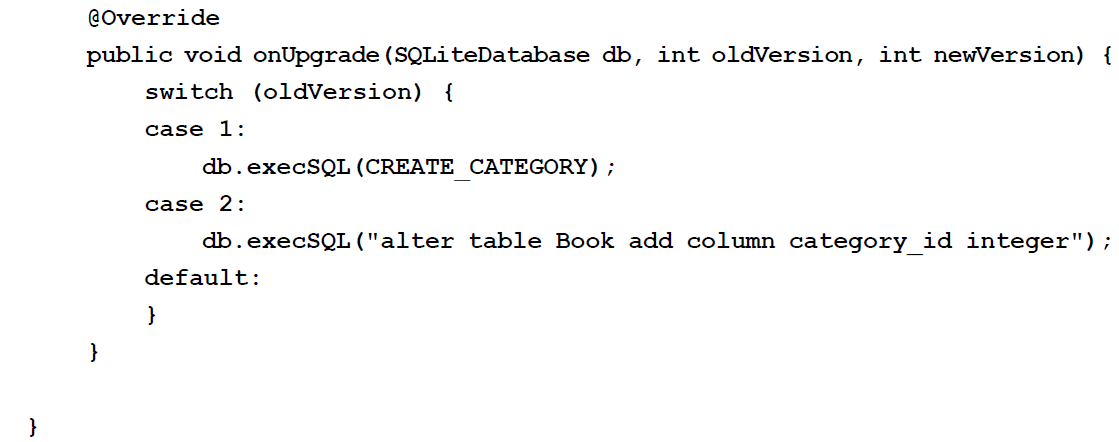 開發隨筆:ListView 自定義、SQLite 升級與 Activity 傳值實踐
開發隨筆:從列表頁到詳情頁的實作整理 在這次的小專案中,我完成了列表頁與詳情頁的資料流串接,過程中也重新梳理了 SQLite 升級、資料庫查詢、Activity 間傳值,
 Android 6.0 重啟(Reboot)流程源碼深度剖析
由於關機與重啟的整體流程高度相似,本文以重啟(Reboot)為主線展開分析。 在 Android 系統中,重啟大致可以歸納為以下幾種觸發方式: 1、長按電源鍵後於菜單中選
 Android 學習:SharedPreferences 輕量資料持久化實作
SharedPreferences 是 Android 提供的輕量級資料儲存機制,適合保存設定、狀態等鍵值對資料。本例以一個音樂開關狀態的保存與還原為例,示範其用法。 執
 硅谷商城項目解析:發現模組的 TabLayout、彈幕與 Gson
硅谷商城項目中的發現模組,主要負責內容瀏覽與社群互動。它結合了 TabLayout、彈幕與 Gson,讓頁面切換、動態展示與資料解析更完整。 TabLayout 標題切