

編輯:關於 Android 程式設計
系統內建的 TextView 並沒有直接提供文字傾斜的屬性(至少我在原生 API 裡沒找到現成的),但只要繼承 TextView 並在繪製時動一點手腳,就能自己做出效果。
關鍵在 onDraw:先 save 畫布狀態,以控件中心為軸心旋轉指定角度,畫完再 restore 還原,避免影響到後續繪製。
public class LeanTextView extends TextView {
    private int mDegrees;

    public int getmDegrees() { return mDegrees; }

    public void setmDegrees(int mDegrees) {
        this.mDegrees = mDegrees;
        invalidate();
    }

    public LeanTextView(Context context) {
        super(context, null);
    }

    public LeanTextView(Context context, AttributeSet attrs) {
        super(context, attrs, android.R.attr.textViewStyle);
        this.setGravity(Gravity.CENTER);
        TypedArray a = context.obtainStyledAttributes(
                attrs, R.styleable.LeanTextView);
        mDegrees = a.getDimensionPixelSize(
                R.styleable.LeanTextView_degree, 0);
        a.recycle();
    }

    @Override
    protected void onDraw(Canvas canvas) {
        canvas.save();
        canvas.translate(getCompoundPaddingLeft(), getExtendedPaddingTop());
        canvas.rotate(mDegrees, this.getWidth() / 2f, this.getHeight() / 2f);
        super.onDraw(canvas);
        canvas.restore();
    }
}
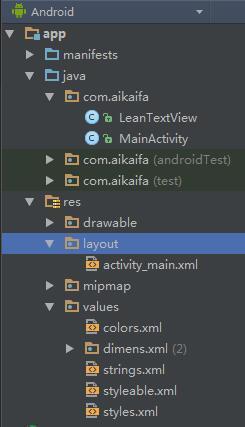
在 values 目錄下新增 styleable.xml,讓 XML 裡可以直接設定角度:
<resources>
    <declare-styleable name="LeanTextView">
        <attr name="degree" format="dimension" />
    </declare-styleable>
</resources>
<com.aikaifa.LeanTextView
    android:id="@+id/lean"
    android:layout_width="match_parent"
    android:layout_height="wrap_content"
    android:padding="10dp"
    android:text="愛開發" />
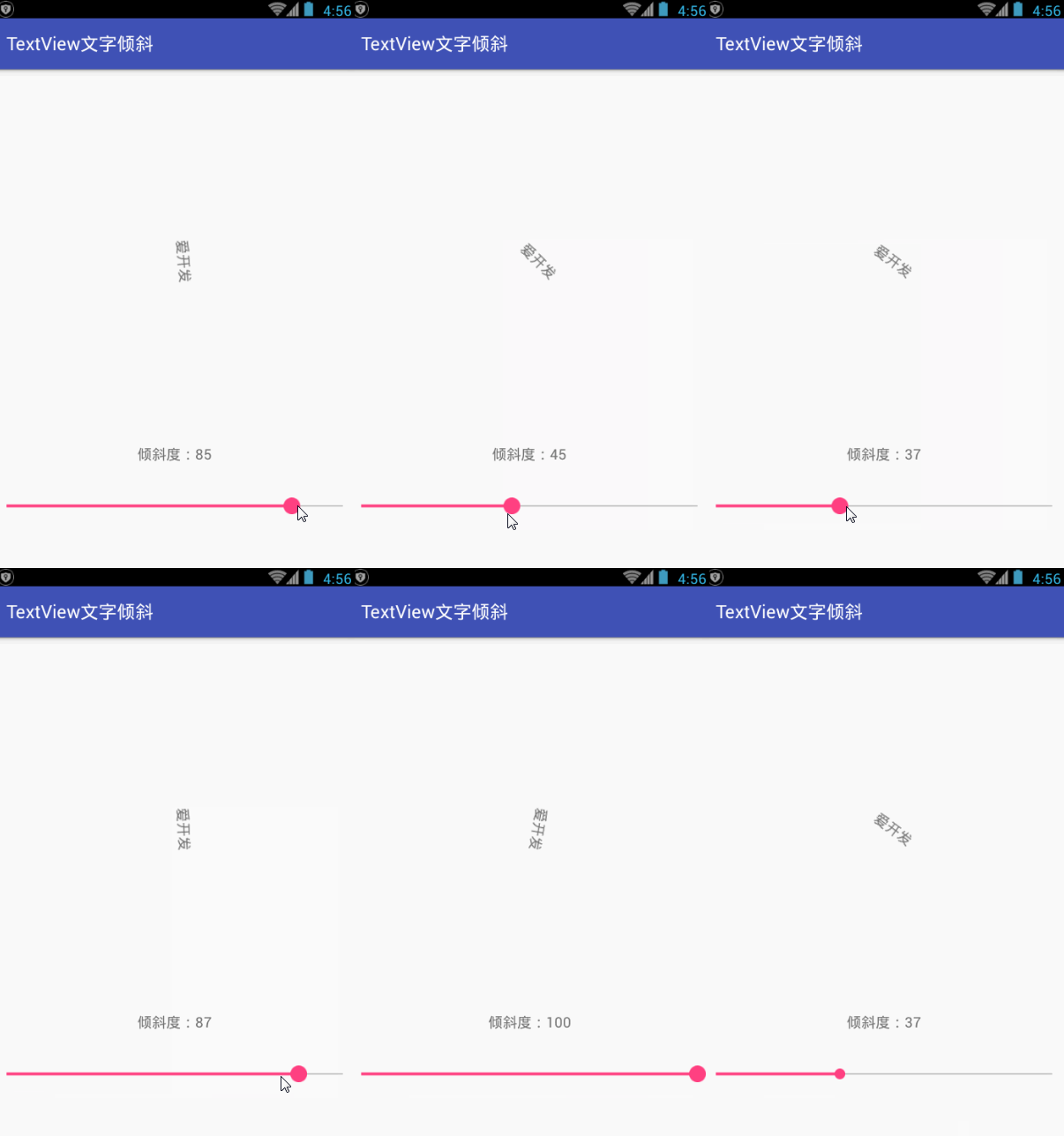
再加一個 TextView 顯示目前角度,一個 SeekBar 拖動調整,效果會更有互動感:
<com.aikaifa.LeanTextView
    android:id="@+id/lean"
    android:layout_width="match_parent"
    android:layout_height="wrap_content"
    android:padding="10dp"
    android:text="愛開發" />

<TextView
    android:id="@+id/degrees"
    android:layout_width="match_parent"
    android:layout_height="wrap_content"
    android:padding="10dp"
    android:gravity="center" />

<SeekBar
    android:id="@+id/sb_lean"
    android:layout_width="match_parent"
    android:layout_height="wrap_content"
    android:layout_marginTop="20dp"
    android:max="100"
    android:progress="30" />
mText = (LeanTextView) findViewById(R.id.lean);
degrees = (TextView) findViewById(R.id.degrees);
SeekBar sbLean = (SeekBar) findViewById(R.id.sb_lean);
sbLean.setOnSeekBarChangeListener(new SeekBar.OnSeekBarChangeListener() {
    @Override
    public void onProgressChanged(SeekBar seekBar, int progress,
                                  boolean fromUser) {
        mText.setmDegrees(progress);
        degrees.setText("傾斜度:" + progress);
    }
    @Override public void onStartTrackingTouch(SeekBar seekBar) { }
    @Override public void onStopTrackingTouch(SeekBar seekBar) { }
});
到這裡,一個可調角度的傾斜文字控件就完成了。這種「繼承原生 View + 改寫 onDraw」的思路幾乎可以套用到任何自定義繪圖需求上,值得多練幾次。
 微信訊息發不出去怎麼辦?清除資料排解方法
若微信聊天時訊息遲遲無法發出,但網路正常,可能是應用資料異常所致。1. 先確認網路是否可正常使用,並嘗試重新開啟微信。2. 若仍無法發送,可進入系統設定中的應用管理,找到
 Android WebView 與 JavaScript 互傳 JSON 的實戰筆記
混合式 App 裡,原生 AND 網頁之間傳資料是日常。字串沒問題,數字也還好,但一碰到物件就會出狀況——這篇記錄的正是這樣一個坑。 問題:傳過去的 JSONObjec
 如何運用工具提升你的 Android 程式碼品質(Checkstyle、Findbugs、PMD)
本文將透過 CheckStyle、FindBugs、PMD 以及 Android Lint 等自動化工具,介紹如何提升你的 Android 程式碼品質。以自動化方式檢查程
 Android Studio 使用 android-pdf-viewer 的問題與解法
需求背景 在 Android 中顯示 PDF,常見做法是先用 DownloadManager 下載檔案,再透過 PDFView 元件渲染。本文以 Android Stud