

編輯:關於 Android 程式設計
效果圖:
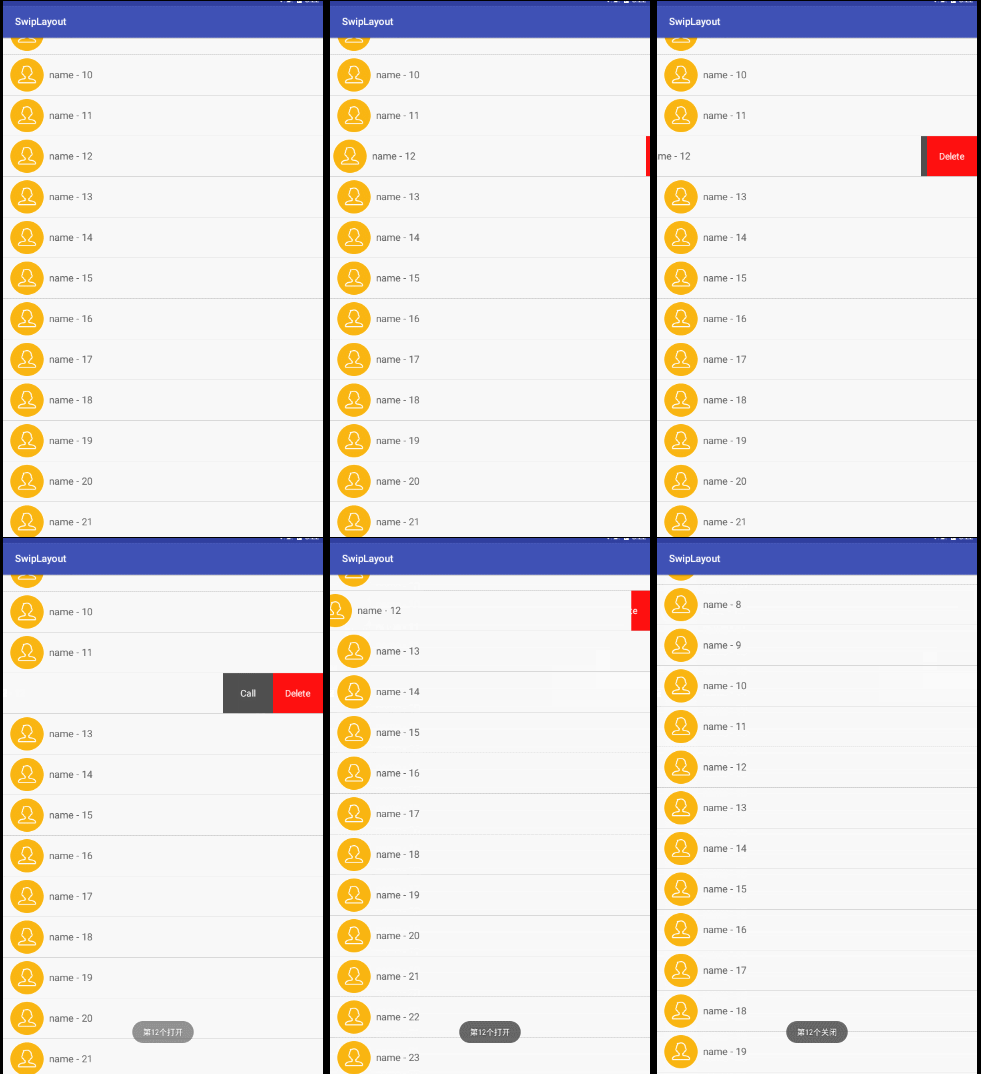
網上常見的做法是把兩個 View 拼接,右側預設不顯示,水平滑動時才把右側露出來。但新版 QQ 的體感明顯更好,於是筆者獻醜做了一個相似度很高的版本。
涉及的知識點:
1、ViewDragHelper 的用法;
2、滑動衝突的處理;
3、自訂 ViewGroup。
ViewDragHelper 推出已經有一段時間,不熟悉的朋友可以搜尋相關資料。這裡主要用到它的幾個方法:
1、tryCaptureView(View child, int pointerId):決定哪個子 View 可以被拖動。
2、getViewHorizontalDragRange(View child):返回子 View 在水平方向可移動的像素範圍,回傳 0 代表水平方向不可拖動。
3、clampViewPositionHorizontal(View child, int left, int dx):在此檢查邊界,left 與 dx 代表即將移動到的位置。
4、onViewPositionChanged(...):當被捕捉的 View 因拖曳或設定而改變位置時回呼。
基本用法如下:
public SwipeLayout(Context context, AttributeSet attrs, int defStyle) { super(context, attrs, defStyle); init(); } private void init() { viewDragHelper = ViewDragHelper.create(this, callback); } public boolean onInterceptTouchEvent(MotionEvent ev) { boolean result = viewDragHelper.shouldInterceptTouchEvent(ev); } public boolean onTouchEvent(MotionEvent event) { viewDragHelper.processTouchEvent(event); return true; }總結三步:在建構子中建立、在 onInterceptTouchEvent 判斷是否攔截、在 onTouchEvent 處理事件。最難理解的部分搞定了,接下來看具體實作。
先看布局:
<LinearLayout xmlns:android="https://schemas.android.com/apk/res/android" android:layout_width="match_parent" android:layout_height="wrap_content" android:orientation="vertical" > <scrollviewgroup.lly.com.swiplayout.SwipeLayout android:id="@+id/swipeLayout" android:layout_width="match_parent" android:layout_height="wrap_content" > <!-- delete區域的布局 --> <include layout="@layout/layout_delete" /> <!-- item內容的布局 --> <include layout="@layout/layout_content" /> </scrollviewgroup.lly.com.swiplayout.SwipeLayout> </LinearLayout>
一個自訂 ViewGroup 包含兩個子控制項,沒什麼特別。接著看 SwipeLayout 的實現:
@Override protected void onFinishInflate() { super.onFinishInflate(); deleteView = getChildAt(0); contentView = getChildAt(1); } @Override protected void onSizeChanged(int w, int h, int oldw, int oldh) { super.onSizeChanged(w, h, oldw, oldh); deleteHeight = deleteView.getMeasuredHeight(); deleteWidth = deleteView.getMeasuredWidth(); contentWidth = contentView.getMeasuredWidth(); screenWidth = getWidth(); } @Override protected void onLayout(boolean changed, int left, int top, int right, int bottom) { // super.onLayout(changed, left, top, right, bottom); deleteView.layout(screenWidth - deleteWidth, 0, (screenWidth - deleteWidth) + deleteWidth, deleteHeight); contentView.layout(0, 0, contentWidth, deleteHeight); }這段在做初始化,重點看 onLayout:我們繼承的是 FrameLayout,先把 deleteView 畫在右側,再覆蓋一層 contentView,於是顯示時只會看到 contentView。
接著看 onTouch:
public boolean onTouchEvent(MotionEvent event) { //如果當前有打開的,則下面的邏輯不能執行 if(!SwipeLayoutManager.getInstance().isShouldSwipe(this)){ requestDisallowInterceptTouchEvent(true); return true; } switch (event.getAction()) { case MotionEvent.ACTION_DOWN: downX = event.getX(); downY = event.getY(); break; case MotionEvent.ACTION_MOVE: //1.獲取x和y方向移動的距離 float moveX = event.getX(); float moveY = event.getY(); float delatX = moveX - downX;//x方向移動的距離 float delatY = moveY - downY;//y方向移動的距離 if(Math.abs(delatX)>Math.abs(delatY)){ //表示移動是偏向於水平方向,那麼應該SwipeLayout應該處理,請求父view不要攔截 requestDisallowInterceptTouchEvent(true); } //更新downX,downY downX = moveX; downY = moveY; break; case MotionEvent.ACTION_UP: break; } viewDragHelper.processTouchEvent(event); return true; }這裡主要處理事件衝突:判定為水平移動時,請求父容器不要攔截。
接下來是重點:
private ViewDragHelper.Callback callback = new ViewDragHelper.Callback() { @Override public boolean tryCaptureView(View child, int pointerId) { return child==contentView; } @Override public int getViewHorizontalDragRange(View child) { return deleteWidth; } @Override public int clampViewPositionHorizontal(View child, int left, int dx) { if(child==contentView){ if(left>0)left = 0; if(left<-deleteWidth)left = -deleteWidth; } return left; } @Override public void onViewPositionChanged(View changedView, int left, int top, int dx, int dy) { super.onViewPositionChanged(changedView, left, top, dx, dy); //判斷開和關閉的邏輯 if(contentView.getLeft()==0 && currentState!=SwipeState.Close){ //說明應該將state更改為關閉 currentState = SwipeState.Close; //回調接口關閉的方法 if(listener!=null){ listener.onClose(getTag()); } //說明當前的SwipeLayout已經關閉,需要讓Manager清空一下 SwipeLayoutManager.getInstance().clearCurrentLayout(); }else if (contentView.getLeft()==-deleteWidth && currentState!=SwipeState.Open) { //說明應該將state更改為開 currentState = SwipeState.Open; //回調接口打開的方法 if(listener!=null){ listener.onOpen(getTag()); } //當前的Swipelayout已經打開,需要讓Manager記錄一下下 SwipeLayoutManager.getInstance().setSwipeLayout(SwipeLayout.this); } } @Override public void onViewReleased(View releasedChild, float xvel, float yvel) { super.onViewReleased(releasedChild, xvel, yvel); if(contentView.getLeft()<-deleteWidth/2){ //應該打開 open(); }else { //應該關閉 close(); } } };這些方法前面都提過:tryCaptureView 讓 contentView 可滑動,getViewHorizontalDragRange 回傳 deleteWidth 作為拖動範圍,clampViewPositionHorizontal 限制邊界,onViewPositionChanged 更新狀態,最後在手指抬起時讓 View 自動回滾。
/** * 打開的方法 */ public void open() { viewDragHelper.smoothSlideViewTo(contentView,-deleteWidth,contentView.getTop()); ViewCompat.postInvalidateOnAnimation(SwipeLayout.this); } /** * 關閉的方法 */ public void close() { viewDragHelper.smoothSlideViewTo(contentView,0,contentView.getTop()); ViewCompat.postInvalidateOnAnimation(SwipeLayout.this); }; public void computeScroll() { if(viewDragHelper.continueSettling(true)){ ViewCompat.postInvalidateOnAnimation(this); } }務必記得重寫 computeScroll,否則滑動會卡住不動。至此這個自訂 FrameLayout 就完成了。
不過還有個問題:在已滑出的 View 中上下滑動時,deleteView 仍維持顯示狀態,因此要在 Activity 中補一段處理:
recyView.setOnScrollListener(new RecyclerView.OnScrollListener() { @Override public void onScrollStateChanged(RecyclerView recyclerView, int newState) { super.onScrollStateChanged(recyclerView, newState); } @Override public void onScrolled(RecyclerView recyclerView, int dx, int dy) { super.onScrolled(recyclerView, dx, dy); if(dy>0 || dy<0){ SwipeLayoutManager.getInstance().closeCurrentLayout(); } } });當 RecyclerView 上下滾動時,順手讓子項復位,收工。
ps:原本是在 Eclipse 的 ListView 中實作,但想說 Google 已不再支援 Eclipse,而 ListView 也逐漸被 RecyclerView 取代,最後便切換到 Android Studio,用 RecyclerView 重寫了一套。
以上便是自訂 View 實現側滑效果的完整解析,希望對你有幫助。
 Android 內容觀察者實戰:監聽簡訊資料庫變化
當我們需要即時掌握 Android 系統中某個資料庫的變化,例如簡訊收件匣的更新,就可以使用內容觀察者 ContentObserver。它能夠在指定 URI 的內容發生改
 Android AbsoluteLayout 絕對位置布局用法
AbsoluteLayout 是一種以絕對座標定位元件的布局方式。開發者可以直接指定元件在畫面上的位置,因此又常被稱為座標布局。 布局特性 AbsoluteLayout
 Android 快速實作:ListView 字母 A-Z 排序與側邊索引
效果展示 字母排序與側邊索引是聯絡人、音樂與字典類 App 常見功能。透過側邊字母欄,使用者可以快速跳轉到指定分組,提升大量資料的瀏覽效率。 拼音檢索 若資料包含中文
 Android Fragment 完全解析:建立、管理、通訊與生命週期
Fragment 概述 Fragment 代表 Activity 中的一部分 UI 或行為。一個 Activity 可以組合多個 Fragment,Fragment 也能