

編輯:關於 Android 程式設計
檔案儲存是 Android 中最基本的一種資料儲存方式,它完全不對內容做任何格式化處理,所有資料都原封不動地寫入檔案。核心概念其實就是輸入流與輸出流。
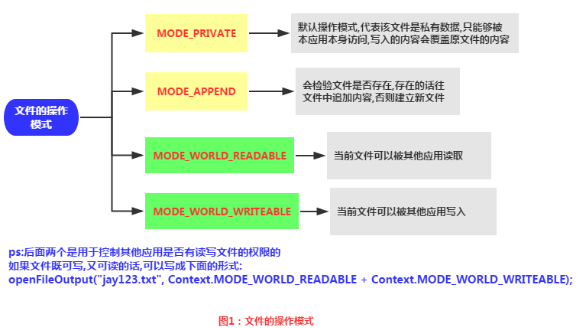
相關操作方法:
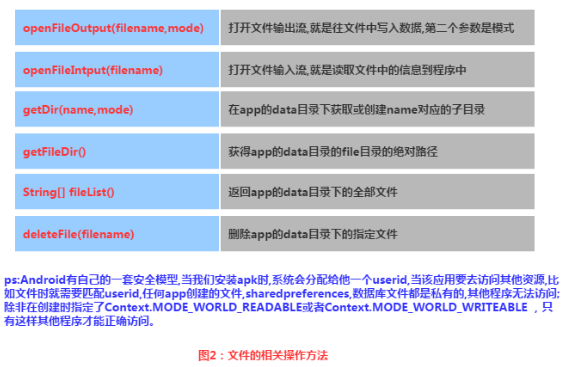
/** * openFileOutput , openFileInput * 這兩種方法同 sp 一樣只能把檔案存到記憶體內固定的路徑中, * 預設為 /data/data/<packageName>/files */ private void save2File() { try { //向檔案寫入內容 FileOutputStream os = openFileOutput("file.txt", Context.MODE_PRIVATE); String text = "寫數據到文件"; os.write(text.getBytes("utf-8")); //關閉流 os.close(); } catch (FileNotFoundException e) { e.printStackTrace(); } catch (UnsupportedEncodingException e) { e.printStackTrace(); } catch (IOException e) { e.printStackTrace(); } } /** * */ private void readFile() { try { FileInputStream ins = openFileInput("file.txt"); byte[] buffer = new byte[100]; int byteCount = ins.read(buffer); String text = new String(buffer,0,byteCount,"utf-8"); Toast.makeText(this,text,Toast.LENGTH_SHORT).show(); ins.close(); } catch (FileNotFoundException e) { e.printStackTrace(); } catch (IOException e) { e.printStackTrace(); } }
檔案儲存位置:/data/data/<package-name>/files
這兩個方法可以取得檔案的 OutputStream 與 InputStream 物件,並透過流物件處理任意資料。但它們與 SharedPreferences 一樣,只能在指定目錄建立檔案,使用上仍有明顯限制。
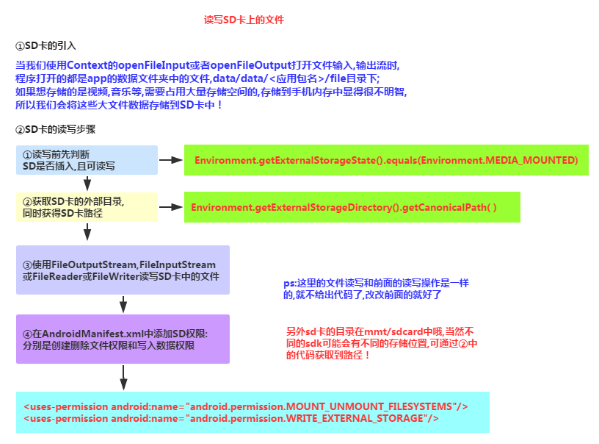
main_activity.xml:
<LinearLayout xmlns:android="https://schemas.android.com/apk/res/android" xmlns:tools="https://schemas.android.com/tools" android:id="@+id/LinearLayout1" android:layout_width="match_parent" android:layout_height="match_parent" android:orientation="vertical" tools:context="com.jay.example.filedemo2.MainActivity"> <TextView android:layout_width="wrap_content" android:layout_height="wrap_content" android:text="請輸入檔案名" /> <EditText android:id="@+id/edittitle" android:layout_width="match_parent" android:layout_height="wrap_content" android:hint="檔案名" /> <TextView android:layout_width="wrap_content" android:layout_height="wrap_content" android:text="請輸入檔案內容" /> <EditText android:id="@+id/editdetail" android:layout_width="match_parent" android:layout_height="wrap_content" android:hint="檔案內容" /> <Button android:id="@+id/btnsave" android:layout_width="wrap_content" android:layout_height="wrap_content" android:text="保存到SD卡" /> <Button android:id="@+id/btnclean" android:layout_width="wrap_content" android:layout_height="wrap_content" android:text="清空" /> <Button android:id="@+id/btnread" android:layout_width="wrap_content" android:layout_height="wrap_content" android:text="讀取sd卡中的檔案" /> </LinearLayout>
接著寫一個 SD 操作類 SDFileHelper.java:
public class SDFileHelper { private Context context; public SDFileHelper() { } public SDFileHelper(Context context) { super(); this.context = context; } //往 SD 卡寫入檔案的方法 public void savaFileToSD(String filename, String filecontent) throws Exception { //如果手機已插入 sd 卡,且 app 具有讀寫 sd 卡的權限 if (Environment.getExternalStorageState().equals(Environment.MEDIA_MOUNTED)) { filename = Environment.getExternalStorageDirectory().getCanonicalPath() + "/" + filename; //這裡就不要用 openFileOutput 了,那個是往手機記憶體中寫數據的 FileOutputStream output = new FileOutputStream(filename); output.write(filecontent.getBytes()); //將 String 字串以位元組流的形式寫入到輸出流中 output.close(); //關閉輸出流 } else Toast.makeText(context, "SD卡不存在或者不可讀寫", Toast.LENGTH_SHORT).show(); } //讀取 SD 卡中檔案的方法 //定義讀取檔案的方法: public String readFromSD(String filename) throws IOException { StringBuilder sb = new StringBuilder(""); if (Environment.getExternalStorageState().equals(Environment.MEDIA_MOUNTED)) { filename = Environment.getExternalStorageDirectory().getCanonicalPath() + "/" + filename; //打開檔案輸入流 FileInputStream input = new FileInputStream(filename); byte[] temp = new byte[1024]; int len = 0; //讀取檔案內容: while ((len = input.read(temp)) > 0) { sb.append(new String(temp, 0, len)); } //關閉輸入流 input.close(); } return sb.toString(); } }
MainActivity.java 實作相關邏輯:
public class MainActivity extends AppCompatActivity implements View.OnClickListener{ private EditText editname; private EditText editdetail; private Button btnsave; private Button btnclean; private Button btnread; private Context mContext; @Override protected void onCreate(Bundle savedInstanceState) { super.onCreate(savedInstanceState); setContentView(R.layout.activity_main); mContext = getApplicationContext(); bindViews(); } private void bindViews() { editname = (EditText) findViewById(R.id.edittitle); editdetail = (EditText) findViewById(R.id.editdetail); btnsave = (Button) findViewById(R.id.btnsave); btnclean = (Button) findViewById(R.id.btnclean); btnread = (Button) findViewById(R.id.btnread); btnsave.setOnClickListener(this); btnclean.setOnClickListener(this); btnread.setOnClickListener(this); } @Override public void onClick(View v) { switch (v.getId()){ case R.id.btnclean: editdetail.setText(""); editname.setText(""); break; case R.id.btnsave: String filename = editname.getText().toString(); String filedetail = editdetail.getText().toString(); SDFileHelper sdHelper = new SDFileHelper(mContext); try { sdHelper.savaFileToSD(filename, filedetail); Toast.makeText(getApplicationContext(), "數據寫入成功", Toast.LENGTH_SHORT).show(); } catch(Exception e){ e.printStackTrace(); Toast.makeText(getApplicationContext(), "數據寫入失敗", Toast.LENGTH_SHORT).show(); } break; case R.id.btnread: String detail = ""; SDFileHelper sdHelper2 = new SDFileHelper(mContext); try { String filename2 = editname.getText().toString(); detail = sdHelper2.readFromSD(filename2); } catch(IOException e){e.printStackTrace();} Toast.makeText(getApplicationContext(), detail, Toast.LENGTH_SHORT).show(); break; } } }
最後別忘了在 AndroidManifest.xml 加上讀寫權限:
<!-- 在 SDCard 中建立與刪除檔案權限 --> <uses-permission android:name="android.permission.MOUNT_UNMOUNT_FILESYSTEMS"/> <!-- 往 SDCard 寫入數據權限 --> <uses-permission android:name="android.permission.WRITE_EXTERNAL_STORAGE"/>
預設情況下,系統會劃出一部分儲存空間給虛擬 SD 卡使用(另一部分則用於安裝作業系統)。
android.os.Enviroment.isExternalStorageRemovalbe()
回傳 true 代表 SD 卡是實體的,反之則為虛擬的。
package com.turing.base.activity.dataStore.fileStore; import android.content.Context; import android.os.Environment; import android.os.StatFs; import android.os.storage.StorageManager; import android.text.TextUtils; import android.util.Log; import java.io.File; import java.lang.reflect.InvocationTargetException; import java.lang.reflect.Method; import java.util.concurrent.ConcurrentLinkedQueue; import java.util.concurrent.ExecutorService; import java.util.concurrent.Executors; /** * 用於適配不同型號手機,反射取得 SD 卡路徑和狀態 * */ public class DevMountInfo { private final String TAG = DevMountInfo.class.getSimpleName(); private static final int ERROR = -1; // class name private final static String CLASS_NAME = "android.os.storage.StorageVolume"; //remained spare memory size private static final int REMAINED_SPARE_IN_MB = 100; // method name private final static String METHOD_GET_VOLUME_LIST = "getVolumeList"; private final static String METHOD_GET_VOLUME_STATE = "getVolumeState"; private final static String METHOD_IS_REMOVABLE = "isRemovable"; private final static String METHOD_GET_PATH = "getPath"; private final static String MOUNTED = "mounted"; private static DevMountInfo INSTANCE; private String mSDCardPath = null; // internal file path private ConcurrentLinkedQueue<String> mInternalPathList = new ConcurrentLinkedQueue<String>(); // external file path private ConcurrentLinkedQueue<String> mExternalPathList = new ConcurrentLinkedQueue<String>(); private ExecutorService mExecutor = null; private DevMountInfo() { mExecutor = Executors.newSingleThreadExecutor(); } public static DevMountInfo getInstance() { synchronized (DevMountInfo.class) { if (null == INSTANCE) { INSTANCE = new DevMountInfo(); } return INSTANCE; } } @Override protected void finalize() throws Throwable { super.finalize(); synchronized (DevMountInfo.class) { mInternalPathList.clear(); mExternalPathList.clear(); mExecutor.shutdown(); INSTANCE = null; } } public void init(final Context context) { mExecutor.execute(new Runnable() { @Override public void run() { executeInit(context); } }); } public boolean isSDCardFull() { return REMAINED_SPARE_IN_MB > (getSDCardAvailSpace() * 1024); } public boolean isSDCardAvaiable() { return !mExternalPathList.isEmpty() || !mInternalPathList.isEmpty(); } public String getSDCardPath() { return mSDCardPath; } public long getSDCardTotalSpace() { long totalSpace = 0; if (!TextUtils.isEmpty(mSDCardPath)) { StatFs sf = new StatFs(mSDCardPath); long blockSize = sf.getBlockSize(); long total = sf.getBlockCount(); totalSpace = total * blockSize / 1024; } return totalSpace; } public long getSDCardAvailSpace() { long availSpace = 0; if (!TextUtils.isEmpty(mSDCardPath)) { StatFs sf = new StatFs(mSDCardPath); long blockSize = sf.getBlockSize(); long availCount = sf.getAvailableBlocks(); availSpace = availCount * blockSize / 1024; } return availSpace; } public String getInternalSDCardPath() { return mInternalPathList.peek(); } public String getExternalSDCardPath() { return mExternalPathList.peek(); } private void executeInit(Context context) { StorageManager mStorageManager = (StorageManager) context.getSystemService(Context.STORAGE_SERVICE); if (mStorageManager != null) { Class<?> mStorageVolume = null; Method mGetVolumeListMethod = null; Method mGetVolumeStateMethod = null; Method mGetPathMethod = null; Method mIsRemovableMethod = null; Object[] mStorageVolumeList = null; try { mStorageVolume = Class.forName(CLASS_NAME); mGetVolumeListMethod = mStorageManager.getClass().getMethod(METHOD_GET_VOLUME_LIST, new Class[0]); mGetVolumeStateMethod = mStorageManager.getClass().getMethod(METHOD_GET_VOLUME_STATE, new Class[]{String.class}); mIsRemovableMethod = mStorageVolume.getMethod(METHOD_IS_REMOVABLE, new Class[0]); mGetPathMethod = mStorageVolume.getMethod(METHOD_GET_PATH, new Class[0]); mStorageVolumeList = (Object[]) mGetVolumeListMethod.invoke(mStorageManager, new Object[0]); boolean mIsRemovable = false; if (mStorageVolumeList != null && mStorageVolumeList.length > 0) { int mStorageVolumeCount = mStorageVolumeList.length; Log.i(TAG, "init() === > StorageVolume Count = " + mStorageVolumeCount); mInternalPathList.clear(); mExternalPathList.clear(); for (int i = 0; i < mStorageVolumeCount; ++i) { String mStoragePath = (String) mGetPathMethod.invoke(mStorageVolumeList[i], new Object[0]); mIsRemovable = ((Boolean) mIsRemovableMethod.invoke(mStorageVolumeList[i], new Object[0])).booleanValue(); if (!TextUtils.isEmpty(mStoragePath)) { String state = (String) mGetVolumeStateMethod.invoke(mStorageManager, new Object[]{mStoragePath}); if ((state != null) && (state.equals(MOUNTED))) { if (mIsRemovable) { Log.i(TAG, "init() === > external storage path = (" + mStoragePath + ")"); mExternalPathList.add(mStoragePath); } else { Log.i(TAG, "init() === > internal storage path = (" + mStoragePath + ")"); mInternalPathList.add(mStoragePath); } } } } } } catch (ClassNotFoundException e) { handleInvalid(); Log.e(TAG, "init() === > Exception:ClassNotFoundException"); } catch (NoSuchMethodException e) { handleInvalid(); Log.e(TAG, "init() === > Exception:NoSuchMethodException"); } catch (IllegalArgumentException e) { handleInvalid(); Log.e(TAG, "init() === > Exception:IllegalArgumentException"); } catch (IllegalAccessException e) { handleInvalid(); Log.e(TAG, "init() === > Exception:IllegalAccessException"); } catch (InvocationTargetException e) { handleInvalid(); Log.e(TAG, "init() === > Exception:InvocationTargetException"); } } else { handleInvalid(); Log.e(TAG, "init() === > can't get storage manager"); } initSDCardPath(); } private void handleInvalid() { mInternalPathList.add(Environment.getExternalStorageDirectory().getPath()); } private void initSDCardPath() { if (!mExternalPathList.isEmpty()) { mSDCardPath = mExternalPathList.peek(); } else if (!mInternalPathList.isEmpty()) { mSDCardPath = mInternalPathList.peek(); } else { mSDCardPath = Environment.getExternalStorageDirectory().getPath(); } Log.i(TAG, "initSDCardPath() === > SDCARD PATH = (" + mSDCardPath + ")"); } /** * SDCARD 是否存在 */ public static boolean externalMemoryAvailable() { return android.os.Environment.getExternalStorageState().equals( android.os.Environment.MEDIA_MOUNTED); } /** * 取得手機內部剩餘儲存空間 * * @return */ public static long getAvailableInternalMemorySize() { File path = Environment.getDataDirectory(); StatFs stat = new StatFs(path.getPath()); long blockSize = stat.getBlockSize(); long availableBlocks = stat.getAvailableBlocks(); return availableBlocks * blockSize; } /** * 取得手機內部總的儲存空間 * * @return */ public static long getTotalInternalMemorySize() { File path = Environment.getDataDirectory(); StatFs stat = new StatFs(path.getPath()); long blockSize = stat.getBlockSize(); long totalBlocks = stat.getBlockCount(); return totalBlocks * blockSize; } /** * 取得手機內建儲存剩餘儲存空間 * * @return */ public static long getAvailableInternalSystemMemorySize() { File path = Environment.getRootDirectory(); StatFs stat = new StatFs(path.getPath()); long blockSize = stat.getBlockSize(); long availableBlocks = stat.getAvailableBlocks(); return availableBlocks * blockSize; } /** * 取得手機內建儲存總的儲存空間 * * @return */ public static long getTotalInternalSystemMemorySize() { File path = Environment.getRootDirectory(); StatFs stat = new StatFs(path.getPath()); long blockSize = stat.getBlockSize(); long totalBlocks = stat.getBlockCount(); return totalBlocks * blockSize; } /** * 取得 SDCARD 剩餘儲存空間 * * @return */ public static long getAvailableExternalMemorySize() { if (externalMemoryAvailable()) { File path = Environment.getExternalStorageDirectory(); StatFs stat = new StatFs(path.getPath()); long blockSize = stat.getBlockSize(); long availableBlocks = stat.getAvailableBlocks(); return availableBlocks * blockSize; } else { return ERROR; } } /** * 取得 SDCARD 總的儲存空間 * * @return */ public static long getTotalExternalMemorySize() { if (externalMemoryAvailable()) { File path = Environment.getExternalStorageDirectory(); StatFs stat = new StatFs(path.getPath()); long blockSize = stat.getBlockSize(); long totalBlocks = stat.getBlockCount(); return totalBlocks * blockSize; } else { return ERROR; } } public static long getAvailableMemorySize(String path) { if (null == path) return 0; StatFs stat = new StatFs(path); long blockSize = stat.getBlockSize(); long availableBlocks = stat.getAvailableBlocks(); return availableBlocks * blockSize; } }
為什麼要用反射?因為 StorageManager.getVolumeList() 與 StorageVolume.getPath() 在很長一段時間裡都是隱藏 API,不對外公開。透過反射呼叫,可以在不改變編譯目標的情況下取得真實的掛載路徑,並用 isRemovable() 區分內建與可移除的空間。這段程式碼也示範了幾個實務細節:把初始處理丟到單執行緒背景執行、每個反射環節都用 try catch 完整包住並回退到 Environment.getExternalStorageDirectory() 作為兜底、以及用 ConcurrentLinkedQueue 保存多個掛載點以支援雙卡與多儲存區機型。
這兩個資料夾大家並不陌生。如果不希望自己的檔案被編譯成二進位格式,就可以放進這兩個目錄。兩者的差別如下:
讀取方式:
res/raw:
InputStream is =getResources().openRawResource(R.raw.filename);
assets:
AssetManager am = getAssets(); InputStream is = am.open("filename");
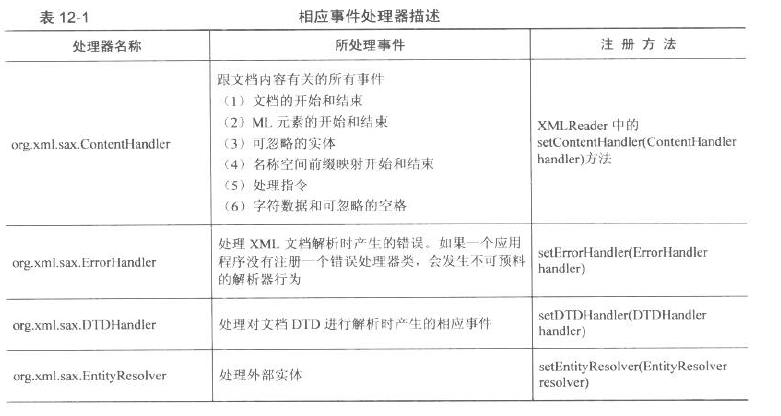
SAX 在處理 XML 時並不會一次把整份檔案載入記憶體,而是一邊讀一邊解析。使用 SAX 需要一個 Handler 物件,實務上通常繼承 org.xml.sax.helpers.DefaultHandler。
因此必須處理以下五個解析事件:
startDocument(),適合在這裡做初始化工作。<product>、<item> 這類起始標記時觸發,對應 startElement(),可以取得當前元素名稱與屬性資訊。</product>、</item> 這類結束標記,對應 endElement(),此時可以取得該元素的所有資訊。endDocument()。若有釋放資源等收尾工作,可在這裡完成。characters()。少了它,前四步等於白做——雖然讀完了內容卻沒有保存。它的主要作用就是保存元素的文字節點,也就是 <product>abc</product> 中的 abc。res\raw\product.xml:
<?xml version="1.0" encoding="utf-8"?> <products> <product> <id>10</id> <name>電腦</name> <price>2067.25</price> </product> <product> <id>20</id> <name>微波爐</name> <price>520</price> </product> <product> <id>30</id> <name>洗衣機</name> <price>2400</price> </product> </products>
Product.java:
public class Product { private int id; private String name; private float price; public int getId() { return id; } public void setId(int id) { this.id = id; } public String getName() { return name; } public void setName(String name) { this.name = name; } public float getPrice() { return price; } public void setPrice(float price) { this.price = price; } }
XML2Product.java(DefaultHandler 子類,核心類,負責處理各解析事件):
import org.xml.sax.Attributes; import org.xml.sax.SAXException; import org.xml.sax.helpers.DefaultHandler; import java.util.ArrayList; import java.util.List; public class XML2Product extends DefaultHandler { private List<Product> products; private Product product; private StringBuffer buffer = new StringBuffer(); public List<Product> getProducts() { return products; } @Override public void characters(char[] ch, int start, int length) throws SAXException { buffer.append(ch, start, length); super.characters(ch, start, length); } @Override public void startDocument() throws SAXException { // 開始分析 xml 檔案,建立 List 物件用於保存分析完的 Product 物件 products = new ArrayList<Product>(); } @Override public void startElement(String uri, String localName, String qName, Attributes attributes) throws SAXException { if (localName.equals("product")) { // 如果分析的是 <product> 標簽,則建立一個 Product 物件 product = new Product(); } super.startElement(uri, localName, qName, attributes); } @Override public void endElement(String uri, String localName, String qName) throws SAXException { if (localName.equals("product")) { // 處理完 <product> 標簽後 將 product 物件添加到 products 中 products.add(product); } else if (localName.equals("id")) { // 設定 id 屬性的值 product.setId(Integer.parseInt(buffer.toString().trim())); // 將標簽內容的緩存區清空 buffer.setLength(0); } else if (localName.equals("name")) { product.setName(buffer.toString().trim()); buffer.setLength(0); } else if (localName.equals("price")) { product.setPrice(Float.parseFloat(buffer.toString().trim())); buffer.setLength(0); } super.endElement(uri, localName, qName); } }
Xml2JavaObjectAct:
import android.app.AlertDialog; import android.os.Bundle; import android.support.v7.app.AppCompatActivity; import android.util.Xml; import android.view.View; import com.turing.base.R; import java.io.InputStream; import java.util.List; public class Xml2JavaObjectAct extends AppCompatActivity { @Override protected void onCreate(Bundle savedInstanceState) { super.onCreate(savedInstanceState); setContentView(R.layout.activity_xml2_java_object); } public void onClick_XMLToObject(View view) { try { // 打開資源檔案 InputStream is = getResources().openRawResource(R.raw.products); XML2Product xml2Product = new XML2Product(); // 開始分析 products.xml 檔案 android.util.Xml.parse(is, Xml.Encoding.UTF_8, xml2Product); // 輸出轉換後的 java 物件 List<Product> products = xml2Product.getProducts(); String msg = "共" + products.size() + "個產品\n"; for (Product product : products) { msg += "id:" + product.getId() + " 產品名:" + product.getName() + " 價格:" + product.getPrice() + "\n"; } // 彈出對話框 new AlertDialog.Builder(this).setTitle("產品信息").setMessage(msg) .setPositiveButton("關閉", null).show(); } catch (Exception e) { } } }
效果圖:
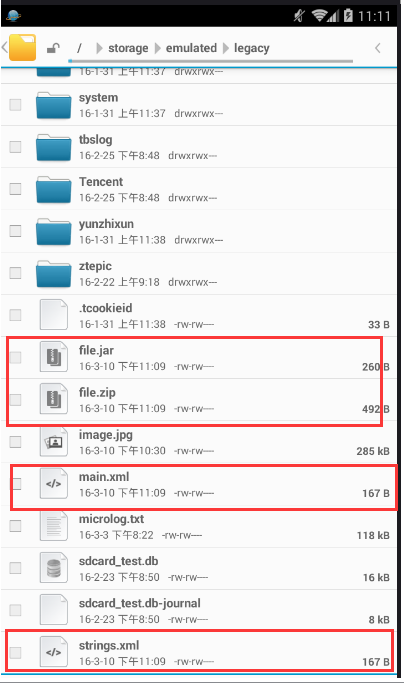
activity_jar_zip.xml:
<?xml version="1.0" encoding="utf-8"?> <LinearLayout xmlns:android="https://schemas.android.com/apk/res/android" android:layout_width="fill_parent" android:layout_height="fill_parent" android:orientation="vertical" > <Button android:layout_width="fill_parent" android:layout_height="wrap_content" android:onClick="onClick_Jar_Compress" android:text="用jar格式壓縮文件" /> <Button android:layout_width="fill_parent" android:layout_height="wrap_content" android:onClick="onClick_Jar_Uncompress" android:text="解壓jar格式文件" /> <Button android:layout_width="fill_parent" android:layout_height="wrap_content" android:onClick="onClick_Zip_Compress" android:text="用zip格式壓縮文件" /> <Button android:layout_width="fill_parent" android:layout_height="wrap_content" android:onClick="onClick_Zip_Uncompress" android:text="解壓zip格式文件" /> </LinearLayout>
JarZipAct:
import android.os.Bundle; import android.support.v7.app.AppCompatActivity; import android.view.View; import android.widget.Toast; import com.turing.base.R; import java.io.File; import java.io.FileInputStream; import java.io.FileOutputStream; import java.io.InputStream; import java.util.jar.JarEntry; import java.util.jar.JarInputStream; import java.util.jar.JarOutputStream; import java.util.zip.ZipEntry; import java.util.zip.ZipInputStream; import java.util.zip.ZipOutputStream; public class JarZipAct extends AppCompatActivity { @Override protected void onCreate(Bundle savedInstanceState) { super.onCreate(savedInstanceState); setContentView(R.layout.activity_jar_zip); } public void onClick_Jar_Compress(View view) { try { // 使用 FileOutputStream 物件指定一個要輸出的壓縮檔案(file.jar) FileOutputStream fos = new FileOutputStream( android.os.Environment.getExternalStorageDirectory() + "/file.jar"); // 第一步 建立 JarOutputStream 物件 JarOutputStream jos = new JarOutputStream(fos); // 第二步 建立一個 JarEntry 物件,並指定待壓縮檔案在壓縮包中的檔案名 JarEntry jarEntry = new JarEntry("strings.xml"); jos.putNextEntry(jarEntry); InputStream is = getResources().getAssets().open("strings.xml"); byte[] buffer = new byte[8192]; int count = 0; // 第四步 寫入數據 while ((count = is.read(buffer)) >= 0) { jos.write(buffer, 0, count); } // 第五步 關閉當前的 JarEntry 等物件 is.close(); jos.closeEntry(); jos.close(); Toast.makeText(this, "成功將 strings.xml 文件以 jar 格式壓縮.", Toast.LENGTH_LONG) .show(); } catch (Exception e) { Toast.makeText(this, e.getMessage(), Toast.LENGTH_LONG).show(); } } public void onClick_Jar_Uncompress(View view) { try { // 定義要解壓的檔案 String filename = android.os.Environment .getExternalStorageDirectory() + "/file.jar"; if (!new File(filename).exists()) { Toast.makeText(this, "壓縮文件不存在.", Toast.LENGTH_LONG).show(); return; } // 使用 FileInputStream 物件指定要解壓的對象 FileInputStream fis = new FileInputStream(filename); // 1 建立 JarInputStream 物件來讀取壓縮檔案(file.jar) JarInputStream jis = new JarInputStream(fis); // 2 呼叫 getNextJarEntry 方法打開壓縮包中的第一個檔案,如果有多個,多次呼叫該方法 JarEntry jarEntry = jis.getNextJarEntry(); // 3 輸出已解壓的檔案 FileOutputStream fos = new FileOutputStream( android.os.Environment.getExternalStorageDirectory() + "/" + jarEntry.getName()); byte[] buffer = new byte[8192]; int count = 0; // 4 輸出已解壓的位元組流 while ((count = jis.read(buffer)) >= 0) { fos.write(buffer, 0, count); } // 5 關閉 jis.closeEntry(); jis.close(); fos.close(); Toast.makeText(this, "成功解壓 jar 格式的檔案.", Toast.LENGTH_LONG).show(); } catch (Exception e) { Toast.makeText(this, e.getMessage(), Toast.LENGTH_LONG).show(); } } public void onClick_Zip_Compress(View view) { try { // 指定了 2 個待壓縮的檔案,都在 assets 目錄中 String[] filenames = new String[] {"main.xml", "strings.xml"}; FileOutputStream fos = new FileOutputStream( android.os.Environment.getExternalStorageDirectory() + "/file.zip"); ZipOutputStream zos = new ZipOutputStream(fos); int i = 1; //枚舉 filenames 中的所有待壓縮檔案 while (i <= filenames.length) { // 從 filenames 陣列中取出當前待壓縮的檔名,作為壓縮後的檔案名,以保持前後檔名一致 ZipEntry zipEntry = new ZipEntry(filenames[i - 1]); // 打開當前的 ZipEntry 物件 zos.putNextEntry(zipEntry); InputStream is = getResources().getAssets().open( filenames[i - 1]); byte[] buffer = new byte[8192]; int count = 0; // 寫入數據 while ((count = is.read(buffer)) >= 0) { zos.write(buffer, 0, count); } zos.flush(); // 關閉當前的 ZipEntry 物件 zos.closeEntry(); is.close(); i++; } zos.finish(); zos.close(); Toast.makeText(this, "成功將 main.xml、strings.xml 文件以 zip 格式壓縮.", Toast.LENGTH_LONG).show(); } catch (Exception e) { Toast.makeText(this, e.getMessage(), Toast.LENGTH_LONG).show(); } } public void onClick_Zip_Uncompress(View view) { try { // 指定待解壓的檔案 String filename = android.os.Environment .getExternalStorageDirectory() + "/file.zip"; if (!new File(filename).exists()) { Toast.makeText(this, "壓縮文件不存在.", Toast.LENGTH_LONG).show(); return; } FileInputStream fis = new FileInputStream(filename); ZipInputStream zis = new ZipInputStream(fis); ZipEntry zipEntry = null; // 透過不斷呼叫 getNextEntry 方法來解壓 file.zip 中所有的檔案 while ((zipEntry = zis.getNextEntry()) != null) { FileOutputStream fos = new FileOutputStream( android.os.Environment.getExternalStorageDirectory() + "/" + zipEntry.getName()); byte[] buffer = new byte[8192]; int count = 0; while ((count = zis.read(buffer)) >= 0) { fos.write(buffer, 0, count); } zis.closeEntry(); fos.close(); } zis.close(); Toast.makeText(this, "成功解壓 jar 格式的檔案.", Toast.LENGTH_LONG).show(); } catch (Exception e) { Toast.makeText(this, e.getMessage(), Toast.LENGTH_LONG).show(); } } }
原文鏈接:https://blog.csdn.net/yangshangwei/article/details/50831269
以上就是本文的全部內容,希望對大家的學習有所幫助。
 ViewSwitcher 用法:兩個視圖之間的帶動畫切換
ViewSwitcher 的作用一句話就能說清:在兩個視圖之間切換時播放動畫。 它的兩個子類大家更熟悉——ImageSwitcher 在切換圖片時加動畫,TextSwi
 Android 使用 OpenCV:非 Cygwin 方式的編譯環境搭建(Win7 + Eclipse + ADT + CDT + NDK)
整個配置其實只有簡單的三步,官方文檔寫得非常簡明全面,值得稱道。 【準備】 1. Eclipse(Indigo) 2. ADT:就是給 Eclipse 添加 Andro
 善用 Android 標準 Action 與 Category 直接調用系統內建 Activity
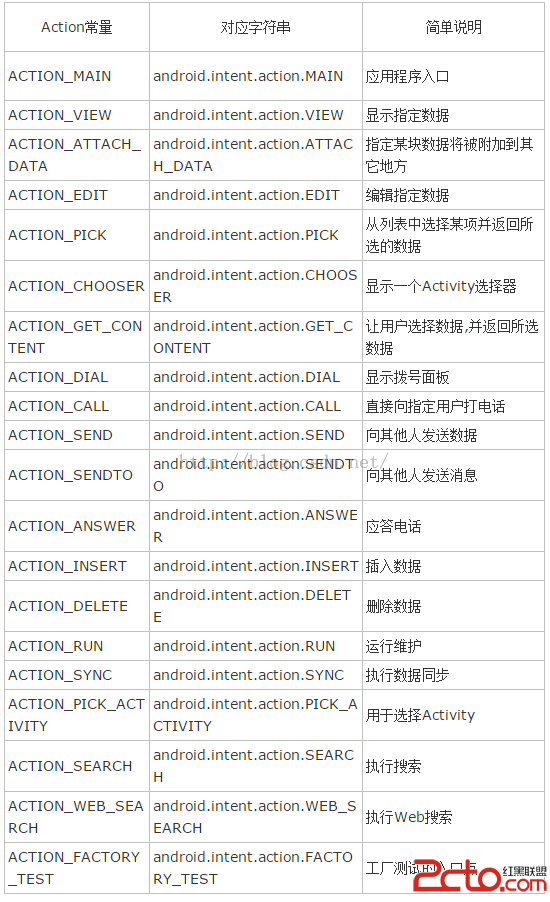
Android 內建了大量標準的 Action 與 Category 常數,透過 Intent 指定它們,就能不寫一行 UI 直接調用系統功能。 實例:讀取聯絡人電話
 詳解 Android 使用 SAX 解析 XML 檔案
解析 XML 的方式有很多種,大家比較熟悉的可能就是 DOM 解析。DOM(文件物件模型)解析:解析器讀入整個文檔,然後構建一個駐留記憶體的樹結構,然後程式碼就可以根據