

編輯:關於 Android 程式設計
我們幾乎每天都在用百度或 Google 搜索:鍵入一兩個字,候選詞就自動跳出來。這種效果在 Android 裡並不需要自己寫過濾算法——AutoCompleteTextView 搭配 ArrayAdapter 就能完成。
三步即可:在佈局中放置 AutoCompleteTextView;準備一個字符串數組並交給 ArrayAdapter;最後呼叫 setAdapter。之後只要輸入 ab,所有包含 ab 的字符串就會自動列入候選。
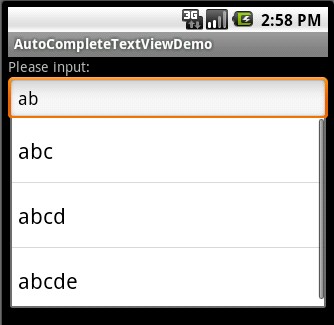
 <?xml version="1.0" encoding="utf-8"?>
<LinearLayout xmlns:android="https://schemas.android.com/apk/res/android"
    android:orientation="vertical"
    android:layout_width="fill_parent"
    android:layout_height="fill_parent" >

    <TextView
        android:layout_width="fill_parent"
        android:layout_height="wrap_content"
        android:text="Please input:" />

    <AutoCompleteTextView
        android:id="@+id/actv"
        android:layout_width="fill_parent"
        android:layout_height="wrap_content" />
</LinearLayout>
package com.android.test;

import android.app.Activity;
import android.os.Bundle;
import android.widget.ArrayAdapter;
import android.widget.AutoCompleteTextView;

public class AutoCompleteTextViewDemo extends Activity {
    private AutoCompleteTextView actv;
    private static final String[] autoStrs = new String[]{"a", "abc", "abcd", "abcde", "ba"};

    public void onCreate(Bundle savedInstanceState) {
        super.onCreate(savedInstanceState);
        setContentView(R.layout.main);

        // 取得 actv 控件
        actv = (AutoCompleteTextView) findViewById(R.id.actv);

        // 建立 ArrayAdapter,把字符串數組傳入
        ArrayAdapter<String> adapter = new ArrayAdapter<String>(
                this, android.R.layout.simple_dropdown_item_1line, autoStrs);
        actv.setAdapter(adapter);
    }
}
就這幾行,自動補全已經生效。
預設的匹配規則是「前綴匹配」,若希望像搜索引擎那樣做包含匹配,可以自定義 Adapter 並覆寫 getFilter;另外下拉列表的樣式由 android.R.layout.simple_dropdown_item_1line 決定,替換成自定義 layout 即可改成帶圖標的候選項。若還想讓使用者必須從候選中選擇,記得在 setOnItemClickListener 裡把選中值寫回輸入框。
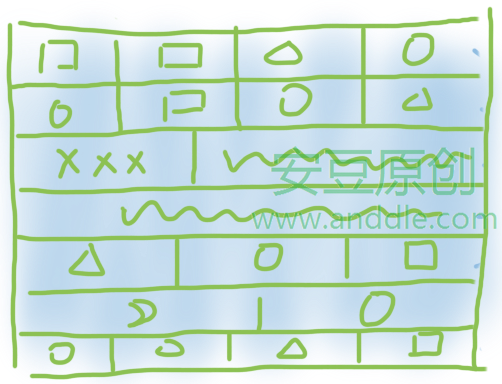 版面與控制項(六):TableLayout 與 VideoView 完整用法
第 7 節 TableLayout TableLayout 顧名思義,就是讓子元件像表格一樣排列的容器。它繼承自 LinearLayout,因此 LinearLayout
 Android 自定義動畫:alpha、scale、translate、rotate、set 的屬性與用法全解
一、概述 Android 的 animation 由四種類型組成:alpha、scale、translate、rotate,對應官方文檔《Animation Resour
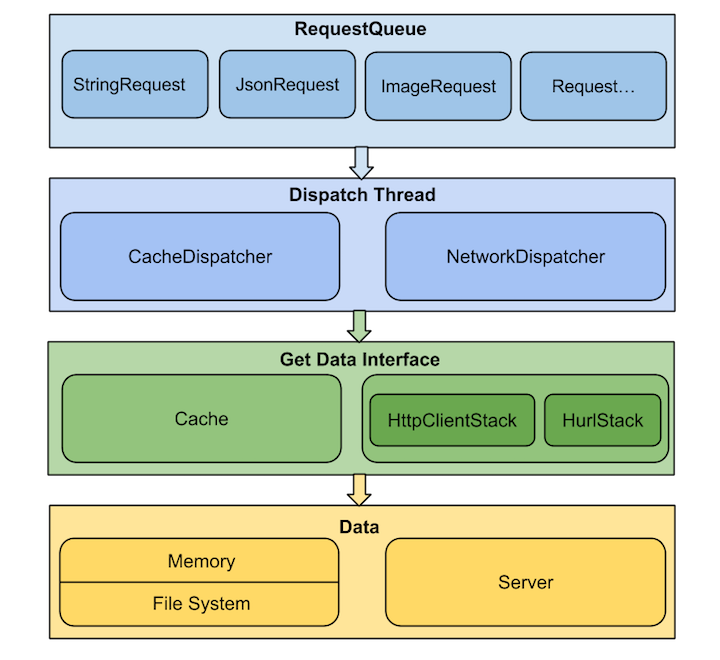 Volley 源碼閱讀筆記:框架脈絡、請求調度與快取細節
前言:怎麼讀一個框架的源碼 這是第一次寫源碼分析類的文章,算是給自己兩天研讀 Volley 做個交代。以前主管常強調「代碼閱讀能力」——如何透過源碼理解框架結構、流程與使
 Android 自定義控件教程(一):還-old版優酷的三級環形菜單
先看效果: 這個菜單由三層同心圓構成,最內圈是小房子圖標(level1),中間灰色的那一圈是 level2,最外圈則是 level3。點擊不同的圖標,會以旋轉動畫的