

編輯:關於 Android 程式設計
在某些 Android 頁面中,特別是使用透明狀態列、全屏或特殊 UI 旗標時,EditText 可能會被軟鍵盤遮擋。即使設定 adjustResize,也可能因為系統 UI 配置而失效。這個問題可以透過監聽版面高度變化,手動調整底部 padding 來解決。
正常情況下,系統 UI 會占據部分空間,例如狀態列、導覽列與鍵盤。若使用以下設定:
getWindow().getDecorView().setSystemUiVisibility(
    View.SYSTEM_UI_FLAG_LAYOUT_FULLSCREEN
);
或:
getWindow().addFlags(
    WindowManager.LayoutParams.FLAG_TRANSLUCENT_STATUS
);
可能會讓 App 內容延伸到系統 UI 下方,導致鍵盤彈起時,視窗不會自動縮放,底部輸入框就被遮住了。
可以監聽 decorView 的版面變化,取得目前可見區域高度。當鍵盤彈起時,可見高度會減少,此時手動增加內容容器的 bottom padding,模擬 adjustResize 的效果。
public class KeyboardPatch {
    private Activity activity;
    private View decorView;
    private View contentView;

    public KeyboardPatch(Activity act, View contentView) {
        this.activity = act;
        this.decorView = act.getWindow().getDecorView();
        this.contentView = contentView;
    }

    public void enable() {
        activity.getWindow().setSoftInputMode(
            WindowManager.LayoutParams.SOFT_INPUT_STATE_HIDDEN
            | WindowManager.LayoutParams.SOFT_INPUT_ADJUST_RESIZE
        );

        decorView.getViewTreeObserver()
            .addOnGlobalLayoutListener(onGlobalLayoutListener);
    }

    public void disable() {
        activity.getWindow().setSoftInputMode(
            WindowManager.LayoutParams.SOFT_INPUT_STATE_HIDDEN
            | WindowManager.LayoutParams.SOFT_INPUT_ADJUST_PAN
        );

        decorView.getViewTreeObserver()
            .removeOnGlobalLayoutListener(onGlobalLayoutListener);
    }

    private ViewTreeObserver.OnGlobalLayoutListener onGlobalLayoutListener =
        new ViewTreeObserver.OnGlobalLayoutListener() {
            @Override
            public void onGlobalLayout() {
                Rect rect = new Rect();
                decorView.getWindowVisibleDisplayFrame(rect);

                int screenHeight = decorView.getContext()
                    .getResources()
                    .getDisplayMetrics()
                    .heightPixels;

                int diff = screenHeight - rect.bottom;

                if (diff != 0) {
                    if (contentView.getPaddingBottom() != diff) {
                        contentView.setPadding(0, 0, 0, diff);
                    }
                } else {
                    if (contentView.getPaddingBottom() != 0) {
                        contentView.setPadding(0, 0, 0, 0);
                    }
                }
            }
        };
}
在 Activity 中建立 KeyboardPatch,並傳入需要調整的內容容器。
KeyboardPatch patch = new KeyboardPatch(
    this,
    findViewById(android.R.id.content)
);
patch.enable();
當鍵盤彈起時,內容容器會增加底部內距,讓 ScrollView 或輸入區域能自動捲動到可見位置。這種做法特別適合有透明狀態列、沉浸式模式或自訂全屏效果的頁面。
 開發 Android 地圖程式:Google Maps API v2 的 API Key 取得流程
要在 App 裡嵌入 Google 地圖,第一步永遠是拿到一組有效的 API Key。以下把整個流程拆成三個動作。 步驟一:找出你的 SHA1 憑證 開啟 Eclips
 Android Studio 實用指南:文本搜索工具
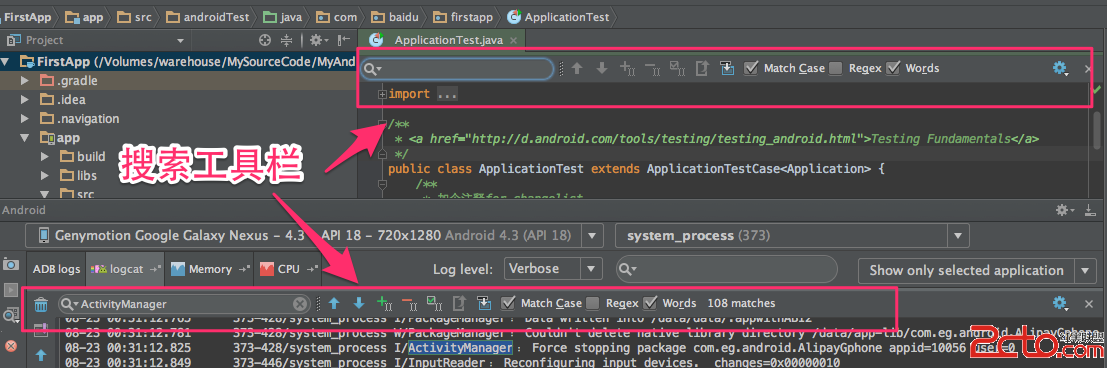
Android Studio 提供強大的文本搜索功能,可在編輯器或日志窗口中使用。Windows/Linux 可使用 Ctrl+F,macOS 可使用 Command+F
 Android 開發步步為營(34):四大組件之 ContentProvider
ContentProvider 從字面理解就是「內容提供者」,它的作用是作為一座橋梁,讓一個應用的資料(如 SQLiteDatabase、SharedPreference
 手機記憶卡誤刪資料怎麼恢復?數據救援教學
相信不少朋友都曾誤刪記憶卡裡的重要資料,這時該怎麼辦?資料還能救回來嗎?別擔心,其實是有辦法的!誤刪資料的處理:1、如果真的誤刪了重要資料,首先需要下載一款數據恢復軟體,