

編輯:關於 Android 程式設計
ExpandableListView 是 Android 中一個非常實用的分組列表控件,本文從介紹到實現代碼,帶大家完整掌握它的基本用法。
與只能顯示單級列表的 ListView 不同,ExpandableListView 可以垂直滾動顯示兩級列表的條目:一級列表(組)中嵌套著二級列表(子項),並支持展開與收縮。手機設置中的分類菜單、手機版 QQ 的分類列表,都是典型的應用場景。
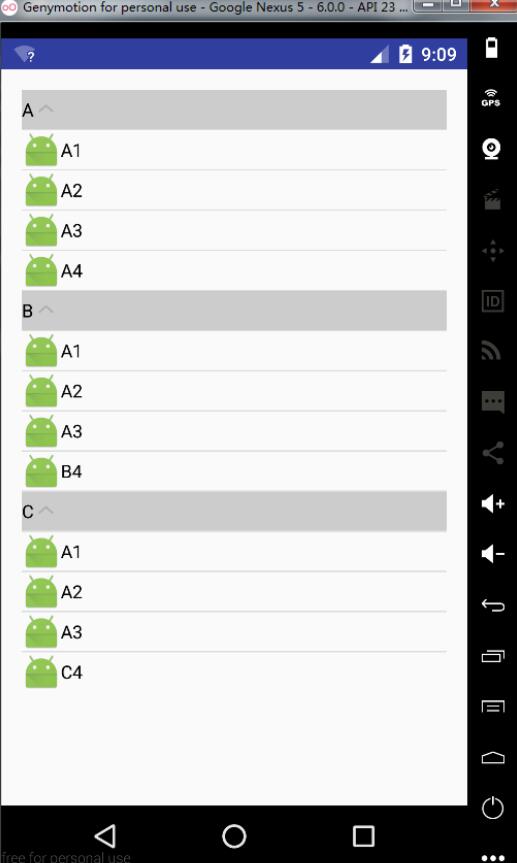
(1)給 ExpandableListView 設置適配器之前,必須先準備好數據源。
(2)數據源即自定義的 ExpandableAdapter,它繼承自 BaseExpandableListAdapter,需要重寫其中的十個方法。數據源中還會用到自定義的 View 布局,通過 getChildView() 和 getGroupView() 分別設置組和子項的樣式。
(3)數據源準備好後,直接調用 ExpandableListView.setAdapter() 即可實現收縮功能。
(1)activity_main.xml:放置一個 ExpandableListView 控件
<?xml version="1.0" encoding="utf-8"?> <RelativeLayout xmlns:android="https://schemas.android.com/apk/res/android" xmlns:tools="https://schemas.android.com/tools" android:layout_width="match_parent" android:layout_height="match_parent" android:paddingBottom="@dimen/activity_vertical_margin" android:paddingLeft="@dimen/activity_horizontal_margin" android:paddingRight="@dimen/activity_horizontal_margin" android:paddingTop="@dimen/activity_vertical_margin" tools:context="com.smyhvae.expandablelistviewdemo.MainActivity"> <ExpandableListView android:id="@+id/expandableListView" android:layout_width="match_parent" android:layout_height="wrap_content" /> </RelativeLayout>
(2)item_group.xml:一級列表 item 的布局
<?xml version="1.0" encoding="utf-8"?> <LinearLayout xmlns:android="https://schemas.android.com/apk/res/android" android:layout_width="match_parent" android:layout_height="wrap_content" android:background="#cccccc" android:orientation="horizontal"> <TextView android:id="@+id/tv_group" android:layout_width="wrap_content" android:layout_height="30dp" android:gravity="center" android:text="group text" android:textColor="#000000" /> </LinearLayout>
(3)item_child.xml:二級列表 item 的布局
<?xml version="1.0" encoding="utf-8"?> <LinearLayout xmlns:android="https://schemas.android.com/apk/res/android" android:layout_width="match_parent" android:layout_height="wrap_content" android:gravity="center" android:orientation="horizontal"> <ImageView android:id="@+id/iv_child" android:layout_width="30dp" android:layout_height="30dp" android:src="@mipmap/ic_launcher"/> <TextView android:id="@+id/tv_child" android:layout_width="match_parent" android:layout_height="wrap_content" android:text="item text" android:textColor="#000000"/> </LinearLayout>
(4)MainActivity.java:在這裡自定義適配器並設置數據
import android.app.Activity; import android.os.Bundle; import android.util.Log; import android.view.View; import android.view.ViewGroup; import android.widget.BaseExpandableListAdapter; import android.widget.ExpandableListView; import android.widget.ImageView; import android.widget.TextView; public class MainActivity extends Activity { //View private ExpandableListView expandableListView; //Model:定義的數據 private String[] groups = {"A", "B", "C"}; //注意,字符數組不要寫成{{"A1,A2,A3,A4"}, {"B1,B2,B3,B4,B5"}, {"C1,C2,C3,C4"}} private String[][] childs = {{"A1", "A2", "A3", "A4"}, {"A1", "A2", "A3", "B4"}, {"A1", "A2", "A3", "C4"}}; @Override protected void onCreate(Bundle savedInstanceState) { super.onCreate(savedInstanceState); setContentView(R.layout.activity_main); expandableListView = (ExpandableListView) findViewById(R.id.expandableListView); expandableListView.setAdapter(new MyExpandableListView()); } //為ExpandableListView自定義適配器 class MyExpandableListView extends BaseExpandableListAdapter { //返回一級列表的個數 @Override public int getGroupCount() { return groups.length; } //返回每個二級列表的個數 @Override public int getChildrenCount(int groupPosition) { //參數groupPosition表示第幾個一級列表 Log.d("smyhvae", "-->" + groupPosition); return childs[groupPosition].length; } //返回一級列表的單個item(返回的是對象) @Override public Object getGroup(int groupPosition) { return groups[groupPosition]; } //返回二級列表中的單個item(返回的是對象) @Override public Object getChild(int groupPosition, int childPosition) { return childs[groupPosition][childPosition]; //不要誤寫成groups[groupPosition][childPosition] } @Override public long getGroupId(int groupPosition) { return groupPosition; } @Override public long getChildId(int groupPosition, int childPosition) { return childPosition; } //每個item的id是否是固定?一般為true @Override public boolean hasStableIds() { return true; } //【重要】填充一級列表 @Override public View getGroupView(int groupPosition, boolean isExpanded, View convertView, ViewGroup parent) { if (convertView == null) { convertView = getLayoutInflater().inflate(R.layout.item_group, null); } else { } TextView tv_group = (TextView) convertView.findViewById(R.id.tv_group); tv_group.setText(groups[groupPosition]); return convertView; } //【重要】填充二級列表 @Override public View getChildView(int groupPosition, int childPosition, boolean isLastChild, View convertView, ViewGroup parent) { if (convertView == null) { convertView = getLayoutInflater().inflate(R.layout.item_child, null); } ImageView iv_child = (ImageView) convertView.findViewById(R.id.iv_child); TextView tv_child = (TextView) convertView.findViewById(R.id.tv_child); //iv_child.setImageResource(resId); tv_child.setText(childs[groupPosition][childPosition]); return convertView; } //二級列表中的item是否能夠被選中?可以改為true @Override public boolean isChildSelectable(int groupPosition, int childPosition) { return true; } } }
注意:上述代碼中還可以自行完成 convertView 和 ViewHolder 的復用優化,以進一步提升性能。
以上就是本文的全部內容,希望對大家的學習有所幫助。
 Android WebView 嵌套於 NestedScrollView 加載騰訊新聞點擊彈層 Bug 排查小記
這篇筆記記錄一個實際專案中遇到的坑:把 WebView 放進 NestedScrollView 加載騰訊新聞頁面時,點擊圖片彈出縮放層卻出現顯示異常的問題。 當時的目標
 Android 6.0 以上 Runtime Permission 適配指南
為什麼 Runtime Permission 會改變 App 邏輯 Android 6.0 開始,危險權限不再於安裝時一次授予,而是改為執行期授權。使用者可以在使用某項功
 Android 進階:用手機麥克風打造類比信號示波器
前面大致介紹過 AudioRecord 與 AudioTrack 的用法,這次把它們和 SurfaceView 結合起來,做一台手機版的類比信號示波器。 物聯網這幾年很
 Android 仿新浪微博:啟動動畫與登入界面的實作教學(上篇)
本文將帶大家動手打造一個模仿新浪微博的啟動頁與登入頁,從開場動畫到登入按鈕的跳轉邏輯,一步步還原熟悉的 App 使用體驗,完整程式碼如下。 啟動界面 啟動頁主要肩負兩項任