

編輯:關於 Android 程式設計
在 AppDelegate 中註冊 Reachability 的通知,就能在全域範圍掌握網路狀態的變化;一旦連線中斷,立刻彈出提示。
Reachability 會在狀態改變時發送通知,因此先加入觀察者,再指定要監看的主機並啟動。
// 網路檢測
[[NSNotificationCenter defaultCenter] addObserver:self
                                        selector:@selector(reachabilityChanged:)
                                            name:kReachabilityChangedNotification
                                          object:nil];

hostReach = [[Reachability reachabilityWithHostName:@"www.baidu.com"] retain];
[hostReach startNotifier];
通知觸發後,從通知物件取回 Reachability 實例,再查詢目前的網路狀態即可決定後續處理。
- (void)reachabilityChanged:(NSNotification*)note {
    Reachability* curReach = [note object];
    NSParameterAssert([curReach isKindOfClass:[Reachability class]]);

    NetworkStatus status = [curReach currentReachabilityStatus];

    if (status == NotReachable) {
        NSUserDefaults *user = [NSUserDefaults standardUserDefaults];
        [user setBool:1 forKey:@"network"];

        UIAlertView *alert = [[UIAlertView alloc] initWithTitle:@"網路連接被斷開"
                                                       message:nil
                                                      delegate:nil
                                             cancelButtonTitle:@"確定"
                                             otherButtonTitles:nil];
        [alert show];
        [alert release];
    } else {
        // 網路恢復,此處可視需要加入還原邏輯
    }
}
實務上有幾點值得留意:Reachability 只能反映「有沒有可達的路徑」,並不代表網路品質或伺服器是否真的回應,因此不能取代請求本身的逾時處理。另外記得在 dealloc 中執行 [[NSNotificationCenter defaultCenter] removeObserver:self] 並停止 notifier,避免通知發送到已釋放的物件。若使用較新的 iOS SDK,UIAlertView 已被棄用,建議改用 UIAlertController。
 Android ExpandableListView 三級選單實作
需求情境 在部分專案中,需要以列表方式呈現多層級資料,例如考核指標、分類與明細。Android 的 ExpandableListView 可處理兩層展開結構;若要模擬三級
 Android 模擬美團風格進度提示框
實作概念 美團風格的等待提示框通常以動畫呈現。這裡可透過兩張圖片輪流切換,模擬人物奔跑或等待中的動畫效果。 建立動畫資源 <animation-list xml
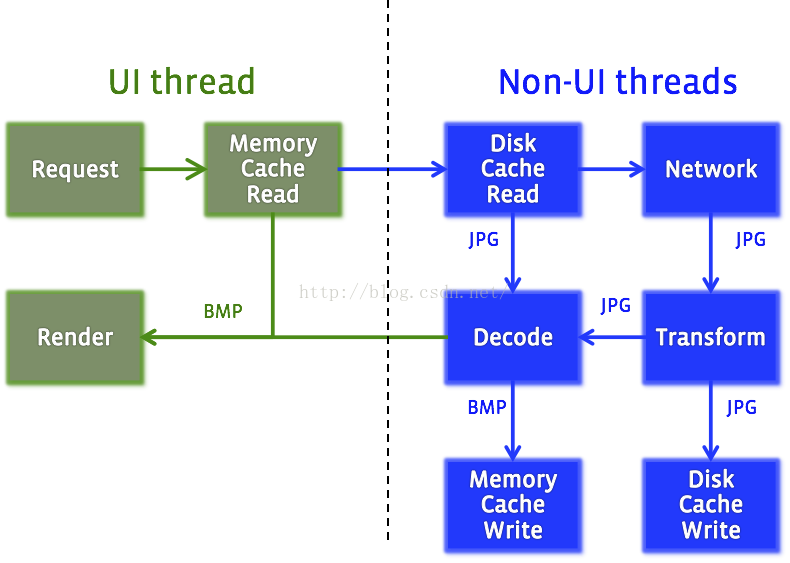 Fresco 深度解析:Facebook 的 Android 圖片加載框架
對 Facebook Android 客戶端而言,快速高效地展示圖片至關重要,但多年來團隊在圖片存儲上一直頗感頭疼。圖片本身體積大,設備卻很「小」——每個像素要佔 4 字
 Android Fragment 嵌套報錯解析
在 Fragment 中嵌套另一個 Fragment 時,若在構造函數中取得 getChildFragmentManager,常會引發錯誤。原因在於此時 Fragment