

編輯:關於 Android 程式設計
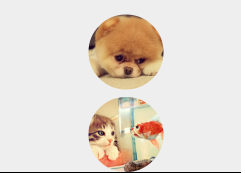
RoundedBitmapDrawable 是官方提供的 Drawable 子類,能直接把一張 Bitmap 轉成帶圓角的樣子,省去自己寫 Canvas 裁切的麻煩。最基本的用法只要四行程式碼:
Bitmap src = BitmapFactory.decodeResource(getResources(), imageId); //獲取Bitmap圖片 RoundedBitmapDrawable roundedBitmapDrawable = RoundedBitmapDrawableFactory.create(getResources(), src); //創建RoundedBitmapDrawable對象 roundedBitmapDrawable.setCornerRadius(100); //設置圓角半徑(根據實際需求) roundedBitmapDrawable.setAntiAlias(true); //設置反走樣 image.setImageDrawable(roundedBitmapDrawable); //顯示圓角圖片
其中 setAntiAlias(true) 別省,少了它圓角邊緣會出現明顯的鋸齒。setCornerRadius 則決定圓角幅度,可依設計稿調整。
生成圓形圖片
這個類別並沒有現成的「畫圓形」方法,但圓形其實就是圓角半徑等於邊長一半的特例。因此思路是先把原圖裁成正方形,再把圓角半徑設為正方形邊長的一半,具體實作如下:
Bitmap src = BitmapFactory.decodeResource(getResources(), imageId); Bitmap dst; //將長方形圖片裁剪成正方形圖片 if (src.getWidth() >= src.getHeight()){ dst = Bitmap.createBitmap(src, src.getWidth()/2 - src.getHeight()/2, 0, src.getHeight(), src.getHeight() ); }else{ dst = Bitmap.createBitmap(src, 0, src.getHeight()/2 - src.getWidth()/2, src.getWidth(), src.getWidth() ); } RoundedBitmapDrawable roundedBitmapDrawable = RoundedBitmapDrawableFactory.create(getResources(), dst); roundedBitmapDrawable.setCornerRadius(dst.getWidth() / 2); //設置圓角半徑為正方形邊長的一半 roundedBitmapDrawable.setAntiAlias(true); image.setImageDrawable(roundedBitmapDrawable);
裁切時的分支判斷值得說明一下:當原圖寬度大於高度,就以高度為邊長,起始 x 座標取「(寬 - 高) / 2」讓裁切區域水平居中;反之則以寬度為邊長,起始 y 座標取「(高 - 寬) / 2」垂直居中。這樣不論原圖比例如何,裁出來的一定是居中的正方形,不會偏心。
以上就是 RoundedBitmapDrawable 產生圓角與圓形圖片的完整做法,希望對各位的開發有所幫助。若有疑問歡迎留言討論。
 Android 系統啟動流程解析
先看一張整體的啟動流程圖: 判斷一個進程是否「活得起來」,有兩個最關鍵的指標:一是啟動了 Binder 線程池,代表它可以進行跨進程通訊;二是啟動了 Handler 消息
 微信公眾號怎麼申請?免費註冊流程與三種類型的差別一次講清
從春節紅包開始,微信公眾號慢慢長成了我們生活的一部分:公益勸募、機票比價、 restaurants 優惠券、原創專欄,幾乎都能在訂閱列表裡找到。想把內容經營成一個公開的窗
 Cordova 開發環境安裝與配置完整指南
Cordova 其實就是一種行動 Web 框架,它的前身是 PhoneGap。後來 PhoneGap 捐贈給 Apache 後,抽離出核心程式碼並改名為 Cordova。
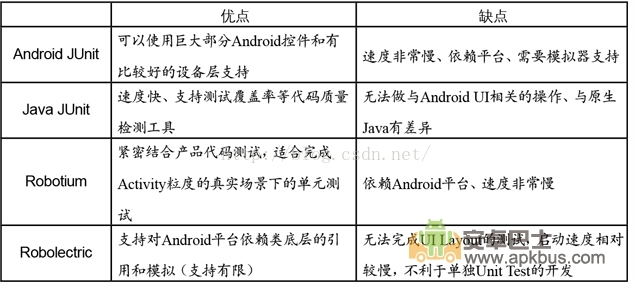 用 Robolectric 為 Android 應用做真正的 JVM 單元測試
為什麼需要 Robolectric Android 的單元測試一直有個尷尬:測試必須跑在模擬器或真機上。建置、部署、啟動 app,往往要等上一分鐘以上——這種回饋速度根本