

編輯:關於 Android 程式設計
圓形頭像在介面設計裡幾乎是標配,本文示範如何藉由 CircleImageView 這個開源元件達成,效果如下。
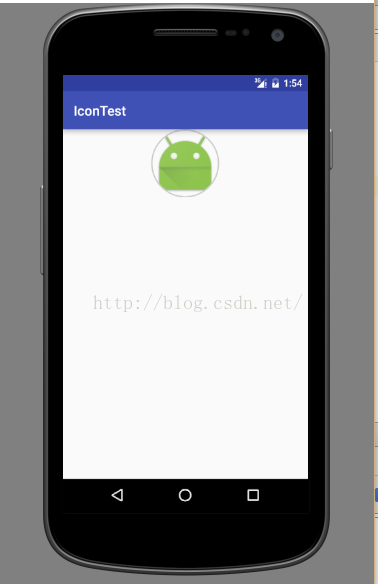
做法不複雜。先在專案裡建一個 circleimageview 套件用來擺放 CircleImageView 類別,稍後把類別檔複製進去即可直接使用。
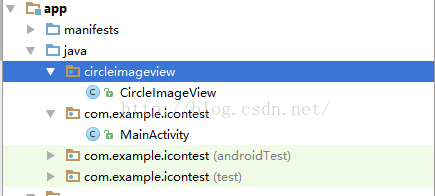
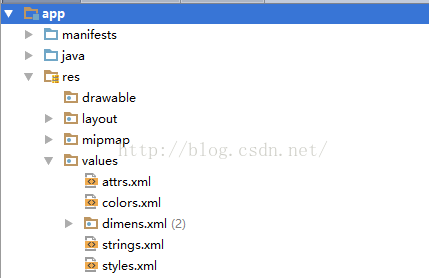
接著新增一個 attrs.xml,內容很精簡,只定義圓形邊框的寬度與顏色兩項:
<?xml version="1.0" encoding="utf-8"?> <resources> <declare-styleable name="CircleImageView"> <attr name="border_width" format="dimension" /> <attr name="border_color" format="color" /> </declare-styleable> </resources>
<?xml version="1.0" encoding="utf-8"?> <RelativeLayout xmlns:android="https://schemas.android.com/apk/res/android" xmlns:tools="https://schemas.android.com/tools" android:layout_width="match_parent" android:layout_height="match_parent" tools:context="com.example.icontest.MainActivity"> <circleimageview.CircleImageView xmlns:app="https://schemas.android.com/apk/res-auto" android:id="@+id/circleImageView" android:layout_width="100dp" android:layout_height="100dp" android:layout_centerHorizontal="true" android:src="@mipmap/ic_launcher" app:border_width="2dp" app:border_color="#ccc" /> </RelativeLayout>
有兩個細節容易漏掉。第一,標籤必須寫完整的套件路徑 circleimageview.CircleImageView;第二,要額外宣告 xmlns:app="https://schemas.android.com/apk/res-auto"。這個命名空間其實就是把根佈局上的 res/android 改成 res-auto 而來,有了它才能設定 border_width 與 border_color 這兩個自定義屬性。
佈局寫好後,在 Activity 裡照常透過 id 取得即可:
CircleImageView icon; icon= (CircleImageView) findViewById(R.id.circleImageView);
這個類別網路上很容易找到,這裡一併貼出,方便直接取用。它的核心思路是:把圖片轉成 BitmapShader 當作畫筆的填充,再用 drawCircle 畫出圓形裁切效果,邊框則是額外一層 STROKE 風格的圓。
package circleimageview; import android.content.Context; import android.content.res.TypedArray; import android.graphics.Bitmap; import android.graphics.BitmapShader; import android.graphics.Canvas; import android.graphics.Color; import android.graphics.Matrix; import android.graphics.Paint; import android.graphics.RectF; import android.graphics.Shader; import android.graphics.drawable.BitmapDrawable; import android.graphics.drawable.ColorDrawable; import android.graphics.drawable.Drawable; import android.net.Uri; import android.util.AttributeSet; import android.widget.ImageView; import com.example.icontest.R; public class CircleImageView extends ImageView { private static final ScaleType SCALE_TYPE = ScaleType.CENTER_CROP; private static final Bitmap.Config BITMAP_CONFIG = Bitmap.Config.ARGB_8888; private static final int COLORDRAWABLE_DIMENSION = 2; private static final int DEFAULT_BORDER_WIDTH = 0; private static final int DEFAULT_BORDER_COLOR = Color.BLACK; private final RectF mDrawableRect = new RectF(); private final RectF mBorderRect = new RectF(); private final Matrix mShaderMatrix = new Matrix(); private final Paint mBitmapPaint = new Paint(); private final Paint mBorderPaint = new Paint(); private int mBorderColor = DEFAULT_BORDER_COLOR; private int mBorderWidth = DEFAULT_BORDER_WIDTH; private Bitmap mBitmap; private BitmapShader mBitmapShader; private int mBitmapWidth; private int mBitmapHeight; private float mDrawableRadius; private float mBorderRadius; private boolean mReady; private boolean mSetupPending; public CircleImageView(Context context) { super(context); init(); } public CircleImageView(Context context, AttributeSet attrs) { this(context, attrs, 0); } public CircleImageView(Context context, AttributeSet attrs, int defStyle) { super(context, attrs, defStyle); TypedArray a = context.obtainStyledAttributes(attrs, R.styleable.CircleImageView, defStyle, 0); mBorderWidth = a.getDimensionPixelSize(R.styleable.CircleImageView_border_width, DEFAULT_BORDER_WIDTH); mBorderColor = a.getColor(R.styleable.CircleImageView_border_color, DEFAULT_BORDER_COLOR); a.recycle(); init(); } private void init() { super.setScaleType(SCALE_TYPE); mReady = true; if (mSetupPending) { setup(); mSetupPending = false; } } @Override public ScaleType getScaleType() { return SCALE_TYPE; } @Override public void setScaleType(ScaleType scaleType) { if (scaleType != SCALE_TYPE) { throw new IllegalArgumentException(String.format("ScaleType %s not supported.", scaleType)); } } @Override public void setAdjustViewBounds(boolean adjustViewBounds) { if (adjustViewBounds) { throw new IllegalArgumentException("adjustViewBounds not supported."); } } @Override protected void onDraw(Canvas canvas) { if (getDrawable() == null) { return; } canvas.drawCircle(getWidth() / 2, getHeight() / 2, mDrawableRadius, mBitmapPaint); if (mBorderWidth != 0) { canvas.drawCircle(getWidth() / 2, getHeight() / 2, mBorderRadius, mBorderPaint); } } @Override protected void onSizeChanged(int w, int h, int oldw, int oldh) { super.onSizeChanged(w, h, oldw, oldh); setup(); } public int getBorderColor() { return mBorderColor; } public void setBorderColor(int borderColor) { if (borderColor == mBorderColor) { return; } mBorderColor = borderColor; mBorderPaint.setColor(mBorderColor); invalidate(); } public int getBorderWidth() { return mBorderWidth; } public void setBorderWidth(int borderWidth) { if (borderWidth == mBorderWidth) { return; } mBorderWidth = borderWidth; setup(); } @Override public void setImageBitmap(Bitmap bm) { super.setImageBitmap(bm); mBitmap = bm; setup(); } @Override public void setImageDrawable(Drawable drawable) { super.setImageDrawable(drawable); mBitmap = getBitmapFromDrawable(drawable); setup(); } @Override public void setImageResource(int resId) { super.setImageResource(resId); mBitmap = getBitmapFromDrawable(getDrawable()); setup(); } @Override public void setImageURI(Uri uri) { super.setImageURI(uri); mBitmap = getBitmapFromDrawable(getDrawable()); setup(); } private Bitmap getBitmapFromDrawable(Drawable drawable) { if (drawable == null) { return null; } if (drawable instanceof BitmapDrawable) { return ((BitmapDrawable) drawable).getBitmap(); } try { Bitmap bitmap; if (drawable instanceof ColorDrawable) { bitmap = Bitmap.createBitmap(COLORDRAWABLE_DIMENSION, COLORDRAWABLE_DIMENSION, BITMAP_CONFIG); } else { bitmap = Bitmap.createBitmap(drawable.getIntrinsicWidth(), drawable.getIntrinsicHeight(), BITMAP_CONFIG); } Canvas canvas = new Canvas(bitmap); drawable.setBounds(0, 0, canvas.getWidth(), canvas.getHeight()); drawable.draw(canvas); return bitmap; } catch (OutOfMemoryError e) { return null; } } private void setup() { if (!mReady) { mSetupPending = true; return; } if (mBitmap == null) { return; } mBitmapShader = new BitmapShader(mBitmap, Shader.TileMode.CLAMP, Shader.TileMode.CLAMP); mBitmapPaint.setAntiAlias(true); mBitmapPaint.setShader(mBitmapShader); mBorderPaint.setStyle(Paint.Style.STROKE); mBorderPaint.setAntiAlias(true); mBorderPaint.setColor(mBorderColor); mBorderPaint.setStrokeWidth(mBorderWidth); mBitmapHeight = mBitmap.getHeight(); mBitmapWidth = mBitmap.getWidth(); mBorderRect.set(0, 0, getWidth(), getHeight()); mBorderRadius = Math.min((mBorderRect.height() - mBorderWidth) / 2, (mBorderRect.width() - mBorderWidth) / 2); mDrawableRect.set(mBorderWidth, mBorderWidth, mBorderRect.width() - mBorderWidth, mBorderRect.height() - mBorderWidth); mDrawableRadius = Math.min(mDrawableRect.height() / 2, mDrawableRect.width() / 2); updateShaderMatrix(); invalidate(); } private void updateShaderMatrix() { float scale; float dx = 0; float dy = 0; mShaderMatrix.set(null); if (mBitmapWidth * mDrawableRect.height() > mDrawableRect.width() * mBitmapHeight) { scale = mDrawableRect.height() / (float) mBitmapHeight; dx = (mDrawableRect.width() - mBitmapWidth * scale) * 0.5f; } else { scale = mDrawableRect.width() / (float) mBitmapWidth; dy = (mDrawableRect.height() - mBitmapHeight * scale) * 0.5f; } mShaderMatrix.setScale(scale, scale); mShaderMatrix.postTranslate((int) (dx + 0.5f) + mBorderWidth, (int) (dy + 0.5f) + mBorderWidth); mBitmapShader.setLocalMatrix(mShaderMatrix); } }
幾個值得留意的細節:setScaleType 被鎖死成 CENTER_CROP,傳入其他值會直接拋例外,因為圓形裁切依賴這個縮放模式;updateShaderMatrix 裡透過比較寬高比例決定填滿方向的縮放值,再將多出的部分置中偏移,這正是「填滿圓形且不變形」的關鍵運算。
 Android AIDL 跨進程通訊介面的使用詳解
AIDL(Android Interface Definition Language)是一種描述 Android 內部進程通訊(IPC)介面的語言,讓我們能定義跨進程的方
 Android Paint MaskFilter:BlurMaskFilter 與 EmbossMaskFilter 效果解析
MaskFilter 是 Paint 中用來處理邊緣與視覺效果的機制。常見的應用包含模糊與浮雕。本文整理 BlurMaskFilter 與 EmbossMaskFilte
 從零開始學 Android(四十):Intent 的第一堂課
Intent(意圖)是 Android 中極為關鍵的一塊拼圖,在 Activity 與 Service 之間的跳轉、資料傳遞都有大量應用。本文從最基礎的用法開始,逐步示範
 25 個值得收藏的 Android 開源 UI 框架
前言 忙完一段落,難得有個空檔,突然興起念頭想自己動手寫一支 App。既然要寫,與其每個效果都從零刻起,不如先盤點市面上現成的開源元件——省時省力,成品質感還更好。以下整