

編輯:關於 Android 程式設計
今天沒事在群裡聊天,有位朋友提到 Android Wheel 這個控制項,我還以為是 Android 內建的,搜了一下才發現是 GitHub 上的開源專案。
下載地址:https://code.google.com/p/android-wheel/ 。看過之後覺得拿來做省市縣三級聯動剛好合適,於是就動手做了一個。
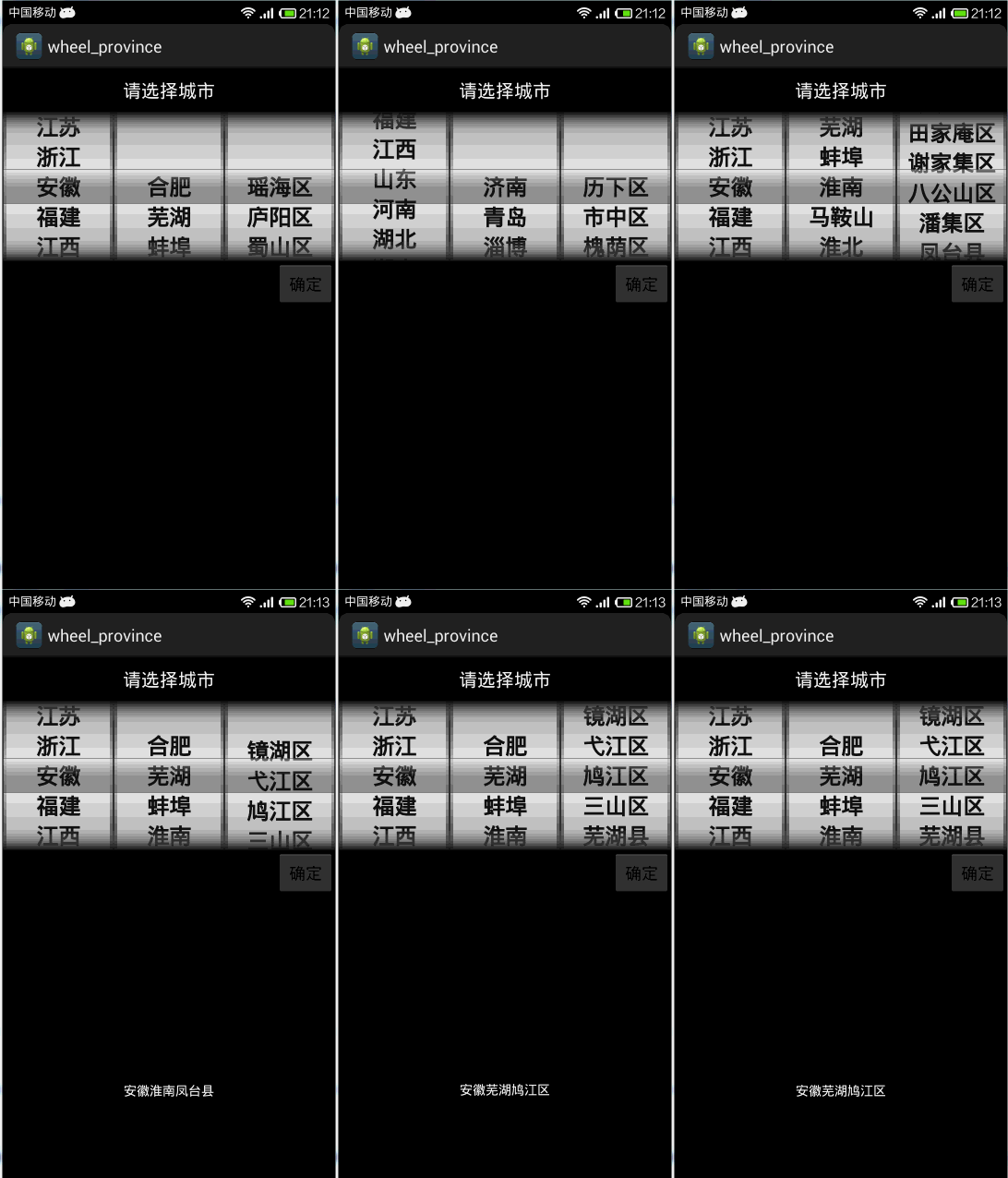
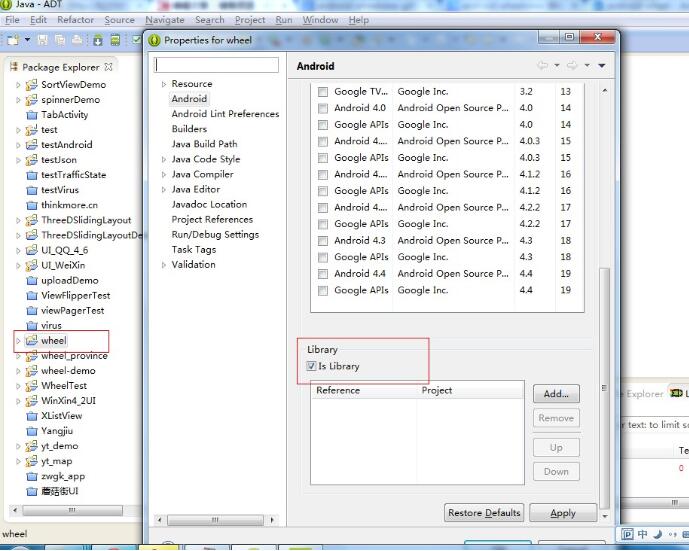
新建專案後,右鍵 → Properties → Android,在下方把 wheel 加入 Library 清單。
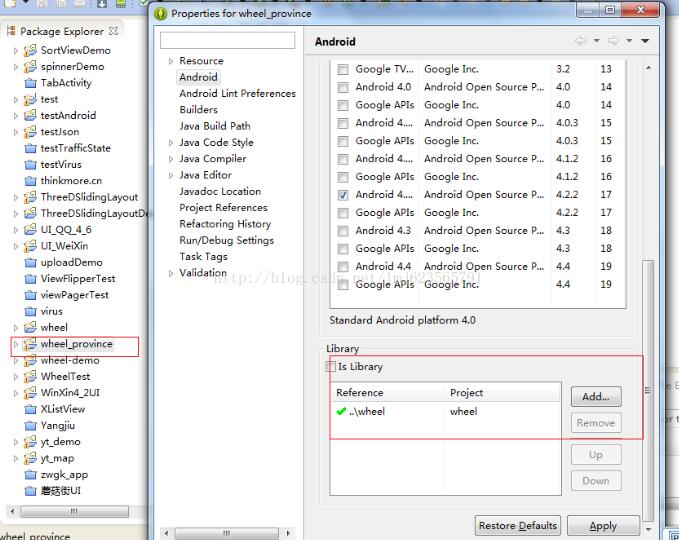
以上兩個步驟其實就是導入任何開源專案的通用流程。
省市區的資料以 JSON 形式放在 assets 的 city.json 中。先了解一下大致格式,後面的程式碼會照這個結構解析:
{"citylist": [{"p":"河北", "c":[{"n":"石家莊", "a":[{"s":"長安區"},{"s":"橋東區"},{"s":"鹿泉市"}] }] }
三層嵌套的對應關係很清楚:p 是省、n 是市、s 是區,key 刻意用單字字母,能讓整個檔案精簡不少。
很簡單,三個 WheelView 分別代表省、市、縣,再加一個確定按鈕:
<LinearLayout xmlns:android="https://schemas.android.com/apk/res/android" xmlns:tools="https://schemas.android.com/tools" android:layout_width="match_parent" android:layout_height="match_parent" android:background="#000000" android:orientation="vertical" > <TextView android:layout_width="wrap_content" android:layout_height="wrap_content" android:layout_gravity="center" android:layout_margin="10dp" android:text="請選擇城市" android:textColor="#ffffff" android:textSize="20sp" /> <LinearLayout android:layout_width="fill_parent" android:layout_height="wrap_content" android:background="@drawable/layout_bg" android:orientation="horizontal" > <kankan.wheel.widget.WheelView android:id="@+id/id_province" android:layout_width="0dp" android:layout_height="wrap_content" android:layout_weight="1" > </kankan.wheel.widget.WheelView> <kankan.wheel.widget.WheelView android:id="@+id/id_city" android:layout_width="0dp" android:layout_height="wrap_content" android:layout_weight="1" > </kankan.wheel.widget.WheelView> <kankan.wheel.widget.WheelView android:id="@+id/id_area" android:layout_width="0dp" android:layout_height="wrap_content" android:layout_weight="1" > </kankan.wheel.widget.WheelView> </LinearLayout> <Button android:onClick="showChoose" android:layout_gravity="right" android:layout_width="wrap_content" android:layout_height="wrap_content" android:text="確定" /> </LinearLayout>
三個 WheelView 的寬度都設為 0dp 搭配 layout_weight="1",讓它們等分整個橫向空間。這是 LinearLayout 裡等寬排列的標準寫法——直接寫 wrap_content 反而會因為內容寬度不同而對不齊。
package com.example.wheel_province; import java.io.IOException; import java.io.InputStream; import java.util.HashMap; import java.util.Map; import kankan.wheel.widget.OnWheelChangedListener; import kankan.wheel.widget.WheelView; import kankan.wheel.widget.adapters.ArrayWheelAdapter; import org.json.JSONArray; import org.json.JSONException; import org.json.JSONObject; import android.app.Activity; import android.os.Bundle; import android.view.View; import android.widget.Toast; /** * * @author zhy * */ public class CitiesActivity extends Activity implements OnWheelChangedListener { /** * 把全國的省市區的信息以json的格式保存,解析完成後賦值為null */ private JSONObject mJsonObj; /** * 省的WheelView控件 */ private WheelView mProvince; /** * 市的WheelView控件 */ private WheelView mCity; /** * 區的WheelView控件 */ private WheelView mArea; /** * 所有省 */ private String[] mProvinceDatas; /** * key - 省 value - 市s */ private Map<String, String[]> mCitisDatasMap = new HashMap<String, String[]>(); /** * key - 市 values - 區s */ private Map<String, String[]> mAreaDatasMap = new HashMap<String, String[]>(); /** * 當前省的名稱 */ private String mCurrentProviceName; /** * 當前市的名稱 */ private String mCurrentCityName; /** * 當前區的名稱 */ private String mCurrentAreaName =""; @Override protected void onCreate(Bundle savedInstanceState) { super.onCreate(savedInstanceState); setContentView(R.layout.citys); initJsonData(); mProvince = (WheelView) findViewById(R.id.id_province); mCity = (WheelView) findViewById(R.id.id_city); mArea = (WheelView) findViewById(R.id.id_area); initDatas(); mProvince.setViewAdapter(new ArrayWheelAdapter<String>(this, mProvinceDatas)); // 添加change事件 mProvince.addChangingListener(this); // 添加change事件 mCity.addChangingListener(this); // 添加change事件 mArea.addChangingListener(this); mProvince.setVisibleItems(5); mCity.setVisibleItems(5); mArea.setVisibleItems(5); updateCities(); updateAreas(); } /** * 根據當前的市,更新區WheelView的信息 */ private void updateAreas() { int pCurrent = mCity.getCurrentItem(); mCurrentCityName = mCitisDatasMap.get(mCurrentProviceName)[pCurrent]; String[] areas = mAreaDatasMap.get(mCurrentCityName); if (areas == null) { areas = new String[] { "" }; } mArea.setViewAdapter(new ArrayWheelAdapter<String>(this, areas)); mArea.setCurrentItem(0); } /** * 根據當前的省,更新市WheelView的信息 */ private void updateCities() { int pCurrent = mProvince.getCurrentItem(); mCurrentProviceName = mProvinceDatas[pCurrent]; String[] cities = mCitisDatasMap.get(mCurrentProviceName); if (cities == null) { cities = new String[] { "" }; } mCity.setViewAdapter(new ArrayWheelAdapter<String>(this, cities)); mCity.setCurrentItem(0); updateAreas(); } /** * 解析整個Json對象,完成後釋放Json對象的內存 */ private void initDatas() { try { JSONArray jsonArray = mJsonObj.getJSONArray("citylist"); mProvinceDatas = new String[jsonArray.length()]; for (int i = 0; i < jsonArray.length(); i++) { JSONObject jsonP = jsonArray.getJSONObject(i);// 每個省的json對象 String province = jsonP.getString("p");// 省名字 mProvinceDatas[i] = province; JSONArray jsonCs = null; try { /** * Throws JSONException if the mapping doesn't exist or is * not a JSONArray. */ jsonCs = jsonP.getJSONArray("c"); } catch (Exception e1) { continue; } String[] mCitiesDatas = new String[jsonCs.length()]; for (int j = 0; j < jsonCs.length(); j++) { JSONObject jsonCity = jsonCs.getJSONObject(j); String city = jsonCity.getString("n");// 市名字 mCitiesDatas[j] = city; JSONArray jsonAreas = null; try { /** * Throws JSONException if the mapping doesn't exist or * is not a JSONArray. */ jsonAreas = jsonCity.getJSONArray("a"); } catch (Exception e) { continue; } String[] mAreasDatas = new String[jsonAreas.length()];// 當前市的所有區 for (int k = 0; k < jsonAreas.length(); k++) { String area = jsonAreas.getJSONObject(k).getString("s");// 區域的名稱 mAreasDatas[k] = area; } mAreaDatasMap.put(city, mAreasDatas); } mCitisDatasMap.put(province, mCitiesDatas); } } catch (JSONException e) { e.printStackTrace(); } mJsonObj = null; } /** * 從assert文件夾中讀取省市區的json文件,然後轉化為json對象 */ private void initJsonData() { try { StringBuffer sb = new StringBuffer(); InputStream is = getAssets().open("city.json"); int len = -1; byte[] buf = new byte[1024]; while ((len = is.read(buf)) != -1) { sb.append(new String(buf, 0, len, "gbk")); } is.close(); mJsonObj = new JSONObject(sb.toString()); } catch (IOException e) { e.printStackTrace(); } catch (JSONException e) { e.printStackTrace(); } } /** * change事件的處理 */ @Override public void onChanged(WheelView wheel, int oldValue, int newValue) { if (wheel == mProvince) { updateCities(); } else if (wheel == mCity) { updateAreas(); } else if (wheel == mArea) { mCurrentAreaName = mAreaDatasMap.get(mCurrentCityName)[newValue]; } } public void showChoose(View view) { Toast.makeText(this, mCurrentProviceName + mCurrentCityName + mCurrentAreaName, 1).show(); } }
幾個實作重點值得提出來講。
資料結構的選擇:省市區的對應關係用兩個 Map 串起來——mCitisDatasMap 以省為 key 存市陣列,mAreaDatasMap 以市為 key 存區陣列。這樣任一層要往下取資料都是一次 O(1) 查表,不必每次重新遍歷 JSON。
解析完就釋放:initDatas() 最後把 mJsonObj 設為 null,這是刻意為之。完整的 JSON 物件會佔用可觀的記憶體,而解析後資訊已經全部轉存到 Map 與陣列裡,沒有理由繼續留著它。
空值的防禦:updateCities 與 updateAreas 都做了 if (cities == null) 的判斷,找不到對應資料時塞入一個空字串陣列。少了這層保護,遇到資料缺漏就會直接空指標崩潰。另外 getJSONArray 用 try-catch 包住並 continue,也是為了容忍「某些省底下暫無市資料」這類情況。
聯動的觸發鏈:onChanged 裡只處理「哪一個滾輪變了」,實際的更新交給 updateCities 與 updateAreas。而 updateCities 在更新完市之後又呼叫了 updateAreas,於是省變 → 市重載 → 區跟著重載,三層依序刷新,邏輯層次很乾淨。
原始碼下載:https://xiazai.jb51.net/201608/yuanma/Androidwheel(jb51.net).rar
 Android WebView 與 JS 互動:從靜態到動態注入
WebView 與 JavaScript 的互動大致可涵蓋以下幾種組合:1、本地 html 與本地 html 裡的 js 互動2、本地 html 與本地 js 互動3、網
 自定義 View 實作教學:帶小圓點的倒數計時圓形進度條
上一篇我們做了一個可以隨時暫停的圓形進度條,這次換個花樣,來做一個「外圈是倒數計時、弧線末端還跟著一顆小圓點」的 View。整個元件裡最麻煩的地方,就在於那顆小圓必須隨著
 Android ListView 的 A-Z 排序、索引與拼音搜索
ListView 的 A-Z 排序與過濾搜索常用於聯繫人、城市列表或標籤列表。若數據本身是中文,通常需要先將漢字轉換為拼音,再取得首字母進行排序與索引。 整體思路 首先
 A10:用 OnDateSetListener 為 DatePicker 加上對話框
這篇可以視為前一篇「TimePicker 與 DatePicker 設定」的補完。上一回提到 DatePicker 本身沒有現成的變更監聽介面,而補上這個能力的方式,就是