

編輯:關於 Android 程式設計
做過主題換膚的朋友,大概都撞過這樣的坑:明明代碼沒錯,顏色卻總是不對勁,甚至直接拋出異常。這一切的根源,往往藏在「主題(Theme)」與「資源解析」的微妙關係裡。本文將帶你深入理解 Android 多主題顏色解析的機制,並給出各版本的兼容方案。
如果您通過以下的代碼來獲取定義的顏色值
context.getResources().getColor(R.color.some_color_resource_id);
在 Android Studio 中會有一個 lint 警告,提示您 Resources#getColor(int) 在 Marshmallow 中被廢棄了,建議使用主題可知的 Resources#getColor(int, Theme) 函數。 為了避免該警告,則可以使用 ContextCompat:
ContextCompat.getColor(context, R.color.some_color_resource_id);
該函數的實現是這樣的:
if (Build.VERSION.SDK_INT >= Build.VERSION_CODES.M) { return context.getResources().getColor(id, context.getTheme()); } else { return context.getResources().getColor(id); }
看起來很簡單。但是為什麼會這樣呢? 為什麼會開始使用帶主題的函數而廢棄之前的函數呢?
Resources#getColor(int) & Resources#getColorStateList(int) 的問題
首先來看看這兩個被廢棄的函數是干啥的:
– Resources#getColor(int) 返回一個資源 id 對應的顏色值,如果該資源為 ColorStateList 則返回 ColorStateList 的默認顏色值
– Resources#getColorStateList(int) 返回對應的 ColorStateList
當在 TextView 中使用自定義的 ColorStateList 的時候, TextView 不可用狀態和可用狀態的文字顏色分別使用 R.attr.colorAccent 和 R.attr.colorPrimary 表示。
<selector xmlns:android="https://schemas.android.com/apk/res/android"> <item android:color="?attr/colorAccent" android:state_enabled="false"/> <item android:color="?attr/colorPrimary"/> </selector>
現在如果您通過如下的代碼來獲取這個ColorStateList
ColorStateList csl = context.getResources().getColorStateList(R.color.button_text_csl);
上面的代碼會拋出一個異常(查看logcat 可以看到如下的信息)
W/Resources: ColorStateList color/button_text_csl has unresolved theme attributes! Consider using Resources.getColorStateList(int, Theme) or Context.getColorStateList(int) at android.content.res.Resources.getColorStateList(Resources.java:1011) ...
哪裡出錯了呢?
問題的根源在於 Resources 對象並沒有和一個 Theme 對象關聯,當使用 R.attr.colorAccent 和 R.attr.colorPrimary 指代顏色的時候,在代碼中通過上面的函數解析的時候沒有指定對應的 Theme導致無法解析出結果。 所以在 Marshmallow 中添加了 ColorStateList 對 Theme 的支持並且添加了這兩個新的函數:Resources#getColor(int, Theme) 和 Resources#getColorStateList(int, Theme),並使用 Theme 參數來解析裡面的 attributes 屬性。
在新版本的 Support 庫中也有對應的實現,分別位於 ResourcesCompat 和 ContextCompat 類中。
使用 AppCompat v24+ 版本可以很容易的解決該問題。
ColorStateList csl = AppCompatResources.getColorStateList(context, R.color.button_text_csl);
在 23+ 版本上直接使用系統的函數,在之前的版本上 AppCompat 自己解析這些 xml 文件從裡面提取 attr 屬性指代的數值。 AppCompat 同時還支持 ColorStateList 新的 android:alpha 屬性。
Resources#getDrawable(int) 和前面的兩個函數的問題是類似的。 在 Lollipop 之前的版本中無法支持 Theme attr。
異常並不總是會出現。VectorDrawableCompat 和 AnimatedVectorDrawableCompat 類中添加了和 AppCompatResources 類類似的功能。比如在 矢量圖中你可以使用 ?attr/colorControlNormal 來設置矢量圖的顏色,VectorDrawableCompat 會自動完成解析該 屬性的工作:
<vector xmlns:android="https://schemas.android.com/apk/res/android" android:width="24dp" android:height="24dp" android:viewportWidth="24.0" android:viewportHeight="24.0" android:tint="?attr/colorControlNormal"> <path android:pathData="..." android:fillColor="@android:color/white"/> </vector>
下面使用一個小測試來回顧一下前面介紹的內容。 假設有下面一個 ColorStateList:
<!-- res/colors/button_text_csl.xml --> <selector xmlns:android="https://schemas.android.com/apk/res/android"> <item android:color="?attr/colorAccent" android:state_enabled="false"/> <item android:color="?attr/colorPrimary"/> </selector>
在應用中定義了如下的 Theme:
<!-- res/values/themes.xml --> <style name="AppTheme" parent="Theme.AppCompat.Light.DarkActionBar"> <item name="colorPrimary">@color/vanillared500</item> <item name="colorPrimaryDark">@color/vanillared700</item> <item name="colorAccent">@color/googgreen500</item> </style> <style name="CustomButtonTheme" parent="ThemeOverlay.AppCompat.Light"> <item name="colorPrimary">@color/brown500</item> <item name="colorAccent">@color/yellow900</item> </style>
在代碼中有如下的函數用來解析顏色值並在代碼中創建 ColorStateList:
@ColorInt private static int getThemeAttrColor(Context context, @AttrRes int colorAttr) { TypedArray array = context.obtainStyledAttributes(null, new int[]{colorAttr}); try { return array.getColor(0, 0); } finally { array.recycle(); } } private static ColorStateList createColorStateList(Context context) { return new ColorStateList( new int[][]{ new int[]{-android.R.attr.state_enabled}, // Disabled state. StateSet.WILD_CARD, // Enabled state. }, new int[]{ getThemeAttrColor(context, R.attr.colorAccent), // Disabled state. getThemeAttrColor(context, R.attr.colorPrimary), // Enabled state. }); }
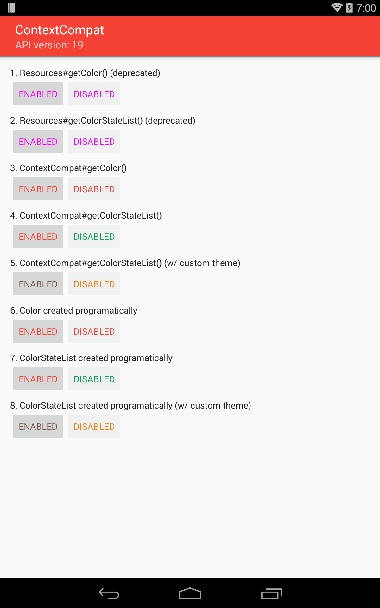
看看是否能猜出在 API 19 和 API 23 版本上文字禁用狀態和正常狀態的顏色,實現代碼如下(5和8的情況,在TextView xml 中指定了 android:theme=”@style/CustomButtonTheme” ):
Resources res = ctx.getResources(); // (1) int deprecatedTextColor = res.getColor(R.color.button_text_csl); button1.setTextColor(deprecatedTextColor); // (2) ColorStateList deprecatedTextCsl = res.getColorStateList(R.color.button_text_csl); button2.setTextColor(deprecatedTextCsl); // (3) int textColorXml = AppCompatResources.getColorStateList(ctx, R.color.button_text_csl).getDefaultColor(); button3.setTextColor(textColorXml); // (4) ColorStateList textCslXml = AppCompatResources.getColorStateList(ctx, R.color.button_text_csl); button4.setTextColor(textCslXml); // (5) Context themedCtx = button5.getContext(); ColorStateList textCslXmlWithCustomTheme = AppCompatResources.getColorStateList(themedCtx, R.color.button_text_csl); button5.setTextColor(textCslXmlWithCustomTheme); // (6) int textColorJava = getThemeAttrColor(ctx, R.attr.colorPrimary); button6.setTextColor(textColorJava); // (7) ColorStateList textCslJava = createColorStateList(ctx); button7.setTextColor(textCslJava); // (8) Context themedCtx = button8.getContext(); ColorStateList textCslJavaWithCustomTheme = createColorStateList(themedCtx); button8.setTextColor(textCslJavaWithCustomTheme);
下面是對應的實現截圖:
總結
以上就是關於分析Android多主題顏色的相關問題的全部內容,希望本文的內容對大家開發Android能有所幫助。
 Android 手勢識別實作:GestureOverlayView 與 GestureLibrary 用法
Android 的 android.gesture 套件提供了手勢繪製與識別能力。典型流程包含建立繪圖區、監聽手勢輸入、儲存手勢樣本,以及比對使用者新畫出的手勢。以下概念
 Android 盒子應用中的自定義 GridView:遙控焦點選取效果實作
在盒子與電視這類以遙控器為主要輸入裝置的 Android 應用中,GridView 很常用於呈現課程、班級或內容卡片。與手機觸控不同,使用者透過方向鍵移動焦點,因此除了點
 Material Design 實戰:用 Behavior 實作支付密碼彈窗與商品屬性選擇
今天的效果在支付寶、淘寶、京東等電商 App 中隨處可見:支付寶的密碼輸入彈窗、商城下單時從底部浮出的商品屬性選擇框。本文就帶你用 Behavior 實作這兩種效果,你會
 Android系統架構全解析
一、Android的發展歷程 2003年Andy Rubin創辦Android公司;2005年Google收購Android公司;2007年成立開放手持設備聯盟(OHA)