

編輯:關於 Android 程式設計
Android 沒有內建的文件檢視器,但系統可以幫你找到有安裝的第三方 App。關鍵在於 MIME type 要填對,以及 URI 要交得出去。
做法都是同一套:建立 ACTION_VIEW 意圖,指定檔案 URI,再告訴系統這是什麼類型。系統拿 MIME type 去比對已安裝程式的意圖過濾器,挑出能處理的 App 交給使用者選擇。
import android.app.Activity;
import android.content.Intent;
import android.net.Uri;
import java.io.File;

/**
 * 自訂 Intent 工具類,可用於取得開啟以下檔案的 Intent:
 * PDF、PPT、WORD、EXCEL、CHM、HTML、TEXT、AUDIO、VIDEO、IMAGE
 */
public class MyIntent {

    // 開啟 HTML 檔案
    public static Intent getHtmlFileIntent(String param) {
        Uri uri = Uri.parse(param).buildUpon()
                .encodedAuthority("com.android.htmlfileprovider")
                .scheme("content").encodedPath(param).build();
        Intent intent = new Intent(Intent.ACTION_VIEW);
        intent.setDataAndType(uri, "text/html");
        return intent;
    }

    // 開啟圖片
    public static Intent getImageFileIntent(String param) {
        Intent intent = new Intent(Intent.ACTION_VIEW);
        intent.addCategory(Intent.CATEGORY_DEFAULT);
        intent.addFlags(Intent.FLAG_ACTIVITY_NEW_TASK);
        Uri uri = Uri.fromFile(new File(param));
        intent.setDataAndType(uri, "image/*");
        return intent;
    }

    // 開啟 PDF
    public static Intent getPdfFileIntent(String param) {
        Intent intent = new Intent(Intent.ACTION_VIEW);
        intent.addCategory(Intent.CATEGORY_DEFAULT);
        intent.addFlags(Intent.FLAG_ACTIVITY_NEW_TASK);
        Uri uri = Uri.fromFile(new File(param));
        intent.setDataAndType(uri, "application/pdf");
        return intent;
    }

    // 開啟純文字,paramBoolean 決定使用 parse 還是 fromFile
    public static Intent getTextFileIntent(String param, boolean paramBoolean) {
        Intent intent = new Intent(Intent.ACTION_VIEW);
        intent.addCategory(Intent.CATEGORY_DEFAULT);
        intent.addFlags(Intent.FLAG_ACTIVITY_NEW_TASK);
        if (paramBoolean) {
            intent.setDataAndType(Uri.parse(param), "text/plain");
        } else {
            intent.setDataAndType(Uri.fromFile(new File(param)), "text/plain");
        }
        return intent;
    }

    // 開啟音訊
    public static Intent getAudioFileIntent(String param) {
        Intent intent = new Intent(Intent.ACTION_VIEW);
        intent.addFlags(Intent.FLAG_ACTIVITY_CLEAR_TOP);
        intent.putExtra("oneshot", 0);
        intent.putExtra("configchange", 0);
        Uri uri = Uri.fromFile(new File(param));
        intent.setDataAndType(uri, "audio/*");
        return intent;
    }

    // 開啟影片
    public static Intent getVideoFileIntent(String param) {
        Intent intent = new Intent(Intent.ACTION_VIEW);
        intent.addFlags(Intent.FLAG_ACTIVITY_CLEAR_TOP);
        intent.putExtra("oneshot", 0);
        intent.putExtra("configchange", 0);
        Uri uri = Uri.fromFile(new File(param));
        intent.setDataAndType(uri, "video/*");
        return intent;
    }

    // 開啟 CHM
    public static Intent getChmFileIntent(String param) {
        Intent intent = new Intent(Intent.ACTION_VIEW);
        intent.addCategory(Intent.CATEGORY_DEFAULT);
        intent.addFlags(Intent.FLAG_ACTIVITY_NEW_TASK);
        Uri uri = Uri.fromFile(new File(param));
        intent.setDataAndType(uri, "application/x-chm");
        return intent;
    }

    // 開啟 Word
    public static Intent getWordFileIntent(String param) {
        Intent intent = new Intent(Intent.ACTION_VIEW);
        intent.addCategory(Intent.CATEGORY_DEFAULT);
        intent.addFlags(Intent.FLAG_ACTIVITY_NEW_TASK);
        Uri uri = Uri.fromFile(new File(param));
        intent.setDataAndType(uri, "application/msword");
        return intent;
    }

    // 開啟 Excel
    public static Intent getExcelFileIntent(String param) {
        Intent intent = new Intent(Intent.ACTION_VIEW);
        intent.addCategory(Intent.CATEGORY_DEFAULT);
        intent.addFlags(Intent.FLAG_ACTIVITY_NEW_TASK);
        Uri uri = Uri.fromFile(new File(param));
        intent.setDataAndType(uri, "application/vnd.ms-excel");
        return intent;
    }

    // 開啟 PPT
    public static Intent getPptFileIntent(String param) {
        Intent intent = new Intent(Intent.ACTION_VIEW);
        intent.addCategory(Intent.CATEGORY_DEFAULT);
        intent.addFlags(Intent.FLAG_ACTIVITY_NEW_TASK);
        Uri uri = Uri.fromFile(new File(param));
        intent.setDataAndType(uri, "application/vnd.ms-powerpoint");
        return intent;
    }
}
// 這個寫法行不通:PDF.apk 無法存取其他 APK 內 assets 的資源
// Intent it = getPdfFileIntent("file:///android_asset/helphelp.pdf");

// 以下皆可正常開啟
Intent it = getHtmlFileIntent("/sdcard/tutorial.html");        // SD 卡根目錄
it = getHtmlFileIntent("/system/etc/tutorial.html");           // 系統內部 etc 目錄
it = getPdfFileIntent("/system/etc/helphelp.pdf");
it = getWordFileIntent("/system/etc/help.doc");
it = getExcelFileIntent("/mnt/sdcard/Book1.xls");
it = getPptFileIntent("/mnt/sdcard/download/Android_PPT.ppt");
it = getVideoFileIntent("/mnt/sdcard/ice.avi");
it = getAudioFileIntent("/mnt/sdcard/ren.mp3");
it = getImageFileIntent("/mnt/sdcard/images/001041580.jpg");
it = getTextFileIntent("/mnt/sdcard/hello.txt", false);
startActivity(it);
第一,assets 內的檔案沒有對外 URI,交給外部 App 一定打不開,這與影片那個案例是同一個原因。第二,從 Android 7.0 起,直接傳 file:// URI 給其他 App 會觸發 FileUriExposedException,必須改用 FileProvider 產生 content:// URI 並授予讀取權限。第三,若裝置上沒有可處理該 MIME type 的 App,startActivity 會拋出 ActivityNotFoundException,記得包上 try-catch 並給使用者提示。
 Android 解析 JSON:JSONObject 與 Gson 的實戰對比
做網路開發,JSON 幾乎是必備的資料格式。Android 上有兩條主要路線:一是官方內建的 org.json 套件,二是以 Google 的 Gson 為代表的第三方庫
 Android 布局詳解:五大常用布局全面梳理
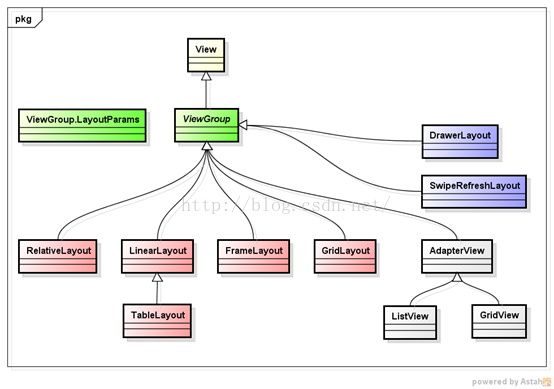
引言——概述 布局是不可見的容器(ViewGroup),用於定義 UI 的可視化結構,並透過布局參數(LayoutParams)定義子元素的尺寸與位置。 Android
 用 Path 與 PathMeasure 繪製支付成功打勾動畫
前言 用支付寶付款後,成功或失敗都會播放一段描邊動畫。要做同樣效果,你可以請設計師輸出 GIF,但圖片檔吃記憶體又無法自適應解析度。其實用 Path 加上 PathMe
 深入 Android 五大佈局物件: from FrameLayout 到 TableLayout
佈局是 Android UI 開發的骨架。Android 提供了五種基礎佈局——FrameLayout(框架佈局)、LinearLayout(線性佈局)、Absolute