

編輯:關於 Android 程式設計
清單裡每張圖都要重新下載,滑動就會卡。加上一層快取,再把下載丟到背景執行緒,是微博這類圖文混排介面的標準做法。以下是一個可直接參考的實作。
快取選用 SoftReference 包裝 Drawable,因為軟引用會在記憶體吃緊時被系統回收,圖片快取正是「有最好、沒有也能重載」的典型場景。下載在獨立背景執行緒進行,完成後透過 Handler 切回主執行緒更新 ImageView,並以回呼介面把結果交給呼叫方。
public class AsyncImageLoader {

    // SoftReference 是軟引用,目的是讓系統在記憶體不足時能回收這些 Drawable
    private HashMap<String, SoftReference<Drawable>> imageCache;

    public AsyncImageLoader() {
        imageCache = new HashMap<String, SoftReference<Drawable>>();
    }

    public Drawable loadDrawable(final String imageUrl, final ImageView imageView,
                                 final ImageCallback imageCallback) {
        // 先查快取
        if (imageCache.containsKey(imageUrl)) {
            SoftReference<Drawable> softReference = imageCache.get(imageUrl);
            Drawable drawable = softReference.get();
            if (drawable != null) {
                return drawable;   // 命中,直接回傳
            }
        }

        final Handler handler = new Handler() {
            public void handleMessage(Message message) {
                imageCallback.imageLoaded((Drawable) message.obj, imageView, imageUrl);
            }
        };

        // 未命中,開新執行緒下載
        new Thread() {
            @Override
            public void run() {
                Drawable drawable = loadImageFromUrl(imageUrl);
                imageCache.put(imageUrl, new SoftReference<Drawable>(drawable));
                Message message = handler.obtainMessage(0, drawable);
                handler.sendMessage(message);
            }
        }.start();
        return null;   // 非同步,先回傳 null 讓呼叫方顯示佔位圖
    }

    public static Drawable loadImageFromUrl(String url) {
        URL m;
        InputStream i = null;
        try {
            m = new URL(url);
            i = (InputStream) m.getContent();
        } catch (MalformedURLException e1) {
            e1.printStackTrace();
        } catch (IOException e) {
            e.printStackTrace();
        }
        return Drawable.createFromStream(i, "src");
    }

    // 回呼介面
    public interface ImageCallback {
        void imageLoaded(Drawable imageDrawable, ImageView imageView, String imageUrl);
    }
}
public class WeiBoAdapater extends BaseAdapter {

    private AsyncImageLoader asyncImageLoader;

    @Override public int getCount() {
        return wbList.size();
    }

    @Override public Object getItem(int position) {
        return wbList.get(position);
    }

    @Override public long getItemId(int position) {
        return position;
    }

    @Override
    public View getView(int position, View convertView, ViewGroup parent) {
        convertView = LayoutInflater.from(getApplicationContext())
                .inflate(R.layout.weibo, null);

        WeiBoHolder wh = new WeiBoHolder();
        wh.wbicon  = (ImageView) convertView.findViewById(R.id.wbicon);
        wh.wbtext  = (TextView) convertView.findViewById(R.id.wbtext);
        wh.wbtime  = (TextView) convertView.findViewById(R.id.wbtime);
        wh.wbuser  = (TextView) convertView.findViewById(R.id.wbuser);
        wh.wbimage = (ImageView) convertView.findViewById(R.id.wbimage);

        WeiBoInfo wb = wbList.get(position);
        if (wb != null) {
            convertView.setTag(wb.getId());
            wh.wbuser.setText(wb.getUserName());
            wh.wbtime.setText(wb.getTime());
            wh.wbtext.setText(wb.getText(), TextView.BufferType.SPANNABLE);

            Drawable cachedImage = asyncImageLoader.loadDrawable(wb.getUserIcon(), wh.wbicon,
                new ImageCallback() {
                    public void imageLoaded(Drawable imageDrawable, ImageView imageView, String imageUrl) {
                        imageView.setImageDrawable(imageDrawable);
                    }
                });

            if (cachedImage == null) {
                wh.wbicon.setImageResource(R.drawable.usericon); // 先顯示佔位圖
            } else {
                wh.wbicon.setImageDrawable(cachedImage);
            }
        }
        return convertView;
    }
}
它能跑,但有三個已知問題值得留意。其一,getView 直接重建 convertView,完全沒有複用,快速滑動時會製造大量物件,應改為 reuse 並搭配 ViewHolder。其二,非同步回來時只更新 imageView,未檢查該 view 是否已被回收給其他項目,這正是清單圖片「錯位」的經典成因——解法是在出發前把 url 存進 imageView.setTag(),回呼時比對 tag 是否仍相同。其三,HashMap 本身非執行緒安全,多執行緒讀寫需要加鎖或改用 ConcurrentHashMap。
若要在正式專案使用,直接採用成熟方案(Fresco、Glide、Picasso)會省下大量邊角處理;上述程式碼的價值在於把快取、背景執行緒、執行緒切換三件事攤開來看。
 Android MVP 入門實作:把邏輯從 Activity 裡拆出來
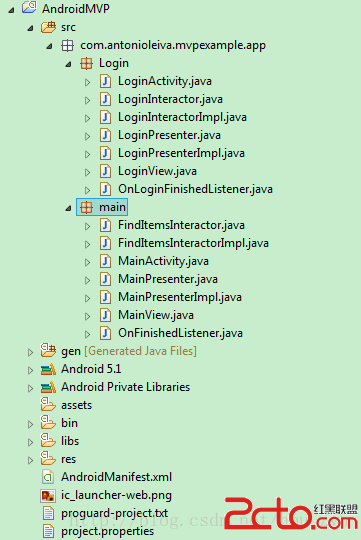
先看專案結構: 可以歸納出一個規律:每個功能模組都由四個部分組成: XXActivity:負責畫面與使用者互動(View 層) XXView(Interface):
 Android Studio 打印調試信息的方法
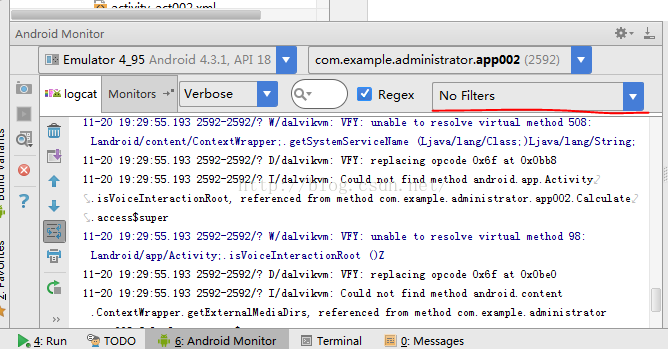
以前開發單片機軟件或上位機時,習慣了用 printf() 打印調試信息。開始學習安卓後,自然也想知道 Android 上的打印調試該怎麼做。這裡介紹的,是在日志(Logc
 Android Service 結合 GPS 與基地台定位的實作
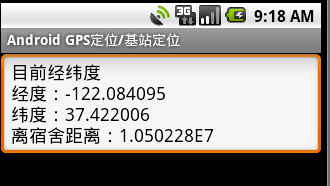
需求說明 本實例希望 Service 每隔 1 秒執行一次定位,優先使用 GPS,若 GPS 無法取得位置,則改用基地台定位,最後將經緯度即時顯示在畫面上。 所需權限 &
 滾動列表中的視頻自動播放實戰:從 ListView 到 RecyclerView
滑動信息流時視頻會自動播放——這樣的體驗在 Facebook、Instagram、Magisto 等熱門應用裡隨處可見。本文將完整梳理如何在滾動列表(無論是 ListVi