

編輯:關於 Android 程式設計
幾乎每個 App 都需要與使用者對話,掌握幾種常見對話框的寫法,能省下不少重複查表的時間。先回顧一下:AlertDialog 是變化最多的對話框,整體結構可切成四個區域——圖示區、標題區、內容區、按鈕區。本文把九種常見型態集中在一個 Activity 裡,按下按鈕即可預覽效果。
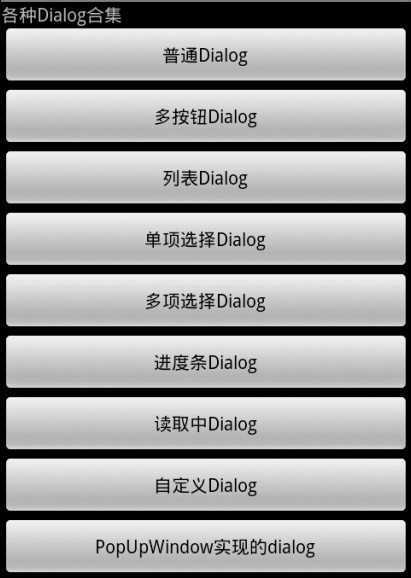
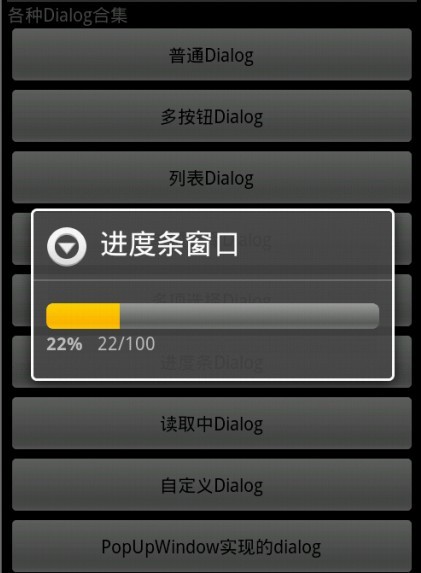
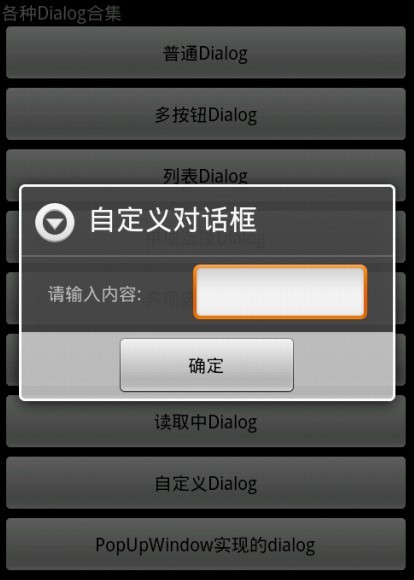
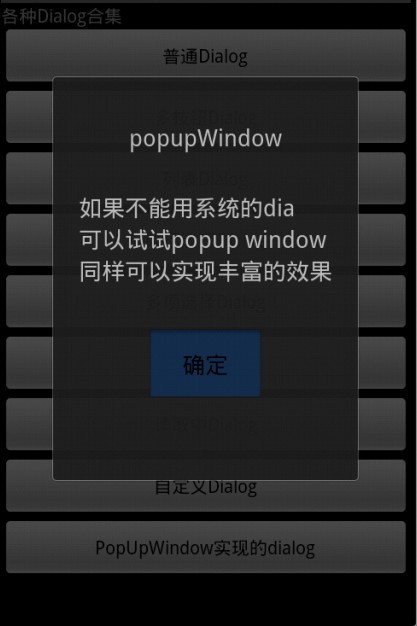
除了 PopupWindow 那個稍微費工,其餘多數只是 Builder 的不同組合,看過一次就能上手。以下是核心程式碼。
package com.naoh.stu;

import java.util.ArrayList;
import android.app.Activity;
import android.app.AlertDialog;
import android.app.ProgressDialog;
import android.content.DialogInterface;
import android.graphics.drawable.BitmapDrawable;
import android.os.Bundle;
import android.view.Gravity;
import android.view.LayoutInflater;
import android.view.View;
import android.view.View.OnClickListener;
import android.view.ViewGroup.LayoutParams;
import android.view.WindowManager;
import android.widget.Button;
import android.widget.EditText;
import android.widget.PopupWindow;
import android.widget.Toast;

public class DiaAllActivity extends Activity implements Runnable {

    private Button btn_diaNormal, btn_diaMulti, btn_diaList, btn_diaSinChos,
            btn_diaMultiChos, btn_diaProcess, btn_diaReadProcess, btn_diaCustom, btn_popUpDia;
    private PopupWindow window = null;
    private Button cusPopupBtn1;
    private View popupView;

    @Override
    public void onCreate(Bundle savedInstanceState) {
        super.onCreate(savedInstanceState);
        setContentView(R.layout.dialog);
        getView();
        setListener();
    }

    private void getView() {
        btn_diaNormal = (Button) findViewById(R.id.btn_diaNormal);
        btn_diaMulti = (Button) findViewById(R.id.btn_diaMulti);
        btn_diaList = (Button) findViewById(R.id.btn_diaList);
        btn_diaSinChos = (Button) findViewById(R.id.btn_diaSigChos);
        btn_diaMultiChos = (Button) findViewById(R.id.btn_diaMultiChos);
        btn_diaProcess = (Button) findViewById(R.id.btn_diaProcess);
        btn_diaReadProcess = (Button) findViewById(R.id.btn_diaReadProcess);
        btn_diaCustom = (Button) findViewById(R.id.btn_diaCustom);
        btn_popUpDia = (Button) findViewById(R.id.btn_popUpDia);
    }

    private void setListener() {
        btn_diaNormal.setOnClickListener(btnListener);
        btn_diaMulti.setOnClickListener(btnListener);
        btn_diaList.setOnClickListener(btnListener);
        btn_diaSinChos.setOnClickListener(btnListener);
        btn_diaMultiChos.setOnClickListener(btnListener);
        btn_diaProcess.setOnClickListener(btnListener);
        btn_diaReadProcess.setOnClickListener(btnListener);
        btn_diaCustom.setOnClickListener(btnListener);
        btn_popUpDia.setOnClickListener(btnListener);
    }

    private Button.OnClickListener btnListener = new Button.OnClickListener() {
        public void onClick(View v) {
            if (v instanceof Button) {
                switch (v.getId()) {
                    case R.id.btn_diaNormal:      showNormalDia();    break;
                    case R.id.btn_diaMulti:       showMultiDia();     break;
                    case R.id.btn_diaList:        showListDia();      break;
                    case R.id.btn_diaSigChos:     showSinChosDia();   break;
                    case R.id.btn_diaMultiChos:   showMultiChosDia(); break;
                    case R.id.btn_diaReadProcess: showReadProcess();  break;
                    case R.id.btn_diaProcess:     showProcessDia();   break;
                    case R.id.btn_diaCustom:      showCustomDia();    break;
                    case R.id.btn_popUpDia:       showCusPopUp(v);    break;
                    default: break;
                }
            }
        }
    };

    /** 1. 普通對話框 */
    private void showNormalDia() {
        AlertDialog.Builder normalDia = new AlertDialog.Builder(DiaAllActivity.this);
        normalDia.setIcon(R.drawable.ic_launcher);
        normalDia.setTitle("普通的對話框");
        normalDia.setMessage("普通對話框的 message 內容");
        normalDia.setPositiveButton("確定", new DialogInterface.OnClickListener() {
            @Override
            public void onClick(DialogInterface dialog, int which) {
                showClickMessage("確定");
            }
        });
        normalDia.setNegativeButton("取消", new DialogInterface.OnClickListener() {
            @Override
            public void onClick(DialogInterface dialog, int which) {
                showClickMessage("取消");
            }
        });
        normalDia.create().show();
    }

    /** 2. 多按鈕對話框 */
    private void showMultiDia() {
        AlertDialog.Builder multiDia = new AlertDialog.Builder(DiaAllActivity.this);
        multiDia.setTitle("多選項對話框");
        multiDia.setPositiveButton("按鈕一", new DialogInterface.OnClickListener() {
            @Override
            public void onClick(DialogInterface dialog, int which) { showClickMessage("按鈕一"); }
        });
        multiDia.setNeutralButton("按鈕二", new DialogInterface.OnClickListener() {
            @Override
            public void onClick(DialogInterface dialog, int which) { showClickMessage("按鈕二"); }
        });
        multiDia.setNegativeButton("按鈕三", new DialogInterface.OnClickListener() {
            @Override
            public void onClick(DialogInterface dialog, int which) { showClickMessage("按鈕三"); }
        });
        multiDia.create().show();
    }

    /** 3. 列表對話框 */
    private void showListDia() {
        final String[] mList = {"選項1", "選項2", "選項3", "選項4", "選項5", "選項6", "選項7"};
        AlertDialog.Builder listDia = new AlertDialog.Builder(DiaAllActivity.this);
        listDia.setTitle("列表對話框");
        listDia.setItems(mList, new DialogInterface.OnClickListener() {
            @Override
            public void onClick(DialogInterface dialog, int which) {
                // which 從 0 開始
                showClickMessage(mList[which]);
            }
        });
        listDia.create().show();
    }

    /** 4. 單項選擇對話框 */
    int yourChose = -1;
    private void showSinChosDia() {
        final String[] mList = {"選項1", "選項2", "選項3", "選項4", "選項5", "選項6", "選項7"};
        yourChose = -1;
        AlertDialog.Builder sinChosDia = new AlertDialog.Builder(DiaAllActivity.this);
        sinChosDia.setTitle("單項選擇對話框");
        sinChosDia.setSingleChoiceItems(mList, 0, new DialogInterface.OnClickListener() {
            @Override
            public void onClick(DialogInterface dialog, int which) {
                yourChose = which;
            }
        });
        sinChosDia.setPositiveButton("確定", new DialogInterface.OnClickListener() {
            @Override
            public void onClick(DialogInterface dialog, int which) {
                if (yourChose != -1) {
                    showClickMessage(mList[yourChose]);
                }
            }
        });
        sinChosDia.create().show();
    }

    /** 5. 多項選擇對話框 */
    ArrayList<Integer> myChose = new ArrayList<Integer>();
    private void showMultiChosDia() {
        final String[] mList = {"選項1", "選項2", "選項3", "選項4", "選項5", "選項6", "選項7"};
        final boolean mChoseSts[] = {false, false, false, false, false, false, false};
        myChose.clear();
        AlertDialog.Builder multiChosDia = new AlertDialog.Builder(DiaAllActivity.this);
        multiChosDia.setTitle("多項選擇對話框");
        multiChosDia.setMultiChoiceItems(mList, mChoseSts, new DialogInterface.OnMultiChoiceClickListener() {
            @Override
            public void onClick(DialogInterface dialog, int which, boolean isChecked) {
                if (isChecked) {
                    myChose.add(which);
                } else {
                    myChose.remove(which);
                }
            }
        });
        multiChosDia.setPositiveButton("確定", new DialogInterface.OnClickListener() {
            @Override
            public void onClick(DialogInterface dialog, int which) {
                int size = myChose.size();
                String str = "";
                for (int i = 0; i < size; i++) {
                    str += mList[myChose.get(i)];
                }
                showClickMessage(str);
            }
        });
        multiChosDia.create().show();
    }

    /** 6. 讀取中(不確定型)對話框 */
    private void showProcessDia() {
        ProgressDialog processDia = new ProgressDialog(DiaAllActivity.this);
        processDia.setTitle("進度條框");
        processDia.setMessage("內容讀取中...");
        processDia.setIndeterminate(true);
        processDia.setCancelable(true);
        processDia.show();
    }

    /** 7. 進度讀取框:需要背景執行緒推進度 */
    ProgressDialog mReadProcessDia = null;
    public final static int MAX_READPROCESS = 100;

    private void showReadProcess() {
        mReadProcessDia = new ProgressDialog(DiaAllActivity.this);
        mReadProcessDia.setProgress(0);
        mReadProcessDia.setTitle("進度條窗口");
        mReadProcessDia.setProgressStyle(ProgressDialog.STYLE_HORIZONTAL);
        mReadProcessDia.setMax(MAX_READPROCESS);
        mReadProcessDia.show();
        new Thread(this).start();
    }

    @Override
    public void run() {
        int progress = 0;
        while (progress < MAX_READPROCESS) {
            try {
                Thread.sleep(100);
                progress++;
                mReadProcessDia.incrementProgressBy(1);
            } catch (InterruptedException e) {
                e.printStackTrace();
            }
        }
        // 讀取完成後關閉視窗
        mReadProcessDia.cancel();
    }

    /** 8. 自定義對話框 */
    private void showCustomDia() {
        AlertDialog.Builder customDia = new AlertDialog.Builder(DiaAllActivity.this);
        final View viewDia = LayoutInflater.from(DiaAllActivity.this).inflate(R.layout.custom_dialog, null);
        customDia.setTitle("自定義對話框");
        customDia.setView(viewDia);
        customDia.setPositiveButton("確定", new DialogInterface.OnClickListener() {
            @Override
            public void onClick(DialogInterface dialog, int which) {
                EditText diaInput = (EditText) viewDia.findViewById(R.id.txt_cusDiaInput);
                showClickMessage(diaInput.getText().toString());
            }
        });
        customDia.create().show();
    }

    /** 9. 用 PopupWindow 實作的對話框 */
    private void showCusPopUp(View parent) {
        if (window == null) {
            popupView = LayoutInflater.from(DiaAllActivity.this).inflate(R.layout.dia_cuspopup_dia, null);
            cusPopupBtn1 = (Button) popupView.findViewById(R.id.diaCusPopupSure);
            window = new PopupWindow(popupView, LayoutParams.FILL_PARENT, LayoutParams.FILL_PARENT);
        }
        window.setAnimationStyle(R.style.PopupAnimation);
        /* 必須呼叫 setBackgroundDrawable:PopupWindow 初始化時會檢查 background 是否為 null,
           若是則 touch / key 事件不會有反應 */
        window.setFocusable(true);
        window.setBackgroundDrawable(new BitmapDrawable());
        window.update();
        window.showAtLocation(parent, Gravity.CENTER_VERTICAL, 0, 0);
        cusPopupBtn1.setOnClickListener(new OnClickListener() {
            @Override
            public void onClick(View v) {
                showClickMessage("popup window 的確定");
            }
        });
    }

    /** 統一顯示點擊結果 */
    private void showClickMessage(String message) {
        Toast.makeText(DiaAllActivity.this, "你選擇的是: " + message, Toast.LENGTH_SHORT).show();
    }
}
版面配置就是一排按鈕:
<?xml version="1.0" encoding="utf-8"?>
<LinearLayout xmlns:android="https://schemas.android.com/apk/res/android"
    android:layout_width="fill_parent"
    android:layout_height="fill_parent"
    android:orientation="vertical" >

    <TextView
        android:layout_width="fill_parent"
        android:layout_height="wrap_content"
        android:text="各種 Dialog 合集" />

    <Button android:layout_width="fill_parent" android:layout_height="wrap_content"
        android:text="普通Dialog" android:id="@+id/btn_diaNormal" />
    <Button android:layout_width="fill_parent" android:layout_height="wrap_content"
        android:text="多按鈕Dialog" android:id="@+id/btn_diaMulti" />
    <Button android:layout_width="fill_parent" android:layout_height="wrap_content"
        android:text="列表Dialog" android:id="@+id/btn_diaList" />
    <Button android:layout_width="fill_parent" android:layout_height="wrap_content"
        android:text="單項選擇Dialog" android:id="@+id/btn_diaSigChos" />
    <Button android:layout_width="fill_parent" android:layout_height="wrap_content"
        android:text="多項選擇Dialog" android:id="@+id/btn_diaMultiChos" />
    <Button android:layout_width="fill_parent" android:layout_height="wrap_content"
        android:text="進度條Dialog" android:id="@+id/btn_diaReadProcess" />
    <Button android:layout_width="fill_parent" android:layout_height="wrap_content"
        android:text="讀取中Dialog" android:id="@+id/btn_diaProcess" />
    <Button android:layout_width="fill_parent" android:layout_height="wrap_content"
        android:text="自定義Dialog" android:id="@+id/btn_diaCustom" />
    <Button android:layout_width="fill_parent" android:layout_height="wrap_content"
        android:text="PopUpWindow實現的dialog" android:id="@+id/btn_popUpDia" />

</LinearLayout>
整體來說,這些範例多以 AlertDialog 為核心,因為它功能最完整、應用最廣。真正需要多花心思的只有 PopupWindow 那一段——特別是 background 與 focusable 的設定,少了它會出現「彈得出來卻點不動」的經典問題。
 Android 筆記六:深入理解 Intent 與 IntentFilter(二)
作者:Jiangdg_VIP https://blog.csdn.net/u012637501 上一篇我們較詳細地學習了 Intent 的相關知識,這次接著學習如何設定
 Android 基礎:Handler 訊息機制詳解(上)
Handler 的定位Handler 主要用於接收子線程發送的訊息,並配合主線程更新 UI。Android 的介面不是執行緒安全的,因此耗時任務不能放在主線程,否則容易造
 Android 開發:打造滑動側邊欄
在 Android 應用開發中,滑動側邊欄十分常見。今天我也親手實作了一個簡單版本,功能雖不算強大,卻值得保留下來,日後需要時稍加修改即可。實現思路其實不複雜:1. 重寫
 Android 綜合實戰:手勢滑動調音量亮度、Palette 取色與 Toolbar
本文整理三個實用技巧:透過手勢滑動調整音量與亮度、使用 Palette 提取圖片配色,以及 Toolbar 的基礎用法。 一、滑動螢幕監聽:手勢調整音量與亮度 影片播放時