

編輯:關於 Android 程式設計
項目迭代久了,res 目錄裡會積攢大量再無人引用的圖片、佈局和字符串,白白佔著包體積。手動排查顯然不現實,好在 Android SDK 自帶的 lint 工具就能勝任這件事。
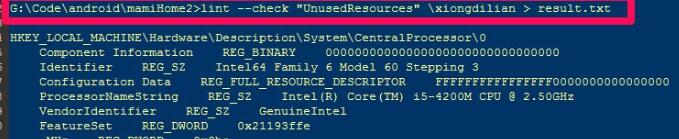
執行命令:
lint –check "UnusedResources" [project_path] > result.txt
跑完之後,當前目錄下會生成一份 result.txt 清單,內容大致如下:
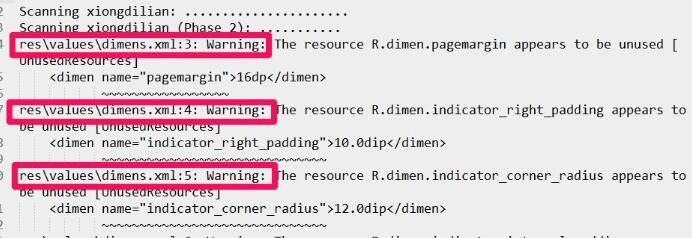
每一行記錄了資源文件的路徑和未使用的具體位置。資源多的時候,清單可能長達幾百行,靠眼睛一條條刪顯然不現實。
既然清單格式固定,就乾脆寫個小工具解析它,把對應文件批量刪掉:
public class DelAction { public static void main(String[] args) throws IOException { String projectPath = "***"; BufferedReader reader = new BufferedReader(new FileReader("result路徑")); String line; int count = 0; while ((line = reader.readLine()) != null) { if (line.contains("UnusedResources") && !line.contains("res/value") && !line.contains("appcompat")) { count++; int end = line.indexOf(":"); if (end != -1) { String file = line.substring(0, end); String f = projectPath + file; boolean flag = new File("【拼出文件完整路徑】" + f.replace("***", "")).delete(); System.out.println("【拼出文件完整路徑】" + f + "=>del=>" + flag); } } } } }
腳本裡那幾個 contains 的排除條件是關鍵:res/value 下的內容(如 colors、strings)不能簡單按文件刪,appcompat 相關資源則是支持庫的,動不得。路徑拼接部分需要按自己工程的目錄結構調整,把佔位符替換成實際值。
最後一點提醒:刪完之後一定要重新執行一次 lint 掃描。因為某張圖片可能同時被多處引用,第一輪刪除後,原本「被使用」的資源可能變成新的無用資源,往往需要重複幾輪才能真正清理乾淨。刪除前記得先提交一次代碼,留出回退餘地。
以上就是本文的全部內容,希望對大家的學習有所幫助。
 Android 下拉刷新框架實現代碼詳解
前段時間項目裡要用下拉刷新,網上找過一些 demo,但質量參差不齊:有的用戶體驗差,有的接口設計不合理。最後實在看不下去,索性自己寫了一個通用框架,效果和擴展性都還不錯,
 以 RecyclerView 打造高擴展性列表菜單
在許多 App 中,例如個人中心、發現頁、動態頁,常見到縱向排列的列表式菜單。這類畫面看似簡單,但若要在分割線、間距、群組與動畫上保持彈性,就需要更靈活的列表實作方式。常
 RxAndroid 入門:from()、just() 與線程切換實踐
開篇 上一篇我用 RxJava 做了個下載圖片刷新 UI 的小案例,從這篇開始,我會一點一點地「拆」RxJava,寫成一個系列,每期內容力求精良精簡。 從哪學起?官方 W
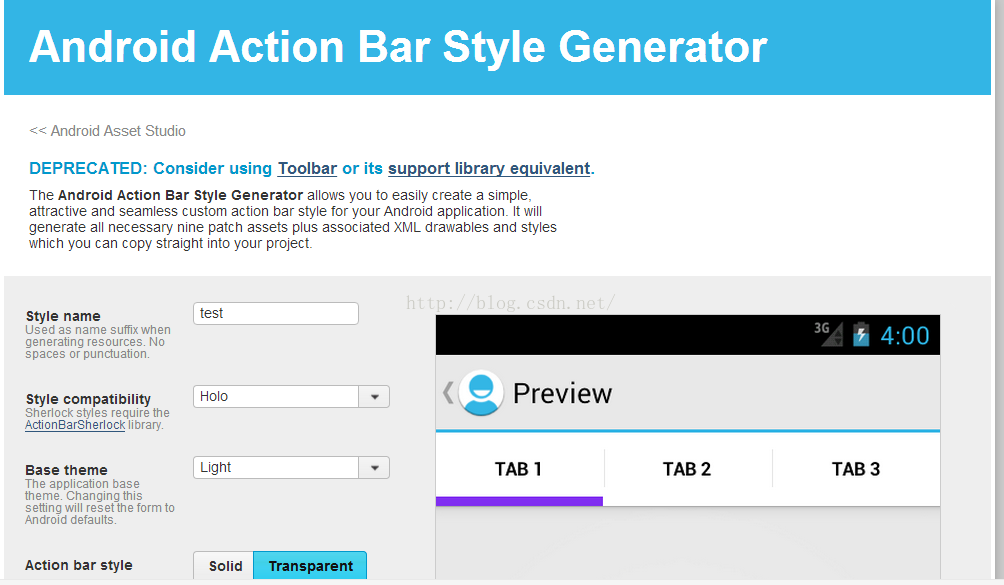 用線上工具產生 ActionBar Style,再手動微調樣式
ActionBar 這個頂部導覽列從 Android 3.0 起就是標準配備,相信大家都已經很熟悉。本文要介紹的不是 API 用法,而是一個能大幅省時的資源:**Andr