

編輯:關於 Android 程式設計
先看需求場景——手淘 HD 的商品詳情頁,「選擇商品屬性」這一塊:
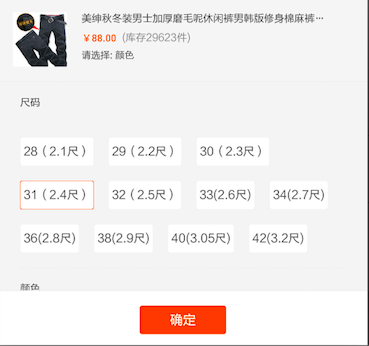
問題在於:商品的尺碼(S、M、L、XL、XXL……)數量不固定,而且每個尺碼對應的 View 寬度還不一樣(主要是文字長度不同)。因此在從服務端拉到數據之前,我們既不知道總共需要幾行,也不知道每行能放幾個。
這就排除了兩個常見選項:
GridView / ListView 不行。它們要求事先知道列數,且 item 寬度通常統一。
多個 LinearLayout 也不好。一個 LinearLayout 只能顯示一行,要多行就得每行 new 一個,而且還得自己算出每行能塞多少個 View——邏輯複雜且容易出錯,數據變化時還要全部重算。
其實這個問題 Web 前端早就解決了,答案就是 CSS3 的 flexbox:
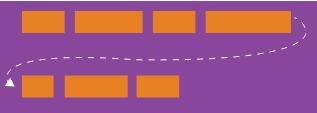
flex-wrap 模式下,元素按順序橫向排列,放不下了自動換行,容器高度由內容撐開。我們要做的,就是在 Android 上實現一個同款。為了符合 Android 的命名習慣,稱之為 FlowLayout。
要寫一個自定義 ViewGroup,只需要抓住兩個核心回調:
1. 新建 FlowLayout 類,繼承 ViewGroup。
2. 在 onMeasure 中計算自身高度。遍歷所有子 View,累加寬度,超出行寬就換行並累加行高。
3. 在 onLayout 中擺放子 View。用 onMeasure 階段算好的座標,調用 childView.layout() 定位。
關鍵點在於:onMeasure 和 onLayout 的遍歷邏輯必須完全一致,否則測出來的高度和實際擺放的位置對不上,會出現內容溢出或大片空白。實踐中可以把這段換行算法抽成一個私有方法,兩處調用。
// 遍歷所有的子 View
for (int i = 0, childCount = getChildCount(); i < childCount; ++i) {
    View childView = getChildAt(i);

    // measure 子 View,並獲取它的寬度和高度
    LayoutParams childLayoutParams = childView.getLayoutParams();
    childView.measure(
            getChildMeasureSpec(widthMeasureSpec, paddingLeft + paddingRight,
                    childLayoutParams.width),
            getChildMeasureSpec(heightMeasureSpec, paddingTop + paddingBottom,
                    childLayoutParams.height));

    int childWidth = childView.getMeasuredWidth();
    int childHeight = childView.getMeasuredHeight();

    // 當前行的高度取本行所有子 View 中最高的那個
    lineHeight = Math.max(childHeight, lineHeight);

    // 嘗試放在上一個 child view 右邊,放不下則換行
    if (childLeft + childWidth + paddingRight > myWidth) {
        childLeft = paddingLeft;
        childTop += mVerticalSpacing + lineHeight;
        lineHeight = childHeight;
    } else {
        childLeft += childWidth + mHorizontalSpacing;
    }
}

int wantedHeight = childTop + lineHeight + paddingBottom;

// 計算 FlowLayout 需要的高度
setMeasuredDimension(myWidth, resolveSize(wantedHeight, heightMeasureSpec));
}
幾個細節值得留意:
· getChildMeasureSpec 是 handling 父子尺寸協商的核心工具方法,它把父容器的 MeasureSpec 和子 View 的 LayoutParams 合成子 View 的 MeasureSpec。手工拼 MeasureSpec 容易出錯,一定要用它。
· resolveSize 負責把「期望高度」和「父容器要求的 MeasureSpec」調和,兼顧 wrap_content 與 match_parent 兩種情況。
· 換行判斷裡的 paddingRight > myWidth 這一步,是為了保證最右側留出 padding 空間。
for (int i = 0, childCount = getChildCount(); i < childCount; ++i) {
    View childView = getChildAt(i);

    if (childView.getVisibility() == View.GONE) {
        continue;
    }

    int childWidth = childView.getMeasuredWidth();
    int childHeight = childView.getMeasuredHeight();

    lineHeight = Math.max(childHeight, lineHeight);

    if (childLeft + childWidth + paddingRight > myWidth) {
        childLeft = paddingLeft;
        childTop += mVerticalSpacing + lineHeight;
        lineHeight = childHeight;
    }

    // 關鍵代碼:定位子 View
    childView.layout(childLeft, childTop, childLeft + childWidth, childTop + childHeight);

    childLeft += childWidth + mHorizontalSpacing;
}
邏輯與 onMeasure 幾乎一模一樣,只是最後一步從「累加」變成了「layout」。
注意這裡跳過了 View.GONE 的子 View——onMeasure 階段也應該做同樣處理,保持兩處一致。順帶一提,View.INVISIBLE 仍然佔位,所以不應跳過。
如果在 onMeasure 裡沒有跳過 GONE 的子 View,但在 onLayout 裡跳過了,就會出現「高度算多了、內容卻沒擺滿」的底部空白。這類 bug 非常難查,因為現象不明顯。建議把兩個方法中的遍歷邏輯完全統一,或者乾脆抽成一個返回「每行佈局信息」的內部方法。
完整代碼已開源在 GitHub 上的 AndroidFlowLayout 項目,打好的 aar 包也上傳到了 bintray。接入非常簡單,只需在項目對應的 build.gradle 中添加依賴:
compile 'com.liangfeizc:flowlayout:1.0.0@aar'
然後在布局裡直接使用:
<com.liangfeizc.flowlayout.FlowLayout
    android:layout_width="match_parent"
    android:layout_height="wrap_content"
    app:horizontalSpacing="8dp"
    app:verticalSpacing="8dp" >

    <TextView
        android:layout_width="wrap_content"
        android:layout_height="wrap_content"
        android:text="S" />
    <!-- 更多尺碼 -->
</com.liangfeizc.flowlayout.FlowLayout>這個基礎版本已經能覆蓋絕大多數標籤流場景,但仍有幾處可以打磨:
1. 支持自定義屬性。通過 obtainStyledAttributes 讀取自定義的 horizontalSpacing、verticalSpacing,比硬編碼常數靈活得多。
2. 每行左對齊之外的對齊模式。flexbox 支持 justify-content(居中、兩端對齊)與 align-items。要實現「每行元素均勻分佈」,需要在 onLayout 前先算出每行的總寬度,再計算每個元素的起始 x。
3. 支持固定列數。如果業務上要求「每行固定 N 個」,可以在 measure 時按索引取模強制換行,這比純流式判斷更簡單。
4. 支持 item 動畫與增刪動畫。FlowLayout 作為 ViewGroup 可以直接配合 LayoutTransition 使用,讓添加/刪除標籤時有平滑過渡。
5. 性能考量。標籤數量極多時,每次 onMeasure 都要遍歷全部子 View 並逐一 measure,開銷可觀。若數據量大,考慮改用 RecyclerView + GridLayoutManager 並自定義 SlotSpanSizeLookup 來實現不等寬列。
自定義 ViewGroup 的精髓就在於:measure 決定「多大」,layout 決定「在哪」。把這兩件事想清楚,任何奇特的自定義佈局都能自己拼出來。
 【Android 仿微信通訊錄 下】自訂 View 為 RecyclerView 打造右側索引導航欄 IndexBar
一、概述 我們用 ItemDecoration 為 RecyclerView 打造了帶懸浮頭部的分組列表。其實 Android 版微信的通訊錄介面,它的分組 title
 Android 4.4 系統瀏覽器:Chromium 的頁面加載模塊與流程剖析
Android 4.4 起,WebView 的實作核心換成了 Chromium。理解它的加載流程,對排查 WebView 相關問題、評估效能瓶頸都有幫助。本文聚焦於 HT
 小心!ListView 結合 EditText 實作中常見的坑
需求與布局 ListView 搭配 EditText 看似簡單,實作時卻容易遇到焦點、資料保存與滾動衝突問題。以下以一個包含多個輸入框的清單為例說明。 焦點丟失 當軟鍵
 Android 日期與時間元件整理:TimePicker、DatePicker 與 Calendar
Android 中處理日期與時間的常用類別有五个:TimePicker、DatePicker、TimePickerDialog、DatePickerDialog 與 Ca