

編輯:關於 Android 程式設計
由於項目中需要用到藍牙通信,我抽空簡單研究了一下,下面是我參考了一些資料後整理出的總結,希望能給大家帶來幫助。
整體來說,Android 藍牙開發可以拆分成幾個關鍵步驟:
1、開啟藍牙
2、搜索可用設備
3、創建藍牙 socket,獲取輸入輸出流
4、讀取和寫入數據
5、斷開連接並關閉藍牙
下面是一個藍牙聊天 demo,先看看效果圖:
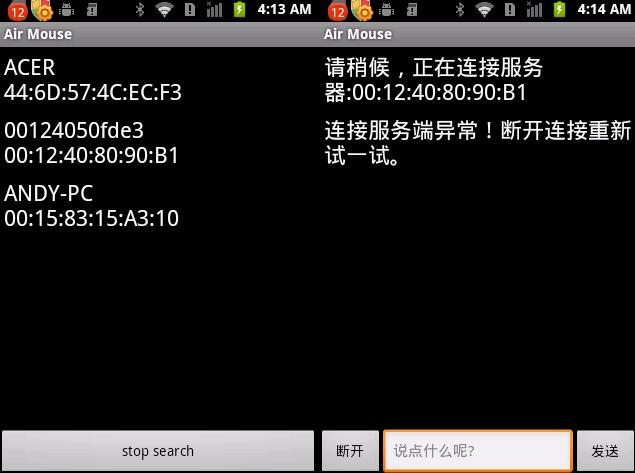
在 Android 中,藍牙的開啟、關閉、獲取設備列表、發現設備、搜索等核心功能,都由 BluetoothAdapter 這個類負責。為了讓調用更簡潔,我們先把它封裝成一個單例管理類 BTManage:
package com.xiaoyu.bluetooth; import java.util.ArrayList; import java.util.Iterator; import java.util.List; import java.util.Set; import android.app.Activity; import android.app.AlertDialog; import android.bluetooth.BluetoothAdapter; import android.bluetooth.BluetoothDevice; import android.content.BroadcastReceiver; import android.content.Context; import android.content.DialogInterface; import android.content.Intent; import android.content.IntentFilter; public class BTManage { private BluetoothAdapter mBtAdapter =null; private static BTManage mag=null; private BTManage(){ mBtAdapter=BluetoothAdapter.getDefaultAdapter(); } public static BTManage getInstance(){ if(null==mag) mag=new BTManage(); return mag; } private StatusBlueTooth blueStatusLis=null; public void setBlueListner(StatusBlueTooth blueLis){ this.blueStatusLis=blueLis; } public BluetoothAdapter getBtAdapter(){ return this.mBtAdapter; } public void openBluetooth(Activity activity){ if(null==mBtAdapter){ AlertDialog.Builder dialog = new AlertDialog.Builder(activity); dialog.setTitle("No bluetooth devices"); dialog.setMessage("Your equipment does not support bluetooth, please change device"); dialog.setNegativeButton("cancel", new DialogInterface.OnClickListener() { @Override public void onClick(DialogInterface dialog, int which) { } }); dialog.show(); return; } if (!mBtAdapter.isEnabled()) { mBtAdapter.enable(); } } public void closeBluetooth(){ if(mBtAdapter.isEnabled()) mBtAdapter.disable(); } public boolean isDiscovering(){ return mBtAdapter.isDiscovering(); } public void scanDevice(){ if(!mBtAdapter.isDiscovering()) mBtAdapter.startDiscovery(); } public void cancelScanDevice(){ if(mBtAdapter.isDiscovering()) mBtAdapter.cancelDiscovery(); } public void registerBluetoothReceiver(Context mcontext){ IntentFilter startSearchFilter = new IntentFilter(BluetoothAdapter.ACTION_DISCOVERY_STARTED); mcontext.registerReceiver(mBlueToothReceiver, startSearchFilter); IntentFilter discoveryFilter = new IntentFilter(BluetoothDevice.ACTION_FOUND); mcontext.registerReceiver(mBlueToothReceiver, discoveryFilter); IntentFilter foundFilter = new IntentFilter(BluetoothAdapter.ACTION_DISCOVERY_FINISHED); mcontext.registerReceiver(mBlueToothReceiver, foundFilter); } public void unregisterBluetooth(Context mcontext){ cancelScanDevice(); mcontext.unregisterReceiver(mBlueToothReceiver); } public List<BTItem> getPairBluetoothItem(){ List<BTItem> mBTitemList=null; Set<BluetoothDevice> pairedDevices = mBtAdapter.getBondedDevices(); Iterator<BluetoothDevice> it=pairedDevices.iterator(); while(it.hasNext()){ if(mBTitemList==null) mBTitemList=new ArrayList<BTItem>(); BluetoothDevice device=it.next(); BTItem item=new BTItem(); item.setBuletoothName(device.getName()); item.setBluetoothAddress(device.getAddress()); item.setBluetoothType(BluetoothDevice.BOND_BONDED); mBTitemList.add(item); } return mBTitemList; } private final BroadcastReceiver mBlueToothReceiver = new BroadcastReceiver() { @Override public void onReceive(Context context, Intent intent) { String action = intent.getAction(); if(BluetoothAdapter.ACTION_DISCOVERY_STARTED.equals(action)) { if(blueStatusLis!=null) blueStatusLis.BTDeviceSearchStatus(StatusBlueTooth.SEARCH_START); } else if (BluetoothDevice.ACTION_FOUND.equals(action)){ BluetoothDevice device = intent.getParcelableExtra(BluetoothDevice.EXTRA_DEVICE); if (device.getBondState() != BluetoothDevice.BOND_BONDED) { BTItem item=new BTItem(); item.setBuletoothName(device.getName()); item.setBluetoothAddress(device.getAddress()); item.setBluetoothType(device.getBondState()); if(blueStatusLis!=null) blueStatusLis.BTSearchFindItem(item); } } else if (BluetoothAdapter.ACTION_DISCOVERY_FINISHED.equals(action)){ if(blueStatusLis!=null) blueStatusLis.BTDeviceSearchStatus(StatusBlueTooth.SEARCH_END); } } }; }
這個封裝類透過註冊廣播接收器來監聽搜索的開始、發現設備、搜索結束三種事件,並通過接口把結果回調給界面層。
藍牙通信的模型和 socket 一致,分為 server 端與 client 端。服務端負責開啟一個監聽 socket,等待客戶端連接,連接建立後循環讀取數據:
package com.xiaoyu.bluetooth; import java.io.BufferedInputStream; import java.io.BufferedOutputStream; import java.io.EOFException; import java.io.IOException; import java.util.UUID; import com.xiaoyu.utils.ThreadPool; import android.bluetooth.BluetoothAdapter; import android.bluetooth.BluetoothServerSocket; import android.bluetooth.BluetoothSocket; import android.os.Handler; import android.os.Message; public class BTServer { public static final String PROTOCOL_SCHEME_L2CAP = "btl2cap"; public static final String PROTOCOL_SCHEME_RFCOMM = "btspp"; public static final String PROTOCOL_SCHEME_BT_OBEX = "btgoep"; public static final String PROTOCOL_SCHEME_TCP_OBEX = "tcpobex"; private BluetoothServerSocket btServerSocket = null; private BluetoothSocket btsocket = null; private BluetoothAdapter mBtAdapter =null; private BufferedInputStream bis=null; private BufferedOutputStream bos=null; private Handler detectedHandler=null; public BTServer(BluetoothAdapter mBtAdapter,Handler detectedHandler){ this.mBtAdapter=mBtAdapter; this.detectedHandler=detectedHandler; } public void startBTServer() { ThreadPool.getInstance().excuteTask(new Runnable() { public void run() { try { btServerSocket = mBtAdapter.listenUsingRfcommWithServiceRecord(PROTOCOL_SCHEME_RFCOMM, UUID.fromString("00001101-0000-1000-8000-00805F9B34FB")); Message msg = new Message(); msg.obj = "請稍候,正在等待客戶端的連接..."; msg.what = 0; detectedHandler.sendMessage(msg); btsocket=btServerSocket.accept(); Message msg2 = new Message(); String info = "客戶端已經連接上!可以發送信息。"; msg2.obj = info; msg.what = 0; detectedHandler.sendMessage(msg2); receiverMessageTask(); } catch(EOFException e){ Message msg = new Message(); msg.obj = "client has close!"; msg.what = 1; detectedHandler.sendMessage(msg); }catch (IOException e) { e.printStackTrace(); Message msg = new Message(); msg.obj = "receiver message error! please make client try again connect!"; msg.what = 1; detectedHandler.sendMessage(msg); } } }); } private void receiverMessageTask(){ ThreadPool.getInstance().excuteTask(new Runnable() { public void run() { byte[] buffer = new byte[2048]; int totalRead; try { bis=new BufferedInputStream(btsocket.getInputStream()); bos=new BufferedOutputStream(btsocket.getOutputStream()); } catch (IOException e) { e.printStackTrace(); } try { while((totalRead = bis.read(buffer)) > 0 ){ String txt = new String(buffer, 0, totalRead, "UTF-8"); Message msg = new Message(); msg.obj = txt; msg.what = 1; detectedHandler.sendMessage(msg); } } catch (IOException e) { e.printStackTrace(); } } }); } public boolean sendmsg(String msg){ boolean result=false; if(null==btsocket||bos==null) return false; try { bos.write(msg.getBytes()); bos.flush(); result=true; } catch (IOException e) { e.printStackTrace(); } return result; } public void closeBTServer(){ try{ if(bis!=null) bis.close(); if(bos!=null) bos.close(); if(btServerSocket!=null) btServerSocket.close(); if(btsocket!=null) btsocket.close(); }catch(IOException e){ e.printStackTrace(); } } }
客戶端則需要先獲取遠程設備,再主動發起連接,連接成功後同樣開啟讀取線程:
package com.xiaoyu.bluetooth; import java.io.BufferedInputStream; import java.io.BufferedOutputStream; import java.io.EOFException; import java.io.IOException; import java.util.UUID; import android.bluetooth.BluetoothAdapter; import android.bluetooth.BluetoothDevice; import android.bluetooth.BluetoothSocket; import android.os.Handler; import android.os.Message; import android.util.Log; import com.xiaoyu.utils.ThreadPool; public class BTClient { final String Tag=getClass().getSimpleName(); private BluetoothSocket btsocket = null; private BluetoothDevice btdevice = null; private BufferedInputStream bis=null; private BufferedOutputStream bos=null; private BluetoothAdapter mBtAdapter =null; private Handler detectedHandler=null; public BTClient(BluetoothAdapter mBtAdapter,Handler detectedHandler){ this.mBtAdapter=mBtAdapter; this.detectedHandler=detectedHandler; } public void connectBTServer(String address){ if(BluetoothAdapter.checkBluetoothAddress(address)){ btdevice = mBtAdapter.getRemoteDevice(address); ThreadPool.getInstance().excuteTask(new Runnable() { public void run() { try { btsocket = btdevice.createRfcommSocketToServiceRecord(UUID.fromString("00001101-0000-1000-8000-00805F9B34FB")); Message msg2 = new Message(); msg2.obj = "請稍候,正在連接服務器:"+BluetoothMsg.BlueToothAddress; msg2.what = 0; detectedHandler.sendMessage(msg2); btsocket.connect(); Message msg = new Message(); msg.obj = "已經連接上服務端!可以發送信息。"; msg.what = 0; detectedHandler.sendMessage(msg); receiverMessageTask(); } catch (IOException e) { e.printStackTrace(); Log.e(Tag, e.getMessage()); Message msg = new Message(); msg.obj = "連接服務端異常!請檢查服務器是否正常,斷開連接重新試一試。"; msg.what = 0; detectedHandler.sendMessage(msg); } } }); } } private void receiverMessageTask(){ ThreadPool.getInstance().excuteTask(new Runnable() { public void run() { byte[] buffer = new byte[2048]; int totalRead; try { bis=new BufferedInputStream(btsocket.getInputStream()); bos=new BufferedOutputStream(btsocket.getOutputStream()); } catch (IOException e) { e.printStackTrace(); } try { while((totalRead = bis.read(buffer)) > 0 ){ String txt = new String(buffer, 0, totalRead, "UTF-8"); Message msg = new Message(); msg.obj = "Receiver: "+txt; msg.what = 1; detectedHandler.sendMessage(msg); } } catch(EOFException e){ Message msg = new Message(); msg.obj = "server has close!"; msg.what = 1; detectedHandler.sendMessage(msg); }catch (IOException e) { e.printStackTrace(); Message msg = new Message(); msg.obj = "receiver message error! make sure server is ok,and try again connect!"; msg.what = 1; detectedHandler.sendMessage(msg); } } }); } public boolean sendmsg(String msg){ boolean result=false; if(null==btsocket||bos==null) return false; try { bos.write(msg.getBytes()); bos.flush(); result=true; } catch (IOException e) { e.printStackTrace(); } return result; } public void closeBTClient(){ try{ if(bis!=null) bis.close(); if(bos!=null) bos.close(); if(btsocket!=null) btsocket.close(); }catch(IOException e){ e.printStackTrace(); } } }
界面層直接使用上面封裝好的類來處理消息收發,通過 Handler 把後台線程收到的消息更新到列表視圖中。搜索設備、列表適配器、數據模型、線程池等輔助類的完整代碼如下:
package com.xiaoyu.bluetooth; public class BTItem { private String buletoothName=null; private String bluetoothAddress=null; private int bluetoothType=-1; public String getBuletoothName() { return buletoothName; } public void setBuletoothName(String buletoothName) { this.buletoothName = buletoothName; } public String getBluetoothAddress() { return bluetoothAddress; } public void setBluetoothAddress(String bluetoothAddress) { this.bluetoothAddress = bluetoothAddress; } public int getBluetoothType() { return bluetoothType; } public void setBluetoothType(int bluetoothType) { this.bluetoothType = bluetoothType; } }
package com.xiaoyu.bluetooth; public class BluetoothMsg { public enum ServerOrCilent{ NONE, SERVICE, CILENT }; public static ServerOrCilent serviceOrCilent = ServerOrCilent.NONE; public static String BlueToothAddress = null,lastblueToothAddress=null; public static boolean isOpen = false; }
package com.xiaoyu.bluetooth; public interface StatusBlueTooth { final static int SEARCH_START=110; final static int SEARCH_END=112; final static int serverCreateSuccess=211; final static int serverCreateFail=212; final static int clientCreateSuccess=221; final static int clientCreateFail=222; final static int connectLose=231; void BTDeviceSearchStatus(int resultCode); void BTSearchFindItem(BTItem item); void BTConnectStatus(int result); }
package com.xiaoyu.utils; import java.util.concurrent.LinkedBlockingQueue; import java.util.concurrent.ThreadFactory; import java.util.concurrent.ThreadPoolExecutor; import java.util.concurrent.TimeUnit; import java.util.concurrent.atomic.AtomicBoolean; import java.util.concurrent.atomic.AtomicInteger; public class ThreadPool { private AtomicBoolean mStopped = new AtomicBoolean(Boolean.FALSE); private ThreadPoolExecutor mQueue; private final int coreSize=2; private final int maxSize=10; private final int timeOut=2; private static ThreadPool pool=null; private ThreadPool() { mQueue = new ThreadPoolExecutor(coreSize, maxSize, timeOut, TimeUnit.SECONDS, new LinkedBlockingQueue<Runnable>(), sThreadFactory); } public static ThreadPool getInstance(){ if(null==pool) pool=new ThreadPool(); return pool; } public void excuteTask(Runnable run) { mQueue.execute(run); } public void closeThreadPool() { if (!mStopped.get()) { mQueue.shutdownNow(); mStopped.set(Boolean.TRUE); } } private static final ThreadFactory sThreadFactory = new ThreadFactory() { private final AtomicInteger mCount = new AtomicInteger(1); @Override public Thread newThread(Runnable r) { return new Thread(r, "ThreadPool #" + mCount.getAndIncrement()); } }; }
最後別忘了在清單文件中加入藍牙相關權限:
<uses-permission android:name="android.permission.BLUETOOTH"/> <uses-permission android:name="android.permission.BLUETOOTH_ADMIN" /> <uses-permission android:name="android.permission.READ_CONTACTS"/>
開發過程中可能會遇到 Unable to start Service Discovery(java.io.IOException) 這個錯誤,排查要點有兩個:其一,客戶端與服務端的 UUID 必須保持統一,格式一般為 "xxxxxxxx-xxxx-xxxx-xxxx-xxxxxxxxxxxx",例如 UUID.fromString("81403000-13df-b000-7cf4-350b4a2110ee");其二,必須先完成配對才能建立連接。
關於藍牙後台配對,可以通過反射調用系統隱藏方法來實現,並監聽 android.bluetooth.device.action.PAIRING_REQUEST 這個廣播:
static public boolean createBond(Class btClass, BluetoothDevice btDevice) throws Exception { Method createBondMethod = btClass.getMethod("createBond"); Boolean returnValue = (Boolean) createBondMethod.invoke(btDevice); return returnValue.booleanValue(); } static public boolean setPin(Class btClass, BluetoothDevice btDevice, String str) throws Exception { Boolean returnValue = null; try { Method removeBondMethod = btClass.getDeclaredMethod("setPin", new Class[] { byte[].class }); returnValue = (Boolean) removeBondMethod.invoke(btDevice, new Object[] { str.getBytes() }); } catch (Exception e) { e.printStackTrace(); } return returnValue; } static public boolean cancelPairingUserInput(Class btClass, BluetoothDevice device) throws Exception { Method createBondMethod = btClass.getMethod("cancelPairingUserInput"); Boolean returnValue = (Boolean) createBondMethod.invoke(device); return returnValue.booleanValue(); }
具體用法是先匹配到 PAIRING_REQUEST 廣播,然後依次調用 setPin、createBond、cancelPairingUserInput 三個方法,其中 "1234" 為配對的 PIN 碼,mDevice 則是你要連接的目標藍牙設備對象。
以上就是本文的全部內容,希望對大家的學習有所幫助,也希望大家多多支持本站。
 Android 手機黑名單的實現:來電攔截與短信屏蔽
有了前面幾篇關於 AIDL 與自動掛斷電話的鋪墊,這次把黑名單這個完整功能做出來。用過 Android 的都熟悉:把某些號碼拉黑之後,對方打電話進不來、發短信也不會提示。
 Android 網絡編程實戰:手把手做一個簡易新聞客戶端
前面講過的知識該綜合運用一下了——XML 的 PULL 解析、ListView 的通用適配器,再加上一個好用的圖片加載庫,就能拼出一個完整的新聞客戶端。 一、智能圖片加
 Android 應用整合百度統計的完整實踐
對於每一款自研的 App 來說,用戶活躍度與使用量是衡量產品價值的重要指標。透過數據統計,我們能即時掌握 App 的下載狀況與使用趨勢,為後續的產品決策提供可靠依據。 就
 教你用 Fiddler 抓取 Android 手機的 HTTP 與 HTTPS 包
Fiddler 是一款免費且輕巧的抓包調試工具,相比 Wireshark 更加簡潔易上手。本篇就來詳細介紹如何借助 WiFi,用手機配合電腦上的 Fiddler 抓取 H