

編輯:關於 Android 程式設計
本文以實例講解如何在 Android 的 TextView 中顯示含圖片的 HTML 內容,分享給大家參考。
使用 TextView 顯示網路圖片時,我在 Android 2.3 系統上可以正常顯示,但當圖片較大時應用會卡頓——這是由於使用主線程去獲取網路圖片造成的。然而若換到 Android 4.0 以上系統運行,圖片卻無法顯示,只會出現一個小方框。
追究原因,是在 4.0 系統上執行時拋出了例外:Android.os.NetworkOnMainThreadException。查閱文件後才發現,4.0 系統不允許主線程(UI 線程)訪問網路,否則會造成主線程掛起,因此系統直接拋出異常。
此處我們對程式碼做了調整,將圖片改為非同步載入,以解決上述問題。
呼叫方式(Activity 中):
TextView textViewContent = (TextView) getActivity().findViewById(R.id.textview_prodcut_detail_more_zp_content); zp_content = "測試圖片信息:<br><img src=\"https://b2c.zeeeda.com/upload/2013/05/10/136814766742544.jpg\" />"; Drawable defaultDrawable = MainActivity.ma.getResources().getDrawable(R.drawable.stub); Spanned sp = Html.fromHtml(zp_content, new HtmlImageGetter(textViewContent, "/esun_msg", defaultDrawable), null); textViewContent.setText(sp);
HtmlImageGetter 類別:
import java.io.InputStream; import android.graphics.Canvas; import android.graphics.drawable.BitmapDrawable; import android.graphics.drawable.Drawable; import android.os.AsyncTask; import android.os.Environment; import android.text.Html.ImageGetter; import android.util.Log; import android.widget.TextView; public class HtmlImageGetter implements ImageGetter{ private TextView _htmlText; private String _imgPath; private Drawable _defaultDrawable; private String TAG = "HtmlImageGetter"; public HtmlImageGetter(TextView htmlText, String imgPath, Drawable defaultDrawable){ _htmlText = htmlText; _imgPath = imgPath; _defaultDrawable = defaultDrawable; } @Override public Drawable getDrawable(String imgUrl) { String imgKey = String.valueOf(imgUrl.hashCode()); String path = Environment.getExternalStorageDirectory() + _imgPath; FileUtil.createPath(path); String[] ss = imgUrl.split("\\."); String imgX = ss[ss.length-1]; imgKey = path+"/" + imgKey+"."+imgX; if(FileUtil.exists(imgKey)){ Drawable drawable = FileUtil.getImageDrawable(imgKey); if(drawable != null){ drawable.setBounds(0, 0, drawable.getIntrinsicWidth(), drawable.getIntrinsicHeight()); return drawable; }else{ Log.v(TAG,"load img:"+imgKey+":null"); } } URLDrawable urlDrawable = new URLDrawable(_defaultDrawable); new AsyncThread(urlDrawable).execute(imgKey, imgUrl); return urlDrawable; } private class AsyncThread extends AsyncTask<String, Integer, Drawable> { private String imgKey; private URLDrawable _drawable; public AsyncThread(URLDrawable drawable){ _drawable = drawable; } @Override protected Drawable doInBackground(String... strings) { imgKey = strings[0]; InputStream inps = NetWork.getInputStream(strings[1]); if(inps == null) return _drawable; FileUtil.saveFile(imgKey, inps); Drawable drawable = Drawable.createFromPath(imgKey); return drawable; } public void onProgressUpdate(Integer... value) { } @Override protected void onPostExecute(Drawable result) { _drawable.setDrawable(result); _htmlText.setText(_htmlText.getText()); } } public class URLDrawable extends BitmapDrawable { private Drawable drawable; public URLDrawable(Drawable defaultDraw){ setDrawable(defaultDraw); } private void setDrawable(Drawable ndrawable){ drawable = ndrawable; drawable.setBounds(0, 0, drawable.getIntrinsicWidth(), drawable.getIntrinsicHeight()); setBounds(0, 0, drawable.getIntrinsicWidth(), drawable.getIntrinsicHeight()); } @Override public void draw(Canvas canvas) { drawable.draw(canvas); } } }
NetWork 類別:
import java.io.BufferedReader; import java.io.IOException; import java.io.InputStream; import java.io.InputStreamReader; import java.io.PrintWriter; import java.net.HttpURLConnection; import java.net.MalformedURLException; import java.net.URL; import java.util.HashMap; import java.util.Iterator; import java.util.Map; import java.util.zip.GZIPInputStream; import java.util.zip.InflaterInputStream; import org.apache.http.HttpEntity; import org.apache.http.HttpResponse; import org.apache.http.client.HttpClient; import org.apache.http.client.methods.HttpGet; import org.apache.http.entity.BufferedHttpEntity; import org.apache.http.impl.client.DefaultHttpClient; import android.graphics.Bitmap; import android.graphics.BitmapFactory; import android.util.Log; public class NetWork { private static String TAG = "NetWork"; public static String getHttpData(String baseUrl){ return getHttpData(baseUrl, "GET", "", null); } public static String postHttpData(String baseUrl, String reqData){ return getHttpData(baseUrl, "POST", reqData, null); } public static String postHttpData(String baseUrl, String reqData, HashMap<String, String> propertys){ return getHttpData(baseUrl, "POST", reqData, propertys); } public static String getHttpData(String baseUrl, String method, String reqData, HashMap<String, String> propertys){ String data = "", str; PrintWriter outWrite = null; InputStream inpStream = null; BufferedReader reader = null; HttpURLConnection urlConn = null; try{ URL url = new URL(baseUrl); urlConn = (HttpURLConnection)url.openConnection(); urlConn.addRequestProperty("Accept-Encoding", "gzip, deflate"); urlConn.setRequestMethod(method); urlConn.setDoOutput(true); urlConn.setConnectTimeout(3000); if(propertys != null && !propertys.isEmpty()){ Iterator<Map.Entry<String, String>> props = propertys.entrySet().iterator(); Map.Entry<String, String> entry; while (props.hasNext()){ entry = props.next(); urlConn.setRequestProperty(entry.getKey(), entry.getValue()); } } outWrite = new PrintWriter(urlConn.getOutputStream()); outWrite.print(reqData); outWrite.flush(); urlConn.connect(); inpStream = urlConn.getInputStream(); String encode = urlConn.getHeaderField("Content-Encoding"); if(encode !=null && encode.indexOf("gzip") != -1){ inpStream = new GZIPInputStream(inpStream); }else if(encode != null && encode.indexOf("deflate") != -1){ inpStream = new InflaterInputStream(inpStream); } reader = new BufferedReader(new InputStreamReader(inpStream)); while((str = reader.readLine()) != null){ data += str; } }catch (MalformedURLException ex){ ex.printStackTrace(); }catch (IOException ex){ ex.printStackTrace(); }finally{ if(reader !=null && urlConn!=null){ try { outWrite.close(); inpStream.close(); reader.close(); urlConn.disconnect(); } catch (IOException ex) { ex.printStackTrace(); } } } return data; } public static Bitmap getBitmapData(String imgUrl){ Bitmap bmp = null; InputStream inpStream = null; try{ HttpGet http = new HttpGet(imgUrl); HttpClient client = new DefaultHttpClient(); HttpResponse response = (HttpResponse)client.execute(http); HttpEntity httpEntity = response.getEntity(); BufferedHttpEntity bufferedHttpEntity = new BufferedHttpEntity(httpEntity); inpStream = bufferedHttpEntity.getContent(); bmp = BitmapFactory.decodeStream(inpStream); }catch (Exception ex){ ex.printStackTrace(); }finally{ if(inpStream !=null){ try { inpStream.close(); } catch (IOException ex) { ex.printStackTrace(); } } } return bmp; } public static InputStream getInputStream(String urlStr){ InputStream inpStream = null; try{ HttpGet http = new HttpGet(urlStr); HttpClient client = new DefaultHttpClient(); HttpResponse response = (HttpResponse)client.execute(http); HttpEntity httpEntity = response.getEntity(); BufferedHttpEntity bufferedHttpEntity = new BufferedHttpEntity(httpEntity); inpStream = bufferedHttpEntity.getContent(); }catch (Exception ex){ ex.printStackTrace(); }finally{ if(inpStream !=null){ try { inpStream.close(); } catch (IOException ex) { ex.printStackTrace(); } } } return inpStream; } }
FileUtil 類別:
import java.io.File; import java.io.FileInputStream; import java.io.FileOutputStream; import java.io.IOException; import java.io.InputStream; import java.io.OutputStream; import android.graphics.drawable.BitmapDrawable; import android.graphics.drawable.Drawable; import android.os.Environment; import android.util.Log; public class FileUtil { private static int FILE_SIZE = 4*1024; private static String TAG = "FileUtil"; public static boolean hasSdcard(){ String status = Environment.getExternalStorageState(); if(status.equals(Environment.MEDIA_MOUNTED)){ return true; } return false; } public static boolean createPath(String path){ File f = new File(path); if(!f.exists()){ Boolean o = f.mkdirs(); return o; } return true; } public static boolean exists(String file){ return new File(file).exists(); } public static File saveFile(String file, InputStream inputStream){ File f = null; OutputStream outSm = null; try{ f = new File(file); String path = f.getParent(); if(!createPath(path)){ return null; } if(!f.exists()){ f.createNewFile(); } outSm = new FileOutputStream(f); byte[] buffer = new byte[FILE_SIZE]; while((inputStream.read(buffer)) != -1){ outSm.write(buffer); } outSm.flush(); }catch (IOException ex) { ex.printStackTrace(); return null; }finally{ try{ if(outSm != null) outSm.close(); }catch (IOException ex) { ex.printStackTrace(); } } return f; } public static Drawable getImageDrawable(String file){ if(!exists(file)) return null; try{ InputStream inp = new FileInputStream(new File(file)); return BitmapDrawable.createFromStream(inp, "img"); }catch (Exception ex){ ex.printStackTrace(); } return null; }
透過自訂 Html.ImageGetter 搭配 AsyncTask 非同步下載與本機快取,即可在 TextView 中安全地呈現含圖片的 HTML 內容,同時避免 4.0 以上系統的主線程網路訪問限制。
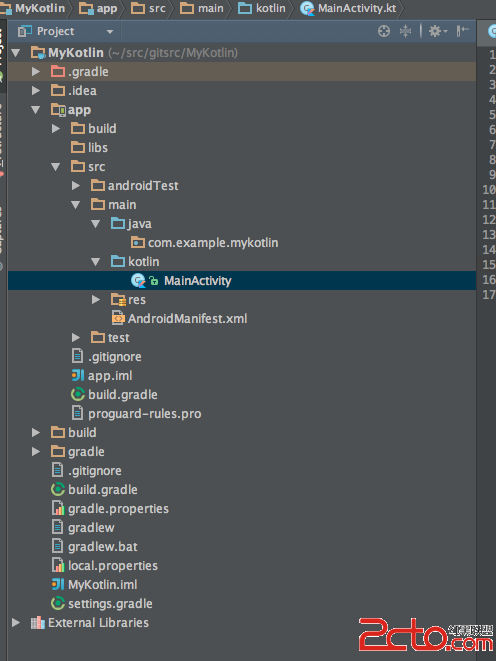 使用 Kotlin 開發 Android 應用的入門指南
一、Kotlin 簡介 Kotlin 是一門基於 JVM 的編程語言,正逐步成长为 Android 開發中取代 Java 的候選者。Java 是世界上使用最廣泛的語言之一
 微信傳圖不再受限!繞過9張限制的實用方法
微信傳圖一次最多9張,容易漏傳或重傳。可改用手機相簿分享功能,一次選擇更多照片後分享給微信好友。若相簿沒有分享功能,也可安裝第三方相簿。 此外,若想增加好友,可到微信設定
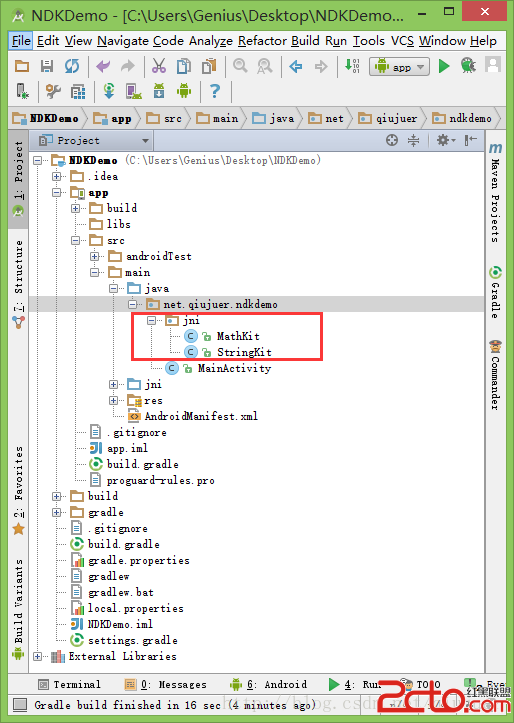 環境配置教學:在 Android Studio 中開發 NDK
說到 NDK 開發,其實是為了在某些需求下需要調用底層的 C/C++ 程式,同時也能換取更高的執行效率。不過實務上能不用就盡量不用,因為它需要配置 NDK、下載並設定 C
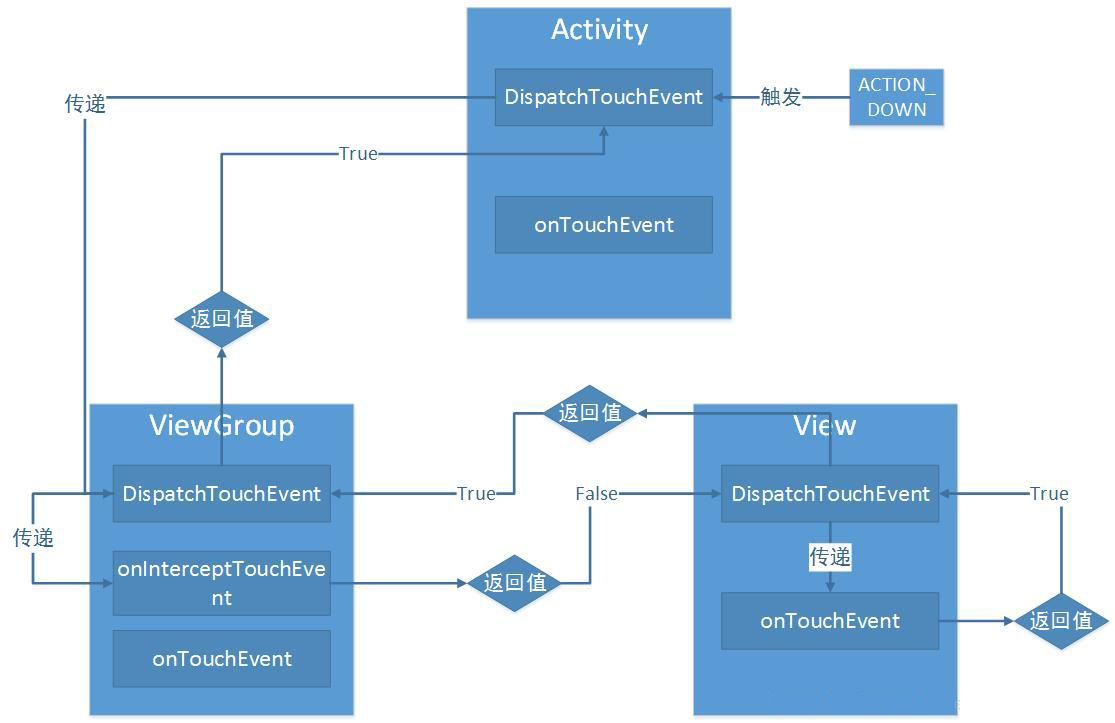 Android 事件分發機制源碼分析:View 篇
Android 的事件分發機制決定了使用者觸控事件如何從 Activity、ViewGroup 傳遞到具體 View。若不了解其流程,容易遇到 ScrollView 與